
1. Product Overview
The HEIBAS G7 Bluetooth Headset is designed for clear communication and audio playback, featuring advanced Bluetooth 6.0 connectivity, active and environmental noise cancellation, and a long-lasting battery. Its ergonomic design ensures a comfortable and secure fit for extended use.

Image: Overview of the HEIBAS G7 Bluetooth Headset highlighting Bluetooth 6.0 features.
2. Package Contents
Please check the package for the following items:
- HEIBAS G7 Bluetooth Headset x 1
- Ear tips (S/M/L) x 3 pairs (6 pieces total)
- Type-C Charging Cable x 1
- Instruction Manual x 1

Image: Diagram showing the headset, charging case, ear tips, and charging cable included in the package.
3. Setup and Pairing
3.1 Initial Charge
Before first use, fully charge the headset and its charging case using the provided Type-C cable. The LED display on the charging case indicates the battery level.

Image: The charging case with an LED display showing battery percentage, indicating the charging status.
3.2 Pairing with a Device
- Ensure the headset is charged.
- Open the charging case. The headset will automatically enter pairing mode.
- On your smartphone, tablet, or PC, enable Bluetooth and search for available devices.
- Select "G7" from the list of devices to connect.
- Once connected, the headset is ready for use.
The headset supports automatic connection to previously paired devices when taken out of the case.

Image: The headset and charging case next to a smartphone, illustrating automatic connection upon removal from the case.
4. Wearing the Headset
The G7 headset features an adjustable design for a secure and comfortable fit on either ear.
4.1 Adjusting the Fit
- The ear hook can be rotated 180° and 360° to fit various ear shapes.
- The head part can rotate 45° left or right, allowing use on either the left or right ear.
- Choose the appropriate ear tip size (S, M, L) for optimal comfort and sound quality.

Image: Diagrams illustrating the 180°, 360°, and 45° adjustment capabilities of the headset for a customized fit.
4.2 Wearing Method
- Rotate the ear hook 90 degrees to the left (for right ear use, rotate 90 degrees to the right).
- Rotate the ear hook 90 degrees upwards.
- Rotate the earphone head and adjust its position to fit your ear shape.
Image: Step-by-step guide on how to wear the headset, including selecting the correct ear tip size (S, M, L).
5. Controls and Functions
The G7 headset features physical buttons for intuitive control of various functions.

Image: Diagram showing the physical buttons on the headset and their corresponding functions, including power, volume, play/pause, call control, mute, and Siri activation.
5.1 Basic Operations
- Power On/Off: Press and hold the main button for 3 seconds.
- Play/Pause: Single press the main button.
- Volume Up/Down: Press the volume buttons (indicated by +/-).
- Next/Previous Track: Press and hold the volume buttons for 2 seconds.
5.2 Call Management
- Answer/End Call: Single press the main button.
- Reject Call: Press and hold the main button for 2 seconds.
- Mute/Unmute: During a call, press the dedicated mute button (located on the side of the headset).
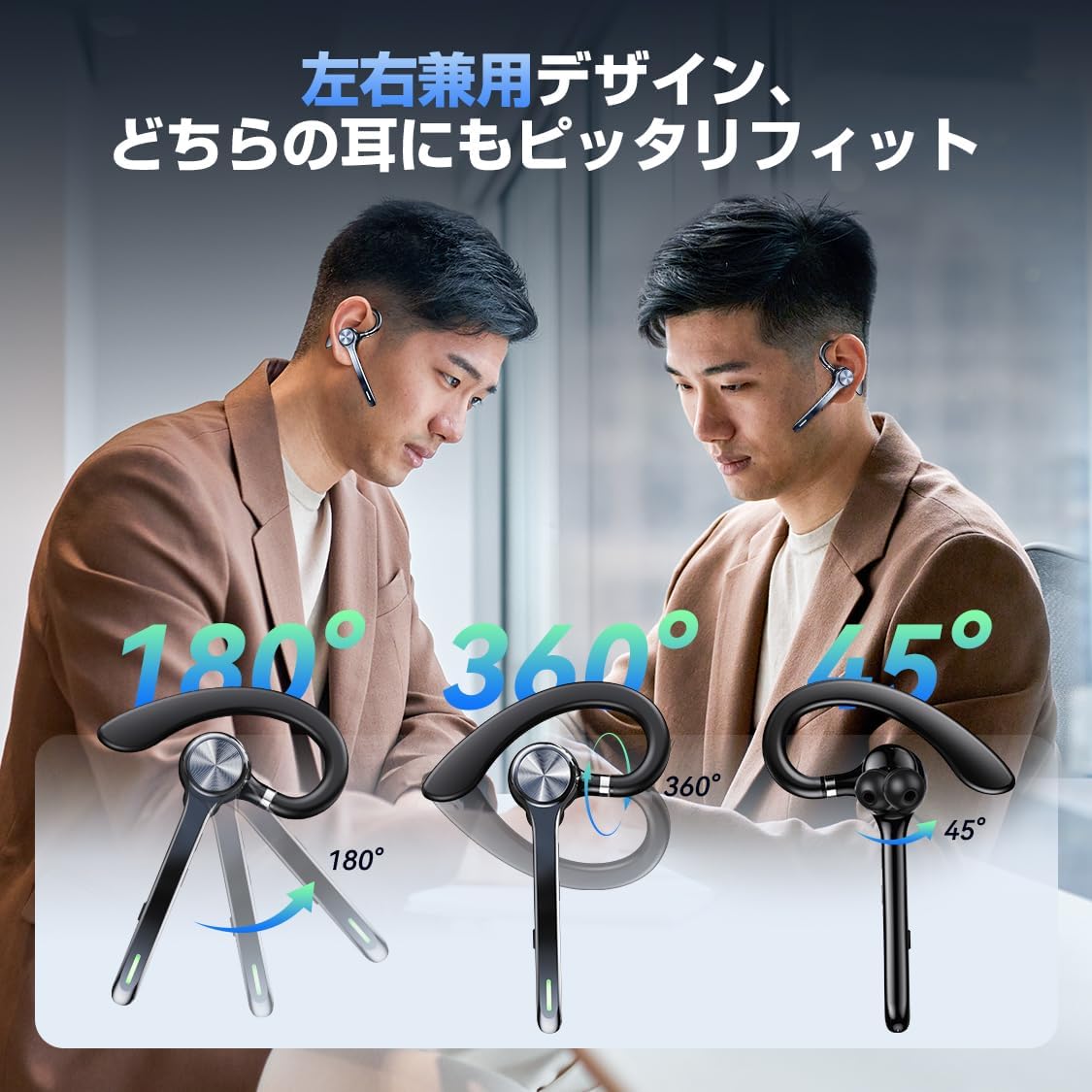
Image: A person using the headset during a call, demonstrating the mute function.
5.3 Voice Assistant (Siri)
- Activate Siri: Double-press the main button.
6. Advanced Features
6.1 Multipoint Connection
The G7 headset supports simultaneous connection to two devices (e.g., a smartphone and a PC). This allows for seamless switching between music playback on one device and calls on another.

Image: The headset connected to both a smartphone and a laptop, demonstrating the multipoint connection feature.
6.2 Noise Cancellation (ANC & ENC)
- Active Noise Cancellation (ANC): Reduces low-frequency ambient noise during music playback (e.g., train sounds, air conditioner hum).
- Environmental Noise Cancellation (ENC): Suppresses background noise during calls, ensuring your voice is transmitted clearly to the other party.

Image: Diagram illustrating the effect of ANC and ENC on sound, showing noise reduction before and after cancellation.
7. Battery and Charging
The G7 headset offers extended battery life for prolonged use.
- Headset Playback Time: Approximately 21-23 hours on a single charge.
- Total Playback Time (with charging case): Up to 108 hours.
- Charging Case Capacity: 500mAh.
- Charging Interface: Type-C.
- Charging Time: Approximately 2-2.5 hours for a full charge.

Image: Visual representation of the headset's battery life, including single playback time, total time with the charging case, and standby time.
8. Specifications
| Model Name | G7 |
| Brand | HEIBAS (Origin qilin) |
| Connectivity Technology | Wireless (Bluetooth 6.0) |
| Headphone Form Factor | Bluetooth Headset (Single Ear) |
| Noise Cancellation | ANC + ENC Dual Noise Cancellation |
| Battery Life (Headset) | 21-23 hours |
| Total Battery Life (with Case) | Up to 108 hours |
| Charging Case Capacity | 500mAh |
| Charging Interface | Type-C |
| Weight | Approx. 12g (headset) |
| Water Resistance | Waterproof (level not specified, generally splash-proof) |
| Compatible Devices | Smartphones, Tablets, Laptops |
| Included Components | Bluetooth Headset, Ear tips, Cable, Instruction Manual |
9. Troubleshooting
9.1 Cannot Power On
- Ensure the headset is fully charged.
- Press and hold the power button for at least 3 seconds.
9.2 Cannot Pair
- Make sure the headset is in pairing mode (usually indicated by a flashing LED).
- Disable and re-enable Bluetooth on your device.
- Ensure the headset is within 10 meters of your device.
- Forget "G7" from your device's Bluetooth list and try pairing again.
9.3 Poor Sound Quality or Disconnections
- Ensure the headset is fully charged.
- Reduce the distance between the headset and your device.
- Avoid obstacles (walls, large electronic devices) between the headset and your device.
- Check for interference from other wireless devices.
9.4 Microphone Issues
- Ensure the microphone is not muted during a call.
- Check your device's audio settings to ensure the headset is selected as the input/output device.
10. Maintenance
- Clean the headset regularly with a soft, dry cloth.
- Avoid exposing the headset to extreme temperatures, humidity, or corrosive liquids.
- Store the headset in its charging case when not in use to protect it and keep it charged.
- Do not attempt to disassemble or repair the headset yourself. Contact customer support if issues arise.
11. Warranty and Support
For warranty information or technical support, please refer to the contact details provided on the product packaging or the official HEIBAS website. Keep your purchase receipt for warranty claims.
12. Product Video
Video: A short preview demonstrating key features of the HEIBAS G7 Bluetooth Headset, including its design, charging, and controls.