
1. Introduction
Thank you for choosing the CBDZONE V168 Pro Max Drone. This advanced unmanned aerial vehicle is designed for capturing cinematic moments with its 8K camera and offers a user-friendly experience with advanced safety features. Its foldable design ensures portability for on-the-go adventures. This manual provides essential information for safe operation, setup, maintenance, and troubleshooting to ensure optimal performance of your drone.
2. Safety Guidelines
Adhering to these safety guidelines is crucial for preventing accidents, ensuring personal safety, and protecting your drone.
- Pre-Flight Check: Always inspect the drone, propellers, and battery before each flight. Ensure all components are securely attached and undamaged.
- Flight Environment: Operate the drone in open areas, away from people, animals, buildings, and power lines. Avoid flying in strong winds, rain, or fog.
- Battery Safety: Use only approved batteries and chargers. Do not overcharge or puncture batteries. Discontinue use if batteries show signs of damage or swelling.
- Respect Privacy: Be mindful of privacy laws and regulations when operating the drone, especially when using the camera.
- Maintain Visual Line of Sight: Always keep the drone within your visual line of sight during flight.
- Emergency Procedures: Familiarize yourself with the drone's emergency landing and return-to-home functions.
- Age Restriction: This product is not a toy. It is intended for users aged 14 and above.
3. Package Contents
Verify that all items listed below are included in your package. If any items are missing or damaged, please contact customer support.

Image: Contents of the CBDZONE V168 Pro Max Drone package. This includes the foldable drone, a remote control with an integrated screen, two batteries, a carrying case, spare propellers, a screwdriver, Type-C charging cables, a card reader, and a memory card.
- V168 Pro Max Drone x 1
- Remote Control with Screen x 1
- Battery x 2
- Spare Blade x 8
- Screwdriver x 1
- Type-C Charging Cable x 2
- Card Reader x 1
- Memory Card x 1
4. Drone Components Overview
Familiarize yourself with the main parts of your V168 Pro Max Drone.
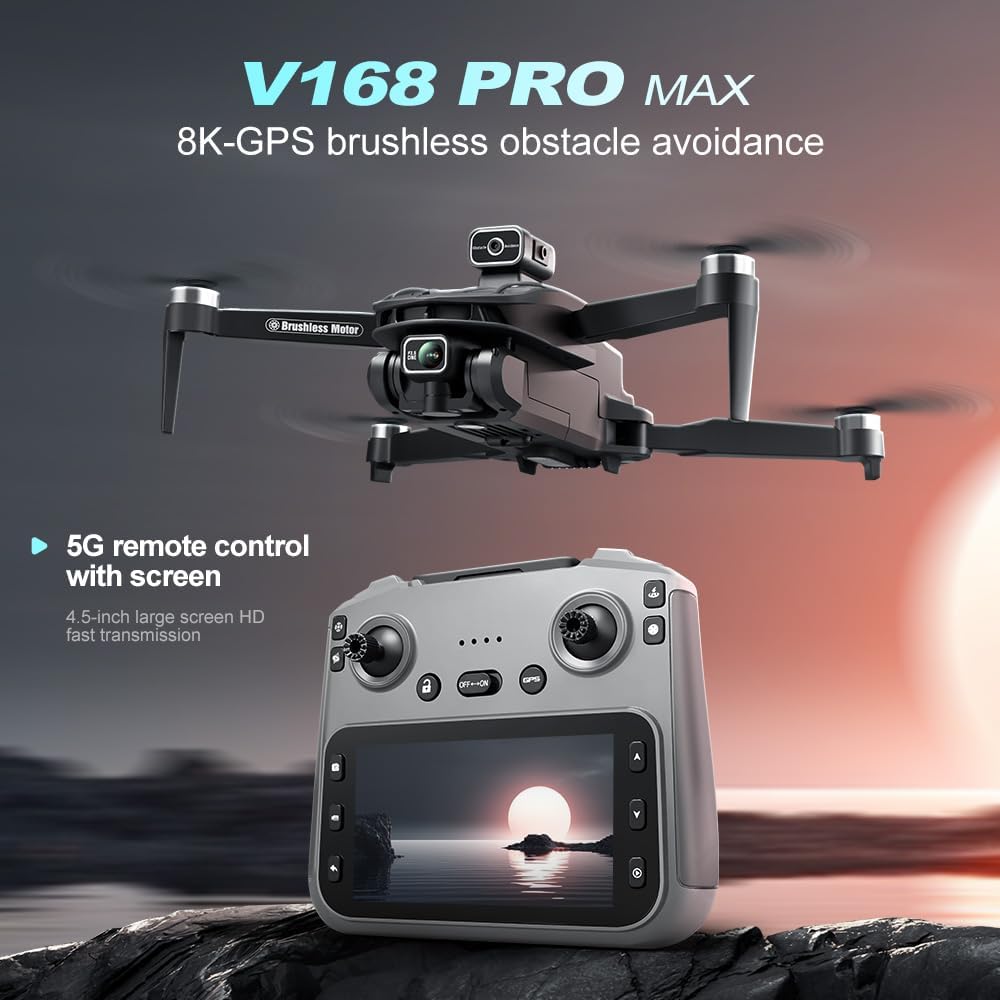
Image: The CBDZONE V168 Pro Max Drone in flight above its remote control. The drone features four propellers, a central body housing the camera, and obstacle avoidance sensors. The remote control has a large integrated screen for real-time video feed and flight information, along with joysticks and control buttons.
- Propellers: Four foldable propellers for flight.
- Motors: Brushless motors for efficient and stable flight.
- 8K Camera: High-resolution camera for photo and video capture.
- Obstacle Avoidance Sensors: Integrated sensors for detecting and avoiding obstacles.
- Battery Compartment: Located at the rear of the drone.
- LED Indicators: Lights indicating drone status and direction.
5. Remote Control Overview
The remote control provides intuitive command over your drone. It features a 4.5-inch large screen for HD fast transmission of video feed.
- Left Joystick: Controls altitude (throttle) and rotation (yaw).
- Right Joystick: Controls forward/backward (pitch) and left/right (roll) movement.
- Integrated Screen: Displays real-time flight data, camera view, and settings.
- Power Button: Turns the remote control on/off.
- Return-to-Home (RTH) Button: Initiates automatic return to the take-off point.
- Photo/Video Button: Captures photos or starts/stops video recording.
- Speed Mode Button: Toggles between different flight speed modes.
- GPS Button: Activates/deactivates GPS functions.
6. Setup
6.1. Charging Batteries
The drone uses Lithium Ion batteries. Ensure both drone and remote control batteries are fully charged before use.
- Connect the Type-C charging cable to the drone battery and a suitable USB power adapter (not included).
- Connect the Type-C charging cable to the remote control and a suitable USB power adapter.
- Charging typically takes approximately 2 hours for drone batteries. The LED indicator on the battery/remote will change when fully charged.
6.2. Installing Batteries
- Drone Battery: Insert the charged drone battery into the battery compartment at the rear of the drone until it clicks into place.
- Remote Control Battery: The remote control has an integrated rechargeable battery. No installation is required after initial charging.
6.3. Propeller Installation
The V168 Pro Max drone comes with foldable propellers. Ensure they are unfolded and securely locked before flight. If replacing, use the provided screwdriver and ensure propellers are installed on the correct motor (indicated by markings A/B).
6.4. Pairing the Drone and Remote Control
- Place the drone on a flat, level surface.
- Press and hold the power button on the drone until the LED indicators start flashing.
- Turn on the remote control.
- The remote control will automatically search for the drone. Once paired, the drone's LED indicators will become solid, and the remote control screen will display the drone's status.
7. Operating Instructions
7.1. Pre-Flight Checks
- Ensure batteries are fully charged in both drone and remote.
- Check propellers for damage and ensure they are unfolded.
- Verify the drone and remote are successfully paired.
- Ensure you are in an open, safe area for flight.
- Calibrate the drone's gyroscope and compass as instructed in the remote control's on-screen prompts.
7.2. Take-off and Landing
- Automatic Take-off: After calibration, press the one-key take-off button on the remote control. The drone will ascend to a safe altitude and hover.
- Manual Take-off: Push both joysticks down and outwards to arm the motors. Then, slowly push the left joystick up to ascend.
- Automatic Landing: Press the one-key landing button. The drone will descend and land gently.
- Manual Landing: Slowly pull the left joystick down to descend. Once landed, push both joysticks down and inwards to disarm the motors.
7.3. Flight Controls
- Left Joystick (Throttle/Yaw):
- Up/Down: Increase/Decrease altitude.
- Left/Right: Rotate drone left/right (yaw).
- Right Joystick (Pitch/Roll):
- Up/Down: Fly forward/backward (pitch).
- Left/Right: Fly left/right (roll).
7.4. Special Features
- GPS Positioning: Provides stable hovering and accurate return-to-home functionality. Ensure GPS signal is strong before activating.
- Obstacle Avoidance: The drone is equipped with sensors to detect and avoid obstacles, enhancing flight safety.
- 8K Camera: Use the dedicated button on the remote to capture high-resolution photos and videos. Footage is saved to the installed memory card.
- Foldable Design: For transport, fold the drone arms inward. Ensure they are fully extended and locked before flight.
8. Maintenance
Regular maintenance ensures the longevity and optimal performance of your drone.
- Cleaning: Use a soft, dry cloth to clean the drone body and camera lens. Avoid using liquids or solvents.
- Propeller Inspection: Regularly check propellers for cracks, bends, or debris. Replace damaged propellers immediately using the provided spare parts and screwdriver.
- Battery Care: Store batteries in a cool, dry place. Do not store fully charged or completely depleted batteries for extended periods. Charge them to about 50-60% for long-term storage.
- Storage: When not in use, store the drone and remote control in their original packaging or a protective case to prevent damage.
9. Troubleshooting
Refer to this section for common issues and their solutions.
| Problem | Possible Cause | Solution |
|---|---|---|
| Drone does not power on. | Low or depleted battery. | Charge the drone battery fully. |
| Remote control does not power on. | Low or depleted internal battery. | Charge the remote control battery fully. |
| Drone and remote fail to pair. | Incorrect pairing procedure; interference. | Ensure drone and remote are close. Repeat pairing steps. Move away from other wireless devices. |
| Drone drifts during flight. | Improper calibration; windy conditions. | Recalibrate the drone's gyroscope and compass on a flat surface. Avoid flying in strong winds. |
| Poor camera image quality. | Dirty lens; insufficient lighting; memory card issues. | Clean the camera lens. Ensure adequate lighting. Check memory card for proper insertion and sufficient space. |
| Drone loses GPS signal. | Flying indoors or near tall structures; magnetic interference. | Fly in open outdoor areas. Avoid areas with high electromagnetic interference. |
10. Specifications
| Feature | Detail |
|---|---|
| Brand | CBDZONE |
| Model Name | 168MAX |
| Manufacturer Part Number | RLV001 |
| Video Capture Resolution | 8K |
| Effective Still Resolution | 12 MP |
| Connectivity Technology | Bluetooth, Wi-Fi |
| Skill Level | Beginner; All |
| Item Weight | 246 Grams (8.7 ounces) |
| Product Dimensions | 9.65"L x 11.37"W x 2.2"H |
| Battery Cell Composition | Lithium Ion |
| Remote Control Included | Yes (with integrated screen) |
| Special Feature | 8K-GPS brushless obstacle avoidance |
11. Warranty and Support
For warranty information and technical support, please refer to the official CBDZONE website or contact your retailer. Keep your purchase receipt as proof of purchase.
For further assistance, please visit: www.cbdzone.com/support (Placeholder link)


