
1. Important Safety Instructions
Please read and understand all safety instructions before using the projector. Keep this manual for future reference.
- Ventilation: Do not block the projector ventilation holes. Blocking them can cause the internal components to overheat and may lead to fire. Ensure sufficient space around the projector for proper airflow.
- Stability: When placing the projector, ensure it is on a stable, flat surface to prevent it from falling.
- Foreign Objects: Do not allow objects or liquids to enter the projector. This can cause dangerous voltage points to be touched, resulting in fire or electric shock.
- Cables: When placing the power cord and connecting cables, arrange them carefully to prevent people from tripping and falling.
- Heat: Do not bring the projector close to fire or other heat sources to avoid fire.

Image: The bottom of the WOLFANG WP06 Mini Projector packaging, displaying important safety warnings regarding ventilation, foreign objects, and cable placement.
2. Package Contents
Verify that all items are present in your package:
- WOLFANG WP06 Mini Projector (x1)
- Remote Control (x1)
- Power Cable (x1)
- HDMI Cable (x1)
- User Manual (x1)

Image: The top of the WOLFANG WP06 Mini Projector retail box, featuring the brand logo and a line drawing of the projector.
3. Product Overview
The WOLFANG WP06 Mini Projector is designed for portability and ease of use, featuring a compact form factor and versatile projection capabilities.
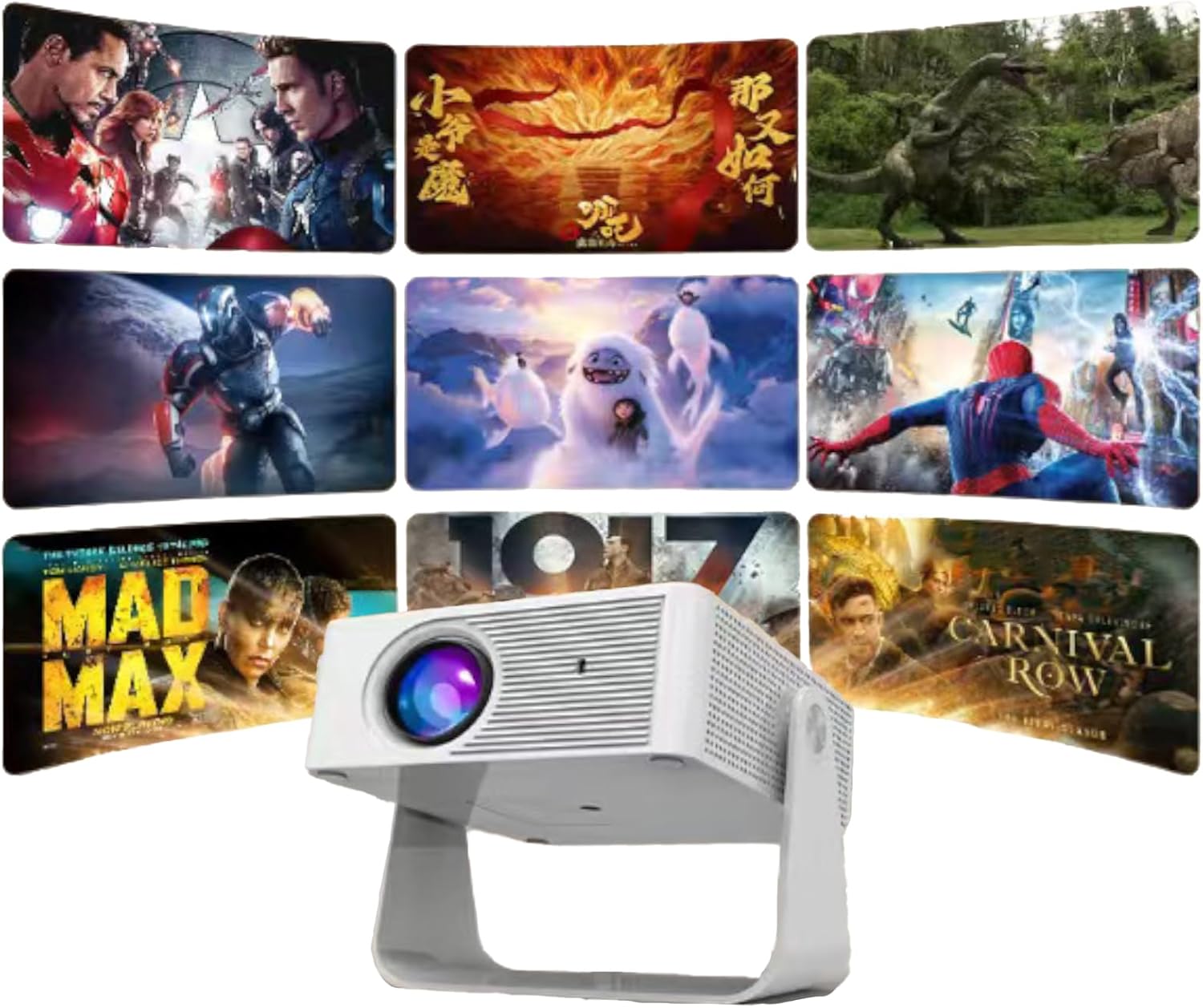
Image: A front view of the WOLFANG WP06 Mini Projector, showcasing its lens and compact design.
Key Features:
- Compact Design: Palm-sized dimensions (4.8 x 3.7 x 3.4 inches) and lightweight (320g) for portability.
- 360° Rotating Stand: Integrated stand allows for flexible projection angles and multiple mounting options (ceiling, wall, tabletop, tripod).
- 1080P Support: Supports 1080P image quality for clear visuals.
- Auto Vertical Keystone Correction: Automatically adjusts vertical image distortion for a properly rectangular picture.
- 50% Zoom Function: Allows for lossless image size reduction from 100% to 50%.
- Eye Care Lens: Features an improved lens designed to reduce harmful blue light.
- Low Noise Operation: Innovative cooling technology minimizes fan noise.
- Multiple Connectivity: HDMI, USB, and wired screen mirroring for iOS/Android devices.

Image: A side view of the WOLFANG WP06 Mini Projector packaging, illustrating key features such as easy projection adjustment, mini size, and multiple input options.
4. Setup
4.1 Placement
Position the projector on a stable surface or mount it according to your preference. The integrated 360° rotating stand allows for flexible angle adjustments. For ceiling or wall mounting, utilize the 1/4" screw holes located at the bottom of the projector.
4.2 Power Connection
- Connect the provided power cable to the projector's power input port.
- Plug the other end of the power cable into a suitable electrical outlet.
4.3 Initial Power On
Press the power button on the projector or the remote control to turn on the device. The projector will initiate its startup sequence.
5. Operating Instructions
5.1 Focus and Keystone Correction
- Focus Adjustment: Rotate the focus ring on the projector lens until the projected image appears sharp and clear.
- Auto Vertical Keystone Correction: The projector features automatic vertical keystone correction. If the image appears trapezoidal vertically, the projector will automatically adjust it to a rectangular shape.
5.2 Screen Mirroring (iOS and Android)
- iOS Devices: Connect your iOS device directly to the projector using a Lightning/USB-C to USB cable. No additional HDMI adapter is required for this method.
- Android Devices: Android devices can be connected via an HDMI adapter or a Chromecast wireless adapter.
- Note on Streaming Services: Due to HDCP copyright restrictions, direct screen mirroring of content from streaming services like Netflix, Prime Video, and Hulu may not be supported. It is recommended to use a TV stick or Chromecast for these platforms.
5.3 Connecting External Devices
The projector is equipped with HDMI and USB ports for connecting various external devices.
- HDMI Port: Connect laptops, TV sticks, gaming consoles (e.g., PS5), DVD players, or other HDMI-enabled devices using the provided HDMI cable. Select the HDMI input source on the projector.
- USB Port: Connect USB storage devices for media playback or use for wired mobile phone screen projection.
- External Speakers: External speakers can be connected via the HDMI port (if the speaker supports HDMI ARC) or potentially via a dedicated audio output port if available (check projector for specific port).
5.4 Zoom Function
The projector supports a lossless zoom function, allowing you to reduce the image size from 100% down to 50%. This is useful for adjusting the projection size without moving the projector, especially in smaller spaces.

Image: The WOLFANG WP06 Mini Projector projecting multiple movie scenes onto a wall, demonstrating its multimedia capabilities.
6. Maintenance
6.1 Cleaning
- Lens: Use a soft, lint-free cloth specifically designed for optical lenses to gently clean the projector lens. Avoid abrasive materials or harsh chemicals.
- Exterior: Wipe the projector's exterior with a soft, dry cloth. Do not use liquid cleaners directly on the device.
- Ventilation: Periodically check and gently clean the ventilation openings to ensure they are free from dust and debris, maintaining optimal airflow.
6.2 Storage
When not in use, store the projector in a cool, dry place, away from direct sunlight and extreme temperatures. If storing for an extended period, consider placing it in its original packaging or a protective case to prevent dust accumulation and damage.
7. Troubleshooting
- No Power: Ensure the power cable is securely connected to both the projector and the power outlet. Check if the power outlet is functional.
- No Image: Verify that the correct input source is selected on the projector. Check all cable connections (HDMI, USB) to external devices. Ensure the lens cap is removed.
- Blurry Image: Adjust the focus ring on the lens. Ensure the projection surface is flat and the projector is at an appropriate distance.
- Image Distorted (not rectangular): The projector has auto vertical keystone correction. If issues persist, try repositioning the projector.
- No Sound: Check the volume settings on both the projector and the connected source device. If using external speakers, ensure they are properly connected and powered on.
- Remote Control Not Working: Ensure the batteries in the remote control are correctly inserted and not depleted. Point the remote directly at the projector's IR receiver.
8. Specifications
| Feature | Specification |
|---|---|
| Brand | WOLFANG |
| Model | WP06 |
| Display Technology | LCD |
| Display Type | LED, LCD |
| Native Resolution | 1920 x 1080 Pixels (1080P FHD Supported) |
| Image Brightness | 16000 Lumen (Marketing term, actual ANSI lumens may vary) |
| Aspect Ratio | 16:9 |
| Refresh Rate | 60 Hz |
| Connectivity Technology | Wired mobile phone screen projection, USB, HDMI |
| Hardware Interface | HDMI, USB |
| Compatible Devices | Laptops, smartphones, TV sticks, gaming consoles, media players |
| Special Features | 2025 Eye Care Lens, 360° Rotating Stand, 50% Zoom, Auto Vertical Keystone Correction, Innovative Cooling Technology |
| Form Factor | Portable |
| Mounting Type | Ceiling Mount, Wall Mount, Tabletop Mount |
| Projector Dimensions | 4.8 x 3.7 x 3.4 inches |
| Projector Weight | 320 g |
| Package Dimensions | 19.2 x 16.8 x 7.6 cm |
| Package Weight | 620 g |

Image: A visual comparison demonstrating the enhanced clarity of a 1080P image versus a 720P image, highlighting the projector's display capabilities.
9. Warranty and Support
WOLFANG is committed to providing quality products and customer service.
- Warranty: The WOLFANG WP06 Mini Projector comes with a 2-year repair warranty.
- Technical Support: Lifetime technical support is provided for this product.
Contact Information:
For any questions, suggestions, or support needs, please contact WOLFANG through the following channels:
- Email: support.vc@wolfang.co
- Website: www.wolfang.co
- YouTube: WOLFANG Official (for unboxing and operation videos)
- WhatsApp: +86 19527121389
- Instagram: WOLFANG Official
- Facebook: WOLFANG Projector

Image: A side view of the WOLFANG WP06 Mini Projector packaging, listing various contact methods for customer support and warranty information.


