
Redragon S157-RGB
Redragon S157-RGB Wired Gaming Keyboard and Mouse Combo User Manual
Model: S157-RGB
Introduction
This manual provides instructions for the Redragon S157-RGB Wired Gaming Keyboard and Mouse Combo. This combo is designed for PC and laptop gaming, offering customizable RGB backlighting, programmable keys, and a high-precision optical mouse. Please read this manual thoroughly before use to ensure proper operation and to maximize your gaming experience.
Package Contents
- Redragon S157-RGB Wired Gaming Keyboard
- Redragon S157-RGB Wired Gaming Mouse
- User Manual
Setup
To set up your Redragon S157-RGB Gaming Keyboard and Mouse Combo, follow these steps:
- Connect the USB cable of the keyboard to an available USB port on your computer.
- Connect the USB cable of the mouse to another available USB port on your computer.
- Your operating system should automatically detect and install the necessary drivers.
- For advanced customization, download and install the dedicated software from the links provided in the "Software Customization" section.
Compatibility: This combo is compatible with Windows 11, Windows 10, Windows 8, Windows 7, Windows Vista, or Windows XP. Limited Mac OS keyboard support is available.
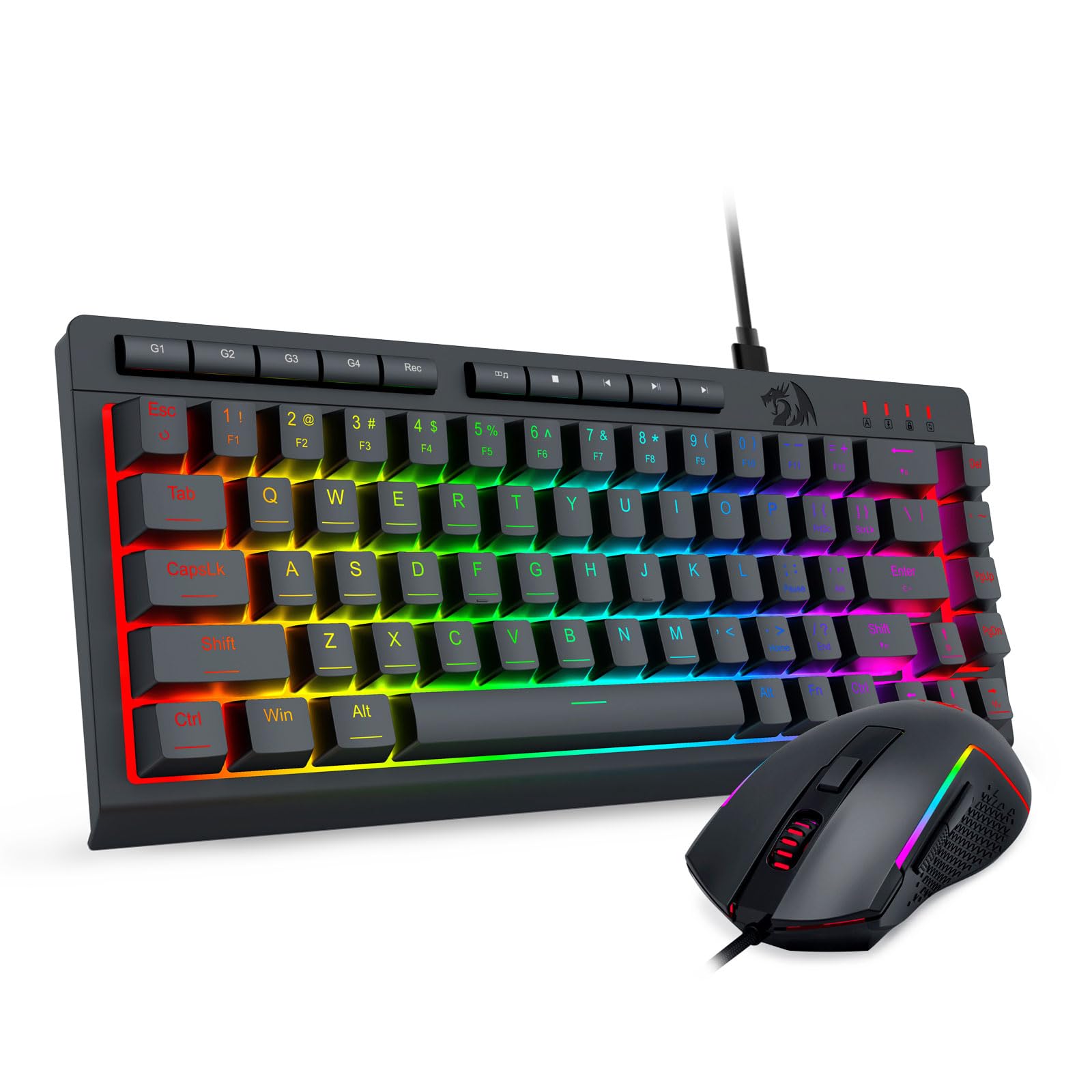
Image: The Redragon S157-RGB Wired Gaming Keyboard and Mouse Combo, showcasing its RGB lighting and compact design on a desk setup.
Operating the Keyboard
RGB Lighting Modes
The keyboard features 8 RGB lighting modes and 7 solid color options. Adjust the lighting to suit your preference:
- Press FN + Alt to cycle through the 8 RGB lighting modes.
- Press FN + Win to switch between the 7 solid color options.
- Adjust brightness with FN + Up Arrow (increase) and FN + Down Arrow (decrease).
- Adjust lighting speed with FN + Left Arrow (decrease) and FN + Right Arrow (increase).

Image: The Redragon S157-RGB keyboard showcasing different RGB lighting patterns and colors.
Dedicated Macro Keys and Multimedia Keys
The keyboard includes dedicated keys for enhanced functionality:
- 4 On-board Macro Keys (G1-G4): These keys allow for on-the-fly macro recording. Refer to the software section for detailed macro programming.
- 5 Independent Multimedia Keys: Control media playback directly from the keyboard.
- 12 FN Multimedia Function Keys: Access additional multimedia functions by pressing the FN key in combination with the F1-F12 keys.
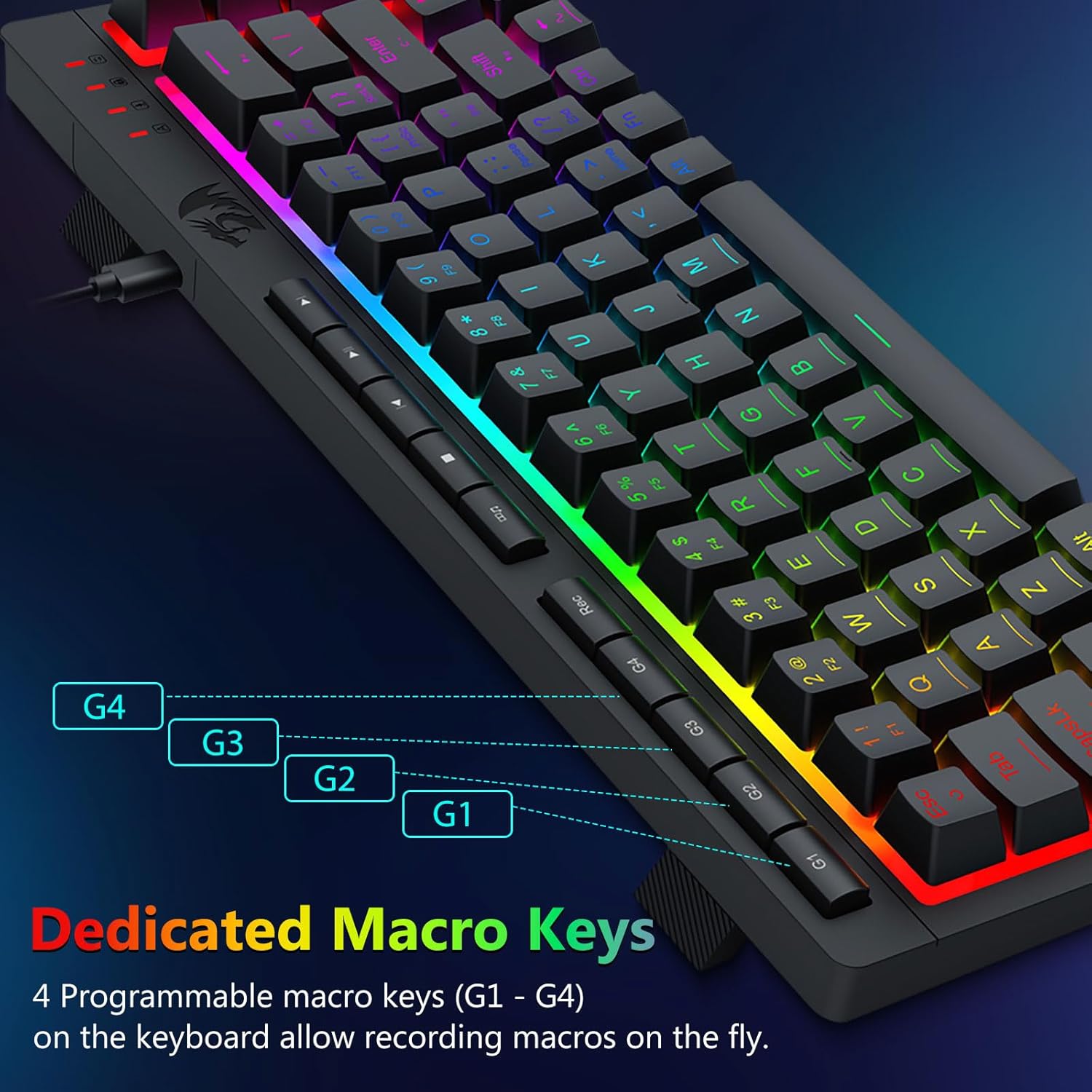
Image: A detailed view of the Redragon S157-RGB keyboard highlighting the dedicated G1-G4 macro keys.
Anti-Ghosting and WIN Key Lock
- 26 Keys Anti-Ghosting: This feature ensures that up to 26 keys can be pressed simultaneously without conflicts, registering every command accurately.
- WIN Key Lock: The Windows key can be disabled during gaming sessions to prevent accidental interruptions.

Image: The Redragon S157-RGB keyboard with visual indicators demonstrating the 26-key anti-ghosting capability.
Quiet and Tactile Keys
The keyboard features membrane linear keys designed for a quiet and tactile typing experience, enhancing comfort during extended use.

Image: A close-up view of the Redragon S157-RGB keyboard keys, showing the internal membrane linear switch design for quiet and tactile feedback.
Keyboard Features Overview
Video: An official overview of the Redragon S157-RGB Wired Gaming Keyboard and Mouse Combo, demonstrating key features and RGB lighting.
Operating the Mouse
DPI Adjustment and Programmable Buttons
The gaming mouse offers precise control and customization:
- Adjustable DPI: Cycle DPI settings from 1200 to 8000 via the dedicated DPI button. Fine-tune DPI from 100 to 8000 using the software driver.
- 6 Programmable Buttons: Customize 6 of the 7 buttons for various in-game actions or shortcuts using the software.
- High-Precision Sensor: Equipped with a high-precision optical sensor for accurate tracking.
- Gaming Grade Micro Switches: Ensures durability and responsiveness for competitive gaming.

Image: The Redragon S157-RGB mouse illustrating its adjustable DPI settings from 1200 to 8000.
Mouse RGB Lighting Effects
The mouse features 8 customizable RGB lighting effects. These can be adjusted via the software driver to match your setup or mood.

Image: Multiple views of the Redragon S157-RGB mouse, each showing a different RGB lighting effect.
Software Customization
Unlock the full potential of your Redragon S157-RGB combo with the dedicated software drivers. The software allows for comprehensive customization of both the keyboard and mouse.
Keyboard Software Features:
- Custom keyboard macro keys programming.
- Advanced RGB backlight customization (modes, colors, brightness, speed).
- Creation of custom shortcuts.
Mouse Software Features:
- Custom button assignments for all programmable buttons.
- Precise DPI adjustment from 100 to 8000.
- RGB lighting effects customization.
- Adjustable polling rate up to 1000Hz.
Download the software drivers from the following links:
- Keyboard Software: bit.ly/S157-RGBKeyboard
- Mouse Software: bit.ly/S157-RGBmouse

Image: Screenshots of the Redragon S157-RGB software interface, showing options for customizing keyboard macros, RGB lighting, mouse DPI, and button functions.
Maintenance
To ensure the longevity and optimal performance of your Redragon S157-RGB Gaming Combo, follow these maintenance guidelines:
- Cleaning: Use a soft, dry cloth to wipe down the keyboard and mouse regularly. For stubborn dirt, a slightly damp cloth can be used, ensuring no liquid enters the devices.
- Spill Resistance: The keyboard is designed to be spill-resistant, effectively preventing water droplets from entering at any angle. However, it is not waterproof. Avoid submerging the device in liquids.
- Storage: Store the devices in a cool, dry place away from direct sunlight and extreme temperatures when not in use.
- Cable Care: Avoid sharp bends or excessive pulling on the USB cables to prevent damage.
Specifications
| Feature | Detail |
|---|---|
| Brand | Redragon |
| Model Number | S157-RGB |
| Keyboard Type | Wired, 60% Mini Macro Membrane |
| Keyboard Backlight | RGB (8 modes, 7 solid colors, adjustable brightness/speed) |
| Keyboard Anti-Ghosting | 26 Keys |
| Mouse Type | Wired, Optical |
| Mouse DPI | 1200-8000 (adjustable via button or software) |
| Mouse Buttons | 7 (6 programmable) |
| Mouse Polling Rate | Up to 1000Hz (via software) |
| Item Weight (Keyboard) | 1.13 pounds (approx. 512 grams) |
| Package Dimensions | 16.26 x 6.5 x 2.05 inches |
| Color | Black |

Image: The Redragon S157-RGB keyboard and mouse displayed with their physical dimensions.
Troubleshooting
If you encounter any issues with your Redragon S157-RGB Gaming Combo, please refer to the following common solutions:
- Device Not Responding:
- Ensure both the keyboard and mouse USB cables are securely connected to your computer's USB ports.
- Try connecting the devices to different USB ports.
- Restart your computer.
- RGB Lighting Not Working/Incorrect:
- For the keyboard, ensure you are using the correct key combinations (FN + Alt, FN + Win, FN + Arrow Keys) to adjust modes, colors, brightness, and speed.
- For the mouse, check the software settings for lighting customization.
- Ensure the software drivers are installed correctly and are up to date.
- Mouse Tracking Issues:
- Clean the optical sensor on the bottom of the mouse.
- Ensure you are using the mouse on a suitable surface (e.g., a mouse pad).
- Adjust the DPI settings using the DPI button or the software.
- Macro Keys Not Functioning:
- Ensure the macro keys are programmed correctly using the dedicated software.
- Verify that the software profile is active.
If the issue persists after trying these steps, please contact Redragon customer support for further assistance.
Warranty and Support
Redragon products are designed for durability and performance. For information regarding warranty coverage and terms, please refer to the warranty card included with your product or visit the official Redragon website.
For technical support, driver downloads, or frequently asked questions, please visit the Redragon support page or contact their customer service directly. Keep your purchase receipt for warranty claims.
Return Policy: This product typically includes a 30-day return policy for refund or replacement, subject to retailer terms.
Related documentsS157-RGB


Ask a question about this manual
Ask about setup, troubleshooting, compatibility, parts, safety, or missing instructions. Manuals+ will review the question and use this page’s manual context to help answer it.