
1. Introduction
This manual provides detailed instructions for the safe installation, operation, and maintenance of your JAZAVA 72 Inch Industrial Ceiling Fan, Model CF04NBK-72. Please read all instructions carefully before beginning installation and retain this manual for future reference.
2. Safety Information
WARNING: To reduce the risk of fire, electric shock, or personal injury, always follow these basic precautions:
- Ensure the power is turned off at the circuit breaker before installation or servicing.
- All electrical connections must be in accordance with local codes, ordinances, and the National Electric Code. If you are unfamiliar with electrical wiring, consult a qualified electrician.
- The mounting structure must be capable of supporting the weight of the fan (approximately 20 lbs).
- Do not operate the fan with damaged blades or housing.
- Keep hands, clothing, and other objects clear of the fan blades when the fan is operating.
- This fan is suitable for damp locations, such as covered patios or porches, but not for direct exposure to rain.

Image: The fan is damp-rated, suitable for covered outdoor areas. Avoid direct rain exposure.
3. Package Contents
Verify that all components are present before beginning installation:
- Fan Motor Assembly
- 8 Aluminum Blades
- Downrods (5-inch, 10-inch, 24-inch)
- Mounting Bracket
- Remote Control with Wall Mount
- Hardware Pack (screws, washers, wire nuts)
- Instruction Manual
4. Specifications
| Model Number | CF04NBK-72 |
| Fan Diameter | 72 Inches |
| Number of Blades | 8 |
| Blade Material | Aluminum |
| Motor Type | DC Motor |
| Number of Speeds | 6 |
| Airflow Capacity | Up to 9400 CFM |
| Noise Level | 40 Decibels |
| Voltage | 110 Volts |
| Wattage | 50 Watts |
| Indoor/Outdoor Use | Indoor, Covered Outdoor Areas |
| Control Method | Remote Control |

Image: The fan features a 100% pure copper brushless DC motor for efficient and powerful operation.

Image: High-grade aluminum blades ensure durability and corrosion resistance, maintaining appearance over time.
5. Setup and Installation
Proper installation is crucial for the safe and efficient operation of your ceiling fan. If you are unsure about any steps, consult a qualified electrician.
5.1 Downrod Selection
Choose the appropriate downrod length for your ceiling height. The fan includes 5-inch, 10-inch, and 24-inch downrods. An optional 48-inch extension rod may be available for purchase separately.
- For 8 ft ceilings: Flush mount (if applicable) or shortest downrod.
- For 10 ft ceilings: 5-inch to 10-inch downrod.
- For 12 ft ceilings: 24-inch downrod.
- For 14 ft ceilings: 48-inch downrod (optional, sold separately).
Important: Ensure the fan blades are at least 7 feet from the floor and at least 12 inches from any wall or obstruction.

Image: Product information including available downrod lengths and recommended room size for optimal performance.
5.2 Mounting
- Securely attach the mounting bracket to a ceiling joist or an outlet box rated for fan support.
- Assemble the downrod to the fan motor assembly, feeding the electrical wires through the downrod.
- Carefully lift the fan assembly and hang it from the mounting bracket.
5.3 Wiring
- Connect the fan's electrical wires to the household wiring according to the wiring diagram provided in the full printed manual. Ensure all connections are secure with wire nuts.
- Tuck all wires neatly into the outlet box.
- Attach the canopy to the mounting bracket, securing it with screws.

Image: Detailed product dimensions and available downrod lengths (5", 10", 24") for flexible installation.
6. Operating Instructions
Your JAZAVA ceiling fan is controlled by the included remote control. Ensure the remote has fresh batteries installed.
6.1 Remote Control Functions
- Fan ON/OFF: Turns the fan on or off.
- Speed Settings (1-6): Adjusts the fan speed from 1 (lowest) to 6 (highest).
- Reverse Function: Changes the direction of blade rotation for seasonal use.
- Timer Settings (1H, 2H, 4H, 8H): Sets the fan to turn off automatically after the selected duration.
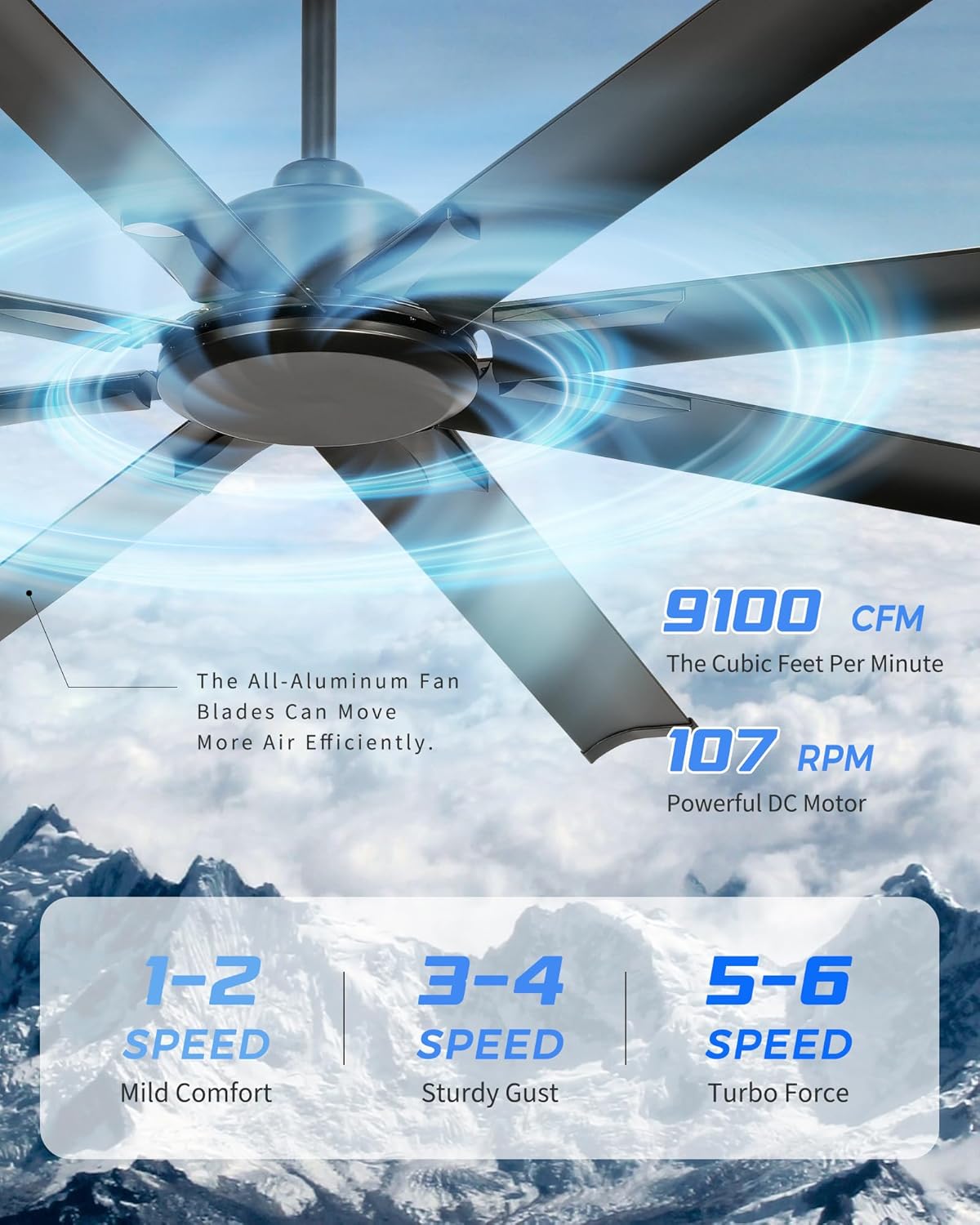
Image: Illustrates the fan's powerful airflow (9100 CFM, 107 RPM) and six-speed settings: 1-2 for Mild Comfort, 3-4 for Sturdy Gust, and 5-6 for Turbo Force.
6.2 Reversible Motor (Summer/Winter Modes)
The fan features a reversible DC motor to optimize air circulation throughout the year.
- Summer Mode (Counter-clockwise rotation): Pushes air downward, creating a cooling breeze.
- Winter Mode (Clockwise rotation): Draws air upward, circulating warm air trapped near the ceiling.

Image: Demonstrates the reversible motor function for optimal comfort in both summer (counter-clockwise, downward airflow) and winter (clockwise, upward airflow).
6.3 Smart Control Integration
This fan supports smart control integration with platforms like Alexa, Google Home, and a dedicated smart app for enhanced convenience.

Image: Illustration of the fan's smart control capabilities, compatible with Alexa, Google Home, and a dedicated smart application.
6.4 Official Product Video
Watch this video for a visual guide on the fan's features, including airflow, speed settings, and reversible motor function.
Video: Demonstrates the JAZAVA Industrial Ceiling Fan's powerful airflow, durable aluminum blades, energy-efficient DC motor, 6 wind speeds, reversible motor for seasonal use, and timer settings.
7. Maintenance
Regular maintenance ensures optimal performance and longevity of your ceiling fan.
- Cleaning: Use a soft, damp cloth to clean the fan blades and motor housing. Do not use abrasive cleaners or solvents.
- Tighten Fasteners: Periodically check all screws and fasteners on the fan and mounting hardware to ensure they are secure.
- Blade Balance: If the fan wobbles, check that all blades are securely attached and balanced. A balancing kit (not included) may be used if necessary.
8. Troubleshooting
If you experience issues with your fan, refer to the following common problems and solutions:
| Problem | Possible Cause | Solution |
|---|---|---|
| Fan does not start | No power to the fan; Loose wire connections; Remote control battery dead or not paired. | Check circuit breaker; Verify all wire connections; Replace remote battery or re-pair remote. |
| Fan wobbles | Loose blade screws; Unbalanced blades; Loose mounting bracket. | Tighten all blade screws; Use a balancing kit; Ensure mounting bracket is securely fastened. |
| Noisy operation | Loose screws; Motor not seated properly; Blades rubbing. | Check and tighten all screws; Ensure motor housing is secure; Verify blades are not touching any part of the fan or ceiling. |
| Remote control not working | Dead battery; Remote not paired; Obstruction between remote and receiver. | Replace battery; Follow pairing instructions in the full manual; Ensure clear line of sight to the fan's receiver. |
9. Warranty and Support
JAZAVA stands behind its products with professional U.S.-based customer service and a local parts warehouse to ensure prompt assistance and maintenance.
For technical support, warranty claims, or spare parts, please contact our customer service team. Refer to the contact information provided in your product packaging or on the official JAZAVA website.

Image: JAZAVA offers trusted U.S. customer support and maintains local inventory for efficient service and parts delivery.