
1. Introduction
Thank you for choosing the ZYHKON Z9Pro Bluetooth Wireless Earbuds. These earbuds are designed to provide a superior audio experience with advanced features such as Hybrid Active Noise Cancellation (ANC), Environmental Noise Cancellation (ENC), a multi-functional touch screen charging case, and Hi-Fi sound quality. This manual will guide you through the setup, operation, and maintenance of your new earbuds.
2. Package Contents
Please ensure all items are present in the package:
- ZYHKON Z9Pro Wireless Earbuds (Left and Right)
- Portable Charging Case with Touch Screen
- USB Type-C Charging Cable
- Instruction Manual
- Silicone Ear Tips (S/M/L sizes)
3. Product Overview
The ZYHKON Z9Pro earbuds feature an ergonomic design for comfortable wear and a smart charging case with an interactive touch screen for easy control.
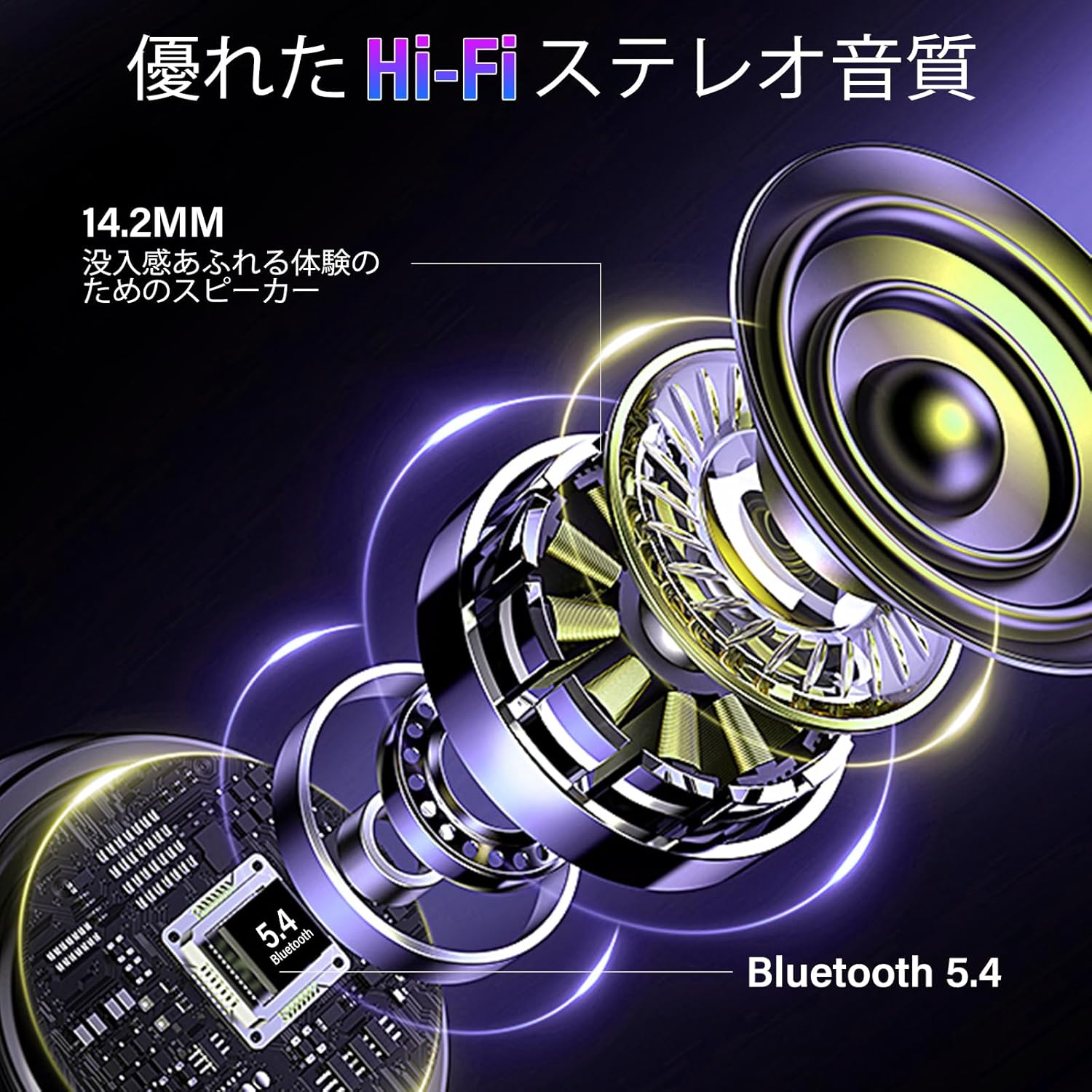
Image: ZYHKON Z9Pro Earbuds securely placed in their charging case, displaying the case's interactive screen.

Image: Detailed view of an earbud's internal components, highlighting the 14.2mm dynamic driver and the Bluetooth 5.4 chip for high-fidelity stereo audio.
4. Setup
4.1 Charging the Earbuds and Case
Before first use, fully charge the earbuds and the charging case. The charging case features a smart LED touch screen that displays battery levels for both earbuds and the case.
- Place the earbuds into the charging case, ensuring they are correctly seated.
- Connect the provided USB Type-C cable to the charging port on the case and a power source.
- The LED screen will indicate the charging status. A full charge for the earbuds takes approximately 1.5 hours. The case provides up to 40 hours of additional charge, extending total playback to approximately 48 hours.

Image: Diagram illustrating the Type-C charging process for the ZYHKON Z9Pro earbuds and case, highlighting the 48-hour total playback time.
4.2 Bluetooth Pairing
The Z9Pro earbuds utilize Bluetooth 5.4 for a stable and efficient connection. They support one-step automatic pairing.
- Open the charging case. The earbuds will automatically enter pairing mode.
- On your device (smartphone, tablet, etc.), enable Bluetooth and search for available devices.
- Select "Z9Pro" from the list of found devices to connect.
- Once connected, the earbuds are ready for use. They will automatically reconnect to the last paired device when removed from the case.
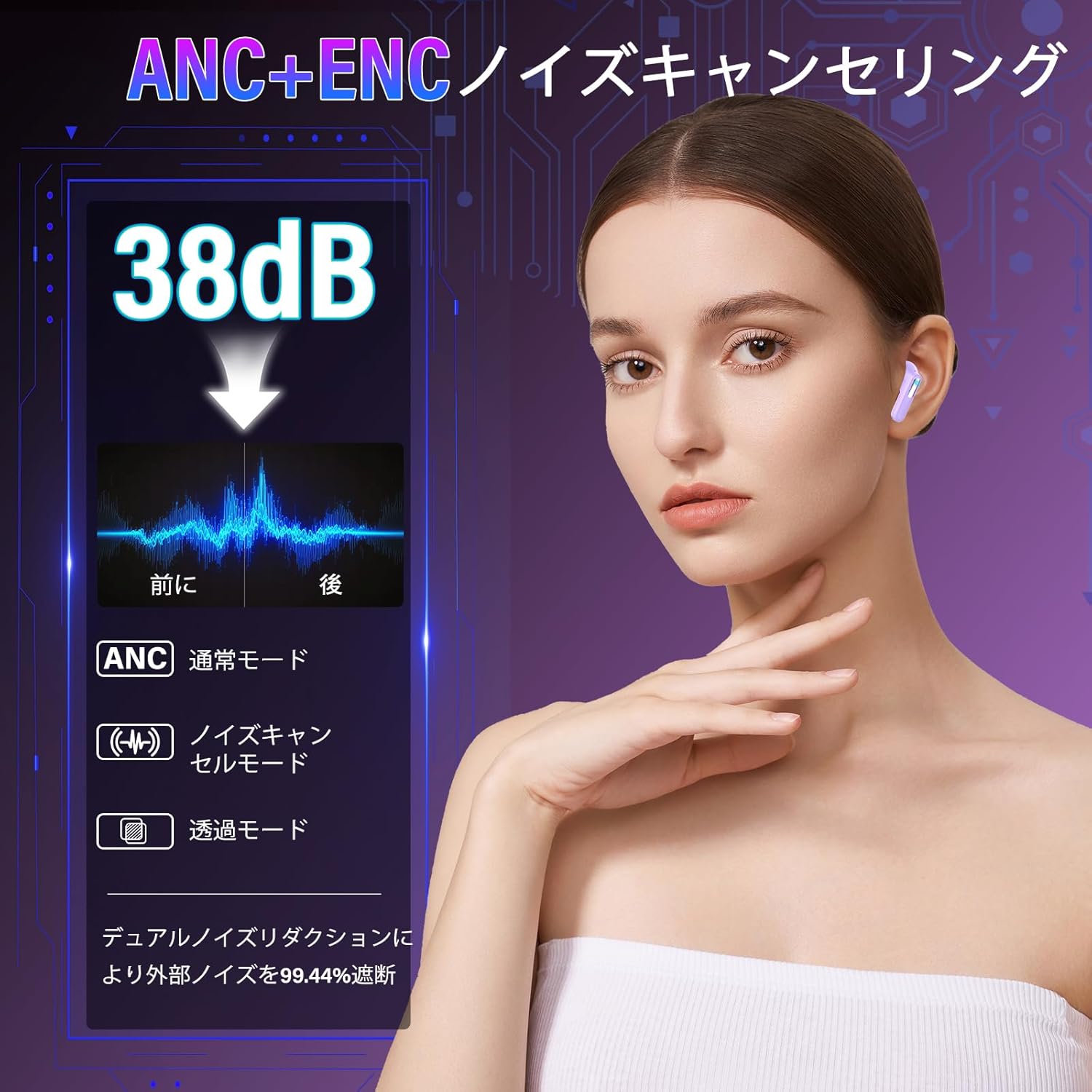
Image: A smartphone screen displaying the Bluetooth pairing interface, showing "Z9Pro" as a discoverable device, indicating successful one-step automatic pairing.
5. Operating Instructions
5.1 Smart Touch Controls (Earbuds)
The earbuds feature touch-sensitive areas for controlling music playback, calls, and other functions.
| Action | Function |
|---|---|
| Single Tap (L/R) | Play/Pause music, Answer/End call |
| Double Tap (L) | Previous Track |
| Double Tap (R) | Next Track |
| Triple Tap (L/R) | Switch ANC/Transparency/Normal Mode |
| Long Press (2s) (L/R) | Activate Voice Assistant (Siri, Google Assistant) |
| Long Press (during call) | Reject call |
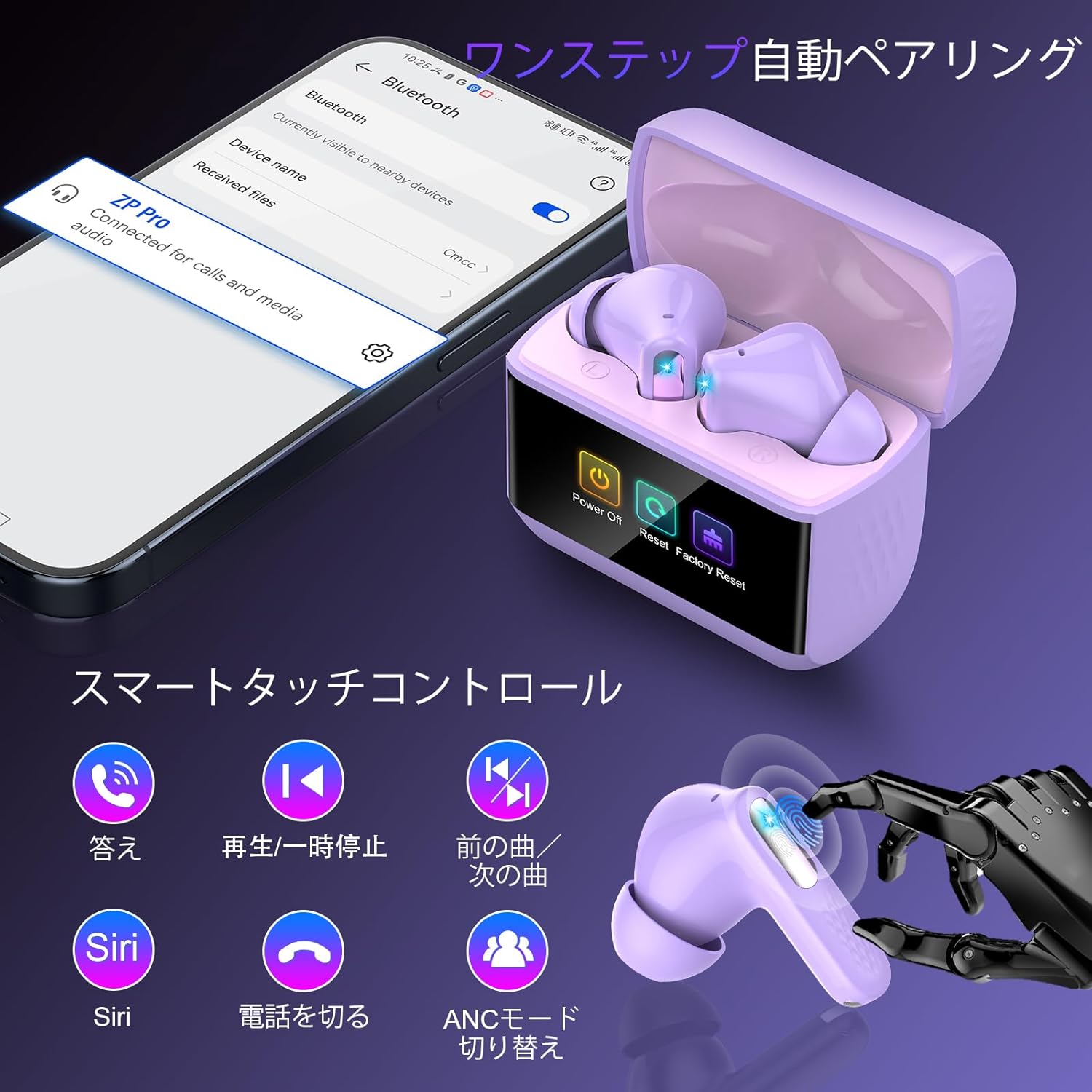
Image: Visual guide to the touch controls on the ZYHKON Z9Pro earbuds, showing gestures for answering calls, playing/pausing music, skipping tracks, and activating ANC modes.
5.2 Touch Screen Controls (Charging Case)
The innovative touch screen on the charging case allows for advanced control without needing your phone.
- Volume Adjustment: Swipe on the screen to access volume controls.
- Track Control: Navigate through your music library.
- Call Management: Answer or end calls directly from the case.
- Alarm Setting: Set alarms for reminders.
- Find Earbuds Function: Activate a sound to locate misplaced earbuds.
- EQ Mode Selection: Switch between 5 different equalizer modes.

Image: A hand interacting with the Z9Pro charging case's touch screen, showcasing various functions like noise reduction settings, volume control, and the 'find earbuds' feature.
5.3 Noise Cancellation Modes (ANC/ENC)
The Z9Pro earbuds feature Hybrid ANC (Active Noise Cancellation) and ENC (Environmental Noise Cancellation) for an immersive audio experience and clear calls.
- ANC Mode: Reduces ambient noise by up to 38dB, ideal for travel or noisy environments.
- Transparency Mode: Allows you to hear your surroundings while listening to audio, useful for awareness.
- Normal Mode: Standard audio playback without noise cancellation.
- ENC for Calls: During calls, ENC technology suppresses up to 90% of environmental noise, ensuring your voice is heard clearly.
Switch between modes by triple-tapping either earbud or using the touch screen on the charging case.

Image: A visual representation of the ANC+ENC noise cancelling feature, showing a 38dB reduction in ambient sound and options for Normal, Noise Cancelling, and Transparency modes.
5.4 EQ Modes
Customize your listening experience with 5 distinct EQ modes, accessible via the charging case touch screen.
- Standard: Balanced sound profile for general listening.
- Rock: Enhanced bass and treble for rock music.
- Jazz: Optimized for jazz music with clear mids.
- Pop: Boosted vocals and bass for pop tracks.
- Classic: Rich and detailed sound for classical music.

Image: Graphic illustrating the five available EQ modes (Standard, Rock, Jazz, Pop, Classic) that redefine your music experience, selectable from the touch screen.
6. Maintenance
6.1 Cleaning
Regular cleaning helps maintain optimal performance and hygiene.
- Gently wipe the earbuds and charging case with a soft, dry, lint-free cloth.
- Remove ear tips and clean them with mild soap and water, then dry thoroughly before reattaching.
- Do not use abrasive cleaners or solvents.
6.2 IPX7 Waterproof Rating
The Z9Pro earbuds are IPX7 waterproof, meaning they are protected against immersion in water up to 1 meter for 30 minutes. This makes them suitable for workouts, sweating, and light rain.
- Do not submerge the earbuds in water for extended periods or use them for swimming.
- Ensure the earbuds are dry before placing them back in the charging case to prevent damage.

Image: A woman wearing the Z9Pro earbuds during a workout, illustrating their ergonomic fit and IPX7 waterproof rating for sweat and light rain resistance. Also shows the included S/M/L ear tips.
7. Troubleshooting
If you encounter any issues with your ZYHKON Z9Pro earbuds, please refer to the following common solutions:
| Problem | Solution |
|---|---|
| Earbuds not pairing | Ensure earbuds are charged. Turn off and on your device's Bluetooth. Place earbuds back in case, close, then reopen to re-enter pairing mode. Try a factory reset via the charging case touch screen if available. |
| No sound from one earbud | Check battery level of both earbuds. Ensure both earbuds are properly connected to your device. Try re-pairing the earbuds. |
| Charging case not charging | Verify the Type-C cable is securely connected to both the case and the power source. Try a different charging cable or power adapter. |
| Touch controls unresponsive | Ensure your fingers are clean and dry. Restart the earbuds by placing them in the case and taking them out again. |
| Poor call quality | Ensure the earbuds are clean, especially the microphone area. Check for strong Bluetooth signal. Ensure ENC is active in noisy environments. |
8. Specifications
| Feature | Detail |
|---|---|
| Brand | ZYHKON |
| Model | Z9Pro |
| Bluetooth Version | 5.4 |
| Bluetooth Range | Up to 15 meters |
| Driver Size | 14.2 mm Dynamic Driver |
| Impedance | 32 Ohms |
| Noise Control | Hybrid Active Noise Cancellation (ANC), Environmental Noise Cancellation (ENC) |
| ANC Reduction | Up to 38dB |
| Battery Life (Earbuds) | 6-8 hours (single charge) |
| Total Playback Time | Up to 48 hours (with charging case) |
| Charging Port | USB Type-C |
| Waterproof Rating | IPX7 |
| Control Method | Touch Control (Earbuds), Touch Screen (Charging Case) |
| Compatible Devices | iPhone, Android smartphones, tablets, and other Bluetooth-enabled devices. |
9. Warranty and Support
9.1 Warranty Information
The ZYHKON Z9Pro Bluetooth Wireless Earbuds come with a 2-year manufacturer's warranty from the date of purchase. This warranty covers defects in materials and workmanship under normal use. It does not cover damage caused by misuse, accidents, unauthorized modifications, or normal wear and tear.
9.2 Customer Support
For technical assistance, warranty claims, or any questions regarding your ZYHKON Z9Pro earbuds, please contact our customer support team. Refer to the contact information provided on the product packaging or our official website.
Please have your purchase receipt and product model number (Z9Pro) ready when contacting support.