
1. Introduction
Thank you for choosing the WIN.MAX Electronic Dart Board. This soft tip dartboard set is designed to provide an engaging and versatile dart-playing experience for up to 8 players. Featuring 34 exciting games with 354 variations, multi-language support, adjustable sound levels, and clear LED displays, this manual will guide you through the setup, operation, and maintenance of your new dartboard.
2. Package Contents
Please ensure all items are present in your package:
- WIN.MAX Electronic Dart Board
- 12 Soft Tip Darts (with full grip texture, aluminum shafts, polypro flights)
- 100 Replacement Soft Tips
- 20 Rubber O-rings (to prevent shaft loosening)
- 24 Polypro Flights (standard size for stable flight)
- 1 Flight Protector
- 1 Dart Wrench
- 1 Power Adapter

3. Setup
3.1 Mounting the Dart Board
The dartboard is designed for easy wall mounting. Ensure you choose a stable surface. The product dimensions are approximately 17.09 inches (W) x 21.85 inches (H) x 1.18 inches (D). Refer to the included mounting hardware and instructions for secure installation.

3.2 Powering the Dart Board
Your dartboard can be powered in two ways:
- AC Adapter: Connect the included power adapter to the dartboard's power input and plug it into a standard electrical outlet.
- Batteries: For portable use, insert 3 AAA batteries (not included) into the battery compartment located on the back of the dartboard.
This video demonstrates the WIN.MAX Electronic Dart Board, showcasing its features and how to power it on. It provides a visual guide to the initial setup and functionality of the dartboard.
4. Operating Instructions
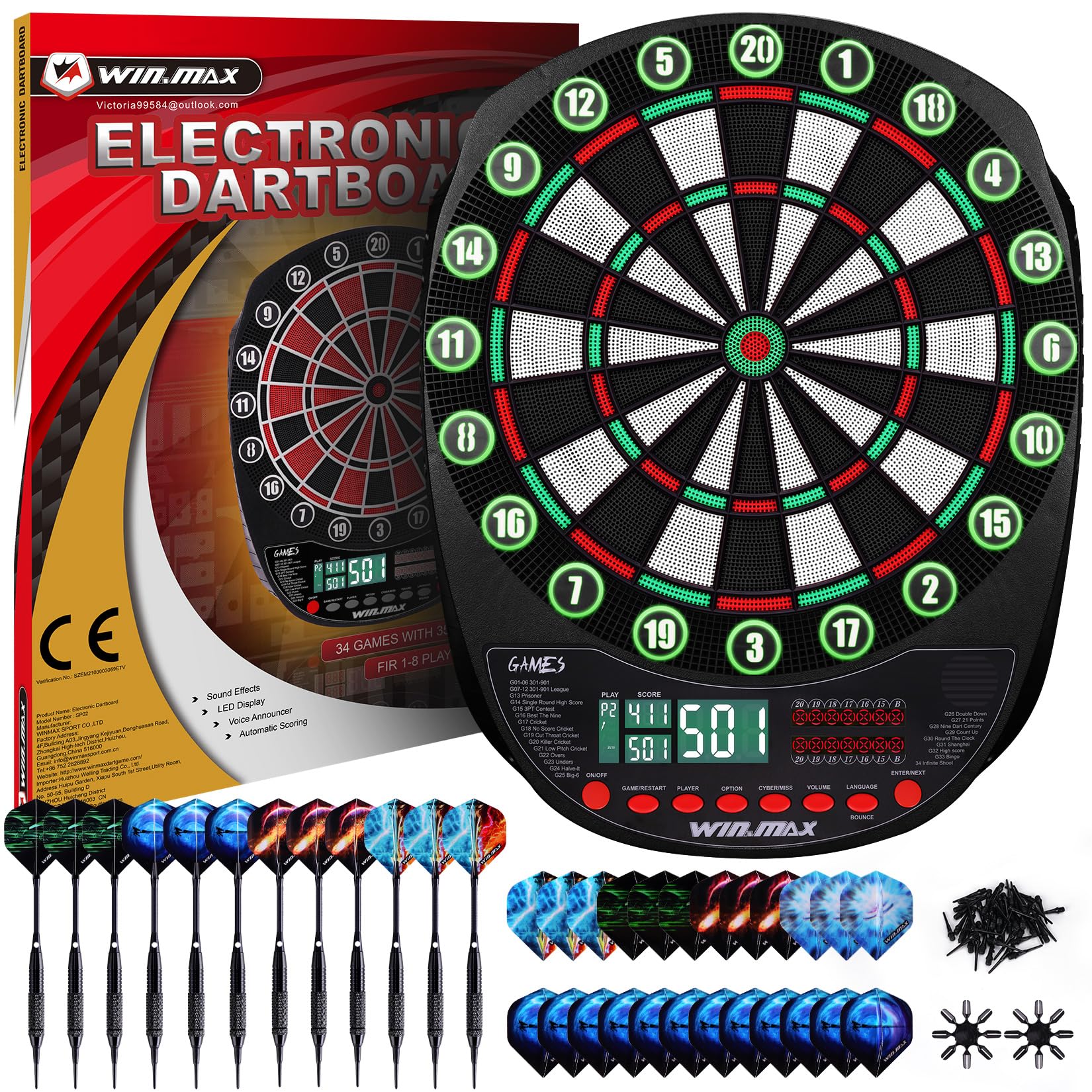
The dartboard features an intuitive control panel with buttons for game selection, player options, sound, and language. The three LED displays provide clear scoring and game information.
4.1 Game Selection
Press the 'Game' button to cycle through the 34 built-in games and their 354 variations. Popular games include 301-901, Cricket, 21 Points, and Shanghai. The selected game will be displayed on the LED screen.
4.2 Player Selection
Use the 'Player' button to select the number of human players (up to 8). You can also choose to play against a computer opponent with 5 adjustable difficulty levels.

4.3 Sound and Language Control
- Volume: Press the 'Volume' button to adjust between 8 sound levels or mute the sound entirely.
- Language: Use the 'Language' button to switch between English, German, and French voice prompts and display text.
This video demonstrates the game selection, player options, and volume control features of a similar electronic dartboard, providing a visual guide to customizing your game experience.
4.4 Scoring and Displays
The dartboard automatically tracks scores for all players. The 3 LED displays provide clear, real-time updates. Different colored lights around the segments indicate individual players, enhancing visibility during gameplay.

5. Playing the Game
5.1 Dart Usage
The included soft-tip darts are designed for safety and durability. The barrels feature a full grip texture for comfortable handling, and the aluminum shafts with rubber O-rings ensure flights remain secure. The polypro flights provide a stable flight path.
5.2 Dart Storage
The dartboard features convenient built-in storage slots to keep your darts organized and prevent loss when not in use.

6. Maintenance
- Cleaning: Wipe the dartboard surface and displays with a soft, dry cloth. Avoid using abrasive cleaners or solvents.
- Dart Tips: Replace worn or broken soft tips using the provided replacement tips and dart wrench.
- General Care: Store the dartboard in a dry environment. Ensure darts are removed carefully after each throw to prevent damage to the segments.
7. Troubleshooting
- Darts Not Sticking: Ensure soft tips are not worn. Replace if necessary. Ensure darts are thrown with adequate force.
- Scoring Errors: If a segment is not registering a hit, gently press the segment to ensure it is not stuck. If issues persist, consult the full user manual for advanced troubleshooting.
- No Power: Check the AC adapter connection or replace batteries if using battery power.
8. Specifications
| Brand | WIN.MAX |
| Model Name | SP02 |
| Material | Nylon |
| Product Dimensions | 2"W x 19"H (approx. 17.09"W x 21.85"H x 1.18"D) |
| Included Components | Dartboard, 12 Darts, 100 Tips, 20 O-rings, 24 Flights, Flight Protector, Dart Wrench, Power Adapter |
| Power Source | AC Adapter (included) or 3 AAA Batteries (not included) |
| Number of Games | 34 Games, 354 Variations |
| Max Players | 8 Players |
| Language Options | English, German, French |
| Sound Levels | 8 Levels + Mute |
9. Warranty and Support
9.1 Warranty Information
This WIN.MAX Electronic Dart Board comes with a 2-year warranty from the date of purchase. This warranty covers manufacturing defects and malfunctions under normal use. Please retain your proof of purchase for warranty claims.
9.2 Customer Support
For any questions, technical assistance, or warranty claims, please contact WIN.MAX customer support through the retailer where the product was purchased or visit the official WIN.MAX website for contact details.