
Klarus P2
Klarus P2 Tactical Pen Light User Manual
Model: P2
Brand: Klarus
1. Introduction
The Klarus P2 is a versatile tactical pen light designed for everyday carry (EDC) and various lighting needs. It features high lumen output, dual power options, and a durable, waterproof construction.

- High Performance: Delivers up to 1000 lumens with an 886-foot throw, utilizing an SFT-25R LED.
- Dual Power Options: Compatible with an included 1800mAh USB-C rechargeable battery or two standard AA batteries for emergency use.
- Durable Design: Crafted from aerospace-grade aluminum alloy, featuring IPX8 waterproof rating and 5ft (1.5m) drop resistance.
- User-Friendly Interface: Tactical tail switch for easy on/off and mode cycling with memory function.
- Compact & Portable: Lightweight (3.22oz) and pen-sized (5.66 inches long) with a two-way detachable clip for versatile carrying.
2. Package Contents
Verify that all items are present in your Klarus P2 package:
- Klarus P2 Tactical Pen Light
- 1800mAh USB-C Rechargeable Battery (LiR 14100)
- USB-C Charging Cable
- Detachable Pocket Clip (pre-installed)
- Lanyard
- Spare O-rings
- User Manual

3. Setup
3.1 Battery Installation
- Unscrew the tailcap of the flashlight.
- Insert the included 1800mAh Li-ion battery with the positive (+) end facing towards the head of the flashlight.
- Alternatively, insert two AA alkaline or lithium-iron batteries with the positive (+) ends facing towards the head. Ensure total voltage does not exceed 3V when using AA batteries.
- Screw the tailcap back on securely to ensure waterproof sealing.

3.2 Battery Charging
The included 1800mAh Li-ion battery has a built-in USB-C charging port. To charge:
- Remove the battery from the flashlight.
- Connect the USB-C charging cable to the port on the battery.
- Connect the other end of the cable to a USB power source.
- The indicator light on the battery will show charging status (e.g., red for charging, green for fully charged).
Note: The flashlight itself does not have an integrated charging port. The battery must be removed for charging.
4. Operating Instructions
4.1 Tail Switch Operation
The Klarus P2 features a tactical tail switch for simple control:
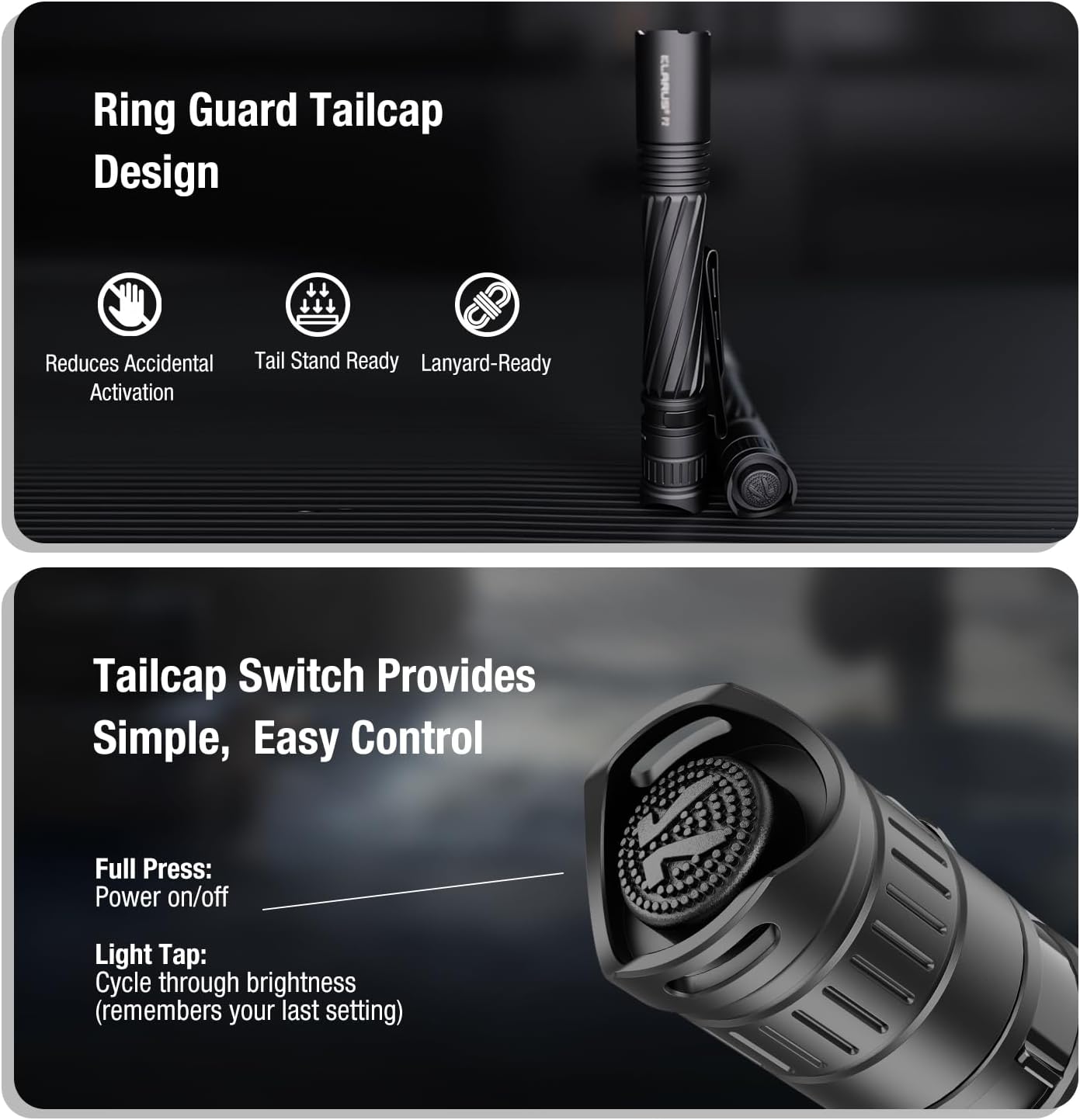
- Full Press: Press the switch completely until it clicks to turn the flashlight ON or OFF.
- Light Tap: While the flashlight is ON, lightly tap the switch (without a full click) to cycle through the brightness modes (Low → Medium → High).
- Memory Function: The flashlight will remember the last used brightness mode when turned off and will activate in that mode when turned back on.
4.2 Brightness Modes
The P2 offers three brightness levels:
- Low: Suitable for close-range tasks and extended runtime.
- Medium: Balanced output for general use.
- High: Maximum output for long-distance illumination and emergencies.
4.3 Carrying and Usage
The Klarus P2 is designed for versatile carry and use:
- Pocket Clip: The two-way detachable clip allows secure attachment to pockets, belts, backpack straps, or hat brims for hands-free lighting.
- Lanyard: Attach the included lanyard to the tailcap for added security and easy retrieval.
- Tail-Standing: The grooved tailcap design enables the flashlight to stand upright, providing ambient lighting.


4.4 Product Video
Watch the official product video for a demonstration of the Klarus P2's features and operation:
5. Maintenance
- Cleaning: Clean the flashlight body with a soft, damp cloth. Do not use harsh chemicals or abrasives.
- Lubrication: Periodically lubricate the O-rings and threads with silicone grease to maintain waterproof integrity.
- O-ring Replacement: If O-rings are damaged or worn, replace them with the provided spare O-rings to ensure IPX8 waterproof performance.
- Battery Care: Store the rechargeable battery in a cool, dry place when not in use. If using AA batteries, remove them during prolonged storage to prevent leakage.

6. Troubleshooting
- Flashlight not turning on:
- Ensure the battery is correctly inserted with the positive (+) end facing the head.
- Check if the battery is charged. Recharge the Li-ion battery or replace AA batteries.
- Tighten the tailcap securely.
- Intermittent operation:
- Clean the battery contacts and threads with a clean cloth.
- Ensure the tailcap is fully tightened.
- Check battery charge level.
- Reduced brightness or throw:
- The battery may be low. Recharge or replace.
- The lens may be dirty. Clean gently with a soft cloth.
7. Specifications
| Feature | Detail |
|---|---|
| Model | P2 |
| Light Output (Max) | 1000 Lumens |
| Beam Distance (Max) | 886 feet (270 meters) |
| Power Source | 1800mAh USB-C Rechargeable Li-ion Battery (included) or 2x AA Batteries |
| Runtime (Max) | 20 hours (with 1800mAh battery) |
| Light Source Type | SFT-25R LED |
| Material | Aerospace-grade Aluminum Alloy |
| Water Resistance Level | IPX8 (Waterproof) |
| Drop Resistance | 5ft (1.5 meters) |
| Product Dimensions | 5.66"D x 0.8"W x 0.8"H (143.8mm x 20.7mm x 20.7mm) |
| Item Weight | 3.22 oz (91.3g) |
| Special Features | High Lumen, Dual Power Options, Mil-Spec Tough, Tactical Tail Switch, Year-Long Standby |
8. Warranty & Support
The Klarus P2 Tactical Pen Light is backed by an industry-leading 5-year worry-free warranty.
For any product inquiries, technical support, or warranty claims, please contact Klarus customer service through their official website or your point of purchase.
Related documentsP2


Ask a question about this manual
Ask about setup, troubleshooting, compatibility, parts, safety, or missing instructions. Manuals+ will review the question and use this page’s manual context to help answer it.