
Introduction
Thank you for choosing the AGXOV D50/D28 MP3 Player. This device is designed to provide a versatile portable audio experience with features including 128GB built-in storage, Bluetooth 5.3 connectivity, FM radio, voice recording, and e-book functionality. This manual provides detailed instructions for setup, operation, and maintenance to ensure optimal performance.
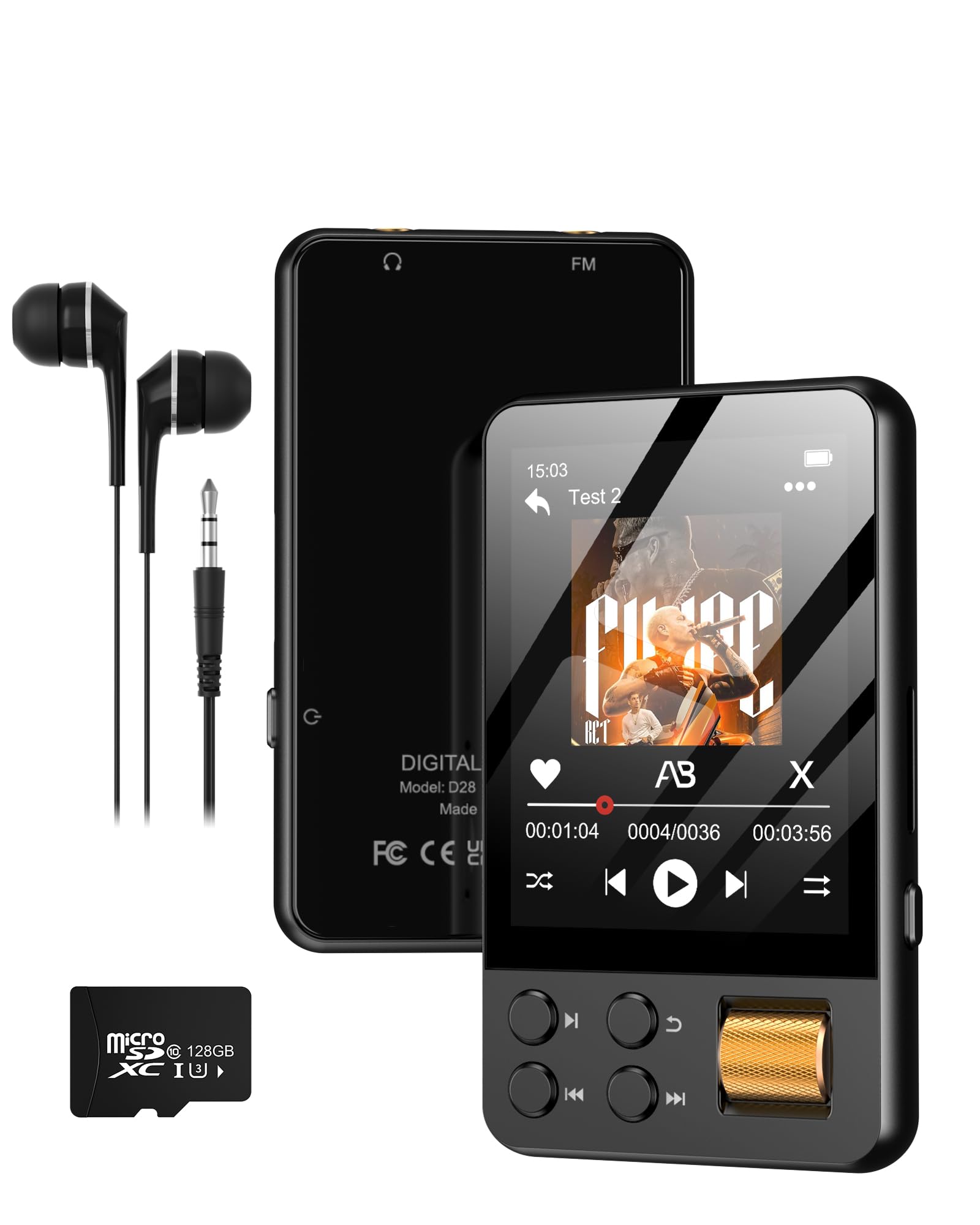
The AGXOV D50/D28 MP3 Player, a compact and versatile portable audio device.
Package Contents
Please verify that all items are present in your package:
- AGXOV D50/D28 MP3 Player x 1
- USB-C Cable x 1
- Wired Headphones x 1
- User Manual x 1

All components included in the AGXOV D50/D28 MP3 Player package.
Product Overview
The AGXOV D50/D28 MP3 Player features a compact design with both a touchscreen and physical buttons for intuitive control. Familiarize yourself with the device's layout:

The AGXOV D50/D28 MP3 Player features a combination of touchscreen and physical button controls, including a dedicated volume/scroll wheel.
Key Controls:
- Touchscreen: Navigate menus and select options.
- Back Button: Return to the previous screen or menu.
- Play/Pause Button: Control media playback.
- Previous/Next Buttons: Skip tracks or navigate through lists.
- Volume/Scroll Wheel: Adjust volume or scroll through content.

The main interface of the AGXOV D50/D28 MP3 Player, showing available functions.
Setup
1. Charging the Device
Before first use, fully charge the MP3 player. Connect the included USB-C cable to the device's charging port and the other end to a USB power adapter (not included) or a computer's USB port. The battery indicator on the screen will show charging status.
2. Transferring Files
To transfer music, videos, images, or e-books to the player:
- Connect the MP3 player to your computer using the USB-C cable.
- The device will appear as a removable disk or media device on your computer.
- Drag and drop your desired files into the appropriate folders (e.g., 'Music', 'Video', 'Pictures', 'Ebook') on the player's internal storage.
- Safely eject the device from your computer before disconnecting the cable.

Connecting the AGXOV D50/D28 MP3 Player to a computer for file transfer and charging.
3. Expanding Storage (Optional)
The player supports expandable storage via a TF (Micro SD) card up to 512GB. Insert the TF card into the designated slot until it clicks into place. Files on the TF card can be accessed through the 'Folder' application or directly within the respective media applications.
Operating Instructions
1. Power On/Off
- Power On: Press and hold the Power button until the screen lights up.
- Power Off: Press and hold the Power button, then select 'Power Off' on the screen.
2. Music Playback
- From the main menu, tap the 'Music' icon.
- Browse your music by Artist, Album, Songs, or Folders.
- Tap a song to begin playback.
- Use the physical buttons or touchscreen controls for Play/Pause, Next/Previous track, and volume adjustment via the scroll wheel.

Experience high-fidelity audio with the AGXOV D50/D28 MP3 Player.
3. Bluetooth Pairing
The device supports Bluetooth 5.3 for wireless audio output.
- From the main menu, tap the 'Bluetooth' icon or navigate to 'Settings' > 'Bluetooth'.
- Turn on Bluetooth. The player will automatically search for nearby Bluetooth devices.
- Select your desired Bluetooth headphones or speaker from the list to pair.
- Once paired, audio will be routed wirelessly to the connected device.

Seamlessly connect your AGXOV D50/D28 MP3 Player to Bluetooth headphones or speakers.
4. FM Radio
To use the FM radio function, ensure wired headphones are connected, as they act as the antenna.
- Connect the wired headphones to the 3.5mm audio jack.
- From the main menu, tap the 'Radio' icon.
- Use the on-screen controls to scan for stations, save favorites, or manually tune.
5. Voice Recorder
- From the main menu, tap the 'Recorder' icon.
- Tap the record button to start recording.
- Tap the stop button to end the recording. Recordings are saved automatically.
6. E-Book Reader
- From the main menu, tap the 'Ebook' icon.
- Select an e-book file to open and read.
- Use the touchscreen to turn pages.
7. Settings
Access the 'Settings' menu to customize various aspects of your player, including display brightness, language, date and time, sound equalizer, and system information.
Maintenance
- Cleaning: Use a soft, dry cloth to clean the device. Avoid liquid cleaners or abrasive materials.
- Storage: Store the player in a cool, dry place away from direct sunlight and extreme temperatures.
- Battery Care: To prolong battery life, avoid fully discharging the battery frequently. Charge the device regularly, even if not in use for extended periods.
- Water Resistance: This device is not waterproof. Avoid exposure to water or high humidity.
Troubleshooting
Device Will Not Turn On
- Ensure the battery is charged. Connect the player to a power source for at least 30 minutes.
- Try performing a hard reset by pressing and holding the Power button for 10-15 seconds.
Cannot Transfer Files
- Check the USB-C cable connection. Try a different USB port or cable.
- Ensure the device is recognized by your computer. You may need to select 'File Transfer' mode on the player if prompted.
Bluetooth Connection Issues
- Ensure Bluetooth is enabled on both the player and the receiving device.
- Place the devices close to each other during pairing.
- If connection is unstable, try unpairing and re-pairing the devices.
- Some users have reported occasional stuttering with Bluetooth playback; ensure the player's firmware is up to date if available.
FM Radio Signal is Weak
- Ensure wired headphones are securely plugged into the 3.5mm audio jack, as they function as the antenna.
- Try moving to an open area or adjusting the position of the headphone cable to improve reception.
Screen Scratches Easily / Poor Viewing Angle
- Consider applying a screen protector to prevent scratches.
- The screen's viewing angles may vary; adjust the device's position for optimal visibility.
Specifications
| Model Name | D50/D28 |
| Brand | AGXOV |
| Memory Storage Capacity | 128 GB (expandable up to 512GB via TF card) |
| Connectivity Technology | Bluetooth 5.3 |
| Special Features | Built-In Speaker, FM Radio, Voice Recorder, E-Book Reader, HiFi Sound |
| Screen Size | 1.77 Inches |
| Product Dimensions | 0.4 x 1.6 x 3.6 inches |
| Item Weight | 2.19 ounces |
| Batteries | 1 A battery required (included) |
| Compatible Devices | Personal Computer, Smartphone, Speaker |
| Media Type | Micro SD |
Warranty and Support
For warranty information or technical support, please refer to the contact details provided with your purchase documentation or visit the official AGXOV website. Keep your purchase receipt for warranty claims.


