
1. Product Overview
The LocoLee Light Kit is an LED lighting accessory designed to illuminate your LEGO 21360 Willy Wonka & The Chocolate Factory model. This kit enhances the visual appeal of your model by highlighting its intricate details with bright, vibrant lights. The model building set itself is not included with this light kit and must be purchased separately.
Key Features:
- Dedicated Compatibility: Specifically designed for seamless integration with the LEGO 21360 Willy Wonka & The Chocolate Factory set.
- High-Quality Components: Constructed from durable copper wire and ABS resin, ensuring longevity and reliable performance.
- USB Powered: Conveniently powered via USB (under 5V), providing bright illumination for your model.
- Enhanced Display: Illuminates both interior and exterior details, making your model glow in the dark and perfect for display.
- Discreet Wiring: Designed to be perfectly hidden within the LEGO structure, maintaining the aesthetic integrity of your model.
2. Safety Information
- Small Parts Warning: This kit contains small parts. Keep out of reach of small children to prevent accidental ingestion.
- Handle Wires Carefully: Do not pull the wires strongly during installation to avoid damage.
- Power Source: Use only a USB power source with a voltage under 5V.
3. Package Contents
Before beginning installation, please verify that all components listed below are present in your package. Refer to the image for a visual representation of the included parts.

Image: Overview of the LocoLee Light Kit package contents, including various LED lights, connecting cables, expansion boards, and a power supply unit.
The kit typically includes:
- Various LED light strings and individual lights (e.g., high-brightness lights, disc lights, light strips).
- Connecting cables of different lengths (e.g., 15cm, 20cm, 30cm, 50cm).
- Expansion boards for connecting multiple lights.
- USB power supply unit.
- Switch module.
- Optical fibers and other decorative elements.
- Instruction manual (online video/PDF access).
4. Installation Guide
Installation of the LocoLee Light Kit requires careful attention to detail. We provide comprehensive step-by-step video and PDF instructions online to guide you through the process. These resources are designed to make installation as straightforward as possible.
Before Installation:
- Test All Lights: Before disassembling any LEGO bricks, connect the power supply and test each individual light part to ensure it is functioning correctly.
- Access Online Instructions: Refer to the detailed video or PDF installation guide provided online. These guides will show you exactly which LEGO bricks to disassemble and where to place each light and wire.
Installation Steps:
- Follow the online step-by-step instructions. The process generally involves carefully disassembling specific LEGO bricks, integrating the light components, and then reassembling the bricks around the lights and wires.
- Ensure wires are neatly tucked away and not pinched between bricks. The design allows for wires to be perfectly hidden.
- Connect the lights to the expansion boards and then to the USB power supply.
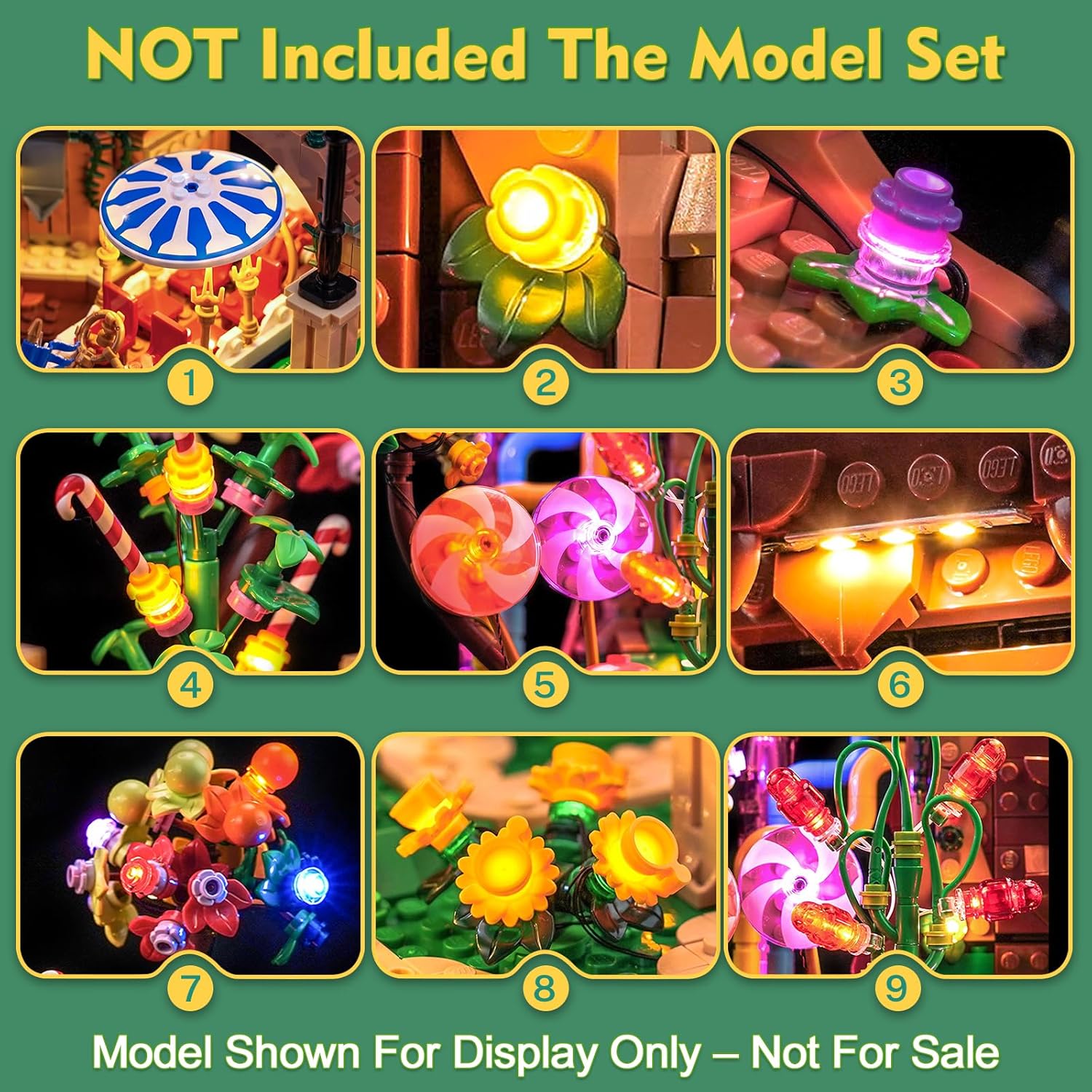
Image: Close-up view of various illuminated details within the LEGO Willy Wonka & The Chocolate Factory model, showcasing individual lights on lollipops, flowers, and other elements.

Image: Detailed view of illuminated lollipops and swirling candy elements, highlighting the vibrant colors and intricate lighting effects.

Image: The illuminated boat component of the LEGO model, showing warm lights within its structure, enhancing its presence.
5. Operating Instructions
Once the light kit is fully installed, operating it is simple:
- Connect the USB power supply unit to a compatible USB port (e.g., power bank, USB wall adapter, computer USB port). Ensure the voltage is under 5V.
- If your kit includes a switch module, use it to turn the lights on or off.
- Enjoy your illuminated LEGO model!

Image: The complete LEGO Willy Wonka & The Chocolate Factory model fully illuminated by the LocoLee Light Kit, showcasing the overall effect of the lighting.
6. Maintenance
To ensure the longevity and optimal performance of your LocoLee Light Kit:
- Cleaning: Gently dust the lights and wires with a soft, dry cloth. Avoid using liquid cleaners directly on the electrical components.
- Storage: If storing the model for an extended period, disconnect the USB power supply.
- Handling: Always handle the model and light kit with care to prevent damage to the delicate wires and LED components.
7. Troubleshooting
If you encounter any issues with your light kit, please refer to the following common troubleshooting steps:
- Lights Not Working:
- Ensure the USB power supply is securely connected to both the kit and a working power source.
- Check if the power source (e.g., wall adapter, power bank) is functioning correctly.
- Verify that all connecting cables are properly seated in the expansion boards and lights.
- If a switch module is present, ensure it is in the 'ON' position.
- Inspect wires for any visible damage or pinches between LEGO bricks.
- Flickering Lights:
- Check all connections for looseness.
- Ensure the power source provides stable power.
If these steps do not resolve the issue, please contact customer support for further assistance.
8. Specifications
| Brand | LocoLee |
| Model Number | 21360 |
| Material | ABS Plastic, Copper Wire |
| Power Source | USB (under 5V) |
| Product Dimensions (LxWxH) | 15.4 x 3.2 x 10.1 cm (approximate package size) |
| Product Weight | 0.22 pounds (approximate) |
| Special Feature | Night Light |
| Educational Objective | Creative Thinking |
9. Warranty and Support
LocoLee is committed to providing high-quality products. If you have any questions, concerns, or require assistance with your light kit, please do not hesitate to contact our customer support team. We are available to help you with installation, troubleshooting, or any product-related inquiries.
Please refer to your purchase documentation for specific warranty details and contact information.