
1. Introduction
Thank you for choosing the DCHK Haribo 100W GaN Wall Charger. This advanced charging device is designed to provide fast and efficient power to a wide range of electronic devices, including smartphones, tablets, laptops, and gaming consoles. Utilizing GaN (Gallium Nitride) technology, it offers high power output in a compact form factor, ensuring reliable and safe charging.

Image: The Haribo 100W GaN Wall Charger plugged into a wall outlet, with a smartphone connected via a USB-C cable. The charger features a digital display showing '100W' and a Haribo Goldbear design.
2. Setup
- Unfold the Plug: Gently pull out the foldable prongs from the charger body.
- Connect to Power: Insert the charger's prongs into a standard 110-240V AC wall outlet.
- Prepare Devices: Ensure your devices are compatible with USB-C or USB-A charging and have appropriate charging cables.
3. Operating Instructions
The Haribo 100W GaN Wall Charger features three USB-C ports and one USB-A port, allowing simultaneous charging of up to four devices. The intelligent power allocation system automatically adjusts output based on connected devices.

Image: The Haribo 100W GaN Wall Charger plugged into a wall, with three USB-C cables connected to two smartphones and a pair of earbuds, and one USB-A cable connected to another smartphone. Each device shows its maximum charging wattage.
- Connect Devices: Plug your device's charging cable into the appropriate USB-C or USB-A port on the charger.
- Monitor Charging: The integrated LED display will show the total wattage being delivered by the charger.
- Smart Power Allocation: When multiple devices are connected, the charger intelligently distributes power to optimize charging speed for each device. For example, if two high-power devices are connected, the output to each port will be adjusted accordingly.
LED Display
The charger features an LED display that provides real-time feedback on the total power output. This allows you to quickly verify that your devices are receiving power and understand the current charging load.
4. Power Output & Port Information
The Haribo 100W GaN Wall Charger is equipped with versatile ports to meet diverse charging needs:

Image: A diagram illustrating the three USB-C ports (C1, C2, C3) and one USB-A port, detailing their individual maximum power outputs and voltage/amperage specifications.
| Port Type | Maximum Output | Voltage/Amperage |
|---|---|---|
| USB-C1/C2/C3 | 100W Max | 5V 3A, 9V 3A, 12V 3A, 15V 3A, 20V 5A |
| USB-A | 30W Max | 5V 3A, 9V 3A, 12V 2.5A |
Simultaneous Charging Power Allocation
- When multiple ports are in use, the total 100W output is dynamically distributed among the connected devices.
- The charger prioritizes devices requiring higher power (e.g., laptops) while ensuring efficient charging for all connected gadgets.
- Refer to the product specifications for detailed power distribution scenarios when using multiple ports simultaneously.
5. GaN Technology Benefits
This charger incorporates Gallium Nitride (GaN) technology, which offers several advantages over traditional silicon-based chargers:

Image: A stylized diagram of a GaN chip on a circuit board, surrounded by icons representing higher power efficiency, stable power delivery, low heat generation, longer lifespan, and faster charging speed.
- Compact Size: GaN components are smaller and more efficient, allowing for a more compact charger design.
- Higher Power Efficiency: Less energy is lost as heat, leading to more power delivered to your devices.
- Lower Heat Generation: The charger operates at cooler temperatures, enhancing safety and longevity.
- Faster Charging Speed: Supports advanced fast charging protocols like Power Delivery (PD 3.0) and Quick Charge (QC 4+/4.0).
6. Safety and Protection
The DCHK Haribo 100W GaN Wall Charger is built with a comprehensive protection system to ensure the safety of your devices and the charger itself:
- Over-Voltage Protection: Prevents damage from excessive voltage input.
- Over-Current Protection: Safeguards against excessive current flow.
- Overheating Protection: Monitors internal temperature to prevent overheating.
- Short Circuit Protection: Automatically cuts power in case of a short circuit.
- Smart IC: Built-in intelligent chip manages power delivery and protection.
7. Product Specifications
Detailed technical specifications for the DCHK Haribo 100W GaN Wall Charger:

Image: A visual representation of the charger's dimensions (3.3in height, 2.2in width, 1.4in depth) and weight (6.9oz), alongside its port configuration.
| Feature | Detail |
|---|---|
| Model Number | RCE-10002 |
| Input Plug | 110~240V, 50/60Hz 2A |
| Total USB Ports | 4 (3x USB-C, 1x USB-A) |
| Wattage | 100 watts (Max) |
| Dimensions | 3.3 × 2.2 × 1.2 inches (84 × 57 × 30 mm) |
| Weight | 6.9 oz (196 g) |
| Material | Acrylonitrile Butadiene Styrene |
| Special Features | Fast Charging, Multi Device Charging, Retractable Plug, Short Circuit Protection, Travel |
| Compatible Devices | Cellular Phones, Game Consoles, Headphones, Laptops, Tablets (iPhone, Galaxy, Pixel, iPad, Nintendo Switch, AirPods) |
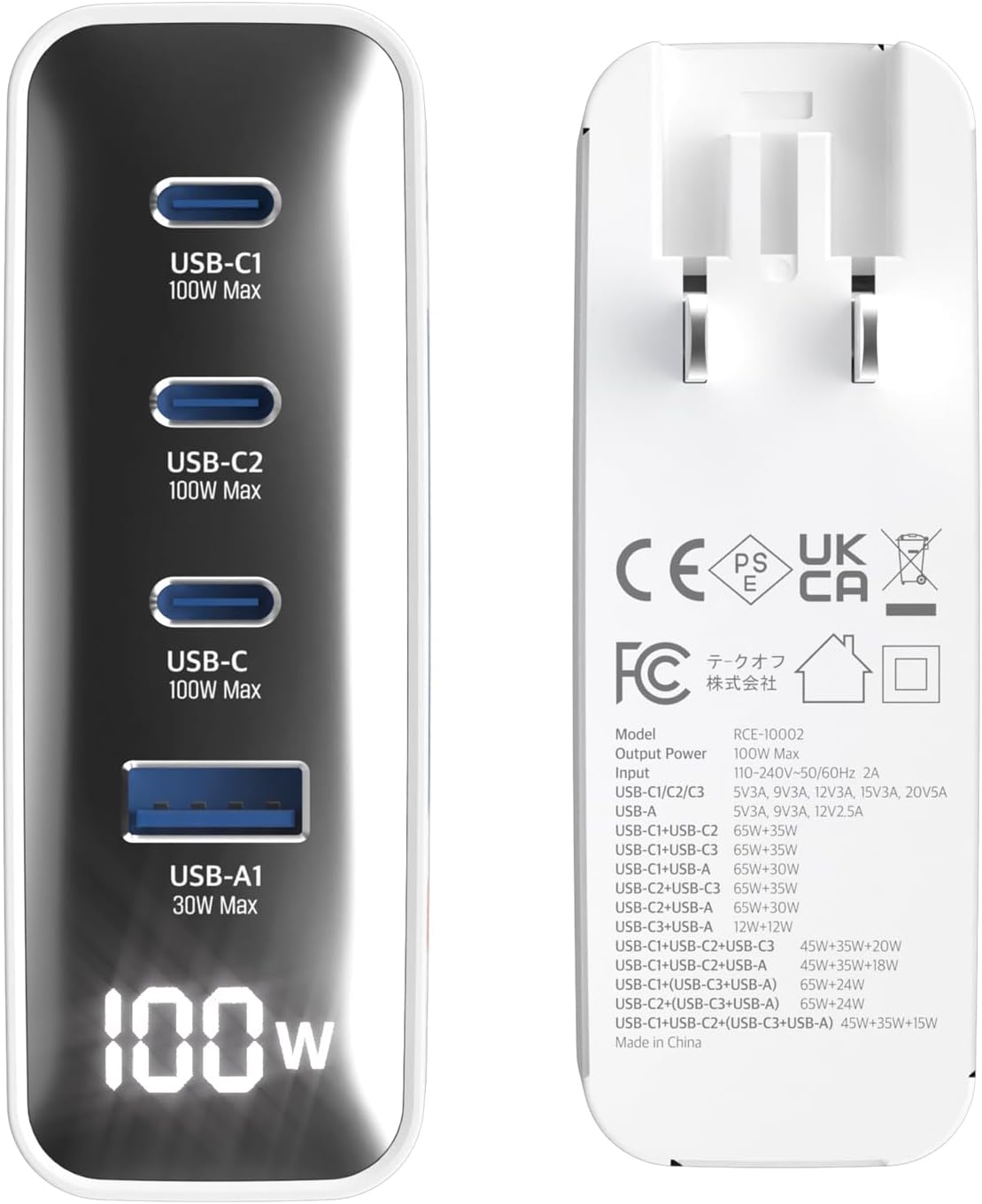
Image: The back of the Haribo 100W GaN Wall Charger, showing the foldable US plug, model number (RCE-10002), input/output power details for various port combinations, and regulatory certifications (CE, FCC, UKCA).
8. Troubleshooting
- Device not charging:
- Ensure the charger is securely plugged into a live wall outlet.
- Verify that the charging cable is properly connected to both the charger and your device.
- Try using a different charging cable or port to rule out cable or port issues.
- Check if your device is compatible with the charger's output specifications.
- Slow charging:
- Ensure you are using a cable that supports fast charging (e.g., PD 3.0 or QC 4+/4.0 compatible).
- If multiple devices are connected, the power is shared. Disconnect less critical devices to allocate more power to the primary device.
- Check your device's charging requirements; some devices may not support the maximum wattage.
- Charger is hot:
- It is normal for the charger to become warm during operation, especially under heavy load.
- If the charger becomes excessively hot, disconnect it immediately and allow it to cool down. Ensure it is used in a well-ventilated area.
9. Warranty and Support
This product comes with a 6-month warranty from the date of purchase, covering any manufacturing defects. For warranty claims or technical support, please contact the manufacturer or your retailer with your proof of purchase.
Please retain your purchase receipt for warranty purposes.