
Introduction
The Funsicle FiltraBoost 1200S Pool Pump with AutoSkimmer is designed to provide efficient filtration and water circulation for above-ground pools. This 2-in-1 system combines a powerful HydroSurge motor with an automatic skimmer to maintain superior water clarity and reduce energy consumption. It is compatible with Funsicle Oasis, Oasis Designer, and Activity Pools.
Key features include:
- HydroSurge Motor: Delivers higher system flow rates while reducing energy consumption.
- Enhanced Filtration: Automatic 2-in-1 skimmer and filter for improved water circulation and clarity.
- Compatibility: Designed for Funsicle above-ground pools with appropriate outlet and inlet openings.
- Water Flow Rate: 1,200 GPH (Gallons Per Hour) for efficient debris and contaminant removal.
- Safety and Convenience: Includes a GFCI plug and a hose-free design for easy attachment to the pool wall. Features a transparent unit for filter monitoring.

Figure 1: Diagram illustrating the Funsicle FiltraBoost 1200S Pool Pump design.
Setup Instructions
Follow these steps to properly set up your Funsicle FiltraBoost 1200S Pool Pump. Ensure the pool is empty or at a safe water level before installation.
- Unpack Components: Carefully remove all components from the packaging. Verify that all parts are present according to the product manual's parts list.
- Position the Pump: The FiltraBoost 1200S is designed for sidewall attachment. Position the pump on the exterior of your above-ground pool, ensuring it aligns with the pool's outlet and inlet openings.
- Attach to Pool Wall: Securely attach the pump unit to the pool wall using the provided mounting hardware. Ensure a tight and stable connection to prevent leaks and ensure proper operation. The hose-free design means it conveniently attaches directly.
- Install Filter Cartridge: Open the transparent unit and insert the Type C filter cartridge. Close the unit securely.
- Connect Power: Plug the GFCI plug into a suitable electrical outlet. Ensure the outlet is protected and meets all local electrical codes. Do not operate the pump until the pool is filled to the recommended level.
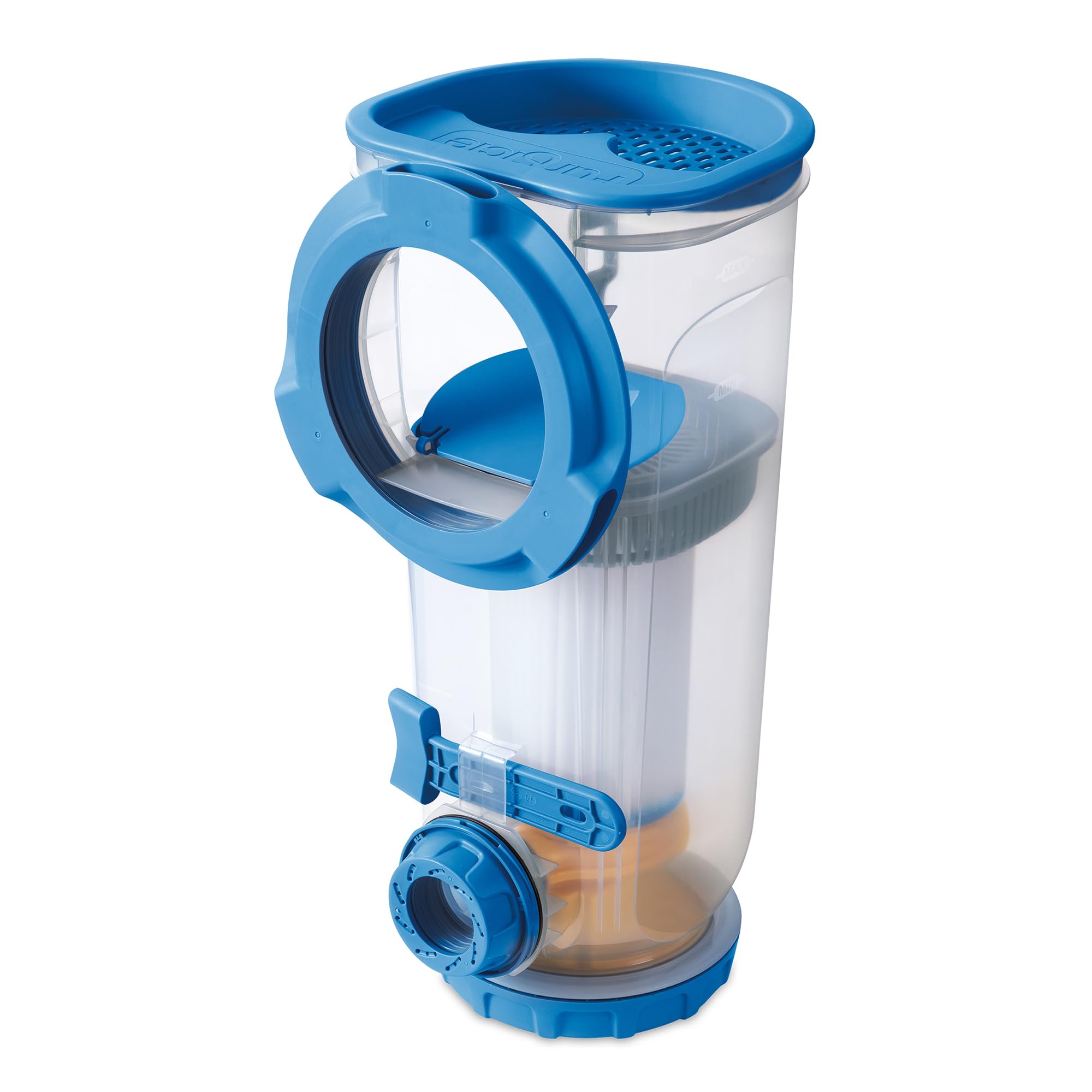
Figure 2: Proper installation of the FiltraBoost 1200S Pool Pump on an above-ground pool sidewall.

Figure 3: The FiltraBoost 1200S pump attached to an activity pool, demonstrating its compact and integrated design.
Video 1: Official Funsicle video demonstrating the installation process of the FiltraBoost Pool Pump.
Operating Instructions
Once the pump is properly installed and the pool is filled, you can begin operation.
- Power On: Ensure the GFCI plug is securely connected to a power outlet. The pump will begin circulating water.
- Automatic Skimming: The integrated AutoSkimmer will automatically collect larger debris from the water surface as the pump operates.
- Filtration: Water is drawn through the Type C filter cartridge, which captures fine particles, ensuring clean and clear pool water.
- Monitoring: The transparent unit allows for easy visual monitoring of the filter cartridge and skimmer basket to determine when cleaning or replacement is needed.

Figure 4: The powerful water jet from the FiltraBoost 1200S pump, indicating active water circulation.
Maintenance
Regular maintenance is crucial for the longevity and efficiency of your FiltraBoost 1200S Pool Pump.
- Clean Skimmer Basket: Periodically check and empty the skimmer basket to remove collected leaves, insects, and other large debris. This prevents clogging and maintains optimal skimming performance.
- Replace Filter Cartridge: The Type C filter cartridge should be replaced approximately every two weeks, or more frequently depending on pool usage and water conditions. A dirty filter reduces pump efficiency and water clarity.
- Inspect Connections: Regularly check all connections and seals for any signs of wear or leaks. Ensure the pump is securely attached to the pool wall.
- Winterization: Before freezing temperatures, disconnect the pump, drain all water, clean the filter and skimmer, and store the unit in a dry, protected area.

Figure 5: The skimmer basket collecting debris, highlighting the need for regular cleaning.

Figure 6: Illustration of the skimmer basket for large debris and the filter cartridge for fine particles, emphasizing dual-action cleaning.
Troubleshooting
If you encounter issues with your FiltraBoost 1200S Pool Pump, refer to the following common troubleshooting steps:
| Problem | Possible Cause | Solution |
|---|---|---|
| Pump not running | No power; GFCI tripped; Motor malfunction | Check power connection and outlet. Reset GFCI. If problem persists, contact customer support. |
| Low water flow | Clogged filter cartridge; Full skimmer basket; Air in system | Clean or replace filter cartridge. Empty skimmer basket. Ensure pump is fully submerged and all air is purged from the system. |
| Water not clearing | Dirty filter; Insufficient run time; Chemical imbalance | Replace filter cartridge. Ensure pump runs for adequate time (8-12 hours daily). Test and adjust pool chemicals as needed. |
| Unusual noise from pump | Debris in impeller; Air in system; Worn motor bearings | Disconnect power and inspect impeller for debris. Purge air from system. If noise continues, contact customer support. |
Specifications
| Feature | Detail |
|---|---|
| Brand | Funsicle |
| Model Number | F53FB12S0 |
| Product Style | Sidewall Pump with AutoSkimmer |
| Power Source | Hydraulic Powered (Electric with GFCI Plug) |
| Water Flow Rate | 1,200 GPH (Gallons Per Hour) |
| Filter Type | Type C Filter Cartridge |
| Compatibility | Funsicle Oasis, Oasis Designer & Activity Pools (2026 Season Models and Later) |
| UPC | 195545038813 |

Figure 7: Compatibility chart for Funsicle pool pumps, including the FiltraBoost 1200S.
Warranty Information
This product is covered by a manufacturer's warranty. Please refer to the warranty card included with your purchase or visit the official Funsicle website for detailed warranty terms and conditions. Keep your proof of purchase for warranty claims.
Customer Support
For further assistance, technical support, or to order replacement parts, please contact Funsicle customer service.
- Website: Visit the official Funsicle website for FAQs and support resources.
- Contact Information: Refer to your product packaging or the Funsicle website for current contact details (phone number, email).


