
1. Introduction
The BALMUDA The Toaster Pro is a versatile steam oven toaster designed to elevate your culinary experience. Featuring unique steam technology and precise temperature control, it ensures a perfect balance of crispy exteriors and moist, flavorful interiors for various foods. Its compact design makes it a stylish and efficient addition to any kitchen.
- Steam Technology: Add 5 cc of water to generate steam, crisping bread and pastries while sealing in flavor and moisture.
- Precise Temperature Control: Three distinct heating zones ensure optimal cooking for a savory, crisp outside and a fluffy, moist inside.
- Versatile Cooking Modes: Includes Shokupan, Golden Toast, Pizza, Croissant, Oven (350°F, 400°F, 450°F), and Salamander Grill.
- Professional Salamander Grill Mode: Powerful top-down heat for caramelizing, searing, and finishing foods.
- Refined Compact Design: A sleek, space-saving form factor that enhances kitchen performance.

2. Setup
2.1 Unboxing and Placement
Carefully remove the toaster from its packaging. Place the toaster on a stable, heat-resistant, and level surface. Ensure adequate clearance around the appliance for ventilation. Do not place it near flammable materials or under cabinets that may be damaged by heat or steam.
2.2 Initial Cleaning
Before first use, wipe the exterior with a damp cloth. Remove the baking rack and crumb tray, wash them with warm soapy water, rinse thoroughly, and dry completely. Reinsert the crumb tray and baking rack.
2.3 Power Connection
Plug the toaster into a grounded 120V AC electrical outlet. Ensure the power cord is not pinched or draped over sharp edges.
2.4 Adding Water for Steam
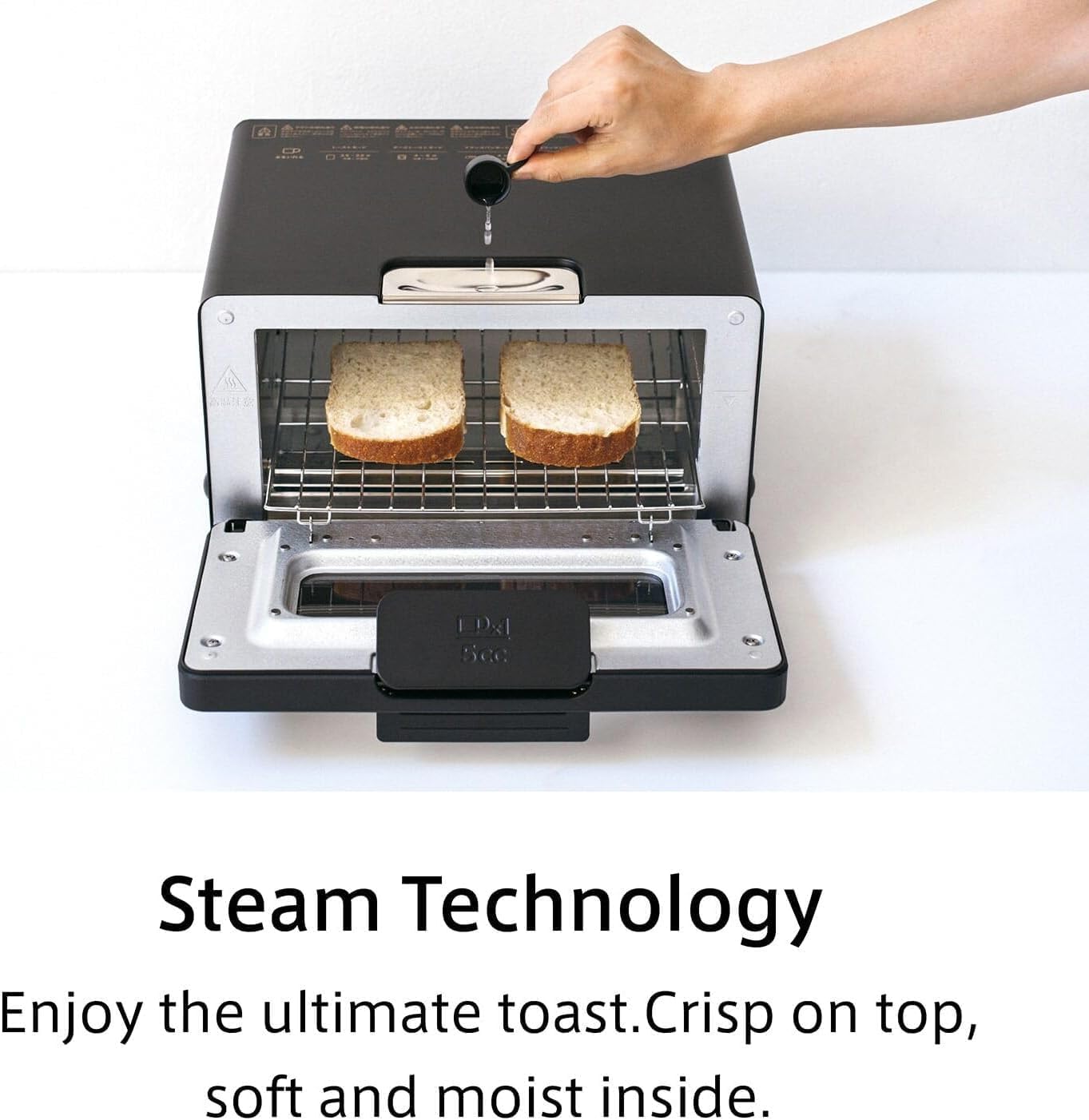
For modes utilizing steam technology, always add 5 cc of water to the water inlet located on the top of the toaster. Use the provided measuring cup for precise measurement. This step is crucial for achieving optimal results with steam-based cooking modes.
3. Operating Instructions
The BALMUDA The Toaster Pro features intuitive controls with a mode dial and a timer dial. Select the desired mode and then set the cooking time.

3.1 Cooking Modes
Turn the left dial to select one of the following modes:
- Shokupan Mode: Ideal for everyday thin-sliced bread and English muffins.
- Golden Toast Mode: Best for thick slices and fresh bread, using high-temperature heating.
- Pizza Mode: Perfect for reheating pizza or other foods requiring a high-heated surface.
- Croissant Mode: Reheats pastries, baguettes, and rolls without browning.
- Oven Mode (350°F, 400°F, 450°F): Heats at fixed temperatures for oven dishes and frozen food.
- Salamander Grill Mode: Provides powerful top-down heat for caramelizing, searing, and finishing foods.

3.2 Setting the Timer
After selecting a mode, turn the right dial to set the desired cooking time. The timer can be set up to 15 minutes. The toaster will automatically shut off once the timer completes.
3.3 Steam Technology in Action
The unique steam technology works by releasing a small amount of water into the toaster chamber, creating a thin layer of moisture on the bread's surface. This moisture is then rapidly heated, preventing the bread from drying out while achieving a perfect crispness.

3.4 Official Product Videos
4. Maintenance
4.1 Cleaning the Crumb Tray
Regularly remove and clean the crumb tray located at the bottom of the toaster. Pull out the tray, discard crumbs, and wash with warm soapy water. Rinse and dry thoroughly before reinserting.
4.2 Cleaning the Baking Rack and Water Inlet
The baking rack can be removed and washed with warm soapy water. The water inlet should be wiped clean with a damp cloth after each use to prevent mineral buildup. For stubborn stains, a mild descaling solution can be used, followed by thorough rinsing.
4.3 Exterior Cleaning
Wipe the exterior of the toaster with a soft, damp cloth. Do not use abrasive cleaners or scouring pads, as these can damage the finish.
5. Troubleshooting
| Problem | Possible Cause | Solution |
|---|---|---|
| Toaster does not turn on. | Not plugged in; power outlet malfunction; timer not set. | Ensure toaster is securely plugged in. Check power outlet with another appliance. Set the timer dial. |
| Food is not toasting evenly. | Incorrect mode selected; food placed improperly; insufficient water for steam. | Verify the correct mode for your food type. Ensure food is centered on the rack. Add 5 cc of water for steam modes. |
| Steam is not visible or insufficient. | No water added to the inlet; water inlet clogged. | Always add 5 cc of water before starting steam modes. Clean the water inlet to remove any mineral buildup. |
| Food is too dry or too crispy. | Incorrect mode or timer setting; no water added for steam. | Adjust mode and timer settings. Ensure water is added for steam modes to retain moisture. |
6. Specifications
| Feature | Detail |
|---|---|
| Brand | BALMUDA |
| Model Number | K11H-SE-BK |
| Color | Off-white |
| Material | Metal |
| Product Dimensions | 12.6"D x 14.1"W x 8.2"H |
| Wattage | 1300 watts |
| Voltage | 120V |
| Item Weight | 9.7 Pounds |
| Number of Settings | 8 (6 modes + 3 oven temperatures) |
| Special Features | Automatic Shut-Off, Built-In Timer, Cool Touch Exterior, Programmable |
| UPC | 850021867294 |

7. Warranty and Support
7.1 Product Warranty
The BALMUDA The Toaster Pro comes with a manufacturer's warranty. Please refer to the warranty card included in your product packaging or visit the official BALMUDA website for detailed terms and conditions regarding warranty coverage and duration.
7.2 Customer Support
For any questions, technical assistance, or service requests, please contact BALMUDA customer support. You can find contact information on the official BALMUDA website or through the retailer where you purchased the product.
Visit the official BALMUDA Store: BALMUDA Store on Amazon
