
Introduction
This manual provides detailed instructions for the safe and efficient operation of your E GATE Duster 5X Projector. Please read this manual thoroughly before using the product and retain it for future reference.
What's in the Box
Verify that all items are present in the package:
- 1x E GATE Duster 5X Projector
- 1x Power Cable
- 1x Remote Control
- 1x User Manual with Warranty Card
Product Overview
The E GATE Duster 5X is a native 1080p projector with 4K Ultra HD support, featuring Android 13, automatic focus and keystone correction, and a sealed optical engine for dust protection.
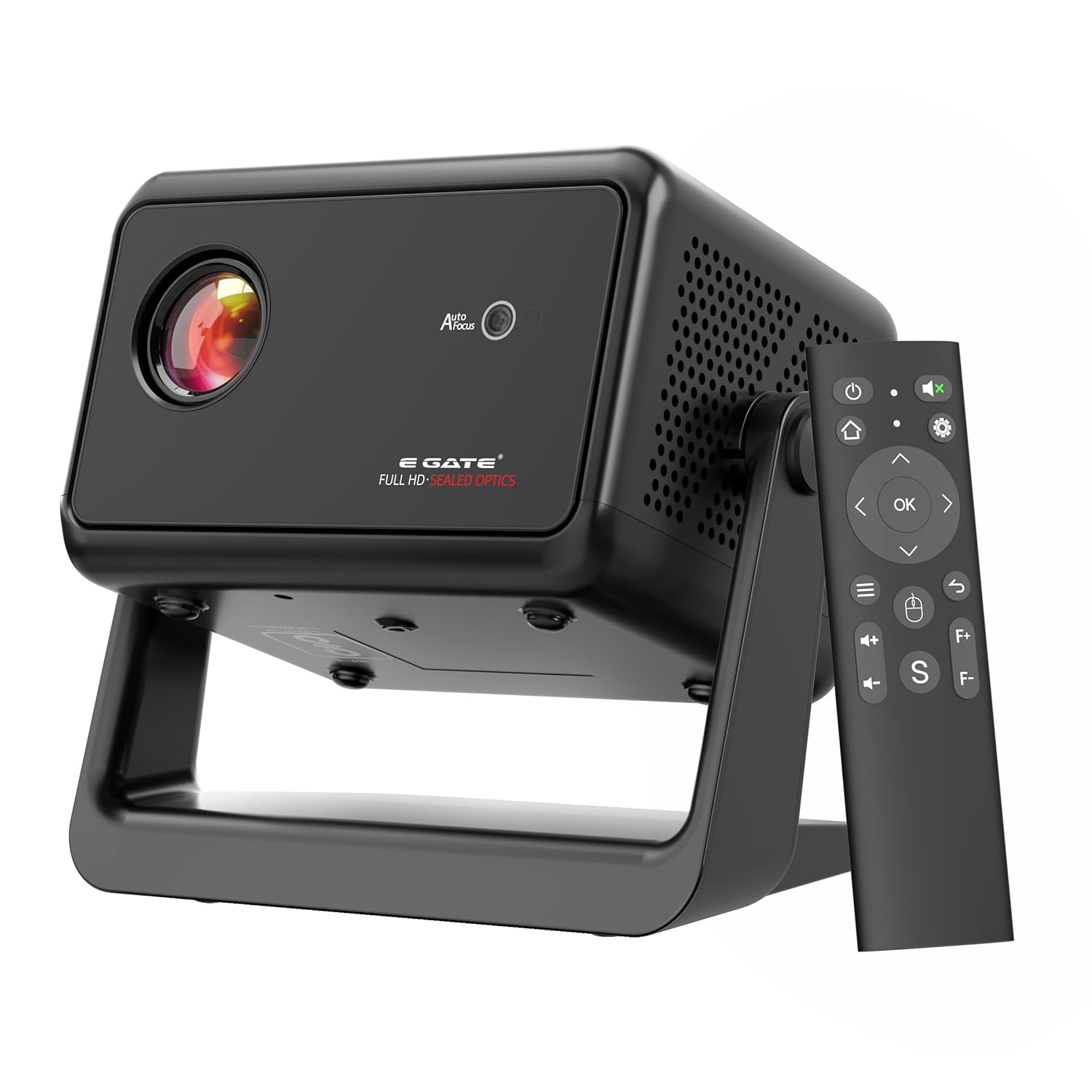
Image: E GATE Duster 5X Projector and its remote control.
Key Features:
- Native 1080p Resolution: Delivers sharp, vibrant visuals.
- 500 ISO Lumens: Provides bright and clear images.
- Android 13: Access to streaming apps like Netflix, Prime Video, YouTube.
- Automatic Focus & Keystone: Ensures a perfectly aligned and sharp picture.
- Sealed Optical Engine: 100% dust-proof design for enhanced durability.
- Flexible Rotating Stand: Allows projection at various angles (0-110 degrees).
- Bi-Directional Bluetooth 5.0: Connect external speakers or use the projector as a Bluetooth speaker.
- Dual Band Wi-Fi 6: Stable and fast wireless connectivity.
- HDMI 2.1 ARC+CEC, USB: Multiple connectivity options.

Image: Overview of the E GATE Duster 5X Projector's key specifications and features.
Setup
1. Initial Placement
Place the projector on a stable, flat surface. The flexible rotating stand allows for projection onto walls or ceilings. Adjust the stand to achieve the desired projection angle.

Image: The projector's flexible rotating stand allows for projection at various angles, including walls and ceilings.
2. Power Connection
- Connect the provided power cable to the projector's power input port.
- Plug the other end of the power cable into a suitable electrical outlet.
3. First-Time Setup (Android & Network)
- Power on the projector using the power button on the device or the remote control.
- Follow the on-screen instructions to complete the initial Android 13 setup, including language selection and Wi-Fi network connection.
- Ensure a stable internet connection for accessing streaming applications and updates.
Operating Instructions
1. Power On/Off
Press the power button on the projector or the remote control to turn the device on or off.
2. Automatic Focus and Keystone Correction
The Duster 5X features automatic focus and 4D+4P keystone correction. The projector will automatically adjust the image for clarity and geometric accuracy upon startup or movement. Manual adjustments can also be made via the settings menu if needed.

Image: The projector's automatic focus and keystone correction ensure a clear and geometrically correct image.
3. Input Sources
The projector supports various input sources:
- HDMI: Connect external devices such as laptops, gaming consoles, or Blu-ray players using an HDMI cable. The projector supports HDMI 2.1 with ARC/eARC and CEC.
- USB: Insert a USB drive into the USB port to play media files directly.
- Screen Mirroring: Wirelessly mirror content from Windows, iOS, or Android devices using the built-in screen mirroring function (Wi-Fi 6).
4. Android OS Navigation
Navigate the Android 13 interface using the provided remote control. Access pre-installed apps like Netflix, Prime Video, and YouTube, or download more from the app store.
5. Bluetooth Connectivity
The projector features Bi-Directional Bluetooth 5.0. You can connect external Bluetooth speakers for enhanced audio or use the projector itself as a Bluetooth speaker to play audio from your smartphone.

Image: Bi-directional Bluetooth allows flexible audio connections, either to external speakers or using the projector as a standalone speaker.
6. Audio Output
The projector includes 10 Watt HiFi speakers. For external audio, use the 3.5mm audio out port or connect via Bluetooth.

Image: The projector features a 10W dedicated grill speaker for clear audio output.
Maintenance
1. Dust-Free Optics
The E GATE Duster 5X is designed with a 100% dust-proof sealed optical engine, minimizing the need for internal cleaning and ensuring clearer images and longer durability.
Image: The sealed optical engine prevents dust accumulation, maintaining image clarity over time.
2. Cleaning
- Exterior: Wipe the exterior of the projector with a soft, dry cloth. Do not use abrasive cleaners or solvents.
- Lens: Gently clean the projector lens with a lens cleaning cloth or specialized lens cleaning solution. Avoid touching the lens directly with your fingers.
3. Lamp Life
The LED lamp in the Duster 5X has an estimated life of 60,000 hours, providing extended usage without frequent lamp replacement.
Troubleshooting
Common Issues and Solutions:
- No Picture:
- Ensure the projector is powered on and the input source is correctly selected.
- Check HDMI or USB cable connections.
- Verify that the connected device (laptop, console) is outputting a signal.
- Blurry Image:
- Allow the automatic focus to adjust. If still blurry, manually adjust focus via settings.
- Ensure the projection surface is flat and the projector is stable.
- No Sound:
- Check the volume level on the projector and the connected source device.
- Ensure external speakers are correctly connected and powered on if used.
- Verify Bluetooth connection if using wireless audio.
- Wi-Fi/Bluetooth Connectivity Issues:
- Restart the projector and your router/Bluetooth device.
- Ensure the projector is within range of the Wi-Fi network or Bluetooth device.
- Check Wi-Fi password and network settings.
- Projector Freezes on Startup:
- Unplug the projector from the power outlet, wait 10 seconds, then plug it back in and restart.
Specifications
| Feature | Detail |
|---|---|
| Brand | E GATE |
| Model Name | Duster 5X |
| Model Number | EGi9M |
| Display Type | LCD |
| Native Resolution | 1920 x 1080 Pixels (Native 1080p) |
| 4K Support | 4K HDR Support (downscaling via HDMI) |
| Brightness | 500 ISO Lumens |
| Image Contrast Ratio | 6000:1 |
| Aspect Ratio | 16:9 |
| Operating System | Android 13 |
| Processor | Amlogic950S, Quad Core |
| GPU | Mali-G31 MP2 |
| RAM/ROM | 1GB-8GB |
| Connectivity | Dual Band Wi-Fi 6 (2.4+5 GHz), Bluetooth 5.0 (Bi-Directional) |
| Ports | HDMI 2.1 ARC+CEC, USB, Audio Out 3.5 mm |
| Speakers | 10 Watt inbuilt HiFi Speakers |
| Special Features | Sealed Optics (100% Dust Free), Fully Automatic Focus & Keystone, Flexible Rotating Stand, Screen Mirroring |
| Throw Ratio | 1.3:1 (Short Throw) |
| Max Projection Size | 300 inches (762cm) |
| Lamp Life | 60,000 hours |
| Product Dimensions | 17 x 11.4 x 16 cm |
| Item Weight | 900 g |
| Country of Origin | China |
Warranty and Support
The E GATE Duster 5X Projector comes with a 1-year warranty provided by EGate from the date of purchase. It is mandatory to register your product to avail warranty benefits. Free home pickup and drop service is provided during the warranty period. For more details, please visit the company's official website.
For technical support or warranty claims, please refer to the contact information provided on your warranty card or the EGate official website.
