
Ayybboo 8206B
Ayybboo Digital Kids Watch 8206B User Manual
Model: 8206B
Introduction
Thank you for choosing the Ayybboo Digital Kids Watch 8206B. This watch is designed for children, featuring a durable build, 3 ATM water resistance, and multiple functions including a 7-color LED backlight, alarm, stopwatch, and date display. This manual will guide you through the setup and operation of your new watch.
Product Features
- 7-Color LED Backlight: Provides clear visibility in low light conditions and offers a fun, customizable display.
- 3 ATM Water Resistance: Suitable for daily use, including hand washing, rain, and splashes. Not recommended for swimming or showering, and do not press buttons underwater.
- Multi-functional Display: Includes time (12/24 hour format), date, day of the week, alarm, and stopwatch.
- Durable Construction: Features a robust case, scratch-resistant acrylic glass, and a soft, comfortable TPU strap.

Image: The watch display with various LED backlight colors, illustrating the luminous feature.
Setup Instructions
Your Ayybboo Digital Kids Watch has four buttons: LIGHT, MODE, START, and RESET. Familiarize yourself with these buttons as shown in the diagram below.

Image: Watch diagram indicating the location and function of the LIGHT, MODE, START, and RESET buttons.
Setting Time and Date:
- From the normal time display, press the MODE button three times to enter time setting mode. The seconds will start flashing.
- Press the RESET button to cycle through the setting options: seconds, hours, minutes, month, date, day of the week.
- Use the START button to adjust the flashing value.
- Once all settings are correct, press the MODE button once to return to the normal time display.
12/24 Hour Format:
- In time setting mode (seconds flashing), press the START button when the hour is flashing to toggle between 12-hour (with AM/PM indicator) and 24-hour formats.
Operating Instructions
Using the LED Backlight:
- Press the LIGHT button to activate the LED backlight.
- Hold the LIGHT button to cycle through the 7 different colors. Release the button to select the desired color.
Using the Stopwatch:
- From the normal time display, press the MODE button once to enter stopwatch mode. The display will show "00:00:00".
- Press the START button to begin timing.
- Press the START button again to pause timing.
- Press the RESET button to reset the stopwatch to "00:00:00".
- Press the MODE button to exit stopwatch mode and return to normal time display.

Image: Illustration of the stopwatch function in use, showing a child running and the watch display.
Setting the Alarm:
- From the normal time display, press the MODE button twice to enter alarm setting mode. The hour digits will flash.
- Press the START button to adjust the hour.
- Press the RESET button to switch to minute setting. The minute digits will flash.
- Press the START button to adjust the minutes.
- Press the MODE button to exit alarm setting mode.
Activating/Deactivating Alarm:
- In normal time display, press and hold the RESET button, then press the START button to toggle the alarm ON/OFF. An alarm icon will appear/disappear on the display.

Image: A child sleeping, with the watch nearby, symbolizing the alarm function.
Care and Maintenance
- Water Resistance: The watch is 3 ATM water-resistant, meaning it can withstand splashes, rain, and hand washing. Do not press any buttons while the watch is wet or submerged. Avoid hot water, steam, and prolonged submersion.
- Cleaning: Wipe the watch with a soft, dry cloth. For stubborn dirt, a slightly damp cloth can be used, then dry thoroughly. Avoid harsh chemicals or abrasive cleaners.
- Battery: The watch uses a non-standard battery. Battery replacement should be performed by a qualified technician to ensure water resistance is maintained.
- Storage: Store the watch in a cool, dry place away from direct sunlight and extreme temperatures when not in use.

Image: A child playing, with the watch shown near splashing water, highlighting its 30M water resistance. A note warns not to press buttons underwater.
Troubleshooting
| Problem | Possible Cause | Solution |
|---|---|---|
| Display is blank or dim. | Low or depleted battery. | Replace the battery. Contact a professional for assistance. |
| Time is incorrect. | Time not set properly or accidentally reset. | Follow the "Setting Time and Date" instructions. |
| Alarm does not sound. | Alarm is not activated or set incorrectly. | Ensure the alarm is ON (alarm icon visible) and the alarm time is set correctly. |
| Water inside the watch. | Buttons pressed underwater or exposed to excessive water pressure/hot water. | Stop using the watch immediately. Take it to a professional for inspection and repair. Water damage is typically not covered under warranty. |
Specifications
- Model Number: 8206B
- Brand: Ayybboo
- Display Type: Digital
- Movement: Digital Quartz
- Case Material: Stainless Steel (back), Plastic
- Strap Material: Thermoplastic Polyurethane (TPU)
- Crystal Type: Acrylic
- Water Resistance: 3 ATM (30 Meters)
- Case Diameter: 3.2 cm (1.26 inches)
- Case Thickness: 1.2 cm
- Band Width: 1.4 cm (0.55 inches)
- Band Length: 22.5 cm (8.86 inches)
- Weight: 21 grams
- Power Source: Battery (1 non-standard battery required)
- Age Range Description: Child
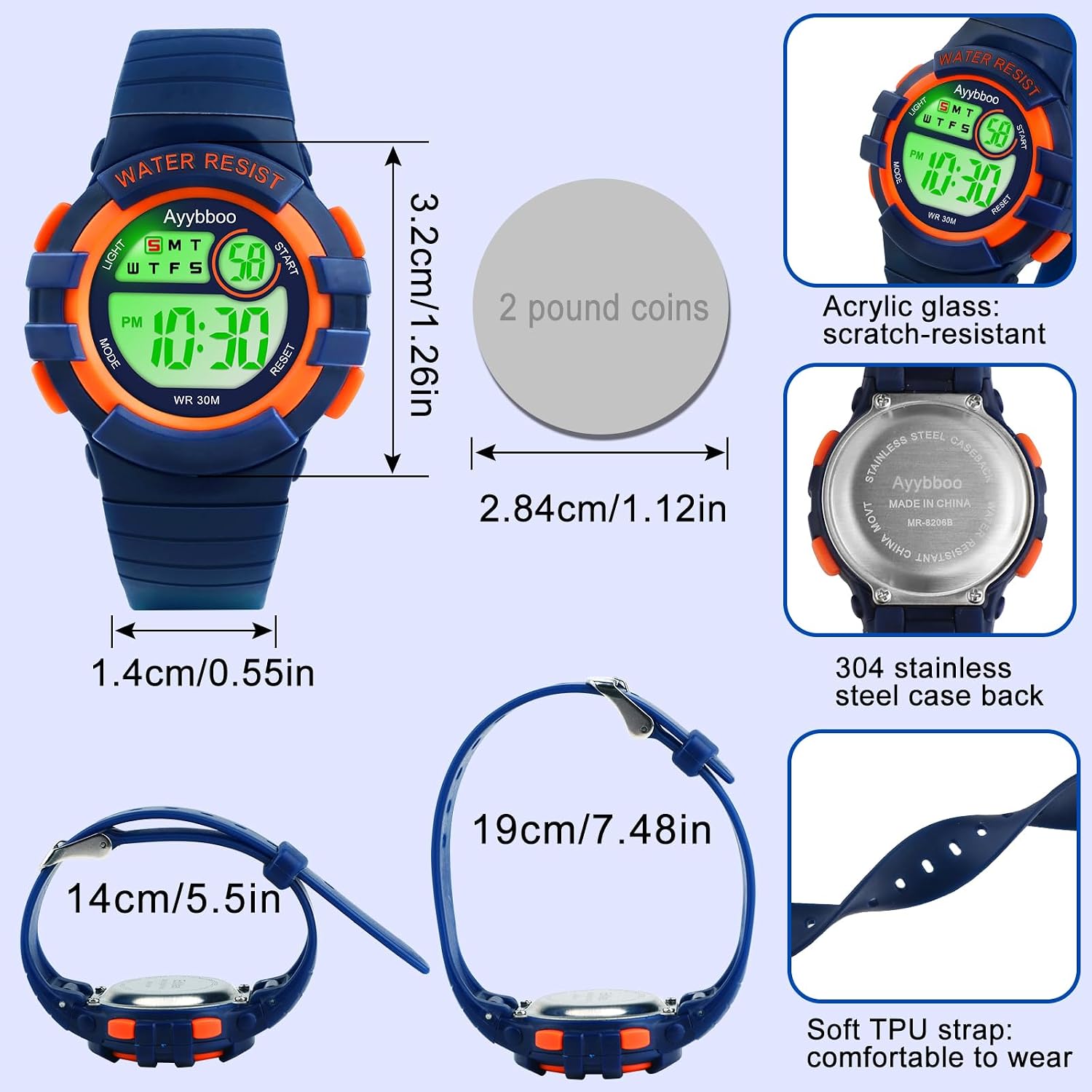
Image: Detailed view of the watch with measurements for case diameter, band width, and band length, along with material descriptions.
Warranty and Support
This Ayybboo Digital Kids Watch comes with a Limited Warranty. For specific details regarding warranty coverage and duration, please refer to the warranty card included with your purchase or contact Ayybboo customer support.
For technical support or inquiries, please visit the Ayybboo brand store on Amazon or contact the seller directly through your purchase platform. Keep your purchase receipt as proof of purchase for warranty claims.
Ayybboo Brand Store: Visit Ayybboo Store
Important Safety Information
- This watch contains small parts and a battery. Keep out of reach of very young children to prevent choking hazards.
- Do not attempt to open the watch case or replace the battery yourself, as this may damage the watch and void the warranty.
- Avoid exposing the watch to extreme temperatures, strong magnetic fields, or direct impact.
Ask a question about this manual
Ask about setup, troubleshooting, compatibility, parts, safety, or missing instructions. Manuals+ will review the question and use this page’s manual context to help answer it.