
1. Introduction
This manual provides detailed instructions for the setup, operation, maintenance, and troubleshooting of your E GATE Atom 4X Automatic Projector. Please read this manual thoroughly before using the product to ensure proper and safe operation.
2. Safety Information
Observe the following safety precautions to prevent damage to the projector and ensure user safety:
- Do not block ventilation openings. Ensure adequate airflow around the projector.
- Use only the power cord supplied with the projector.
- Avoid direct eye exposure to the projector lens when the lamp is on.
- Do not place the projector on unstable surfaces.
- Keep the projector away from water or other liquids.
- Refer all servicing to qualified service personnel.
3. Package Contents
Verify that all items are present in the package:
- E GATE Atom 4X Projector
- Power Cord
- Remote Control
- User Manual (this document)
4. Product Overview
4.1 Key Features
- Native 1080p Resolution with 4K HDR Support
- 400 ISO Lumens Brightness
- Integrated Android 12 Operating System with access to 9000+ apps (Netflix, Prime Video, YouTube)
- Pre-installed LIVE TV feature (MovieARK)
- Automatic Keystone Correction and Precision Focus
- Rotatable Flex Angle design for versatile projection angles
- Dual Band Wi-Fi 6 (2.4+5 GHz) and Bi-Directional Bluetooth 5.4
- HDMI 2.1 with ARC-eARC-CEC, USB, and 3.5mm Audio Out ports
- 6000:1 Contrast Ratio and 60,000 hours lamp life
- Built-in 5 Watt Speakers
4.2 Projector Components

Figure 4.1: Front view of the E GATE Atom 4X Projector, showcasing the lens and sleek design.
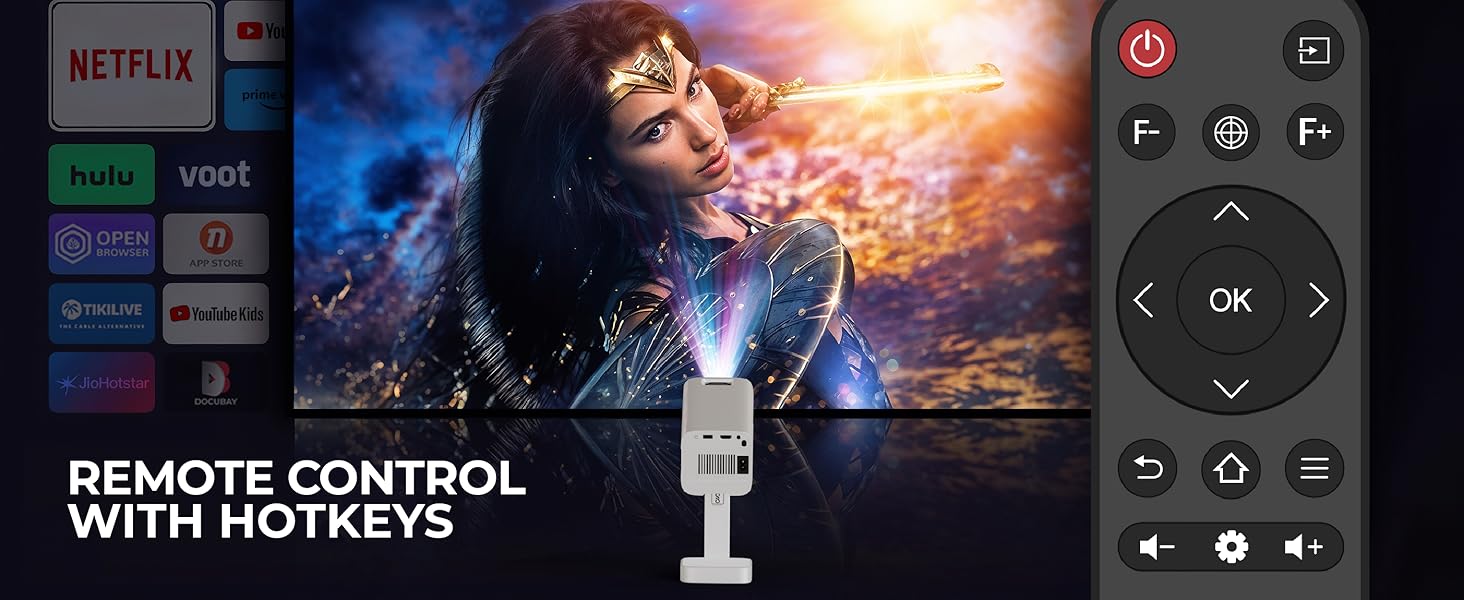
Figure 4.2: The E GATE Atom 4X Projector featuring its adjustable stand, allowing for flexible projection angles.

Figure 4.3: Rear view of the E GATE Atom 4X Projector, highlighting the various connectivity ports including HDMI, USB, and power input.
5. Setup
5.1 Placement
Position the projector on a stable, flat surface. The flexible stand allows for projection onto walls or ceilings. Ensure there are no obstructions to the lens or ventilation openings.
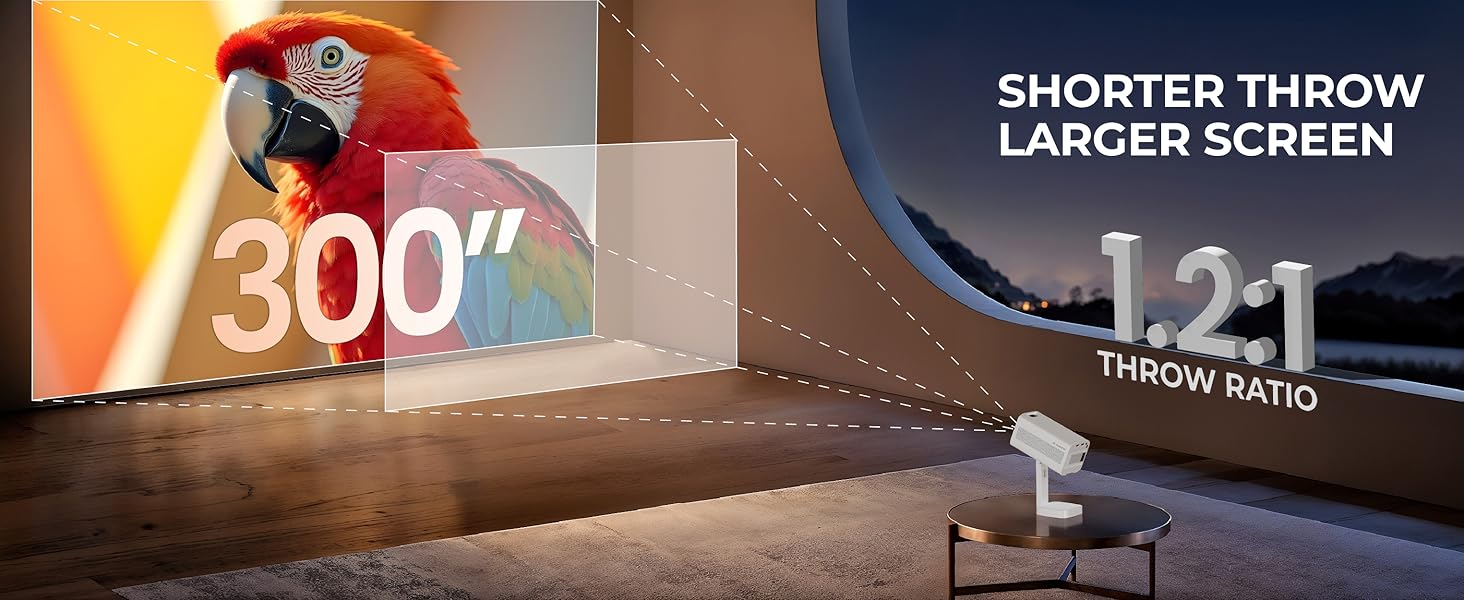
Figure 5.1: Diagram illustrating the projector's 1.2:1 throw ratio, enabling a large screen size (up to 300 inches) from a shorter distance.
5.2 Power Connection
Connect the supplied power cord to the projector's power input port and then to a power outlet. The projector will enter standby mode.
5.3 Initial Power On
Press the power button on the projector or the remote control to turn on the device. The E GATE logo will appear, followed by the Android home screen.
5.4 Focus and Keystone Adjustment
The Atom 4X features automatic keystone correction and precision focus for an optimal image. The projector will attempt to adjust these settings automatically upon startup or movement.
- Auto Focus: The projector automatically adjusts the image clarity.
- Auto Keystone: The projector automatically corrects trapezoidal distortion to create a rectangular image.
- Manual Adjustment: For fine-tuning, use the remote control to access manual focus and 4-point or 6D keystone adjustments (30° Horizontal + Vertical electronic correction).

Figure 5.2: Visual representation of the projector's auto focus, auto keystone, and 4-point digital adjustment capabilities for an instant perfect view.
6. Operating Instructions
6.1 Remote Control
The included remote control provides full functionality for navigating the projector's interface and settings.

Figure 6.1: The projector's remote control, featuring dedicated buttons for power, navigation, volume, and quick access functions.
- Power Button: Turns the projector on/off.
- Navigation Pad: Use for menu navigation.
- OK Button: Confirms selections.
- Back Button: Returns to the previous screen.
- Home Button: Returns to the Android home screen.
- Volume Buttons: Adjusts audio output.
- Focus Buttons (F/F+): Manually adjusts focus.
6.2 Connectivity
The projector offers multiple ways to connect external devices and access content.
- HDMI: Connect devices like laptops, gaming consoles, Blu-ray players, or streaming sticks (e.g., Fire TV Stick) using an HDMI cable. The HDMI 2.1 port supports ARC/eARC/CEC.
- USB: Insert USB drives to play photos, videos, music, or view documents directly.
- Bluetooth 5.4: Connect external Bluetooth speakers or headphones for enhanced audio. The bi-directional Bluetooth also allows the projector to act as a Bluetooth speaker.
- Wi-Fi 6 (Dual Band): Connect to your wireless network for internet access and online streaming.
- Screen Mirroring: Wirelessly cast content from Android, iOS, or Windows devices using Miracast or compatible protocols.
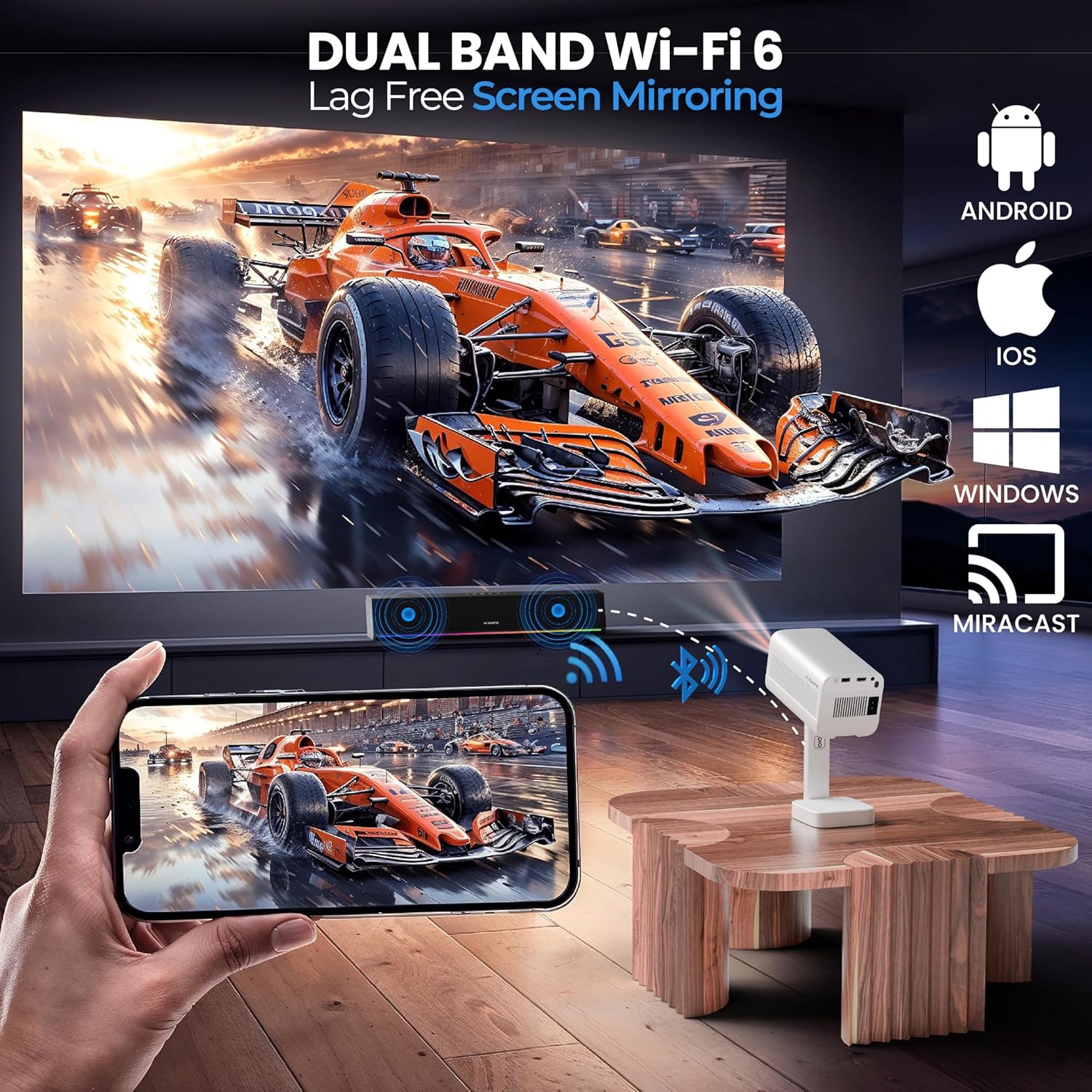
Figure 6.2: Illustration of lag-free screen mirroring from a smartphone to the projector using Dual Band Wi-Fi 6.
6.3 Smart Features (Android 12)
The E GATE Atom 4X runs on Android 12, providing a smart TV experience.
- App Access: Download and use over 9000 applications, including popular streaming services like Netflix, Prime Video, and YouTube.
- Live TV (MovieARK): Access hundreds of free live TV channels from India and abroad without registration or subscription.
- User Interface: Navigate through the Whale OS UI for a clean and intuitive experience.
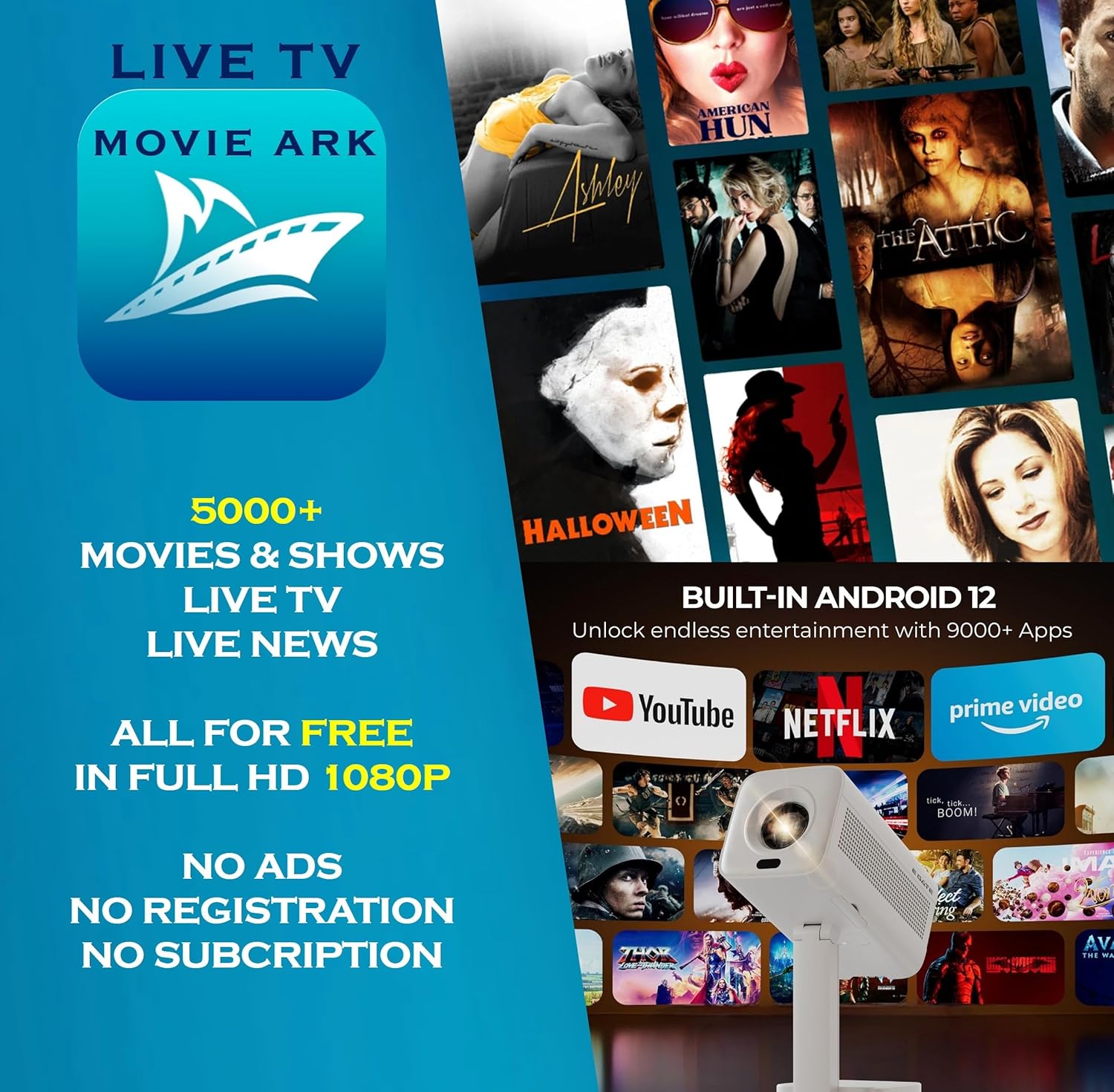
Figure 6.3: The projector's built-in Android 12 interface displaying various streaming applications and the MovieARK Live TV feature.
7. Maintenance
7.1 Lens Cleaning
Regularly clean the projector lens to maintain optimal image quality. The Atom 4X features easy lens access for hassle-free cleaning.
- Use a soft, lint-free cloth specifically designed for optical lenses.
- Gently wipe the lens in a circular motion.
- Avoid using abrasive cleaners or excessive force.
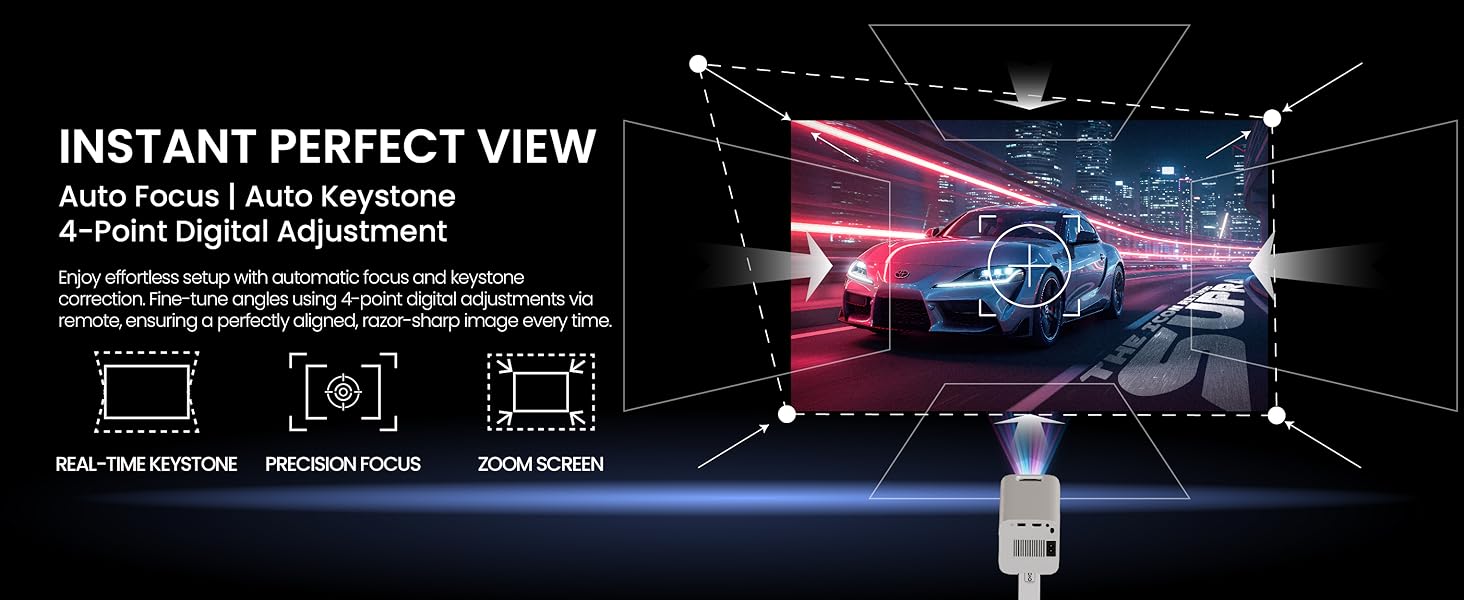
Figure 7.1: Diagram illustrating the easy access mechanism for cleaning the projector lens, ensuring clear and sharp projections.
7.2 General Care
- Keep the projector in a clean, dust-free environment.
- Do not expose the projector to extreme temperatures or humidity.
- Unplug the projector when not in use for extended periods.
8. Troubleshooting
If you encounter issues with your projector, refer to the following common problems and solutions:
| Problem | Possible Cause | Solution |
|---|---|---|
| No image displayed | Power cable disconnected, incorrect input source, lens cap on. | Check power connection, select correct input source, remove lens cap. |
| Image is blurry | Out of focus, incorrect keystone. | Adjust focus manually using the remote, allow auto keystone to correct or adjust manually. |
| No sound | Volume too low, incorrect audio output, external device muted. | Increase projector volume, check audio settings, unmute external device. |
| Remote control not working | Low batteries, obstruction, remote not paired. | Replace batteries, remove obstructions, re-pair Bluetooth remote if applicable. |
| Wi-Fi/Bluetooth connection issues | Out of range, interference, incorrect settings. | Ensure projector is within range of router/device, minimize interference, check network settings. |
9. Specifications
| Feature | Detail |
|---|---|
| Brand | E GATE |
| Model Name | Atom 4X |
| Model Number | EO9026 |
| Native Resolution | 1920 x 1080 (1080p) |
| Supported Resolution | Up to 4K Ultra HD (decoding via HDMI) |
| Brightness | 400 ISO Lumens |
| Contrast Ratio | 6000:1 |
| Display Type | LCD |
| Aspect Ratio | 16:9 |
| Lamp Life | 60,000 Hours |
| Operating System | Android 12 (Whale OS UI) |
| Processor | HiSilicon V252, Quad Core |
| Memory | 1GB RAM, 8GB Storage |
| Wi-Fi | Dual Band Wi-Fi 6 (2.4 + 5 GHz) |
| Bluetooth | Bi-Directional Bluetooth 5.4 |
| Connectivity | HDMI 2.1 (ARC/eARC/CEC), USB, 3.5mm Audio Out |
| Speakers | 5 Watt Inbuilt Speakers |
| Product Dimensions | 9.6 x 24.3 x 18.5 cm |
| Item Weight | 800 g |
| Mounting Type | Tabletop Mount (Portable) |
9.1 Brightness Information
E GATE projectors use ISO Lumens for brightness measurement, an industry-standard method, ensuring verifiable specifications.

Figure 9.1: Comparison table explaining ISO Lumens (on-screen brightness) versus non-verifiable source lumens (Chinese ANSI), highlighting the importance of standardized measurements.
10. Warranty and Support
Your E GATE Atom 4X Projector comes with a 1-year warranty from the date of purchase. To avail warranty benefits, product registration is mandatory.
- Warranty Period: 1 year from the date of purchase.
- Service: Free home pickup & drop service is provided during the warranty period.
- Registration: Visit the official E GATE website to register your product.
- Manufacturer: Optroniq India (Importer)
- Contact: For support and service inquiries, please refer to the contact information on the official E GATE website.


