
1. Introduction
This manual provides essential information for the safe and effective use of your WALKINGPAD X21 Folding Treadmill. Please read it thoroughly before operating the device and retain it for future reference.
The WALKINGPAD X21 is designed for home use, offering a compact and foldable solution for walking and jogging. It features a smart vertical fold design, an LED display with rotary control, and requires no assembly.
2. Safety Information
2.1 General Safety Precautions
- Ensure the treadmill is placed on a flat, stable surface.
- Keep children and pets away from the treadmill during operation.
- Do not operate the treadmill if it is damaged or malfunctioning.
- Wear appropriate athletic footwear.
- Consult a physician before starting any new exercise program.
- The maximum user weight capacity is 240 lbs (108 kg).
2.2 Electrical Safety
- Use only the provided power cord.
- Plug the treadmill into a grounded outlet.
- Unplug the treadmill when not in use or before cleaning/maintenance.
3. Product Overview
3.1 Components
The WALKINGPAD X21 consists of the main treadmill unit, a power cord, a safety key, and this user manual.

Image: The WALKINGPAD X21 Folding Treadmill in its unfolded state, ready for use. A smaller inset shows the treadmill folded vertically.
3.2 Key Features
- Smart Vertical Fold: Allows for compact storage.
- LED Display: Shows time, speed, distance, and calories.
- Rotary Control Knob: Intuitive speed adjustment.
- Wide Running Belt: 18.1" width and 47.6" length for comfortable use.
- Quiet Operation: Engineered for reduced noise.
- Bluetooth Connectivity: For app integration.
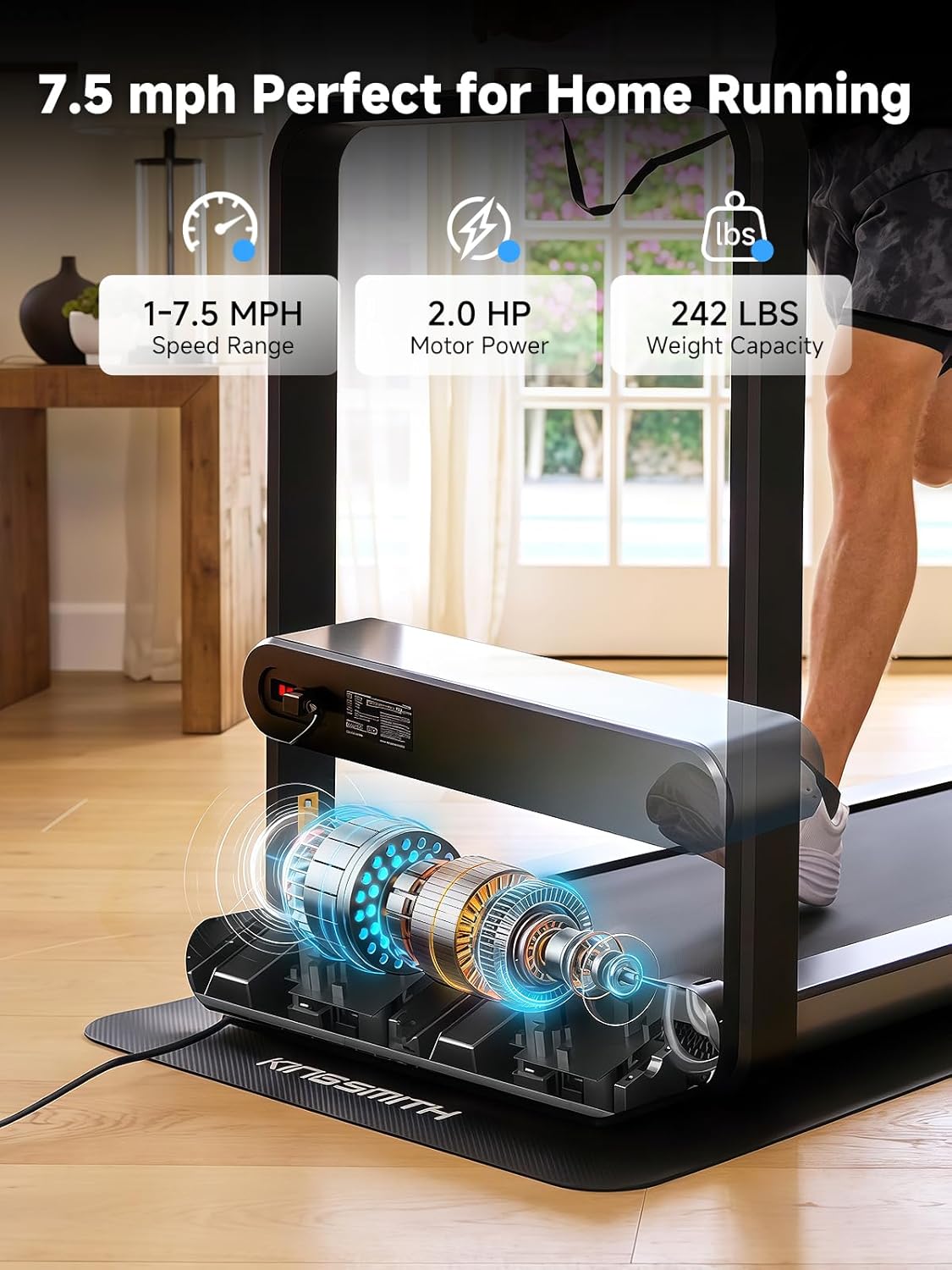
Image: Diagram illustrating key features of the WALKINGPAD X21, including speed range (1-7.5 mph), motor power (2.0 HP), and weight capacity (242 lbs).
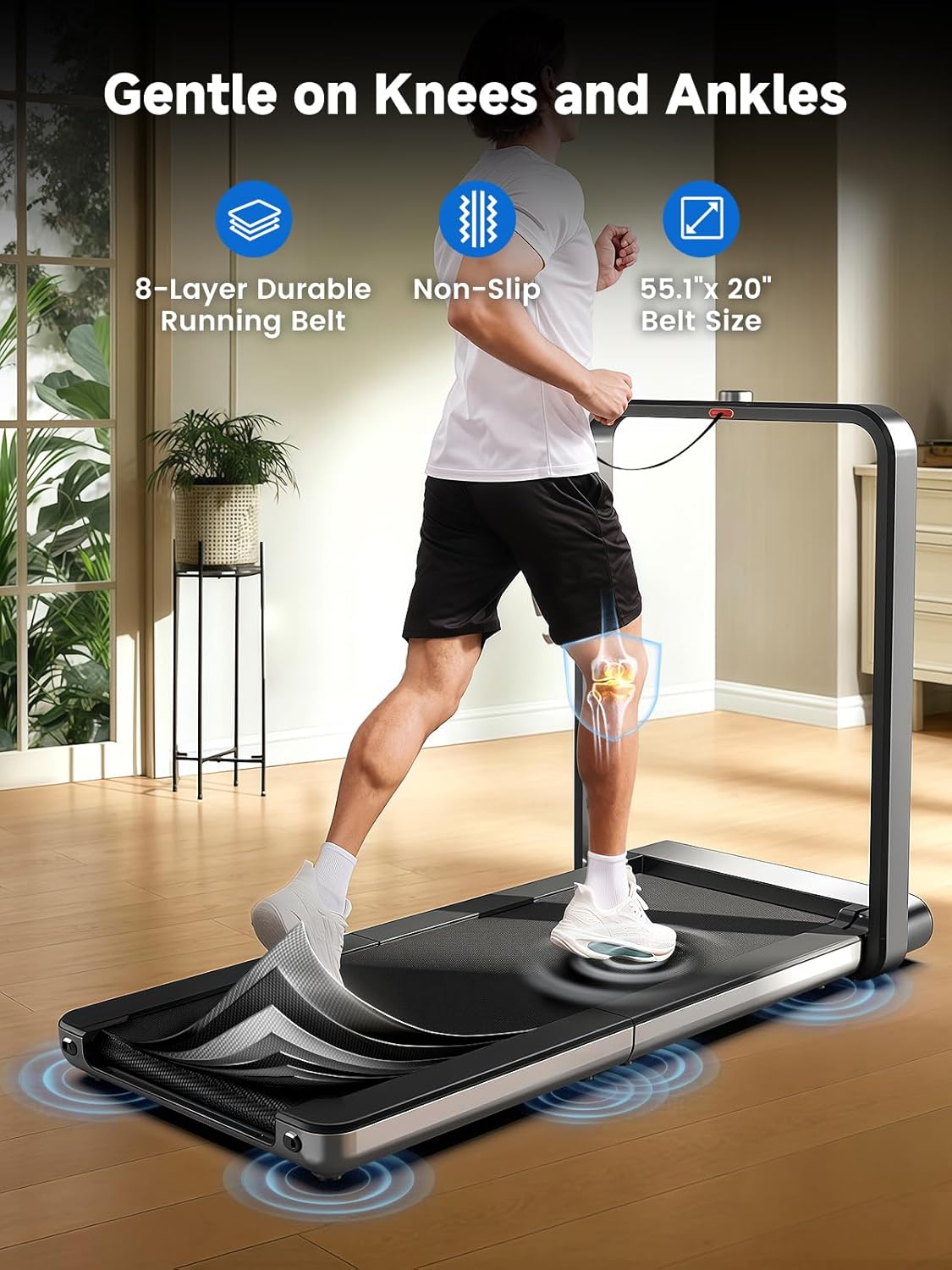
Image: A user running on the WALKINGPAD X21, highlighting the 8-layer durable running belt, non-slip surface, and 55.1" x 20" belt size designed for joint comfort.
4. Setup
4.1 Unfolding the Treadmill
- Place the folded treadmill on a clear, level surface.
- Gently pull the handle to release the vertical lock.
- Lower the running deck until it is fully flat on the floor.
- Ensure all parts are securely locked into place before use.

Image: A sequence of six images demonstrating the unfolding process of the WALKINGPAD X21 treadmill from its compact, vertically stored position to its fully extended, operational state.
4.2 Power Connection
- Connect the power cord to the treadmill's power input.
- Plug the other end into a standard 110-120V grounded electrical outlet.
- Insert the safety key into its designated slot on the console. The treadmill will not operate without the safety key in place.
5. Operating Instructions
5.1 Starting the Treadmill
- Ensure the safety key is inserted.
- Step onto the treadmill belt.
- Press the start button or rotate the control knob to begin.
5.2 Adjusting Speed
The WALKINGPAD X21 features a rotary control knob for speed adjustment.
- Rotate Clockwise: Increase speed.
- Rotate Counter-clockwise: Decrease speed.
- The speed range is 1 to 7.5 mph.

Image: A close-up view of the WALKINGPAD X21's sleek hidden LED display and the central rotary control knob, showing various stats like time, speed, distance, and calories.
5.3 Display Information
The integrated LED display shows the following metrics:
- Time elapsed
- Current speed
- Distance covered
- Calories burned
5.4 Using the Mobile Application (Bluetooth)
The WALKINGPAD X21 can connect to a mobile application via Bluetooth for enhanced control and tracking.
- Download the official WALKINGPAD app from your device's app store.
- Enable Bluetooth on your mobile device.
- Open the app and follow the on-screen instructions to pair with your X21 treadmill.
- The app allows for workout tracking, program selection, and remote control of the treadmill.

Image: A user interacting with the WALKINGPAD mobile application on a smartphone, which is placed on the treadmill's console, showing workout data and control options.
6. Folding and Storage
The WALKINGPAD X21 features a unique tri-fold design for convenient storage.
- Ensure the treadmill is stopped and unplugged.
- Lift the rear section of the running deck upwards.
- Fold the deck inward towards the front until it locks into a compact position.
- The treadmill can then be stored vertically against a wall or in a closet.
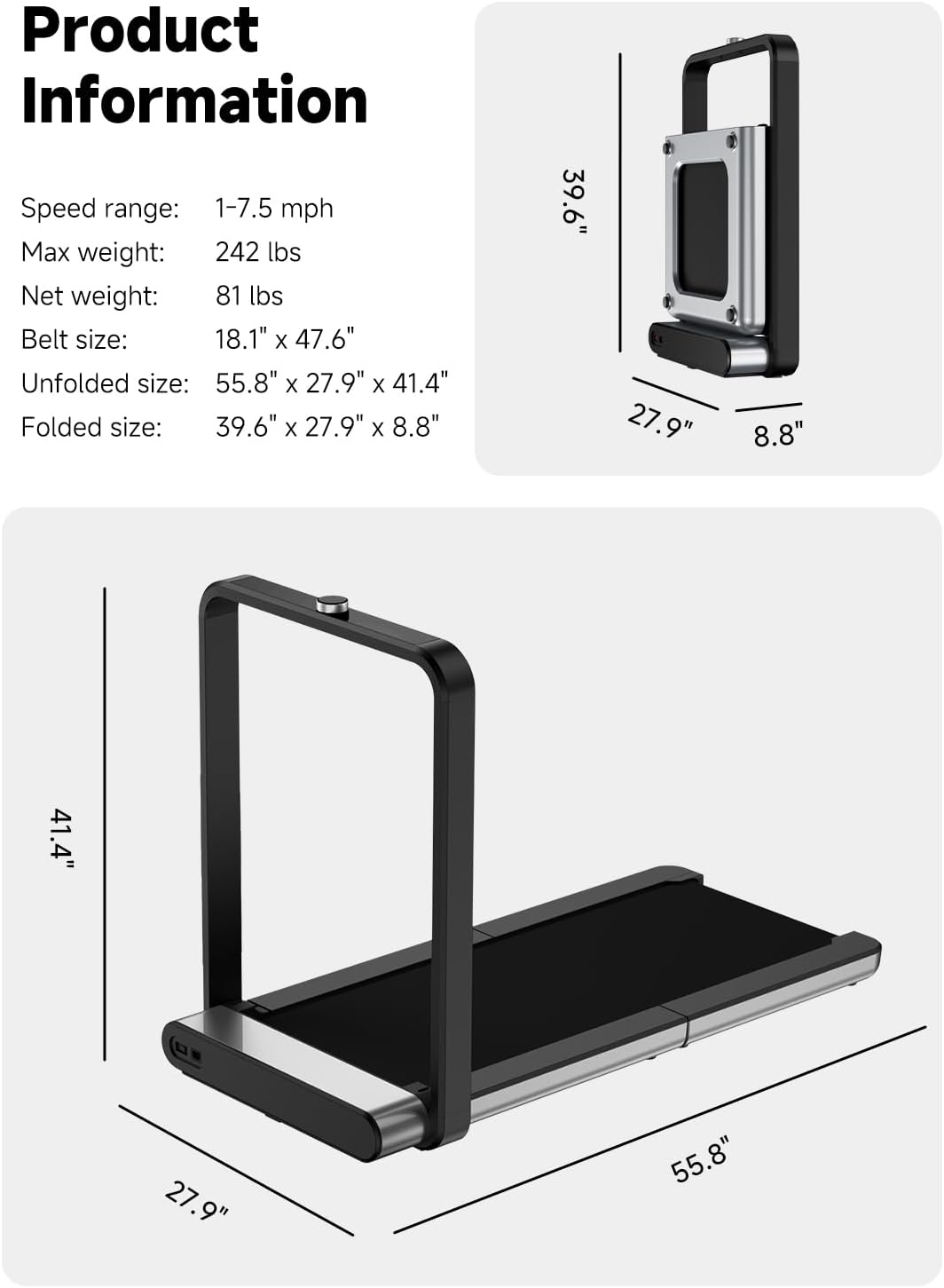
Image: A user demonstrating the folding process of the WALKINGPAD X21 treadmill, showing it transitioning from an unfolded state to a compact, vertically stored position next to a wall.
7. Maintenance
7.1 Cleaning
- Wipe down the treadmill with a damp cloth after each use.
- Do not use abrasive cleaners or solvents.
7.2 Belt Lubrication
Regular lubrication of the running belt is essential for optimal performance and longevity. Refer to the specific instructions provided with your lubrication kit or contact customer support for guidance.
7.3 Belt Adjustment
If the running belt becomes misaligned, it may need adjustment. Consult the detailed instructions in the full user manual or contact customer support for assistance.
8. Troubleshooting
| Problem | Possible Cause | Solution |
|---|---|---|
| Treadmill does not start. | Power cord not connected; Safety key not inserted. | Ensure power cord is securely plugged in; Insert safety key fully. |
| Running belt slips or is off-center. | Belt requires adjustment or lubrication. | Refer to belt adjustment/lubrication instructions or contact support. |
| Unusual noise during operation. | Loose components; Lack of lubrication. | Check for loose parts and tighten; Lubricate running belt. If noise persists, contact support. |
For further troubleshooting or issues not listed, please contact WALKINGPAD customer support.
9. Specifications
- Model Name: WALKINGPAD X21
- Speed Range: 1 - 7.5 mph
- Maximum Weight Recommendation: 240 lbs
- Item Weight: 81 lbs
- Motor Power: 2 Horsepower
- Deck Length: 47.6 inches
- Running Belt Width: 18.1 inches
- Unfolded Dimensions (LxWxH): 55.8" x 27.9" x 41.4"
- Folded Dimensions (LxWxH): 39.6" x 27.9" x 8.8"
- Material: Aluminum
- Power Source: Corded Electric (110-120V)
- Connectivity: Bluetooth
- Included Components: Power Cord, Safety Key, User Manual
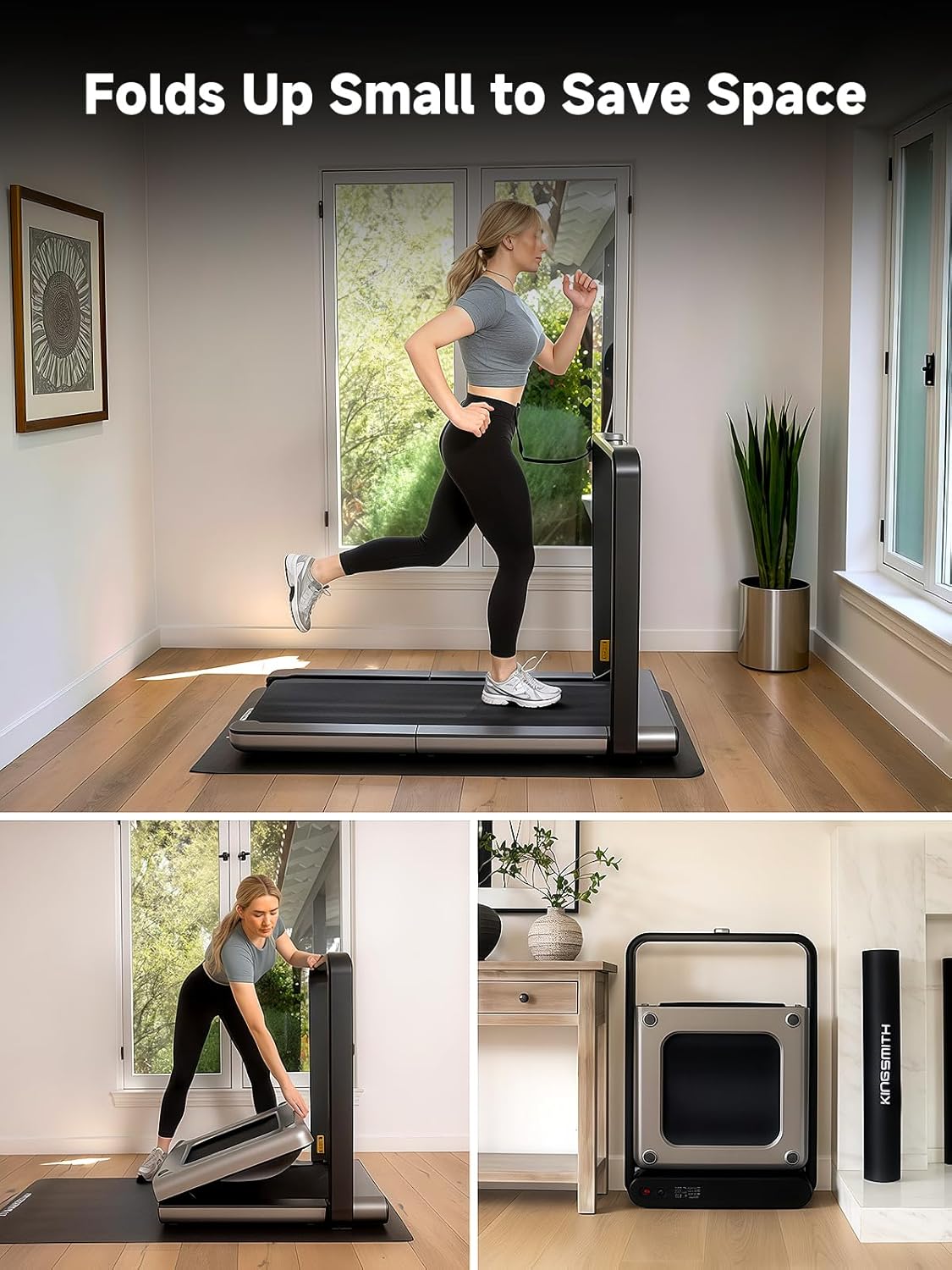
Image: Detailed product information including speed range, max weight, net weight, belt size, unfolded size, and folded size, accompanied by dimension diagrams of the treadmill.
10. Warranty and Support
The WALKINGPAD X21 Folding Treadmill comes with a 1 Year Manufacturer Warranty.
For warranty claims, technical support, or any inquiries, please contact WALKINGPAD customer service through their official website or the contact information provided with your purchase.
Please retain your proof of purchase for warranty validation.


