
vivo T4R 5G
vivo T4R 5G Smartphone User Manual
Model: T4R 5G
1. Introduction
This manual provides essential information for setting up, operating, and maintaining your vivo T4R 5G smartphone. The vivo T4R 5G is designed for powerful performance, advanced camera capabilities, and long-lasting battery life.
Key Features:
- Powerful 5G Performance: Equipped with a MediaTek Dimensity 7400 5G processor for smooth multitasking and reliable 5G connectivity.
- Large Immersive Display: Features a 6.77-inch display for enhanced viewing and entertainment.
- Stabilized Camera System: Includes a 50MP primary camera with Optical Image Stabilization (OIS) and a 2MP secondary lens, alongside a 32MP front camera.
- Smooth Multitasking: Offers 8GB RAM with 128GB internal storage for seamless operation and ample space.
- Long-Lasting Battery: Powered by a 5700mAh battery for extended usage throughout the day.
- Premium Design: Presented in a stylish Twilight Blue finish with a comfortable grip.
2. Device Overview
Familiarize yourself with the physical components of your vivo T4R 5G smartphone.

Figure 2.1: Front and Rear View of vivo T4R 5G. This image displays the full device, highlighting the display on the front and the camera module and vivo branding on the rear in Twilight Blue.
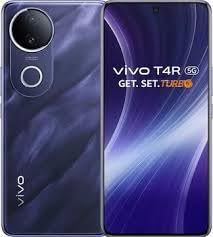
Figure 2.2: Rear Camera Module Detail. This close-up shows the circular camera housing with the 50MP primary lens and secondary lens, along with the flash and OIS branding.
Physical Components:
- Front Camera: Located at the top center of the display.
- Display: Large 6.77-inch AMOLED screen.
- Power Button: Typically on the right side of the device.
- Volume Buttons: Typically on the right side, above the power button.
- USB Type-C Port: Located at the bottom for charging and data transfer.
- SIM Card Tray: Location may vary, usually on the side.
- Rear Cameras: Dual camera setup with 50MP main lens, located on the back.
- Fingerprint Sensor: Integrated for biometric security.
3. Setup Guide
3.1 Inserting the SIM Card
- Locate the SIM card tray on the side of your device.
- Insert the SIM ejector tool (included in the box) into the small hole next to the tray and push gently until the tray pops out.
- Place your Nano SIM card into the tray with the gold contacts facing down. Ensure it is correctly aligned. This device supports a single SIM card.
- Carefully push the tray back into the slot until it is flush with the device.
3.2 Powering On Your Device
- Press and hold the Power button on the side of the phone until the vivo logo appears on the screen.
- Follow the on-screen instructions to complete the initial setup, including language selection, Wi-Fi connection, Google account setup, and fingerprint recognition.
3.3 Charging the Battery
- Connect the USB Type-C cable to the phone's charging port at the bottom.
- Connect the other end of the cable to the power adapter and plug it into a wall outlet.
- The battery icon on the screen will indicate charging status.
4. Basic Operation
4.1 Making Calls
- Tap the Phone icon on the home screen.
- Enter the phone number using the dial pad or select a contact from your address book.
- Tap the Call button to initiate the call.
4.2 Sending Messages
- Tap the Messages icon.
- Tap the New Message icon (usually a plus sign or a chat bubble).
- Enter the recipient's number or select from contacts, then type your message.
- Tap Send.
4.3 Using the Camera
- Open the Camera app.
- Select between photo, video, or other modes.
- Tap the Shutter button to capture a photo or start/stop video recording.
- Switch between the 50MP rear camera and 32MP front camera as needed.
4.4 Internet Connectivity (5G)
- Ensure your SIM card is active with a 5G data plan.
- Navigate to Settings > Network & Internet > Mobile network to configure data settings.
- For Wi-Fi, go to Settings > Network & Internet > Wi-Fi, select a network, and enter the password.
4.5 Fingerprint Recognition
- Go to Settings > Security > Fingerprint.
- Follow the on-screen instructions to register your fingerprint for secure unlocking and app access.
5. Maintenance
5.1 Battery Care
- To maximize the lifespan of your 5700mAh battery, avoid extreme temperatures.
- Do not let the battery completely drain frequently. Charge it before it reaches very low levels.
- Use only the original or certified charging accessories.
5.2 Software Updates
- Regularly check for system updates to ensure optimal performance and security. Go to Settings > System > System update.
- Ensure your device has sufficient battery and a stable internet connection before performing updates.
5.3 Cleaning Your Device
- Use a soft, lint-free cloth to gently wipe the screen and body of the phone.
- Avoid using harsh chemicals or abrasive materials.
- Keep ports free of dust and debris.
6. Troubleshooting
6.1 Device Not Powering On
- Ensure the battery is charged. Connect the charger and wait a few minutes before attempting to power on.
- Press and hold the Power button for at least 10-15 seconds to force a restart.
6.2 Network Issues (No Signal/Slow 5G)
- Check if your SIM card is properly inserted.
- Restart the device.
- Verify that mobile data is enabled in settings.
- Contact your service provider to confirm network coverage and plan status.
6.3 Camera Not Working
- Close and reopen the Camera app.
- Clear the cache and data of the Camera app via Settings > Apps > Camera > Storage.
- Restart your phone.
6.4 Device Performance is Slow
- Close unnecessary background applications.
- Clear cache from apps and system.
- Ensure sufficient storage space is available (128GB internal storage).
- Perform a system update if available.
7. Specifications
| Feature | Detail |
|---|---|
| Brand | vivo |
| Model Name | T4R |
| Operating System | Android |
| Processor | MediaTek Dimensity 7400 5G (CPU Model: G3, Speed: 2.6 GHz) |
| RAM | 8 GB |
| Internal Storage | 128 GB |
| Display Size | 6.77 inches (17.5 Centimetres) |
| Display Type | AMOLED |
| Resolution | 1080 x 2400 (Maximum Display Resolution: 2340 x 1080) |
| Rear Camera | 50 MP (Primary) + 2 MP (Secondary), with OIS |
| Front Camera | 32 MP |
| Battery Capacity | 5700 mAh |
| Cellular Technology | 5G |
| SIM Card Type | Single Nano SIM |
| Connector Type | USB Type C |
| Biometric Security | Fingerprint Recognition |
| Color | Twilight Blue |
| Item Dimensions | 16.4 x 7.5 x 0.8 Centimeters |
| Item Weight | 190 Grams |
| Box Contents | USB Cable |
8. Warranty and Support
8.1 Product Warranty
The vivo T4R 5G smartphone comes with a 1 Year Warranty from the date of purchase. This warranty covers manufacturing defects under normal use conditions. Please retain your proof of purchase for warranty claims.
8.2 Manufacturer Information
Manufacturer: Vivo Mobile India Pvt. Ltd.
Packer Contact Information: Vivo Mobile India Private Limited PLOT NO 8, SECTOR 24, YAMUNA EXPRESSWAY AREA, GAUTAM BUDDHA NAGAR, UP INDIA-201310
8.3 Customer Support
For further assistance, technical support, or service inquiries, please visit the official vivo India website or contact their customer service helpline. Refer to the official vivo website for the most current support contact details and service center locations.
You can also find more information and support resources on the vivo Store on Amazon.
Related documentsT4R 5G


Ask a question about this manual
Ask about setup, troubleshooting, compatibility, parts, safety, or missing instructions. Manuals+ will review the question and use this page’s manual context to help answer it.