
NAVIC T3
NAVIC T3 Electric Scooter User Manual
Model: T3
1. Introduction
Thank you for choosing the NAVIC T3 Electric Scooter. This manual provides essential information for the safe assembly, operation, maintenance, and troubleshooting of your scooter. Please read this manual thoroughly before your first ride to ensure optimal performance and safety. Retain this manual for future reference.
Important Safety Notice:
- Always wear a helmet and appropriate safety gear when riding.
- Adhere to local laws and regulations regarding electric scooter use.
- Perform a pre-ride inspection before each use.
- Do not ride under the influence of alcohol or drugs.
- This product is designed for adults.
2. Product Overview
The NAVIC T3 Electric Scooter is designed for efficient and comfortable urban commuting. It features a robust motor, dual suspension, and smart connectivity for an enhanced riding experience.

Figure 2.1: Main view of the NAVIC T3 Electric Scooter, showcasing its design and integrated smart features.
Key Features:
- Powerful Motor: Equipped with a 350W motor for speeds up to 19 mph and 15% hill climbing capability.
- Dual Suspension: Front and rear suspension system for a smooth and comfortable ride over varied terrain.
- Dual Braking System: Combines electronic anti-lock braking (EABS) with a mechanical drum brake for reliable stopping power.
- Smart App Connectivity: Control various scooter functions via a dedicated smartphone application.
- Clear LCD Display: Provides real-time information on speed, battery level, and riding mode.
- Portable Folding Design: Folds in approximately 3 seconds for easy storage and transport.
- Solid Tires: 8.5-inch maintenance-free solid tires reduce the risk of punctures.

Figure 2.2: Performance highlights of the NAVIC T3 Electric Scooter, including speed, range, motor power, tire size, and charging time.

Figure 2.3: The dual suspension system ensures a smooth and comfortable ride by absorbing shocks from uneven surfaces.
3. Setup and Initial Preparation
3.1 Unboxing and Assembly
Carefully remove all components from the packaging. The scooter typically comes partially assembled. Follow these steps to complete the setup:
- Attach the Handlebar: Insert the handlebar stem into the main frame and secure it with the provided screws. Ensure all connections are tight.
- Check Tire Pressure (if applicable): Although the T3 uses solid tires, ensure they are free from damage.
- Inspect Brakes: Verify that both the front and rear brakes function correctly and are properly aligned.
- Unfold the Scooter: Release the folding mechanism and lock the stem into the upright position. Ensure it clicks securely into place.
3.2 Initial Charging
Before your first ride, fully charge the scooter's battery. This helps to optimize battery life and performance.
- Locate the charging port, usually on the side of the deck.
- Connect the charger to the scooter, then plug the charger into a standard power outlet.
- The charger indicator light will typically turn red during charging and green when fully charged.
- Charging time is approximately 4 hours for a full charge.
4. Operating Instructions
4.1 Power On/Off and Basic Controls
To power on the scooter, press and hold the power button on the LCD display. To power off, press and hold the power button again. The LCD display shows current speed, battery level, and riding mode.
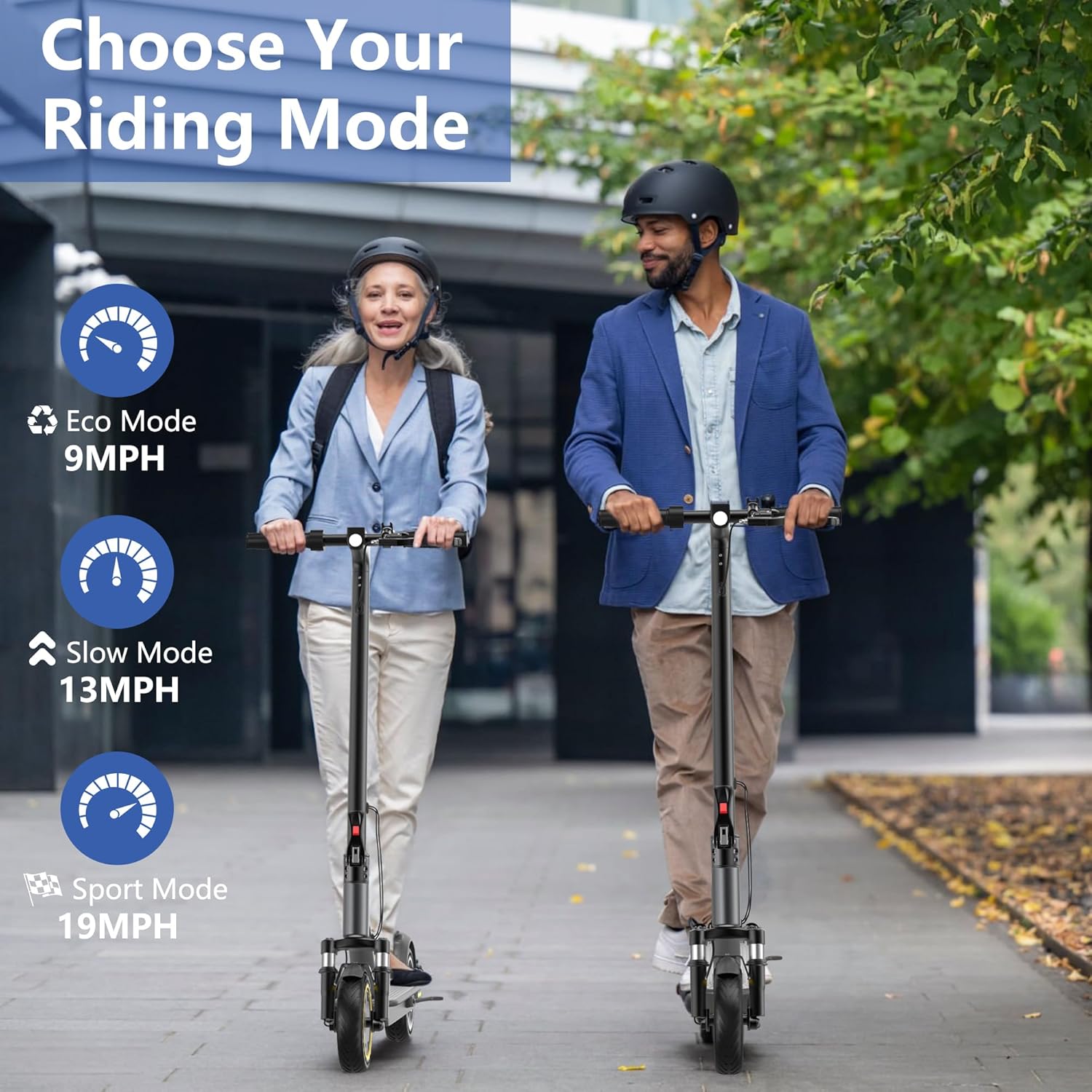
Figure 4.1: The clear LCD display provides essential riding information at a glance.
4.2 Riding Modes
The NAVIC T3 offers three distinct riding modes to suit different preferences and conditions. Cycle through modes by pressing the power button once after the scooter is on.
- Eco Mode (9 mph): Energy-saving mode for extended range and gentle cruising.
- Slow Mode (13 mph): Balanced mode for moderate speed and range.
- Sport Mode (19 mph): Maximum speed and power for dynamic riding.
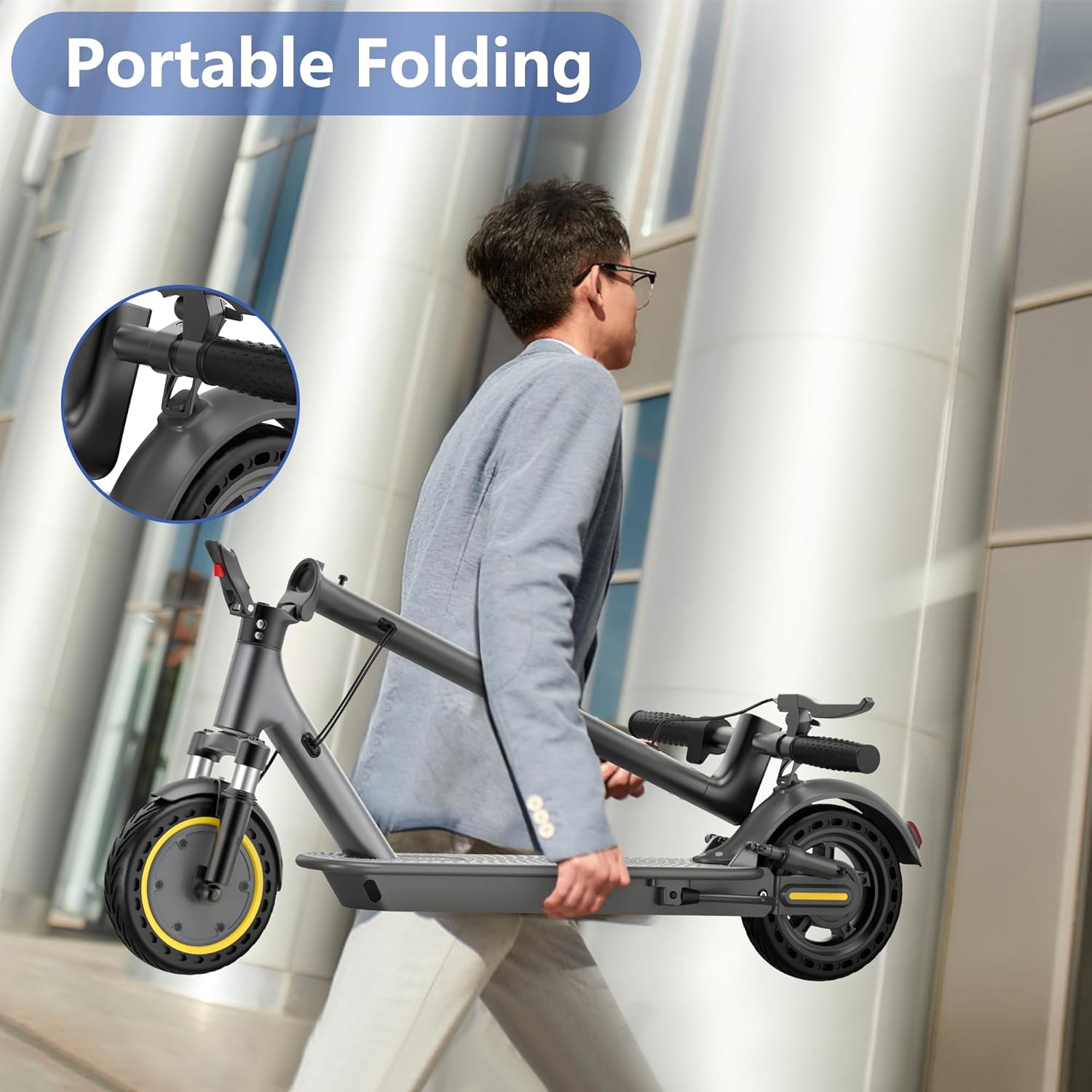
Figure 4.2: Select the appropriate riding mode based on your desired speed and terrain.
4.3 Braking System
The scooter is equipped with a dual braking system for enhanced safety and control.
- Electronic Anti-lock Braking System (EABS): Provides smooth and controlled deceleration.
- Mechanical Drum Brake: Offers additional stopping power, especially in emergency situations.

Figure 4.3: The dual braking system ensures effective and safe stopping.
4.4 Lighting System
For visibility and safety, especially during low-light conditions, the scooter features integrated lighting.
- Bright Headlight: Illuminates the path ahead.
- Warning Tail Light: Enhances visibility from the rear, activating upon braking.

Figure 4.4: The double lighting system provides visibility and safety during rides.
4.5 Smart App Control
Enhance your riding experience by connecting your NAVIC T3 Electric Scooter to its dedicated smartphone application via Bluetooth.
- Download the official NAVIC app from your device's app store.
- Ensure Bluetooth is enabled on your smartphone and the scooter is powered on.
- Open the app and follow the on-screen instructions to pair with your scooter.
- Through the app, you can:
- Lock/Unlock the scooter.
- Select riding modes.
- Control lighting system.
- Adjust speed levels.
- Activate cruise control.
- View scooter status and ride data.

Figure 4.5: The smartphone app provides comprehensive control and monitoring features for your scooter.
5. Charging and Battery Care
Proper charging and battery maintenance are crucial for extending the lifespan and performance of your scooter's battery.
- Always use the original charger provided with your scooter.
- Do not overcharge the battery; disconnect the charger once the indicator turns green.
- Avoid completely draining the battery before recharging.
- Store the scooter in a cool, dry place when not in use, and ensure the battery is partially charged (around 50-70%) if storing for extended periods.
- The 36V 7.8Ah battery provides a maximum range of 19 miles under optimal conditions.

Figure 5.1: The scooter's battery offers a good balance of range and charging efficiency.
6. Folding and Portability
The NAVIC T3 Electric Scooter features a quick-folding mechanism, making it convenient for storage and transport.
- Ensure the scooter is powered off before folding.
- Locate the folding latch or lever near the base of the handlebar stem.
- Engage the latch/lever to release the stem.
- Carefully fold the handlebar stem downwards until it locks into place with the rear fender or a designated hook.
- To unfold, reverse the process, ensuring the stem is securely locked in the upright position before riding.
The scooter weighs approximately 30.8 pounds (14 kg), making it manageable for carrying onto public transport or storing in a car trunk.

Figure 6.1: The scooter's foldable design allows for easy transport and compact storage.
7. Maintenance
Regular maintenance ensures the longevity and safe operation of your NAVIC T3 Electric Scooter.
7.1 Cleaning
- Wipe the scooter with a damp cloth after each use to remove dirt and dust.
- Do not use high-pressure water jets or corrosive cleaning agents.
- Ensure the charging port cover is securely closed to prevent water ingress.
7.2 Tire Care
The scooter is equipped with 8.5-inch solid tires, which are maintenance-free and puncture-resistant. Regularly inspect them for any signs of wear or damage.
7.3 Brake Inspection
- Periodically check the brake levers for proper tension and responsiveness.
- Ensure the drum brake and EABS are functioning effectively. If you notice any degradation in braking performance, consult a qualified technician.
7.4 General Checks
- Check all screws and fasteners regularly to ensure they are tight.
- Inspect the folding mechanism for smooth operation and secure locking.
- Keep the scooter stored in a dry environment to prevent rust and electronic damage.
8. Safety Guidelines
Your safety is paramount. Adhere to the following guidelines to minimize risks while riding your electric scooter.
- Always wear a certified helmet and protective gear (knee pads, elbow pads, gloves).
- Familiarize yourself with local traffic laws and regulations for electric scooters.
- Maintain a safe speed and distance from other vehicles and pedestrians.
- Avoid riding in heavy rain, snow, or icy conditions. The scooter is not fully waterproof.
- Do not perform stunts or aggressive maneuvers.
- Ensure the maximum load capacity of 265 pounds (120 kg) is not exceeded.
- The scooter is UL-2272 certified, indicating compliance with electrical safety standards.
- Always be aware of your surroundings and potential hazards.
9. Troubleshooting
This section addresses common issues you might encounter with your NAVIC T3 Electric Scooter.
| Problem | Possible Cause | Solution |
|---|---|---|
| Scooter does not power on. | Low battery; loose power connection; faulty power button. | Charge the battery fully. Check all cable connections. If issue persists, contact support. |
| Reduced range or power. | Low battery; riding uphill frequently; heavy load; cold weather. | Ensure battery is fully charged. Adjust riding style. Check for optimal operating temperature. |
| Brakes feel weak or unresponsive. | Brake cable loose; brake pads worn; EABS malfunction. | Inspect brake cables and levers. Have brake pads checked by a technician. Contact support for EABS issues. |
| App connectivity issues. | Bluetooth off; app not updated; scooter not discoverable. | Ensure Bluetooth is on. Update app to latest version. Restart scooter and phone. |
| Unusual noises during operation. | Loose components; motor issue; suspension issue. | Inspect all visible parts for looseness. If noise persists, discontinue use and contact support. |
10. Specifications
Detailed technical specifications for the NAVIC T3 Electric Scooter.
| Feature | Detail |
|---|---|
| Brand | NAVIC |
| Model Name | T3 |
| Motor Power | 350W |
| Max Speed | 19 mph |
| Max Range | 19 Miles |
| Battery | 36V 7.8Ah |
| Charging Time | Approx. 4 hours |
| Weight Limit | 264 Pounds (120 kg) |
| Product Dimensions (LxWxH) | 42"L x 16"W x 44"H |
| Item Weight | 30.8 Pounds (14 kg) |
| Wheel Size | 8.5 Inches |
| Wheel Type | Solid |
| Suspension Type | Dual Suspension |
| Brake Style | Front Braking, Rear Braking (EABS + Drum) |
| Frame Material | Metal Alloy / Aluminum |
| Special Features | Cruise Control, Dual Braking System, Foldable, Lights, Lightweight |
| Age Range (Description) | Adult |
| UL Certification | UL-2272 Test Report |
11. Warranty and Support
NAVIC provides a one-year warranty for the T3 Electric Scooter from the date of purchase. This warranty covers manufacturing defects under normal use conditions.
For warranty claims, technical assistance, or any product-related inquiries, please contact NAVIC customer support. Our team aims to respond to all inquiries within 24 hours.
Please refer to your purchase documentation or the official NAVIC website for specific contact details and the full warranty policy.
Keep your proof of purchase for warranty validation.
Ask a question about this manual
Ask about setup, troubleshooting, compatibility, parts, safety, or missing instructions. Manuals+ will review the question and use this page’s manual context to help answer it.