
Introduction
The Kismile Nugget Ice Maker is designed to produce chewable nugget ice efficiently. This manual provides essential information for the safe and effective operation, maintenance, and troubleshooting of your ice maker. Please read all instructions carefully before use.
- Fast Ice Production: Capable of producing up to 35 pounds of ice in 24 hours, with initial ice production starting in approximately 6 minutes.
- Chewable Nugget Ice: Produces soft, chewable nugget ice that melts slower, ideal for various beverages.
- Intelligent Operation: Features advanced infrared sensor technology to automatically stop ice production when the basket is full and resume when ice is removed.
- Self-Cleaning Function: Includes a one-click self-cleaning feature for convenient maintenance.
- Compact Design: Designed for countertop use, suitable for home, kitchen, office, or party settings.
Safety Instructions
- Ensure the ice maker is placed on a stable, level surface away from direct sunlight and heat sources.
- Do not immerse the appliance, power cord, or plug in water or other liquids.
- Supervise children when the appliance is in use.
- Use only potable water in the ice maker.
- Unplug the appliance before cleaning or when not in use for extended periods.
- Do not operate the appliance with a damaged cord or plug.
- Keep ventilation openings clear of obstructions.
Product Overview
Familiarize yourself with the components of your Kismile Nugget Ice Maker.

Image: Close-up of the Kismile Nugget Ice Maker's control panel, showing "Ice Full", "Add Water", and "Ice/Clean" indicators and button.
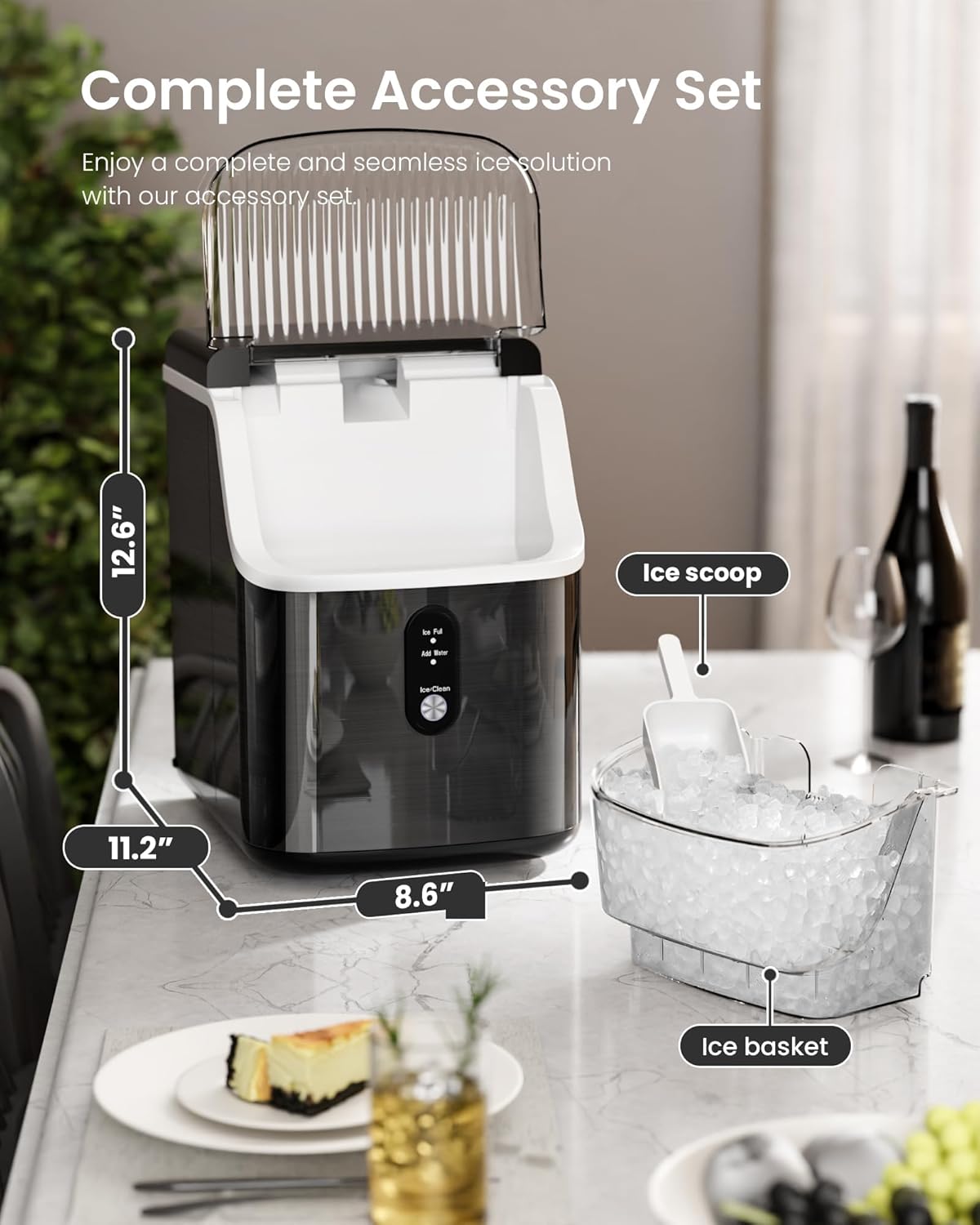
Image: The Kismile Nugget Ice Maker with its dimensions labeled: 11.2 inches wide, 8.6 inches deep, and 12.6 inches high.

Image: The Kismile Nugget Ice Maker shown with its included ice scoop and detachable ice basket filled with nugget ice.
Setup
- Unpacking: Carefully remove the ice maker from its packaging. Remove all packing materials, including any tape or protective film.
- Placement: Place the ice maker on a flat, stable, and heat-resistant surface. Ensure there is adequate ventilation around the unit (at least 5 inches of space on all sides). Avoid placing it near heat sources or in direct sunlight.
- Initial Cleaning: Before first use, it is recommended to perform a self-cleaning cycle. Refer to the "Maintenance" section for detailed instructions.
- Add Water: Open the top lid and fill the water reservoir with potable water up to the MAX fill line. Do not overfill.
- Power Connection: Plug the power cord into a grounded electrical outlet.
Operating Instructions
- Start Ice Production: After adding water and plugging in the unit, press the "Ice/Clean" button once to begin the ice-making cycle. The "Ice Making" indicator light will illuminate.
- Monitor Ice Production: The ice maker will start producing nugget ice in approximately 6-7 minutes. The ice will drop into the removable ice basket.
- Ice Full Sensor: The "Ice Full" indicator light will turn on when the ice basket is full, and the machine will automatically pause ice production. Remove ice from the basket to resume operation.
- Add Water Indicator: If the water level in the reservoir is too low, the "Add Water" indicator light will illuminate, and the machine will pause. Add more water to the reservoir to resume ice production.
- Continuous Operation: The machine is designed for continuous operation. As ice melts, the water returns to the reservoir to be reused for new ice.
- Serving Ice: Use the provided ice scoop to retrieve ice from the basket. The ice basket is detachable for easy serving.

Image: The Kismile Nugget Ice Maker actively producing nugget ice, filling the transparent ice basket.

Image: A Kismile Nugget Ice Maker with a full basket of ice, highlighting its large capacity and fast ice-making capability.
Maintenance
Regular cleaning ensures optimal performance and longevity of your ice maker.
- Self-Cleaning Function:
- Ensure the ice basket is empty and the water reservoir is filled with clean water.
- Press and hold the "Ice/Clean" button for 5 seconds to activate the self-cleaning cycle. The "Ice/Clean" indicator will flash.
- The cleaning cycle will run for approximately 15 minutes.
- Once complete, drain the water from the unit by removing the drain plug located at the bottom.
- Rinse the interior with clean water and drain again.
- Manual Cleaning:
- Unplug the ice maker before cleaning.
- Remove the ice basket and wash it with mild soap and warm water. Rinse thoroughly.
- Wipe the exterior of the unit with a soft, damp cloth.
- For hard water deposits, a solution of water and vinegar can be used during the self-cleaning cycle or for manual scrubbing of the reservoir.
- It is recommended to clean the machine at least once a week, depending on usage.

Image: The Kismile Nugget Ice Maker undergoing its self-cleaning cycle, with water circulating inside the transparent unit.

Image: A close-up of the Kismile Nugget Ice Maker's drain plug, showing water being drained from the unit.
Troubleshooting
| Problem | Possible Cause | Solution |
|---|---|---|
| Ice Maker Not Working | No power, water reservoir empty. | Check power connection. Fill water reservoir to MAX line. |
| "Add Water" Indicator On | Water level is too low. | Add potable water to the reservoir until the indicator turns off. |
| "Ice Full" Indicator On | Ice basket is full. | Remove ice from the basket. The machine will resume operation automatically. |
| Ice Melts Quickly | Ambient temperature is too high; ice basket is not insulated. | Place the ice maker in a cooler environment. Transfer ice to a freezer for long-term storage. |
| Unusual Noise | Normal operation sounds (compressor, fan, water pump); internal components may need cleaning. | Ensure the unit is on a level surface. Perform a self-cleaning cycle. If noise persists and is abnormal, contact customer support. |
| Ice Production is Slow | High ambient temperature; dirty condenser; insufficient water. | Ensure proper ventilation. Clean the condenser (if accessible and instructed). Check water level. |
Specifications
- Brand: Kismile
- Model Number: KS-Z5825NB-B-NEW
- Ice Production Capacity: Up to 35 lbs per 24 hours
- First Ice Production Time: Approximately 6-7 minutes
- Dimensions (L x W x H): 11.2" x 8.6" x 12.6"
- Weight: Approximately 20.68 lbs
- Features: Chewable Nugget Ice, Self-Cleaning Function, Intelligent Sensor, One-Click Operation
Warranty and Support
Kismile offers protection plans for your product. For specific warranty details and to register your product, please refer to the documentation included with your purchase or visit the official Kismile website.
For customer support, technical assistance, or warranty claims, please contact Kismile Direct, the seller of this product. Their contact information can typically be found on your purchase receipt or on the product listing page on Amazon.
- Seller: Kismile Direct
- Protection Plans Available: 2-Year and 3-Year Protection Plans (details available at purchase).
- Return Policy: Standard 30-day refund/replacement policy applies (check retailer for specifics).
Additional Resources
While no official seller instruction videos are available, you may find helpful community-created content. Always exercise caution and verify information from unofficial sources.
Video: A user-created video addressing common questions about nugget ice makers. This video is not an official Kismile instructional video.

