
1. Introduction
Welcome to the VIVO T4R 5G smartphone user manual. This guide provides essential information to help you get started with your new device, understand its features, and maintain optimal performance. Please read this manual carefully before using your phone.
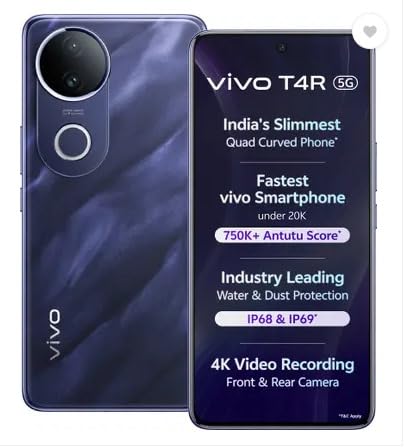
Figure 1: VIVO T4R 5G Smartphone, showcasing its sleek design and key features like 5G connectivity, quad-curved display, and water/dust protection.
2. Setup
2.1 Unboxing and Initial Inspection
Upon unboxing your VIVO T4R 5G, ensure all components are present:
- VIVO T4R 5G Smartphone
- Charging Cable (USB Type-C)
- Power Adapter
- SIM Ejector Tool
- Quick Start Guide
2.2 Inserting SIM Cards
The VIVO T4R 5G supports Dual SIM functionality. To insert your SIM cards:
- Locate the SIM card tray on the side of the phone.
- Insert the SIM ejector tool into the small hole next to the tray and press gently until the tray pops out.
- Place your Nano-SIM cards into the designated slots on the tray. Ensure the gold contacts face downwards.
- Carefully reinsert the tray into the phone until it clicks into place.
2.3 Powering On and Initial Configuration
To power on your device, press and hold the Power button until the VIVO logo appears. Follow the on-screen prompts to complete the initial setup, including selecting your language, connecting to a Wi-Fi network, and setting up your Google account.
3. Operating Your VIVO T4R 5G
3.1 Basic Navigation
The VIVO T4R 5G features a responsive touchscreen for all interactions. Use gestures such as tapping, swiping, pinching, and spreading to navigate the interface, open apps, and control functions.
3.2 5G Connectivity
Your device supports 5G cellular technology, enabling ultra-fast internet speeds. Ensure your SIM card supports 5G and that you are in a 5G coverage area for optimal performance. You can manage network settings in the 'Settings' menu under 'Network & internet'.
3.3 Camera Usage
The VIVO T4R 5G is equipped with a versatile camera system, including three rear cameras (48 MP main sensor) and one front camera, capable of 4K video recording. To use the camera:
- Open the Camera application.
- Select your desired shooting mode (e.g., Photo, Video, Portrait, High Dynamic Range).
- Tap the shutter button to capture photos or start/stop video recording.

Figure 2: Rear view of the VIVO T4R 5G, highlighting the triple camera setup and flash.
3.4 Display Features
The device features a Curved AMOLED display with a maximum resolution of 2392 × 1080 Pixels and a 120Hz fast refresh rate for smooth visuals. It also supports HDR+ and offers 4500 Nits Peak Brightness for vibrant and clear viewing.

Figure 3: Close-up of the VIVO T4R 5G's curved AMOLED display, emphasizing its slim body and 120Hz refresh rate.
3.5 Audio
The VIVO T4R 5G is equipped with Dual Stereo Speakers for an immersive audio experience. Adjust volume using the physical volume buttons on the side of the device.

Figure 4: Illustration of the VIVO T4R 5G's dual stereo speaker system for enhanced audio output.
3.6 Charging
The device has a 5700 Milliamp Hours battery. Use the provided USB Type-C cable and power adapter for charging. Fast charging capabilities ensure your phone is powered throughout the day.
4. Maintenance
4.1 Cleaning Your Device
To clean your VIVO T4R 5G, use a soft, lint-free cloth. Avoid using harsh chemicals or abrasive materials, as these can damage the screen or finish. For stubborn smudges, lightly dampen the cloth with water.
4.2 Water and Dust Resistance
The VIVO T4R 5G features Industry Leading Water & Dust Protection (IP68 & IP69 rated). While resistant to splashes and dust, it is not fully waterproof. Avoid intentional submersion in water and exposure to high-pressure water jets. Damage caused by liquid exposure is not covered under warranty.

Figure 5: The VIVO T4R 5G demonstrating its IP68 and IP69 water and dust resistance capabilities.
4.3 Software Updates
Regularly check for and install software updates to ensure your device has the latest features, security patches, and performance improvements. You can find update options in 'Settings' under 'System update'.
4.4 Storage Management
Your device comes with 256 GB of internal storage. To maintain optimal performance, regularly manage your storage by deleting unnecessary files, uninstalling unused apps, and backing up important data to cloud services or an external drive.
5. Troubleshooting
This section addresses common issues you might encounter with your VIVO T4R 5G.
5.1 Device Not Responding
If your phone becomes unresponsive, press and hold the Power button for approximately 10-15 seconds to force a restart.
5.2 Overheating
It is normal for the device to warm up during intensive use (e.g., gaming, 4K video recording, or prolonged 5G usage). If the device becomes excessively hot, close background applications, reduce screen brightness, and allow it to cool down. Avoid using the phone while charging if it is already warm.
5.3 Battery Drains Quickly
If you experience rapid battery drain, consider the following:
- Reduce screen brightness.
- Disable unused features like Wi-Fi, Bluetooth, or GPS when not needed.
- Close background apps.
- Check battery usage in 'Settings' to identify power-hungry applications.
5.4 Network Connectivity Issues
If you have trouble connecting to a network:
- Ensure your SIM card is correctly inserted.
- Toggle Airplane Mode on and off.
- Restart your phone.
- Check your network settings in 'Settings' > 'Network & internet'.
5.5 Factory Reset
As a last resort for persistent software issues, you may perform a factory reset. Warning: This will erase all data on your phone. Back up your data before proceeding. Go to 'Settings' > 'System' > 'Reset options' > 'Erase all data (factory reset)'.
6. Specifications
Below are the key technical specifications for the VIVO T4R 5G smartphone:
| Feature | Specification |
|---|---|
| Brand | vivo |
| Model Series | T4R 5G |
| Operating System | Android |
| RAM Memory | 8 GB |
| Internal Storage | 256 GB |
| CPU Model | Snapdragon |
| CPU Speed | 2.6 GHz |
| Colour | Twilight Blue |
| SIM Card Slot Count | Dual SIM |
| Connector Type | USB Type C |
| Display Type | Curved AMOLED |
| Max Display Resolution | 2392 × 1080 Pixels |
| Display Pixel Density | 387 Pixels Per Inch (PPI) |
| Rear Camera Resolution | 48 MP (Optical Sensor) |
| Video Capture Resolution | 4K |
| Battery Capacity | 5700 Milliamp Hours |
| Water Resistance Level | Water Resistant (IP68 & IP69) |
| Item Weight | 183.5 Grams |
| Item Dimensions | 16.3 x 7.7 x 0.7 Centimeters |
| Cellular Technology | 5G |
| Model Year | 2025 |
7. Warranty and Support
7.1 Warranty Information
The VIVO T4R 5G comes with a 1 Year Warranty from the date of purchase. This warranty covers manufacturing defects under normal use. Please retain your proof of purchase for warranty claims. The warranty does not cover damage caused by misuse, accidents, unauthorized repairs, or liquid damage.
7.2 Customer Support
For technical assistance, service, or further inquiries, please contact VIVO customer support. You can find contact details on the official VIVO website or through the contact information provided with your product packaging.
Manufacturer: VIVO
Packer Contact Information: Vivo Mobile India Private Limited PLOT NO 8, SECTOR 24, YAMUNA EXPRESSWAY AREA, GAUTAM BUDDHA NAGAR, UP INDIA-201310


