
KARACA 000001000242260003
KARACA Hatır Turkish Coffee Maker Instruction Manual
Model: 000001000242260003
1. Introduction
Thank you for choosing the KARACA Hatır Turkish Coffee Maker. This electric coffee machine is designed to prepare authentic Turkish coffee with ease, offering features like automatic temperature control, overflow protection, and audible/visual alerts. This manual provides essential information for the safe and efficient operation, maintenance, and troubleshooting of your appliance.

Image 1.1: The KARACA Hatır Turkish Coffee Maker in Galaxy Grey.

Image 1.2: The KARACA Hatır Turkish Coffee Maker demonstrating its 5-cup capacity with prepared coffee.
2. Important Safety Instructions
- Read all instructions before using the appliance.
- Do not immerse the appliance, power cord, or plug in water or other liquids.
- Close supervision is necessary when any appliance is used by or near children.
- Unplug from outlet when not in use and before cleaning. Allow to cool before putting on or taking off parts, and before cleaning the appliance.
- Do not operate any appliance with a damaged cord or plug, or after the appliance malfunctions or has been damaged in any manner.
- The coffee pot is NOT dishwasher safe. Hand wash only.
- Ensure the connector on the bottom of the coffee pot is covered before washing.
- Use only cold water for brewing.
- Do not fill the coffee pot above the maximum fill line to prevent overflow.

Image 2.1: The coffee pot features a protection system to prevent operation without sufficient water.
3. Product Components
Your KARACA Hatır Turkish Coffee Maker consists of the following main parts:
- Main Unit (Base)
- Coffee Pot (Brewing Chamber)
- Measuring Spoon

Image 3.1: The coffee maker main unit, coffee pot, and included measuring spoon.

Image 3.2: Dimensions of the coffee maker and its removable pot. The main unit is approximately 10.5 inches high, 7.0 inches wide, and 7.3 inches deep. The coffee pot is approximately 5.93 inches high and 4.4 inches wide. The power cable length is 31.5 inches.
4. Setup
- Unpack: Carefully remove all components from the packaging.
- Clean: Before first use, wash the coffee pot and measuring spoon with warm soapy water. Rinse thoroughly and dry. Wipe the main unit with a damp cloth.
- Placement: Place the main unit on a stable, flat, heat-resistant surface, away from water sources.
- Power Connection: Plug the appliance into a suitable electrical outlet.
5. Operating Instructions
Follow these steps to brew delicious Turkish coffee:
- Add Coffee: For each cup of coffee, add one level measuring spoon of Turkish coffee into the coffee pot. Adjust to taste.
- Add Water: For each cup of coffee, add one cup of cold water to the coffee pot. Do not exceed the 'MAX' fill line indicated inside the pot.
- Mix: Stir the coffee and water mixture gently with a spoon until well combined.
- Place Pot: Place the coffee pot securely into the main unit.
- Select Brewing Mode:
- Press the "Turkish Coffee" button for a regular brew.
- Press the "Ember Roasted Turkish Coffee" button for a slower, more intense brew, mimicking traditional ember cooking.
- Brewing Process: The machine will begin brewing. It features automatic temperature control and an anti-overflow system.
- Alerts: The appliance will provide audible and visual alerts when the coffee is ready. The automatic shut-off function will activate once brewing is complete.
- Serve: Carefully remove the coffee pot from the main unit and pour the freshly brewed Turkish coffee into cups.

Image 5.1: Step-by-step guide to preparing Turkish coffee: 1. Add coffee, 2. Add water, 3. Mix, 4. Start the machine.

Image 5.2: The control panel showing buttons for "Turkish Coffee" and "Ember Roasted Turkish Coffee" brewing options.

Image 5.3: Icons illustrating the automatic features: auto power shut-down, anti-overflow system, audio & light warning, and automatic heat setting.

Image 5.4: Freshly brewed Turkish coffee being poured from the coffee pot into a serving cup.
Video 5.1: An instructional video demonstrating the preparation process for Turkish coffee using the KARACA Hatır Turkish Coffee Maker. This video shows adding coffee and water, mixing, selecting a brewing mode, and pouring the finished coffee.
6. Maintenance and Cleaning
Proper cleaning ensures the longevity and optimal performance of your coffee maker.
- Unplug: Always unplug the appliance from the power outlet before cleaning.
- Cool Down: Allow the coffee maker to cool completely before cleaning.
- Clean Coffee Pot:
- Ensure the electrical connector at the bottom of the coffee pot is securely covered with its protective cap.
- Hand wash the coffee pot with warm soapy water and a soft sponge.
- Rinse thoroughly under running water, ensuring no soap residue remains.
- Dry completely before storing or next use.
- Do not place the coffee pot in a dishwasher.
- Clean Main Unit: Wipe the exterior of the main unit with a soft, damp cloth. Do not use abrasive cleaners or scourers.
- Descaling: If mineral deposits accumulate over time, descale the coffee pot using a descaling solution suitable for coffee makers, following the product's instructions.
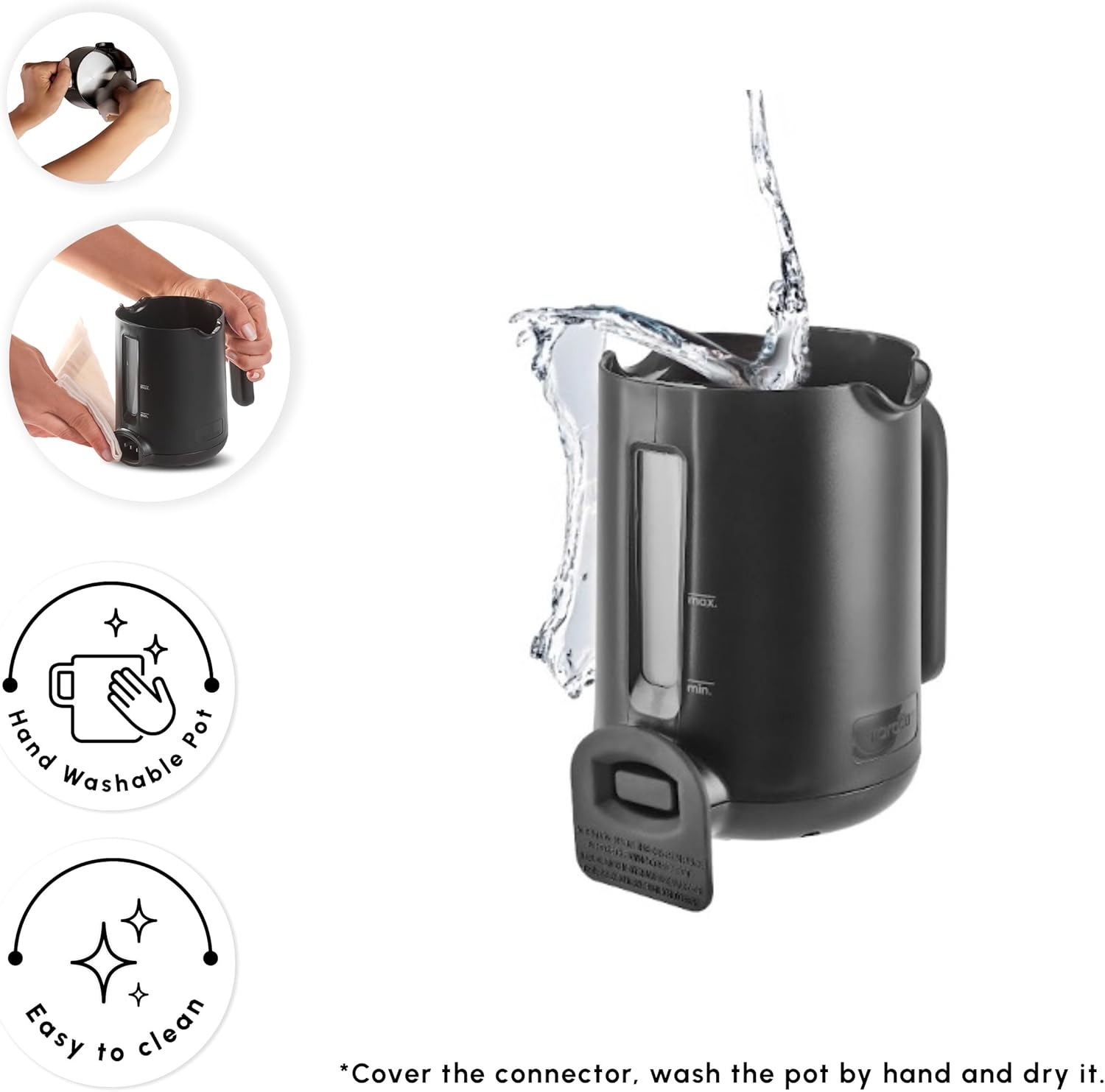
Image 6.1: The coffee pot is hand washable. Ensure the connector is covered before washing.
7. Troubleshooting
| Problem | Possible Cause | Solution |
|---|---|---|
| Appliance does not turn on. | Not plugged in, power outage, or faulty outlet. | Ensure the appliance is securely plugged into a working electrical outlet. Check your home's circuit breaker. |
| Coffee overflows during brewing. | Too much water or coffee added. | Ensure water level does not exceed the 'MAX' fill line in the coffee pot. Reduce the amount of coffee if necessary. The machine has an anti-overflow system, but overfilling can still cause issues. |
| Coffee is not hot enough. | Incorrect brewing cycle or insufficient heating. | Ensure the correct brewing mode is selected. If the issue persists, contact customer support. |
| Coffee tastes weak or too strong. | Incorrect coffee-to-water ratio. | Adjust the amount of Turkish coffee or water according to your preference. Use the provided measuring spoon as a guide. |
| Appliance makes unusual noises. | Normal operation sounds or internal issue. | Some operational sounds are normal. If the noise is excessive or unusual, unplug the appliance and contact customer support. |
8. Specifications
- Brand: KARACA
- Model Name: Hatır
- Model Number: 000001000242260003
- Capacity: 5 Cups
- Color: Galaxy Grey
- Product Dimensions: 10"D x 10"W x 10"H (approximate)
- Item Weight: 3.88 pounds
- Coffee Maker Type: Turkish Coffee Machine
- Operation Mode: Fully Automatic
- Special Features: Ember Mode, Automatic Temperature Control, Overflow Protection, Audible & Visual Alerts, Automatic Shut-off.
- Dishwasher Safe: No (Coffee Pot)
9. Warranty and Support
For warranty information and customer support, please refer to the documentation included with your purchase or visit the official KARACA website. Keep your proof of purchase for any warranty claims.
Manufacturer: KARACA
Date First Available: September 2, 2025
Related documents000001000242260003


Ask a question about this manual
Ask about setup, troubleshooting, compatibility, parts, safety, or missing instructions. Manuals+ will review the question and use this page’s manual context to help answer it.