
hygger Aquarium LED Light HG160-18W Instruction Manual
Model: HG160-18W
Product Overview
This manual provides detailed instructions for the hygger Aquarium LED Light, model HG160-18W. This full-spectrum LED light is designed for aquariums, offering various lighting modes, adjustable colors, and brightness levels to create an optimal environment for aquatic plants and fish. It features an external controller for easy customization and a durable, waterproof design.

Image: hygger Aquarium LED Light with external controller.
Safety Instructions
Please read and understand all safety instructions before installing or operating this product. Failure to follow these instructions may result in injury or damage to the product.
- Do Not Immerse: This light is rated IP65 for splash protection, but it is not submersible. Do not immerse the light fixture or controller in water.
- Power Disconnection: Always disconnect the power supply before performing any installation, maintenance, or cleaning.
- Children and Pets: Keep the product and its components out of reach of children and pets.
- Damage Inspection: Do not operate the light if any part of the fixture, power cord, or adapter is damaged. Contact customer support for assistance.
- Correct Adapter: Use only the power adapter supplied with this product. Using an incorrect adapter may cause damage or fire.
- Indoor Use Only: This product is designed for indoor aquarium use only. Do not use outdoors.
- Ventilation: Ensure adequate ventilation around the light fixture to prevent overheating.
Package Contents
Verify that all items are present in the package:
- hygger Aquarium LED Light (HG160-18W)
- Power Adapter (DC 12V/1.5A)
- Extendable Metal Brackets
Product Features
- Adjustable Color and Brightness: Offers 8 customizable colors (Red, Green, Orange, Yellow, Cyan, Purple, Blue, Full Spectrum White) and 10 adjustable brightness levels (10% to 100%).
- Multiple Working Modes: Features 5 functional modes: Day Mode, Night Mode, Day + Night Mode, 24/7 Natural Mode, and DIY Mode to suit various aquarium needs.
- 24/7 Natural Mode: Automatically simulates natural sunrise, daylight, sunset, and moonlight cycles, creating a realistic environment for aquatic life.
- DIY Mode: Allows users to program custom lighting schedules with adjustable time, color, and brightness across 5 distinct stages.
- Full Spectrum Lighting: Equipped with high-quality 5050 and 2835 LED chips, providing a high PAR value and optimal wavelengths (blue and red light) to promote photosynthesis in aquatic plants.
- Durable and Waterproof Design: Constructed with an aluminum shell for efficient heat dissipation and an IP65 waterproof rating, protecting against splashes and moisture. Each LED bead is individually sealed.

Image: Full spectrum light details with LED types and spectral distribution.
- Extendable and Detachable Brackets: Stable and robust metal brackets allow for easy installation and adjustment on various aquarium sizes (30-45 cm for the 18W model), including rimmed and rimless tanks.
Setup Instructions
- Unpack Components: Carefully remove the LED light fixture, power adapter, and extendable metal brackets from the packaging.
- Attach Brackets: Slide the extendable metal brackets onto both ends of the LED light fixture. Ensure they are securely inserted into the designated slots.

Image: Illustration of the extendable and detachable brackets for tank mounting.
- Position Light on Aquarium: Place the light fixture on top of your aquarium. Adjust the extendable brackets to fit the length of your tank (e.g., 30-45 cm for the 18W model). Ensure the light is centered and stable on the tank edges.
- Connect Power: Connect the power adapter's DC plug to the input port on the light fixture's controller cable. Then, plug the power adapter into a standard electrical outlet.
- Controller Placement: Position the external controller in a dry, easily accessible location, away from direct water splashes.
Operating Instructions
Controller Overview
The external smart LCD display controller allows for easy management of all light functions. Familiarize yourself with the buttons and display:

Image: Detailed view of the external controller, showing the LCD screen and control buttons.
- LCD Display: Shows current mode, local time, start/end times, brightness level, and color.
- COLOUR Button: Cycles through 8 available colors.
- SET Button: Used to confirm settings or move to the next parameter during programming.
- UP / DOWN Buttons: Adjust values (time, brightness, color options).
- 24/7 Button: Activates the 24/7 Natural Mode. Long press for 3 seconds to set local time.
- DIY/OK Button: Enters DIY Mode. Also acts as an 'OK' button to confirm and save settings in DIY mode.
- ON/OFF Button: Short press to turn the light on after plugging in. Long press to turn off.
Setting Local Time
- Long press the 24/7 button for 3 seconds until the time display flashes.
- Use the UP and DOWN buttons to adjust the hour.
- Press the SET button to move to the minute setting.
- Use the UP and DOWN buttons to adjust the minutes.
- Press DIY/OK to confirm and exit the time setting.
Operating Modes
The light offers 5 distinct operating modes:

Image: Visual representation of Day Mode, Night Mode, and Day + Night Mode.
- Day Mode: Provides a bright, full-spectrum white light. In this mode, the color is not adjustable, but the brightness can be set to one of 10 levels. Timer settings are optional.
- Night Mode: Offers adjustable color (8 options) and brightness (10 levels). This mode is ideal for creating a calming nighttime ambiance. Timer settings are optional.
- Day + Night Mode: Features fixed full-spectrum white light during the day and fixed blue light during the moon time. Brightness is adjustable.
- 24/7 Natural Mode: This mode automatically simulates a natural light cycle:
- Sunrise (soft orange glow)
- Daylight (full spectrum white glow)
- Sunset (soft orange glow)
- Moonlight (blue light)

Image: Diagram of the 24/7 Natural Mode light cycle and examples of DIY mode stages.
- DIY Mode: This mode allows for complete customization of your lighting schedule. You can set 5 different stages (L1-L5) with specific times, colors (8 options), and brightness levels (10 options).
- Press the DIY/OK button to enter DIY mode.
- Use the SET button to cycle through the parameters for each stage (time, color, brightness).
- Use the UP and DOWN buttons to adjust the desired values for each parameter.
- After setting all 5 stages, press DIY/OK to confirm and save your custom program.
Color and Brightness Adjustment
In modes where color and brightness are adjustable (e.g., Night Mode, DIY Mode):

Image: Visual guide to adjustable colors and brightness levels.
- Adjusting Color: Press the COLOUR button repeatedly to cycle through the 8 available color options.
- Adjusting Brightness: Use the UP and DOWN buttons to increase or decrease the light intensity across 10 levels (10% to 100%).
Timer Settings
The light offers options for timed operation:
- No Timed Setting: To disable the timer, press the `MODE` button for 1 second, then press the `SET` button for 3 seconds.
- Timed Setting: To enable and set a timer, press the `MODE` button for 3 seconds, then press the `SET` button for 3 seconds. You can then set the desired start and end times for the light to operate.
- DIY Mode Timer: In DIY mode, the timer is integrated into each of the 5 stages, allowing for precise scheduling of light changes.
Maintenance
Regular maintenance ensures the longevity and optimal performance of your hygger Aquarium LED Light.
- Cleaning the Fixture: With the power disconnected, gently wipe the light fixture with a soft, damp cloth to remove dust, water spots, and algae buildup. Do not use harsh chemicals or abrasive materials, as these can damage the light's surface or waterproof seal.
- Controller Care: Keep the external controller dry and clean. Avoid exposing it to water or high humidity.
- Power Cord and Adapter: Periodically inspect the power cord and adapter for any signs of wear, cuts, or damage. If damage is found, discontinue use immediately and contact customer support.
- Ventilation: Ensure that the aluminum housing remains clear of obstructions to allow for proper heat dissipation.
Troubleshooting
If you encounter issues with your hygger Aquarium LED Light, refer to the following table for common problems and solutions.
| Problem | Possible Cause | Solution |
|---|---|---|
| Light does not turn on. |
|
|
| Light flickers or dims unexpectedly. |
|
|
| Controller display is blank or unresponsive. |
|
|
| Cannot change color or brightness. |
|
|
| 24/7 mode not working as expected. |
|
|
Specifications (Model HG160-18W)
Detailed technical specifications for the hygger Aquarium LED Light 18W model:

Image: Product size and specification chart for various wattage models.
| Specification | Value |
|---|---|
| Model | HG160 |
| Wattage | 18 Watts |
| Input Voltage | AC100-240V |
| Output Voltage | DC 12V/1.5A |
| Light Size (Without Bracket) | 27.5 x 11 x 1.3 cm (10.8 x 4.3 x 0.5 inch) |
| Application Tank Length | 30-45 cm |
| LED Quantity | 60 PCS (40 White, 2 Red, 4 Blue, 2 Green, 12 RGB) |
| Lumens | 591 Lm |
| Rendering Index | > 90 |
| Color Temperature | 16568K |
| Power Cord Length | 150 cm + 60 cm |
| Material | Aluminum |
| Waterproof Rating | IP65 (Splash-proof) |
| Item Weight | 630 Grams |
| Energy Efficiency Class | E |
For more detailed product information and energy label, please refer to the official EPREL database:
EPREL Product Information (QR Code: 2369463)

Image: Product Information Sheet with EPREL data.
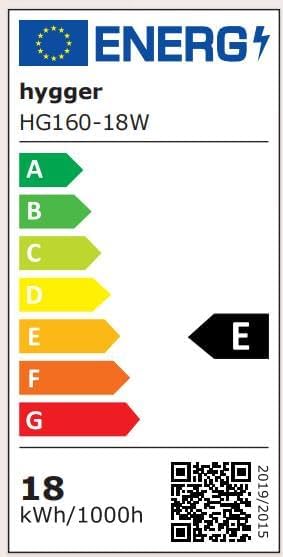
Image: Energy Label for hygger HG160-18W.
Warranty and Support
This hygger product comes with a standard manufacturer's warranty. For specific warranty terms, duration, and conditions, please refer to the warranty card included with your purchase or contact hygger customer support directly.
If you require technical assistance, have questions about product operation, or need to report a defect, please contact hygger customer service through their official website or the contact information provided in your product packaging.


