
1. Product Overview
The SPOOBOOLA TD-001 6-in-1 Party DJ Disco Light is a versatile lighting device designed to create dynamic and engaging atmospheres for various events. It combines multiple lighting effects including disco balls, laser patterns, star lights, ocean wave projections, and LED lights, all controllable via a remote. Its sound-activated feature allows the lighting to synchronize with music, enhancing the party experience.

Image 1.1: The SPOOBOOLA TD-001 6-in-1 Party DJ Disco Light in operation, displaying multiple vibrant light patterns.
2. What's in the Box
Please check the package contents to ensure all items are present:
- Disco ball light
- Remote control
- USB cable
- Power adapter
- User Manual
3. Safety Information
To ensure safe operation and prevent damage, please read and follow these safety guidelines:
- Do not look directly into the light source. Laser light can cause eye damage.
- Keep the device away from water or other liquids to prevent electric shock.
- Ensure proper ventilation to prevent overheating. Do not cover the cooling fan.
- Use only the provided USB cable and power adapter.
- Keep out of reach of children.
- Unplug the device when not in use or before cleaning.
4. Product Features
The SPOOBOOLA TD-001 offers a range of features for dynamic lighting:
- 6-in-1 Lighting Combination: Integrates party lights, star lights, ocean lights, DJ lights, strobe lights, and pattern projection lights.
- Sound Activated Mode: Built-in high-sensitivity sound receiver allows lighting to change with music rhythm.
- Remote Control: Conveniently adjust lighting modes, colors, and speed from a distance.
- Wide Illumination Range: Three disco ball lights provide brighter effects and a wide coverage area.
- Versatile Installation: Features a high-quality handle and mounting bracket for flexible placement on surfaces, walls, or ceilings.
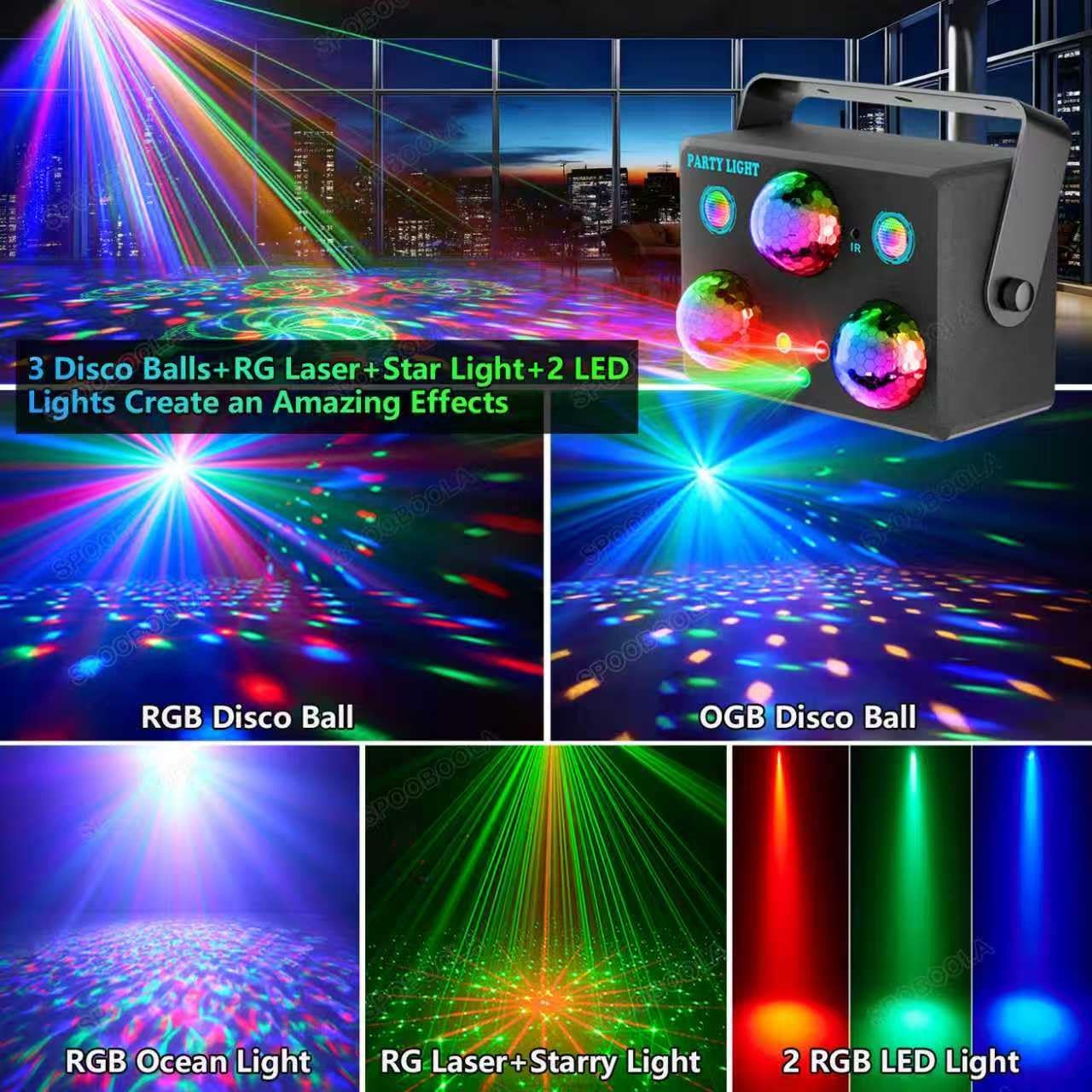
Image 4.1: Visual representation of the 6-in-1 lighting effects, including disco balls, ocean waves, and laser patterns.
5. Setup
Follow these steps to set up your SPOOBOOLA TD-001 Party DJ Disco Light:
- Unpack: Carefully remove all components from the packaging.
- Power Connection: Connect the provided USB cable to the device's USB port (DC 5V/2A) and then plug the adapter into a standard power outlet.
- Initial Power On: Locate the ON/OFF switch on the back of the device and slide it to the 'ON' position. The light will activate.
- Remote Control Battery: Ensure the remote control has working batteries. If not, insert or replace them according to the remote's instructions.
- Placement: Place the light on a stable, flat surface or mount it using the provided bracket.

Image 5.1: The disco light unit, USB cable, and power adapter, illustrating the power connection.

Image 5.2: Detailed view of the product's front and rear panels, highlighting connection ports and controls.
6. Operating Instructions
The SPOOBOOLA TD-001 can be operated using the remote control or the manual buttons on the device.
6.1 Remote Control Functions
The included remote control provides full functionality:

Image 6.1: The remote control unit, displaying buttons for mode selection, color changes, and speed adjustments.
- Power Button (⏻): Turns the device ON or OFF.
- Pause Button: Freezes the current light effect.
- Music 1 / Music 2: Activates sound-activated modes with different sensitivities or patterns.
- Light Mode Buttons: Select specific light effects: STAR LIGHT, DJ LIGHT, PARTY LIGHT, DISCO BALL, OCEAN LIGHT.
- LED Color / Pattern Color / Ocean Color: Cycles through available colors for each light type.
- RGB / Ball Color / OGB: Adjusts colors for disco balls and other lights.
- Strobe: Activates the strobe light effect.
- Speed (+/-): Adjusts the rotation or movement speed of the light patterns.
6.2 Lighting Modes
The device offers a variety of pre-programmed lighting modes:
- Party Light Mode: Combines multiple effects for a vibrant party atmosphere.
- Star Light Mode: Projects a starry sky effect.
- Ocean Light Mode: Creates a dynamic ocean wave ripple effect.
- DJ Light Mode: Features sharp, rhythmic light patterns.
- Disco Ball Mode: Classic rotating multi-color spot effects.
- Strobe Mode: Rapid flashing lights for an intense effect.

Image 6.2: Examples of different lighting modes and their visual impact in various settings.
6.3 Sound Activated Mode
The built-in microphone detects music and sounds, causing the light patterns and colors to change in sync with the rhythm. Use the 'Music 1' or 'Music 2' buttons on the remote to activate this feature. 'Music 1' typically offers auto-play with flashing to rhythm, while 'Music 2' provides flashing with rhythm even without light effects when no music is playing.
Video 6.3: Demonstration of the disco ball light's various modes and sound-activated features.
Video 6.4: A short clip showcasing the party light's dynamic effects for dance and DJ settings.
7. Installation and Mounting
The SPOOBOOLA TD-001 is designed for flexible placement:
- Surface Placement: Simply place the light on any flat, stable surface such as a table, floor, or cabinet.
- Wall/Ceiling Mounting: The device includes a detachable handle/bracket. Attach the bracket to the sides of the light using the provided screws. Once attached, the bracket can be used to mount the light to a wall or ceiling using appropriate fasteners (not included). Ensure the mounting surface is strong enough to support the device.
- Adjustable Angle: The bracket allows for adjustment of the light's projection angle to suit your needs.
8. Maintenance
To ensure the longevity and optimal performance of your disco light, follow these maintenance tips:
- Cleaning: Use a soft, dry cloth to clean the exterior of the device. Do not use abrasive cleaners or solvents.
- Lens Care: Gently wipe the light lenses with a microfiber cloth to remove dust and smudges, ensuring clear projection.
- Storage: When not in use, store the device in a cool, dry place away from direct sunlight and extreme temperatures.
- Ventilation: Periodically check that the cooling fan on the back of the unit is free from dust and obstructions.
9. Troubleshooting
If you encounter issues with your SPOOBOOLA TD-001, refer to the following common problems and solutions:
| Problem | Possible Cause | Solution |
|---|---|---|
| Light does not turn on. | No power, loose connection, device OFF. | Check power outlet, ensure USB cable is securely connected, slide ON/OFF switch to 'ON'. |
| Remote control not working. | Dead batteries, remote out of range, IR receiver blocked. | Replace remote batteries, ensure remote is pointed at the device's IR receiver, remove any obstructions. |
| Lights not syncing with music. | Sound-activated mode not active, low music volume, microphone blocked. | Press 'Music 1' or 'Music 2' on the remote, increase music volume, ensure microphone is not covered. |
| Light patterns are dim or blurry. | Dirty lenses, too much ambient light. | Clean lenses with a soft cloth, reduce ambient light in the room. |
10. Specifications
Key technical details for the SPOOBOOLA TD-001:
- Model Number: TD-001
- Color: Black
- Shape: Round
- Material: Acrylonitrile Butadiene Styrene (ABS)
- Finish Type: Painted
- Light Source Type: LED
- Power Source: Corded Electric (DC 5V/2A)
- Mounting Type: Anywhere (Surface, Wall, Ceiling with bracket)
- Light Source Special Features: Sound activated, Multi-pattern projection
- Number of Light Sources: 3
- Item Weight: 0.74 Kilograms
- Item Dimensions (L x W x H): 7"L x 5"W x 5.5"H
11. Warranty
The SPOOBOOLA TD-001 Party DJ Disco Light comes with a 1-year manufacturer's warranty. Please retain your proof of purchase for warranty claims. For specific details regarding warranty coverage and procedures, refer to the warranty card included in your package or contact customer support.
12. Support
For further assistance, technical support, or warranty inquiries, please contact SPOOBOOLA customer service. Refer to the contact information provided on the product packaging or the official SPOOBOOLA website.