
1. Introduction
This manual provides essential information for the safe and efficient operation of your TCL 50P7K 50-inch QLED 4K Ultra HD HDR Google TV. Please read it thoroughly before using the television and retain it for future reference. This document covers installation, initial setup, feature explanations, maintenance, and troubleshooting.
2. Safety Information
Observe the following safety precautions to prevent fire, electric shock, or injury.
- Power Supply: Connect the TV only to an AC 100-240V, 50/60Hz power outlet. Ensure the power cord is not damaged or pinched.
- Ventilation: Do not block ventilation openings. Allow adequate space around the TV for proper airflow to prevent overheating.
- Placement: Place the TV on a stable, level surface or mount it securely to a wall. Avoid placing it in direct sunlight, near heat sources, or in environments with high humidity or dust.
- Water and Moisture: Do not expose the TV to rain or moisture. Do not place objects filled with liquids, such as vases, on the TV.
- Cleaning: Unplug the TV before cleaning. Use a soft, dry cloth. Do not use liquid or aerosol cleaners.
- Servicing: Do not attempt to service the TV yourself. Refer all servicing to qualified service personnel.
3. Package Contents
Verify that all items are present in the packaging:
- TCL 50P7K 50-inch QLED 4K Ultra HD HDR Google TV
- Remote Control
- Power Cord
- TV Stand (2 pieces) and Screws
- User Manual (this document)
- Warranty Card
4. Setup
4.1 Physical Installation
Before proceeding, ensure the TV is placed on a stable surface or securely mounted. The TV dimensions without the base are 1111 x 646 x 68.7 mm, and with the base, they are 1111 x 697 x 280 mm. The net weight is 8.9 Kg.

Image: Front view of the TCL 50P7K television, displaying its dimensions and the included remote control for scale.
4.2 Connecting Peripherals
The TCL 50P7K offers various input and output ports for connecting external devices.
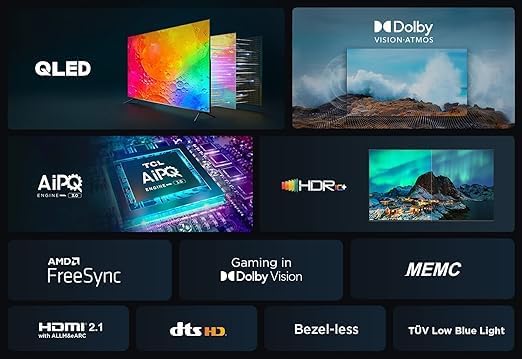
Image: Rear view of the TCL 50P7K television, highlighting the arrangement of its various input and output ports.
- HDMI: Connect Blu-ray players, game consoles, or other HDMI-enabled devices. The TV supports ARC & eARC.
- USB (0.3): Connect USB storage devices for media playback. There is 1 USB port.
- LAN: Connect an Ethernet cable for a wired internet connection.
- RF In: Connect an antenna or cable for digital broadcasting (DVB-T/T2/S/S2).
- Digital Audio Output (Optical): Connect to an external audio receiver or soundbar.
4.3 Initial Power On and Google TV Setup
After connecting the power cord, press the power button on the remote control or TV. Follow the on-screen instructions to complete the initial setup, which includes:
- Language selection
- Network connection (Wi-Fi 5G or LAN)
- Google Account sign-in for Google TV features
- Channel scanning
5. Operating the TV
5.1 Remote Control
The included Bluetooth remote control provides access to all TV functions, including voice search via Google Assistant.
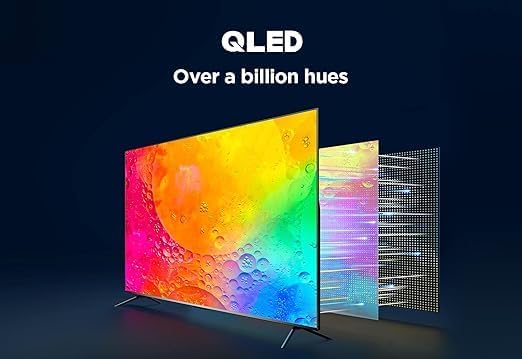
Image: The remote control for the TCL 50P7K television, featuring various buttons for navigation, volume, channel selection, and dedicated app access.
5.2 Google TV Interface
Navigate the Google TV interface using the remote control's directional pad and OK button. The home screen provides access to:
- Apps: Access pre-installed apps like Netflix, YouTube, Prime Video, Disney+, and download more from Google Play Store.
- Content Recommendations: Personalized suggestions based on your viewing habits.
- Inputs: Switch between connected devices.
- Settings: Adjust TV configurations.
5.3 Smart Features
- Google Assistant: Use voice commands via the remote control for search, control, and information.
- Chromecast built-in: Cast content from your smartphone or tablet directly to the TV.
- Airplay 2: Stream content from Apple devices.
- Screen Mirroring: Mirror your device's screen to the TV.
- Time Shift & PVR: Pause live TV and record programs (requires compatible USB storage).
5.4 Picture and Sound Settings
Access the settings menu to customize visual and audio preferences. Picture modes include Standard, Sports, Movie, and Intelligent. Sound modes include Dynamic, Standard, Movie, Music, Voice, Game, and Sport.
6. Key Features
The TCL 50P7K incorporates advanced technologies for an enhanced viewing experience.
6.1 QLED Technology
Quantum Dot technology delivers a wide color gamut, producing over a billion hues for vibrant and precise color reproduction.

Image: A visual representation of QLED technology, illustrating its capability to produce over a billion distinct colors for enhanced picture quality.
6.2 AiPQ Processor
TCL's AiPQ Processor utilizes unique image quality tuning algorithms for pixel-level adjustments, optimizing picture quality for a superior viewing experience.
6.3 Dolby Atmos and DTS Virtual:X
Experience immersive, three-dimensional audio with Dolby Atmos and DTS Virtual:X, providing enhanced clarity and emotional impact.

Image: Graphic illustrating the immersive audio and visual experience provided by Dolby Vision and Dolby Atmos technologies.
6.4 Multiple HDR Formats
The TV supports High Dynamic Range (HDR) content, including Dolby Vision, HDR10+, and HLG (Hybrid Log Gamma), offering striking brightness, exceptional shadow details, and vivid colors from various content providers.

Image: A side-by-side comparison demonstrating the enhanced detail and contrast provided by HDR10+ technology versus standard dynamic range.
6.5 HVA Screen and Motion Clarity (MEMC)
The HVA Screen technology enhances contrast and reduces halo effects. Motion Clarity (MEMC) ensures smooth motion in fast-paced scenes.

Image: A collage showcasing various features of the TCL 50P7K, including the AiPQ Engine, HDR+, AMD FreeSync, HDMI 2.1, DTS HD, Bezel-less design, and TÜV Low Blue Light certification.
6.6 Gaming Features
With a 120Hz refresh rate, VRR (Variable Refresh Rate), and Game Mode, the TV is optimized for a responsive gaming experience.
7. Maintenance
7.1 Cleaning the TV
- Screen: Gently wipe the screen with a soft, lint-free cloth. For stubborn marks, lightly dampen the cloth with water or a specialized screen cleaner (ensure it's TV-safe) and wipe. Do not spray liquid directly onto the screen.
- Cabinet: Wipe the TV cabinet with a soft, dry cloth.
- Important: Always unplug the TV from the power outlet before cleaning. Avoid using abrasive cleaners, waxes, or solvents.
8. Troubleshooting
If you encounter issues with your TV, refer to the following common problems and solutions:
| Problem | Possible Solution |
|---|---|
| No power | Ensure the power cord is securely plugged into the TV and a working electrical outlet. Check the power outlet with another device. |
| No picture, but sound is present | Check the input source. Ensure external devices are powered on and connected correctly. Try another HDMI cable. |
| No sound, but picture is present | Check the volume level and mute status. Verify audio output settings if using external speakers. |
| Remote control not working | Ensure batteries are correctly inserted and not depleted. Point the remote directly at the TV's IR sensor. Re-pair the Bluetooth remote if necessary. |
| Network connection issues | Check your router and modem. Restart them if needed. Ensure Wi-Fi password is correct. Try a wired LAN connection. |
| Picture quality issues (e.g., blurry, distorted) | Check the source resolution. Adjust picture settings (brightness, contrast, sharpness). Ensure antenna/cable connection is secure. |
If the problem persists after trying these solutions, contact customer support.
9. Specifications
Technical details for the TCL 50P7K 50-inch QLED 4K Ultra HD HDR Google TV:
| Feature | Detail |
|---|---|
| Model Number | 50P7K |
| Screen Size | 50 Inch |
| Resolution | 3840 x 2160 (4K, Ultra HD) |
| Display Technology | QLED |
| Backlight Type | Direct LED |
| Viewing Angle | 178° |
| Refresh Rate | 120 Hz |
| Operating System | Google TV |
| Internal Memory | 16GB |
| Audio Output Power | 10 Watt x 2 Channels (2.0CH) |
| Speaker Type | Box speaker |
| Bluetooth | Bluetooth 5.4 |
| Wi-Fi | Wi-Fi 5G |
| HDMI Ports | ARC & eARC support |
| USB Ports | 1 (USB 0.3) |
| LAN Port | 1 |
| RF In | 1 (Digital) |
| Digital Audio Output | 1 (Optical) |
| Power Consumption | 125 Watt |
| Standby Power | <0.5 Watt |
| Dimensions (W x H x D) without base | 1111 x 646 x 68.7 mm |
| Dimensions (W x H x D) with base | 1111 x 697 x 280 mm |
| Net Weight | 8.9 Kg |
| Country of Origin | Egypt |
10. Warranty and Support
10.1 Warranty Information
Your TCL 50P7K television comes with a 2 Years full free warranty. Please refer to the included Warranty Card for detailed terms and conditions, including coverage, limitations, and how to claim warranty service.
10.2 Customer Support
For technical assistance, troubleshooting beyond this manual, or warranty service, please contact TCL customer support. Contact information can typically be found on the warranty card, TCL's official website, or the product packaging.


