
1. Introduction
The KLSYQ W610 Smart AI Glasses integrate advanced AI technology with practical eyewear design. These glasses offer features such as hands-free photo and video capture, real-time AI translation, and smart interaction capabilities, all within a comfortable and durable frame. This manual provides detailed instructions for setup, operation, and maintenance to ensure optimal use of your device.
2. Package Contents
Verify that all items listed below are included in your package:
- KLSYQ W610 Smart AI Glasses
- Magnetic USB Charging Cable
- Cleaning Cloth
- Instruction Manual
- Interchangeable Lenses (e.g., clear, sunglasses)

3. Setup
3.1 Powering On/Off
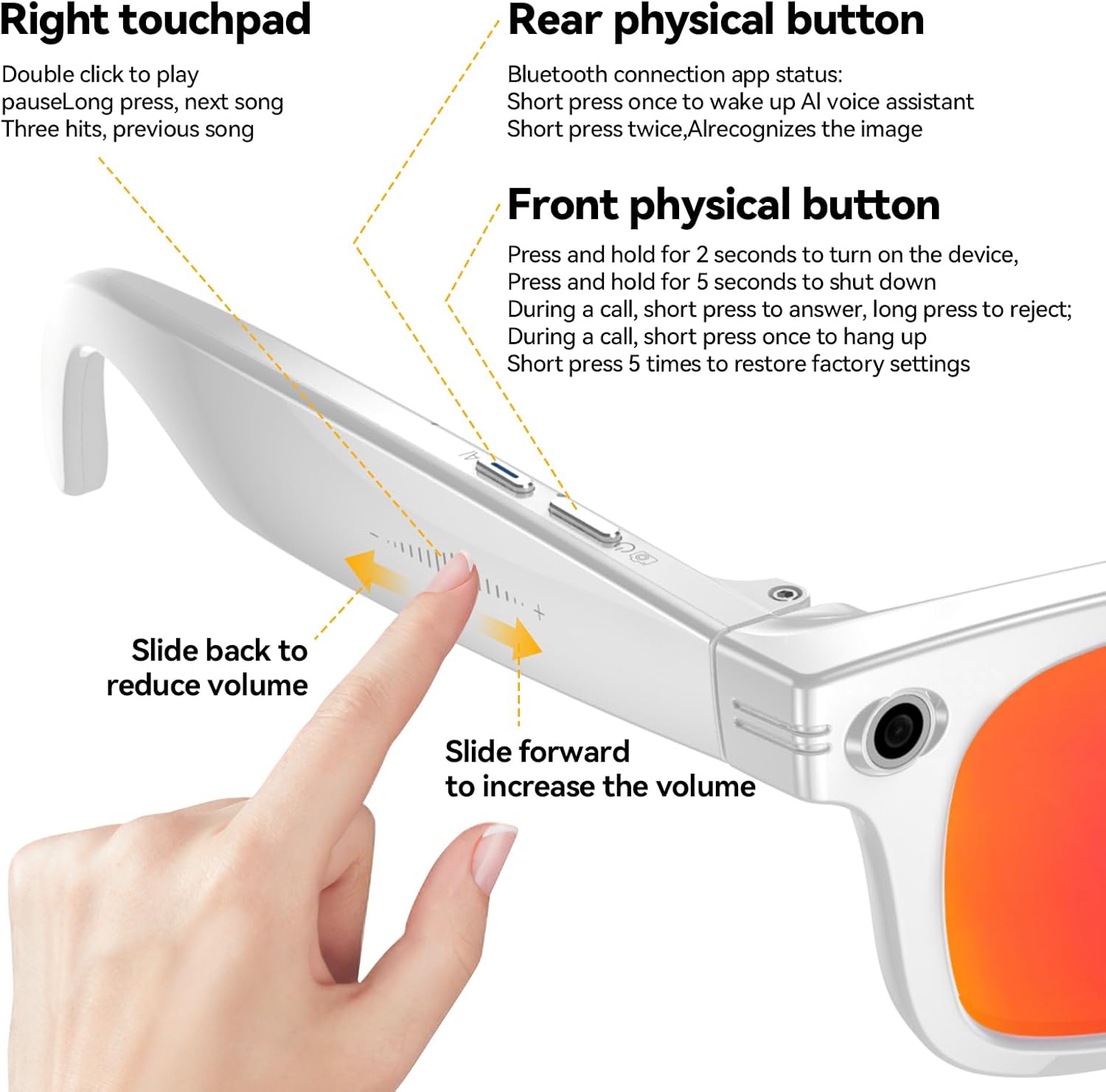
- Power On: With both hands, long press the two buttons located on the temples of the glasses for 3 seconds until you hear "Power on, pairing."
- Power Off: Long press any of the buttons on the temples until you hear "Power off."
3.2 App Download & Installation
To unlock the full potential of your W610 Smart AI Glasses, download the companion app:
- Locate the QR code on the product packaging or in the included instruction manual.
- Scan the QR code with your smartphone's camera.
- Follow the on-screen prompts to download and install the "HeyCyan" app from your device's app store (e.g., Apple App Store, Google Play Store).
- Quickly sign up or log in using your Apple ID or Gmail account.
3.3 Bluetooth Pairing
After installing the app, pair your glasses via Bluetooth:
- Ensure Bluetooth is enabled on your smartphone.
- Open the "HeyCyan" app.
- In the app, navigate to the device connection section.
- Select "GG & GGlite" or a similar option to find your W610 glasses.
- Confirm the connection when prompted. You will hear "Connected" from the glasses.
3.4 Lens Replacement
The W610 glasses come with interchangeable lenses, including clear, black, red, and blue light blocking options. To replace lenses:
- Gently but firmly press on the inside of the current lenses to pop them out.
- Align the new lenses with the frame and press them into place from the front until they snap securely.

4. Operating Instructions
4.1 Music Playback
Control your music directly from the glasses:
- Play/Pause: Single click any button on the temples.
- Volume Control: Swipe forward on the left temple to increase volume, swipe backward to decrease volume.
- Change Track: Swipe forward on the right temple for the next song, swipe backward for the previous song.
4.2 Phone Calls
Manage calls hands-free:
- Answer Call: Single click any button when an incoming call is received.
- End Call: Double click any button during a call.
- Reject Call: Long press any button when an incoming call is received.
4.3 AI Assistant
Engage with the AI assistant for information and tasks:
- Activate: Say "Hey Cyan" or single click any button on the glasses.
- Interaction: Ask questions, receive explanations, and get translations. The AI assistant supports models like Deepseek and GPT-4o Mini.
- Language Selection: Choose your preferred language within the app for AI interactions.

4.4 Real-time Translation
The glasses support real-time translation for 139 languages:
- Simultaneous Mode: Use the app to select source and target languages. Speak into the glasses, and the translation will be provided in real-time.
- Photo Translation: Take a photo of text (e.g., a menu, sign), and the AI will recognize and translate it.
- Offline Translation: Certain languages may be available for offline translation, allowing use without an internet connection.
4.5 Camera Functions (Photo/Video)
Capture moments with the integrated camera:
- Take Photo: Single click the front physical button. The camera features an 8 MP physical sensor, boosted to 32 MP via interpolation.
- Record Video: Double click the front physical button to start recording. Video recording includes EIS stabilization for clear footage.
- Wi-Fi Instant Share: Photos, videos, and voice memos can be transferred instantly to your phone via built-in Wi-Fi without cables or extra apps.
5. Maintenance
5.1 Cleaning
Use the provided cleaning cloth to gently wipe the lenses and frame. Avoid abrasive materials or harsh chemicals that could damage the surfaces.
5.2 Water and Dust Resistance
The W610 glasses are IP65-rated for dust and water resistance. This means they are protected against dust ingress and low-pressure water jets from any direction. They can withstand rain splashes and workout sweat but should not be submerged in water.
5.3 Charging
To charge your glasses:
- Connect the magnetic USB charging cable to the charging port on the glasses' temple.
- Connect the other end of the USB cable to a compatible power source (e.g., computer USB port, wall adapter).
- A full charge from 0% to 100% typically takes 2 hours.
Battery Life: The 290 mAh battery provides approximately 11 hours of music playback or 9 hours of voice calls.
6. Troubleshooting
- Cannot Power On: Ensure the glasses are fully charged. Long press both buttons for 3 seconds.
- Bluetooth Connection Issues: Ensure Bluetooth is enabled on your phone and the glasses are in pairing mode. Try restarting both devices.
- App Not Responding: Close and reopen the app. Ensure the app is updated to the latest version.
- Poor Audio Quality: Check the volume settings on both the glasses and your connected device. Ensure the speakers are not obstructed.
- Camera/Video Issues: Ensure the camera lens is clean and unobstructed. Check the app for any specific camera settings or permissions.
- AI Assistant/Translation Not Working: Ensure you have an active internet connection (for most AI features). Verify language settings in the app.
7. Specifications
| Model Number | W610 |
| Manufacturer | KLSYQ |
| Item Weight | 5.6 ounces (approx. 159g) |
| Package Dimensions | 6.54 x 2.76 x 2.4 inches |
| Battery Capacity | 290 Milliamp Hours (mAh) |
| Music Playback Time | Up to 11 hours |
| Voice Call Time | Up to 9 hours |
| Charging Time | Approx. 2 hours (0-100%) |
| Camera Resolution | 8 MP (physical), 32 MP (interpolated photos) |
| Video Stabilization | EIS Stabilization |
| Memory Storage | 32 GB |
| Operating System | AsteroidOS |
| Connectivity | Bluetooth 5.4, 802.11ac Wi-Fi |
| Water/Dust Resistance | IP65 Rated |
| Special Features | Wi-Fi Instant Share, AI Translation (139 languages), AI Wake-word Interaction, Photochromic Lenses |
8. Warranty and Support
For warranty information, technical support, or service inquiries, please refer to the contact details provided on the product packaging or visit the official KLSYQ website. Keep your purchase receipt for warranty claims.