
1. Introduction
Welcome to the user manual for your new KPON 3-in-1 Wireless Charger Magsafe Charging Stand. This device is designed to efficiently charge your compatible iPhone, Apple Watch, and AirPods simultaneously. Please read this manual carefully to ensure proper use and optimal performance.
2. Product Overview
The KPON 3-in-1 Wireless Charger is a versatile charging solution featuring MagSafe compatibility for secure attachment and efficient power delivery. Its foldable design enhances portability, making it suitable for travel and office use. The integrated night light offers adjustable illumination for various environments.

Image 1: The KPON 3-in-1 Wireless Charger in use, simultaneously charging an iPhone, Apple Watch, and AirPods.
2.1. Components
The package includes:
- KPON 3-in-1 Wireless Charger Main Unit x1
- 20W PD Adapter x1
- Charging Cable x1
- User Manual x1
2.2. Design Features
The charger features a compact, foldable design, weighing approximately 350g, making it highly portable for travel or daily use. Its multi-angle adjustment allows for optimal viewing while charging.

Image 2: The foldable design of the charger, demonstrating its compact form factor for easy transport.
The stand helps organize your charging area, reducing cable clutter and creating a more efficient workspace.

Image 3: Illustrates the reduction of cable clutter by using the 3-in-1 wireless charging stand.
3. Setup Instructions
- Connect the provided charging cable to the USB-C port on the back of the charging stand.
- Connect the other end of the charging cable to the included 20W PD adapter.
- Plug the 20W PD adapter into a standard power outlet.
- The stand is now ready for use. The night light may illuminate, indicating power.
4. Operating Instructions
4.1. Charging Devices
This stand supports simultaneous charging of up to three devices: an iPhone (MagSafe compatible), an Apple Watch, and AirPods (wireless charging case).
- For iPhone: Place your MagSafe-compatible iPhone onto the magnetic charging pad. The strong magnet will securely hold your device. You can adjust the angle for optimal viewing in both portrait and landscape orientations.
- For Apple Watch: Place your Apple Watch onto the dedicated charging module. Ensure it aligns correctly for charging to begin.
- For AirPods: Place your AirPods (with wireless charging case) on the base charging pad. This pad provides up to 5W output, primarily recommended for earphones.
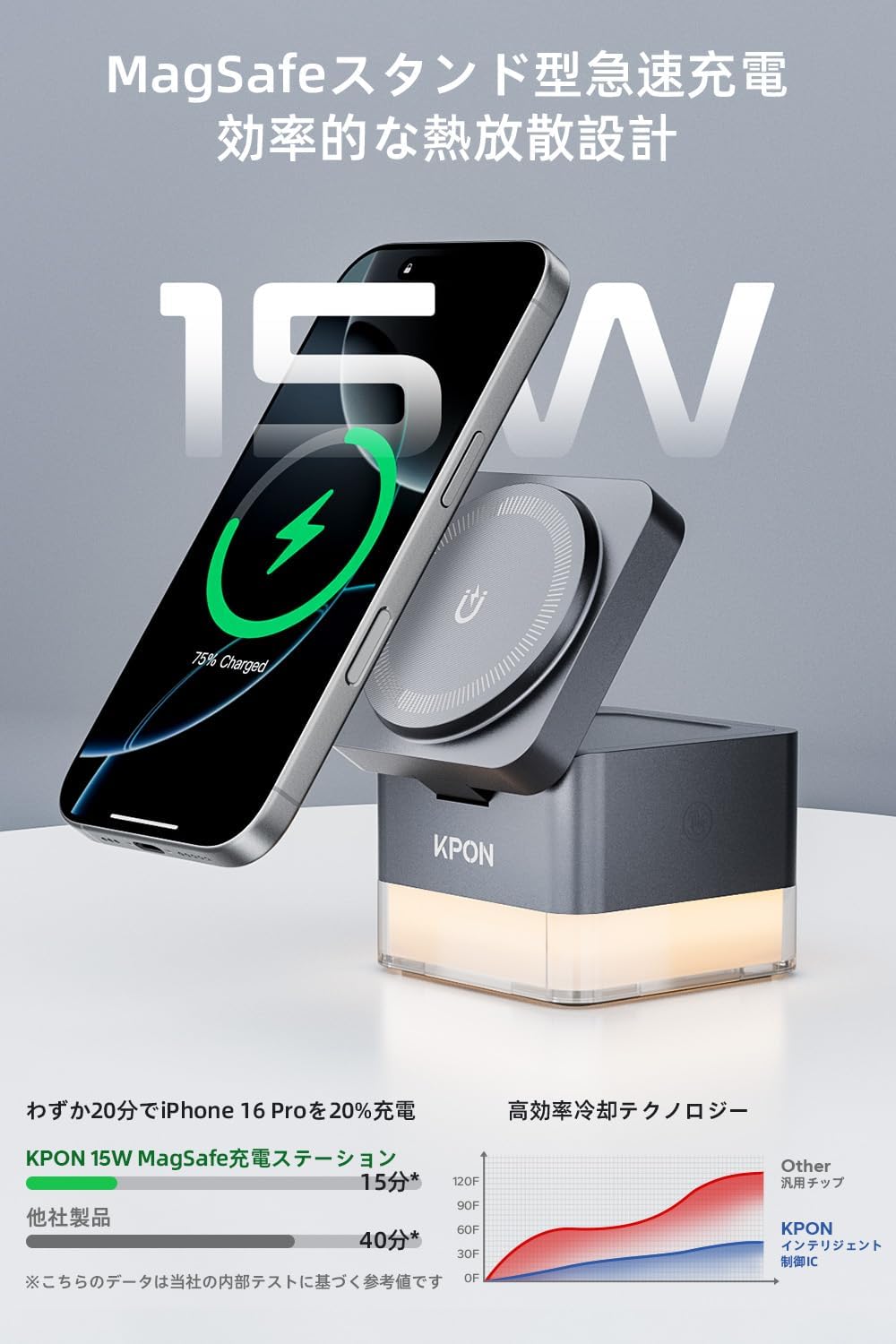
Image 4: An iPhone charging on the stand, highlighting its 15W fast charging capability and efficient heat dissipation design.

Image 5: Demonstrates the strong magnetic fixation for the iPhone, allowing stable charging in both vertical and horizontal positions.
Note: For optimal charging, ensure your iPhone case is MagSafe compatible and not excessively thick. Thick cases may hinder charging efficiency or cause temporary charging interruptions due to heat.
4.2. Night Light Function
The charging stand features an integrated night light at its base. To operate the night light:
- Turn On/Off: Gently touch the touch sensor located on the side of the stand to turn the light on or off.
- Adjust Brightness/Color: Continue touching the sensor to cycle through different brightness levels or color modes (warm light, 7-color RGB cycle mode).

Image 6: The charging stand with its night light feature activated, providing ambient illumination.
5. Compatibility
The KPON 3-in-1 Wireless Charger is compatible with:
- iPhone: iPhone 17/16/15/14/13/12 series (MagSafe compatible cases recommended).
- Apple Watch: Apple Watch Ultra 2-11/SE/Ultra/Ultra2 series. (Note: This product is only compatible with Apple Watch; it does not support Android OS smartwatches.)
- AirPods: AirPods 2-4/Pro2/Pro3 series (requires wireless charging case). The base wireless charging pad is also compatible with other Qi-enabled smartphones that do not support MagSafe.

Image 7: Visual representation of compatible Apple devices including various iPhone models, Apple Watch series, and AirPods.
6. Safety Information
The charger incorporates a high-performance chip for smart charging control, including automatic shutdown after full charge and overcharge protection. It also features foreign object detection and short-circuit prevention for enhanced safety during use.
7. Specifications
| Feature | Specification |
|---|---|
| Brand | KPON |
| Model Number | S6-G-JP |
| Color | Gray |
| Input Voltage | 5 Volts |
| Output Voltage | 15 Volts |
| Output Current | 3 Amperes |
| Wattage | 15 W (Max) |
| Total USB Ports | 1 |
| Product Dimensions | 10.9 x 10.8 x 8.8 cm |
| Product Weight | 351 g |
8. Troubleshooting
If you encounter issues with your charging stand, please refer to the following:
- Device not charging:
- Ensure the charging stand is properly connected to the 20W PD adapter and a working power outlet.
- Verify that your device is correctly aligned on its respective charging area.
- Remove any thick or non-MagSafe compatible cases from your iPhone.
- Confirm your AirPods case supports wireless charging.
- Check for any foreign objects between the charger and your device.
- Slow charging:
- Ensure you are using the included 20W PD adapter and charging cable. Lower wattage adapters may result in slower charging speeds.
- Charging multiple devices simultaneously may slightly reduce individual charging speeds compared to charging a single device.
- High temperatures can temporarily slow down charging. Ensure the charger is in a well-ventilated area.
- Night light not working:
- Ensure the charging stand is powered on.
- Gently touch the touch sensor to activate the light.
9. Maintenance
To maintain your KPON 3-in-1 Wireless Charger:
- Keep the device clean by wiping it with a soft, dry cloth.
- Avoid using abrasive cleaners or solvents.
- Do not expose the device to extreme temperatures or humidity.
10. Warranty and Support
KPON offers a 24-month warranty for this product. If any issues arise with the charger within the warranty period, please contact customer support for assistance. We provide new product exchanges, refunds, and usage guidance. Our dedicated support team is available 24/7 to ensure your satisfaction and trust.
For support, please visit our official website or contact us via the details provided in your product packaging.


