
1. Safety Instructions
Please read all safety instructions carefully before using the MERTTURM Planetarium Projector HN-201. Keep this manual for future reference.
- Indoor Use Only: This device is designed for indoor use. Do not expose it to rain or moisture. It is not waterproof.
- Power Source: Use only the provided USB Type-C cable and a compatible 5V power adapter. Ensure the power source meets the device's requirements.
- Avoid Direct Eye Exposure: Do not look directly into the projection lens when the device is operating, as the light source may cause eye strain.
- Ventilation: Ensure proper ventilation around the projector. Do not cover ventilation openings.
- Cleaning: Use the provided lens cleaning cloth to gently clean the lens. Do not use abrasive cleaners or solvents.
- Disassembly: Do not attempt to disassemble or modify the projector. This will void the warranty and may cause damage or injury.
- Children: Keep the device out of reach of small children to prevent accidental ingestion of small parts or misuse.
- Temperature: Operate and store the device within recommended temperature ranges. Avoid extreme heat or cold.
2. Product Overview
The MERTTURM Planetarium Projector HN-201 is a versatile device designed to project high-definition celestial scenes, provide soothing white noise, and function as a Bluetooth speaker. It comes with 8 interchangeable glass discs for diverse visual experiences.
Package Contents:
- MERTTURM Planetarium Projector HN-201
- USB Type-C Cable
- User Manual (this document)
- Lens Cleaning Cloth
- 8 HD Glass Projection Discs
Key Features:
- High-Definition Projection: Adjustable focus lens for clear, realistic images.
- 8 Glass Discs: Includes various themes like Saturn's Rings, Moon Landing, Lunar Galaxy, Marine World, Starry Galaxy, Forest & Starry Sky, Astronaut, and Clouds & Moon.
- 12 White Noises: Built-in soundscapes to aid relaxation and sleep.
- Sleep Timer: Automatic shut-off options (15/30/60 minutes).
- Bluetooth 5.0 Speaker: Connect your smartphone to play music.
- Portable Design: Compact and easy to move.
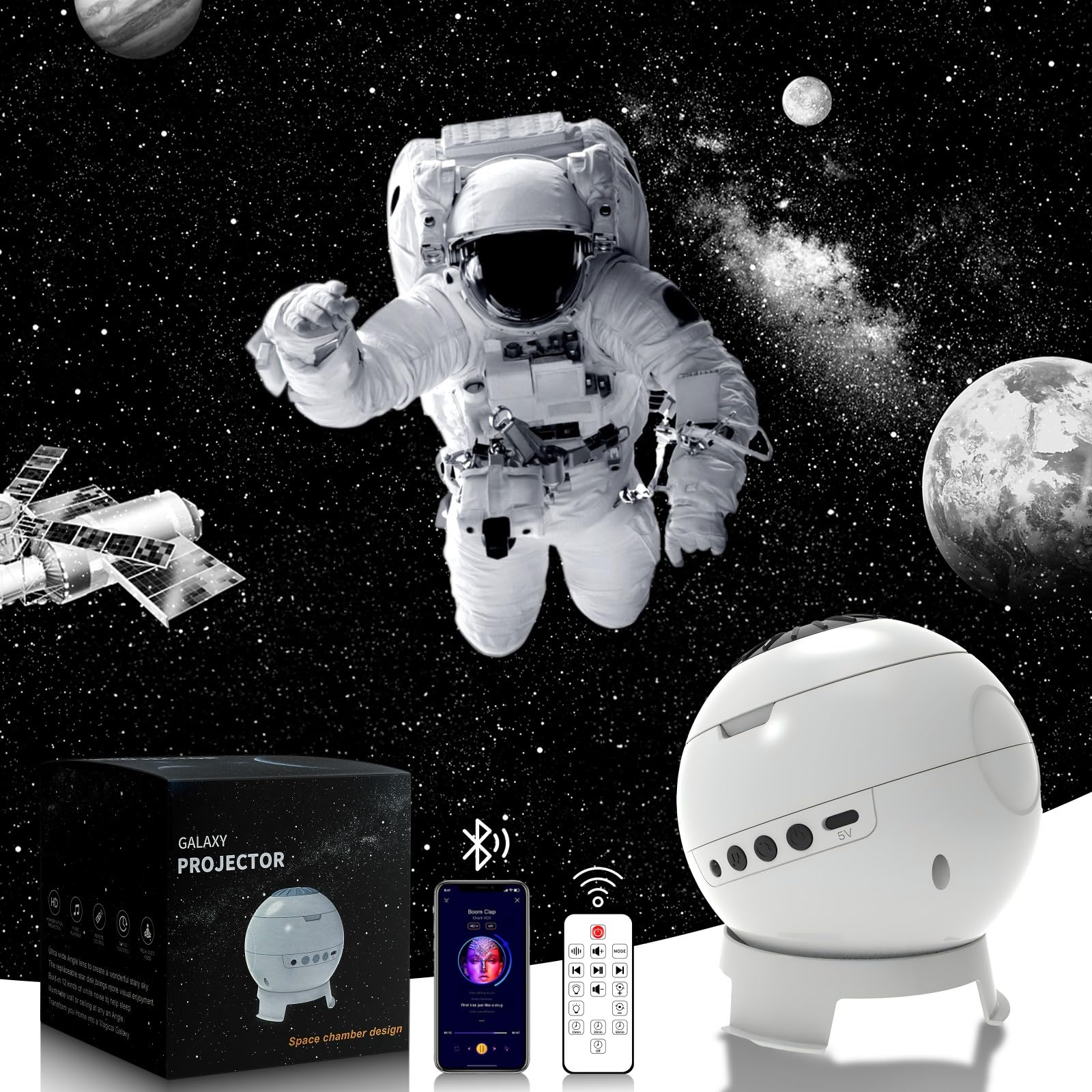
Figure 2.1: MERTTURM Planetarium Projector HN-201.
3. Setup
3.1 Power Connection
- Connect the provided USB Type-C cable to the power input port on the projector.
- Plug the other end of the USB cable into a compatible 5V USB power adapter (not included) or a USB port on a computer.
- The projector will power on automatically or can be turned on using the power button.
3.2 Inserting Projection Discs
- Gently open the disc tray on the top of the projector.
- Select one of the 8 HD glass projection discs.
- Insert the disc into the tray with the image facing downwards (towards the lens).
- Close the disc tray securely.

Figure 3.1: The projector displaying various cosmic scenes from the 8 included glass discs.
3.3 Adjusting Focus
To achieve a clear and sharp projection, adjust the focus manually:
- Place the projector on a stable surface, aiming it at a flat, light-colored wall or ceiling.
- Rotate the focus ring located around the projection lens until the image appears sharp and clear.
- The optimal projection distance is between 0.5 to 3 meters, covering an area of 12 to 24 square meters.

Figure 3.2: Illustration of focus adjustment for a clear projection.
4. Operation
4.1 Basic Controls
The projector features intuitive controls, either directly on the device or via a remote control (if included, refer to remote control section for details).
- Power Button: Press to turn the projector on or off.
- Projection Mode Button: Cycle through different projection effects (e.g., static, slow rotation).
- Brightness Adjustment: Increase or decrease the projection brightness.
- Rotation Speed: Adjust the speed of the projected image rotation.
4.2 Bluetooth Speaker Function
The projector includes a built-in Bluetooth 5.0 speaker for audio playback.
- Ensure the projector is powered on.
- On your smartphone or other Bluetooth-enabled device, search for Bluetooth devices.
- Select "HN-201" from the list of available devices to pair.
- Once paired, you can play audio through the projector's speaker. Adjust volume from your connected device.

Figure 4.1: Using the projector's Bluetooth 5.0 speaker function.
4.3 White Noise and Sleep Timer
The projector offers 12 white noise options and a sleep timer for a relaxing environment.
- White Noise Selection: Press the dedicated white noise button to cycle through the 12 different soundscapes.
- Timer Settings: Press the timer button to set the automatic shut-off duration to 15, 30, or 60 minutes. The projector will turn off automatically after the selected time.

Figure 4.2: The projector's white noise feature for relaxation.

Figure 4.3: Setting the 3-stage auto-off timer.
5. Maintenance
5.1 Cleaning the Lens and Discs
To maintain optimal projection quality, keep the lens and glass discs clean.
- Use the provided lens cleaning cloth to gently wipe the projection lens and the glass discs.
- Do not use liquid cleaners, abrasive materials, or harsh chemicals, as these can damage the lens or disc surfaces.
- Ensure the projector is turned off and unplugged before cleaning.
5.2 General Cleaning
Wipe the exterior of the projector with a soft, dry cloth. Avoid getting moisture into any openings.
5.3 Storage
When not in use for extended periods, store the projector in a cool, dry place, away from direct sunlight and extreme temperatures. Keep the glass discs in their protective packaging.
6. Troubleshooting
| Problem | Possible Cause | Solution |
|---|---|---|
| No power/Projector does not turn on. |
|
|
| Projected image is blurry. |
|
|
| Bluetooth speaker not connecting. |
|
|
| No sound from Bluetooth speaker. |
|
|
7. Specifications
| Feature | Detail |
|---|---|
| Model Number | HN-201 |
| Brand | MERTTURM |
| Dimensions (L x W x H) | 10 x 10 x 12.5 cm (3.94 x 3.94 x 4.92 inches) |
| Weight | 247.2 Grams (0.54 lbs) |
| Power Input | 5 Volts (USB Type-C) |
| Wattage | 5 Watts |
| Light Source Type | LED |
| Projection Discs | 8 HD Glass Discs |
| Connectivity | Bluetooth 5.0 |
| Special Features | Integrated speaker, automatic timer, HD images with manual focus, portable. |
| Recommended Use | Decoration, Night Light, Relaxation |
| Material | Acrylonitrile Butadiene Styrene (ABS), Glass |
| Waterproof | No |
8. Warranty & Support
MERTTURM products are manufactured to high-quality standards. For information regarding warranty coverage, please refer to the warranty card included with your purchase or contact the seller directly. Keep your proof of purchase for warranty claims.
For technical support or inquiries, please contact MERTTURM customer service or the retailer from whom you purchased the product.