
1. Important Safety Information
Please read all instructions carefully before assembly and use. Failure to follow these instructions may result in injury or damage to the product.
- Two-Person Assembly: Always assemble this unit with two people to prevent tip-over and ensure proper handling of components.
- Fireplace Clearance: Keep the electric fireplace insert at least 3 feet (0.9 meters) away from any combustible materials such as curtains, bedding, furniture, and other flammable items.
- Supervision: Never leave the electric fireplace unattended while in use.
- Unplug When Not in Use: Always unplug the electric fireplace when not in use or when leaving the room.
- Child and Pet Safety: Keep the fireplace out of reach of children and pets.
- Weight Limit: Do not place heavy objects directly on the fireplace insert or exceed the TV stand's stated weight capacity.
- Ventilation: Ensure proper ventilation around the fireplace unit. Do not block air vents.
- Power Source: Connect the fireplace to a properly grounded outlet. Do not use extension cords.
2. Package Contents
Your PRETZI Fireplace TV Stand is shipped in two separate packages, which may arrive on different days. Please ensure all parts are present before beginning assembly.
- TV Stand Panels (MDF and particle board components)
- 36" Electric Fireplace Insert
- LED Light Strip with Remote Control
- Stainless Steel Support Posts
- Mirrored Cabinet Doors
- Glass Shelves
- Assembly Hardware (screws, cam locks, dowels, hinges, etc.)
- Fireplace Remote Control
- User Manual / Assembly Instructions
3. Assembly Instructions
This section provides a general overview of the assembly process. Refer to the detailed step-by-step diagrams in the included paper manual for precise instructions. Two people are recommended for assembly.
3.1 Preparation
- Clear a spacious area for assembly.
- Unpack all components and separate them by type. Verify against the parts list in your paper manual.
- Gather necessary tools (screwdriver, hammer, drill recommended for efficiency).
3.2 Base and Frame Assembly
Begin by connecting the main base panels using the provided hardware. The assembly video demonstrates connecting the initial pieces and attaching the corner support brackets.

Image: The sturdy base of the TV stand with gold stainless steel support posts, ensuring stability.
3.3 Fireplace Installation
Carefully slide the 36-inch electric fireplace insert into its designated central compartment within the TV stand frame. Ensure all cables are accessible for connection.
3.4 Adding Shelves and Doors
Install the glass shelves into the side compartments. Attach the mirrored cabinet doors using the provided hinges. The doors feature a high-gloss finish.

Image: Detailed view of the TV stand's storage compartments, including glass shelves and cable management holes.
3.5 LED Light Strip Installation
Adhere the LED light strip along the designated areas, typically under the top shelf or within the open compartments, as indicated in the manual. Connect the power source.
3.6 Top Panel Placement
Secure the top panel of the TV stand. This panel features a special textured design for enhanced aesthetics.
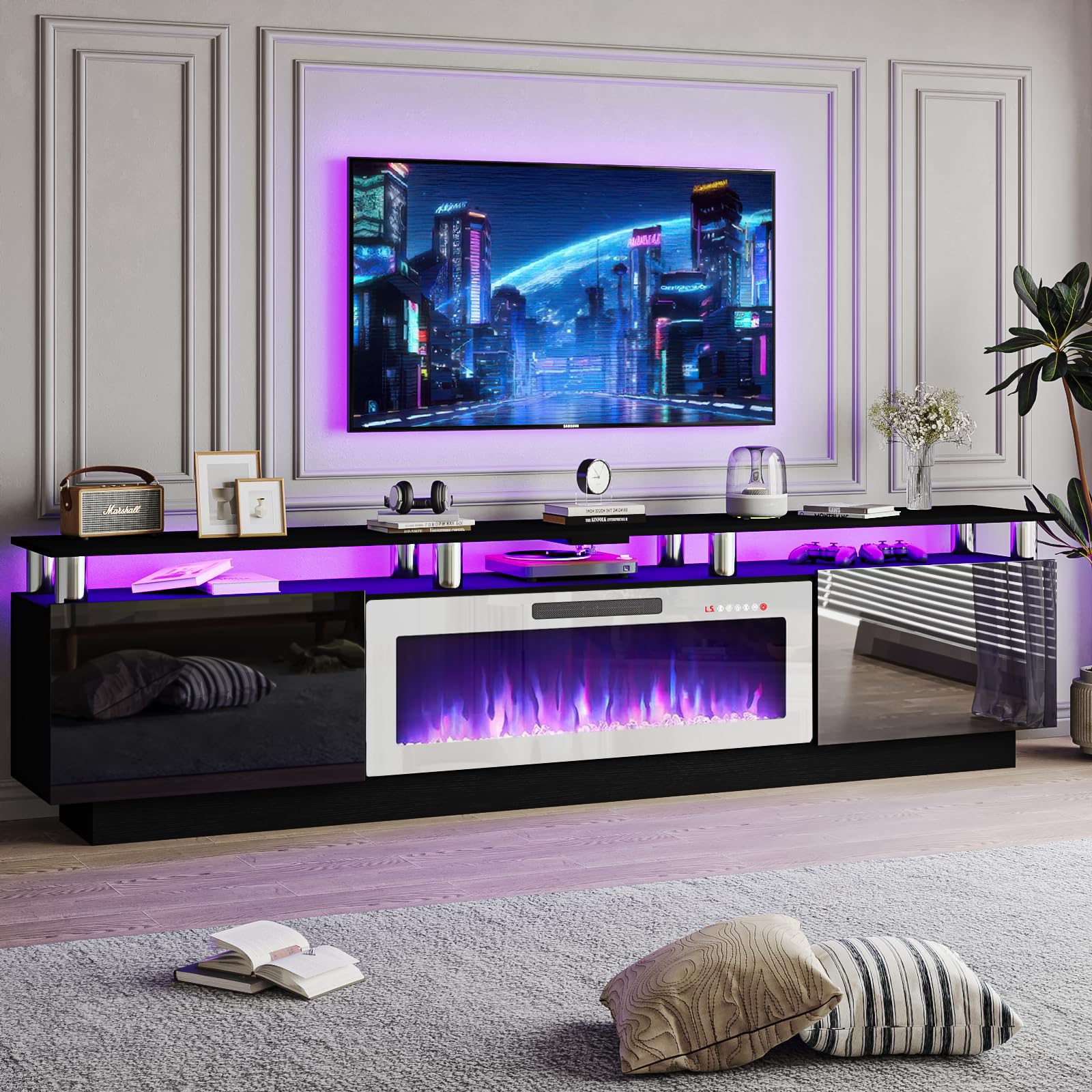
Image: The completed PRETZI 80-inch Modern Fireplace TV Stand, ready for use.
3.7 Assembly Video Guide
For a visual walkthrough of the assembly process, please refer to the official assembly video below. This video covers key steps and tips for successful setup.
Video: Official assembly guide for the PRETZI Fireplace TV Stand, demonstrating step-by-step construction from unboxing to final setup.
4. Operating Instructions
4.1 Electric Fireplace Operation
The electric fireplace can be operated using the control panel on the unit or the included remote control.
- Power On/Off: Press the power button on the unit or remote.
- Flame Effects: Choose from 12 realistic 3D flame effects to create a cozy ambiance. Adjust flame brightness (5 levels) as desired.
- Heat Settings: Select between 750W and 1500W heating modes for warmth and energy efficiency. The fireplace functions as a space heater.
- Timer Function: Set the operational timer for 1-8 hours. This is a safety feature to automatically turn off the unit.

Image: The electric fireplace control panel and remote, illustrating various settings for flame and heat.
4.2 LED Light Operation
The integrated LED lights are controlled via their dedicated remote control.
- Power On/Off: Use the remote to turn the LED lights on or off.
- Color Selection: Choose from 20 LED color combinations to personalize your viewing experience.
- Brightness Adjustment: Adjust the brightness of the LED lights to suit your preference.

Image: The TV stand with its LED lights activated, displaying a range of color options for customization.
5. Maintenance
Regular maintenance will ensure the longevity and optimal performance of your TV stand and fireplace.
- Cleaning: Wipe surfaces with a soft, damp cloth. Avoid harsh chemicals or abrasive cleaners that may damage the high-gloss finish or wood grain.
- Dusting: Regularly dust the unit, especially around the fireplace vents, to prevent dust buildup that could affect performance.
- Hardware Check: Periodically check all assembly hardware to ensure it remains tight. Retighten if necessary.
- Fireplace Inspection: Inspect the fireplace for any signs of damage or wear. If any issues are found, discontinue use and contact customer support.
6. Troubleshooting
If you encounter any issues with your PRETZI Fireplace TV Stand, please refer to the following common solutions:
- Fireplace Not Turning On: Ensure the unit is properly plugged into a working outlet. Check the power switch on the unit and the remote control batteries.
- No Heat Output: Verify that the heat setting is activated on the control panel or remote. Ensure vents are not obstructed.
- LED Lights Not Working: Check the power connection for the LED strip. Ensure the remote control batteries are functional and there are no obstructions between the remote and the receiver.
- Assembly Difficulties: Review the assembly video and paper manual carefully. Ensure all parts are correctly oriented and all hardware is used as specified. Contact customer support if you are stuck on a particular step.
7. Specifications
| Feature | Detail |
|---|---|
| Brand | PRETZI |
| Model Number | PB70-8COL-BLK |
| Color | Black + Silver Posts With White Fireplace |
| Size | 80 inches (supports TVs up to 90 inches) |
| Item Dimensions | 80" L x 14" W x 24" H (203.2cm L x 35.5cm W x 61cm H) |
| Item Weight | 76.7 Pounds |
| Material Type | Alloy Steel, Wood (MDF and fine wood grain particle board) |
| Style | Modern |
| Fireplace Size | 36 inches |
| Fireplace Heat Output | 750W / 1500W |
| Fireplace Features | Adjustable Flame (12 effects), Adjustable Thermostat, Dimmer, Multicolor Flame, 1-8 Hour Timer, Overheating Protection |
| LED Lights | 20 Color Combinations |
| Storage | Cabinets with mirrored doors, open shelves, cable management holes |
| Assembly Required | Yes |

Image: Detailed dimensions of the PRETZI 80-inch Fireplace TV Stand.
8. Warranty and Support
For any questions, concerns, or assistance with your PRETZI Fireplace TV Stand, please contact our customer support team. We offer 24-hour customer support to ensure your satisfaction.
Please refer to your purchase documentation for specific warranty details. Keep your proof of purchase for any warranty claims.