
1. Introduction
Thank you for choosing the FliteZone Bell 222 RC Helicopter with GPS. This model is a tribute to the classic "Airwolf" helicopter, featuring realistic details such as movable side doors, shock-absorbing landing gear, and cool light effects. Equipped with a high-quality remote control for bidirectional transmission and an intelligent flight control system, this model is suitable for both beginners and advanced users. This manual provides essential information for safe operation, setup, maintenance, and troubleshooting.
2. Safety Information
Important Safety Warnings:
- This product is not a toy.
- Not suitable for children under 14 years of age.
- Use only under direct adult supervision.
- Always operate the helicopter in open areas, away from people, animals, and obstacles.
- Ensure the battery is fully charged before each flight.
- Do not modify the helicopter or its components.
- Keep fingers and loose clothing away from rotating parts.
- In case of emergency, use the emergency motor switch immediately.
3. Package Contents
The FliteZone Bell 222 RC Helicopter package includes the following items:
- Assembled Helicopter
- High-quality Aluminum Carrying Case
- 2.4G Remote Control Transmitter (Mode 1/2 selectable)
- LiPo Battery (Smart Battery)
- Battery Charger
- User Manual
- Spare Rear Rotor Blades (black)

Image: The FliteZone Bell 222 RC Helicopter and its remote control neatly packed within the included aluminum carrying case, ready for transport and storage.
4. Product Overview
The FliteZone Bell 222 is equipped with advanced electronics and features to provide a stable and enjoyable flight experience.
- GPS System: Provides precise positioning and advanced flight functions.
- Dual Brushless Motors: Ensures powerful and efficient flight performance.
- Direct Drive: Enhances responsiveness and control.
- Smart LiPo Battery: Intelligent battery management for optimal performance and safety.
- 6G Flight Stabilization: Offers a fully stabilized mode, ideal for beginners.
- Optical Height Stabilizer & LIDAR Sensor: For precise altitude holding and stable hovering.
- Manually Programmable Flight Height: Allows customization of flight parameters.
- Geofencing: Limits the flight area for enhanced safety and control.
- Special Features: Movable side doors, shock-absorbing chassis, and cool light effects for a realistic appearance.
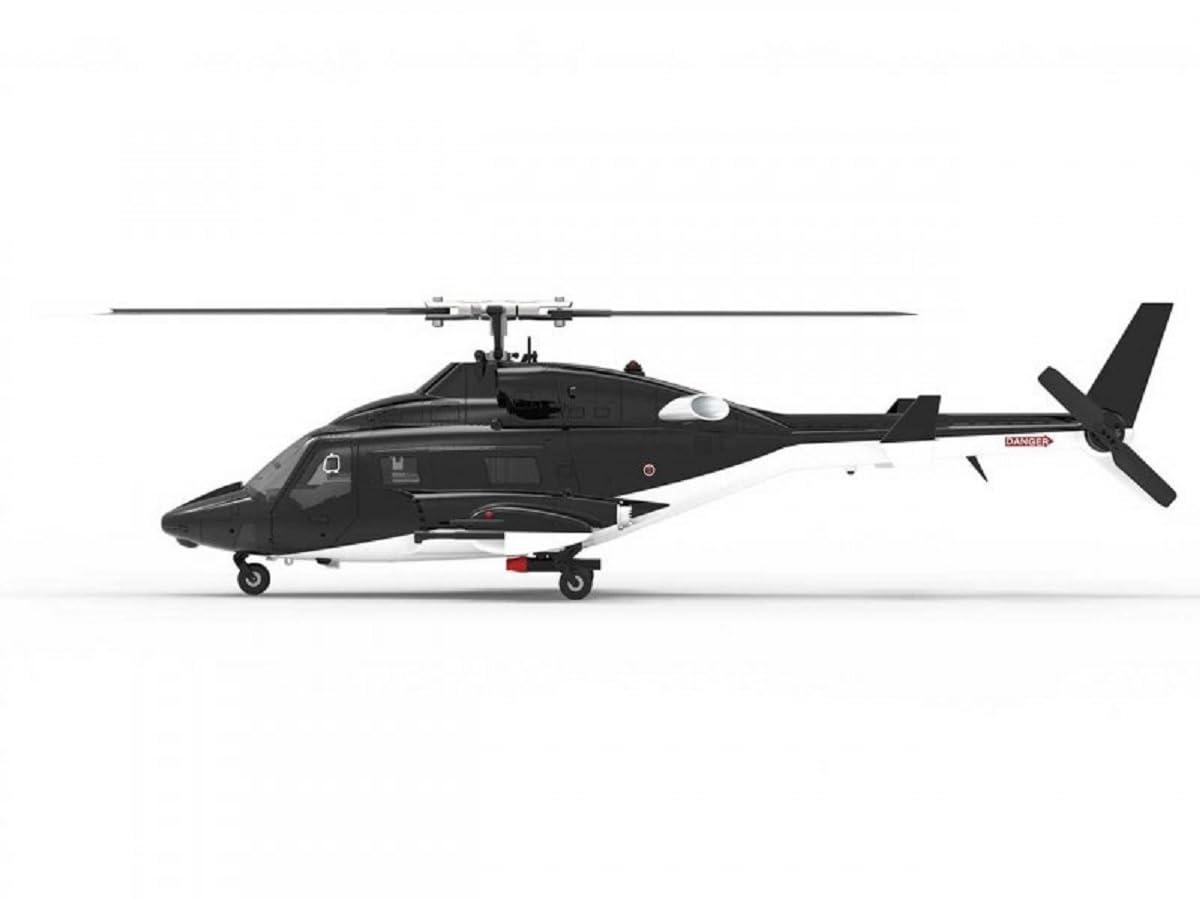
Image: A detailed side view of the FliteZone Bell 222 RC Helicopter, showcasing its sleek black and white design and intricate rotor system.

Image: A front-side perspective of the FliteZone Bell 222 RC Helicopter, emphasizing the detailed cockpit and robust landing gear.
5. Setup
5.1. Battery Charging
- Connect the provided charger to a suitable power source.
- Connect the Smart LiPo battery to the charger.
- Allow the battery to charge fully. The charger's indicator light will signal when charging is complete.
- Always supervise the charging process and disconnect the battery once fully charged.
5.2. Remote Control Setup
- Install the required batteries (not specified in JSON, assume standard AA/AAA) into the 2.4G remote control transmitter.
- Select your preferred operating mode (Mode 1 or Mode 2) if applicable, according to the transmitter's instructions.
- Ensure the transmitter is powered on before powering on the helicopter.
5.3. Initial Helicopter Checks
- Visually inspect the helicopter for any damage or loose parts.
- Ensure the main and tail rotor blades are securely attached and free to rotate.
- Connect the fully charged LiPo battery to the helicopter's power connector.
- Place the helicopter on a flat, level surface for initial calibration.

Image: The product packaging for the FliteZone Airwolf helicopter, illustrating key features and the included remote control, providing a visual guide to the system components.
6. Operating Instructions
6.1. Basic Flight (Stabilized Mode)
The 6G flight stabilization system makes the helicopter easy to control for beginners.
- Power on the helicopter, then the remote control. Wait for the binding process to complete (indicator lights will confirm).
- Ensure the helicopter is on a flat surface for GPS and stabilization system initialization.
- To take off, gently push the throttle stick upwards. The helicopter features a one-button take-off function for ease of use.
- Use the control sticks to maneuver the helicopter. Practice hovering at a low altitude first.
- To land, gently pull the throttle stick downwards, or use the one-button landing function.
6.2. Advanced Flight Modes and Functions
The Bell 222 offers several advanced flight capabilities:
- Automatic Circular Flight: Activate this function via a dedicated button on the remote control to make the helicopter fly in a perfect circle.
- Dynamic "8" Flight: Engage this mode for the helicopter to perform a dynamic figure-eight flight pattern.
- Backward Flight: Once basic controls are mastered, the helicopter is capable of flying backward.
- One-Button Return: Utilizes the GPS system to automatically return the helicopter to its take-off point.
- One-Button Landing: Initiates an automatic, controlled landing sequence.
- Automatic Return on Low Battery: The helicopter will automatically return to its take-off point when the battery level is critically low.
- Emergency Motor Switch: A safety feature to immediately cut power to the motors in an emergency.
- Failsafe Function: Provides a safety protocol in case of signal loss.
- Manual Mode: For advanced and professional users, this mode allows for gradually disabling electronic aids for more direct control.
- Geofencing: Set boundaries for the flight area to prevent the helicopter from flying too far or into restricted zones.
7. Maintenance
Regular maintenance ensures the longevity and optimal performance of your helicopter.
- Cleaning: After each flight, gently clean the helicopter body and rotor blades with a soft, dry cloth. Avoid using water or chemical cleaners.
- Rotor Blades: Inspect main and tail rotor blades for any cracks, bends, or damage. Replace damaged blades immediately using the provided spare rear rotor blades or genuine replacements.
- Battery Care: Store the LiPo battery in a cool, dry place, away from direct sunlight and extreme temperatures. Do not overcharge or over-discharge the battery.
- Storage: When not in use, store the helicopter and remote control in the high-quality aluminum carrying case to protect them from dust and damage.
8. Troubleshooting
If you encounter issues with your FliteZone Bell 222, refer to the following common problems and solutions:
| Problem | Possible Cause | Solution |
|---|---|---|
| Helicopter does not respond to remote control. | Not bound, low battery in remote or helicopter, interference. | Ensure remote and helicopter are powered on and bound. Check and charge batteries. Fly in an area with less interference. |
| Helicopter drifts during flight. | Improper calibration, wind, damaged rotor blades. | Perform a fresh calibration on a flat surface. Avoid flying in strong winds. Inspect and replace damaged rotor blades. |
| Short flight time. | Battery not fully charged, aging battery. | Ensure battery is fully charged before each flight. Consider replacing an old battery. |
| Helicopter crashes or loses control. | Pilot error, signal loss, mechanical failure. | Practice in open areas. Check for signal interference. Inspect for mechanical damage. Use the emergency motor switch if necessary. |
9. Specifications
Technical specifications for the FliteZone Bell 222 RC Helicopter:
| Feature | Detail |
|---|---|
| Model Name | Bell 222 GPS (Airwolf) |
| Model Number | 16500 |
| Brand | RC Toys Pleyer (FliteZone) |
| Length | 415 mm |
| Height | 118 mm |
| Weight | ~310 g |
| Main Rotor Diameter | 375 mm |
| Tail Rotor Diameter | 70 mm |
| Drive Motor | BL2511 Brushless Motor |
| Tail Motor | BL1204 Brushless Motor |
| Battery | 1200 mAh, 7.4 V LiPo 25C (Smart Battery) |
| Flight Time | Maximum 10-12 minutes |
| Material | Plastic |
| Color | Black |
| Age Recommendation | 14 years and up |
| Special Features | Light effects, backward flight, automatic return, emergency switch, GPS, 6G stabilization, optical height stabilizer, LIDAR sensor, geofencing. |
10. Warranty and Support
For warranty information, technical support, or replacement parts, please contact the manufacturer or your retailer.
Manufacturer: RC Toys Pleyer
For additional resources, you may visit the FliteZone website: www.flitezone.de
Product UPC/EAN: 4056534069514