
1. Product Overview
The LEFANT M2 Pro is an advanced robot vacuum and mop designed to provide efficient and comprehensive floor cleaning. It features dToF laser navigation for precise mapping, powerful 6000Pa suction, and a smart 2-in-1 sweeping and mopping function. The device also includes an automatic dust collection station for hands-free maintenance and can be controlled via a dedicated app or voice commands.
Key Features:
- dToF Laser Navigation & PSD Obstacle Avoidance: Maps your home with high precision and detects obstacles in real-time.
- 6000Pa Suction Power: Effectively removes dust, pet hair, debris, and crumbs from various surfaces.
- 2-in-1 Sweeping and Mopping: Cleans and mops simultaneously with an electronic water tank for adjustable flow.
- Customized Cleaning & Multi-Floor Mapping: Create up to 3 floor maps, set no-go zones, and customize cleaning schedules via the app.
- 2.5L Automatic Dust Emptying Station: Provides up to 90 days of hands-free dust collection.
- Smart App & Voice Control: Compatible with Alexa, Google Home, and the Lefant app for convenient control.
2. Package Contents
Before setup, ensure all items are present in the package:
- Robot Vacuum Cleaner x 1
- Automatic Emptying Station x 1
- Mop Holder x 1
- Power Cable x 1
- User Manual x 1
- Dust Bags x 2
- Washable Mop Cloth x 1
- HEPA Filter x 4
- Dry Mop Cloth x 1
- Cleaning Tool x 1
- Side Brush x 2
- Filter Sponge for Dustbin x 2

3. Setup Guide
3.1 Initial Placement and Charging
- Place the automatic emptying station against a wall in an open area, ensuring there are no obstacles within 1 meter to either side and 1.5 meters in front.
- Connect the power cable to the station and plug it into a power outlet.
- Place the robot onto the charging contacts of the station to begin initial charging. Ensure the robot is fully charged before its first use.
3.2 Connecting to the Lefant App
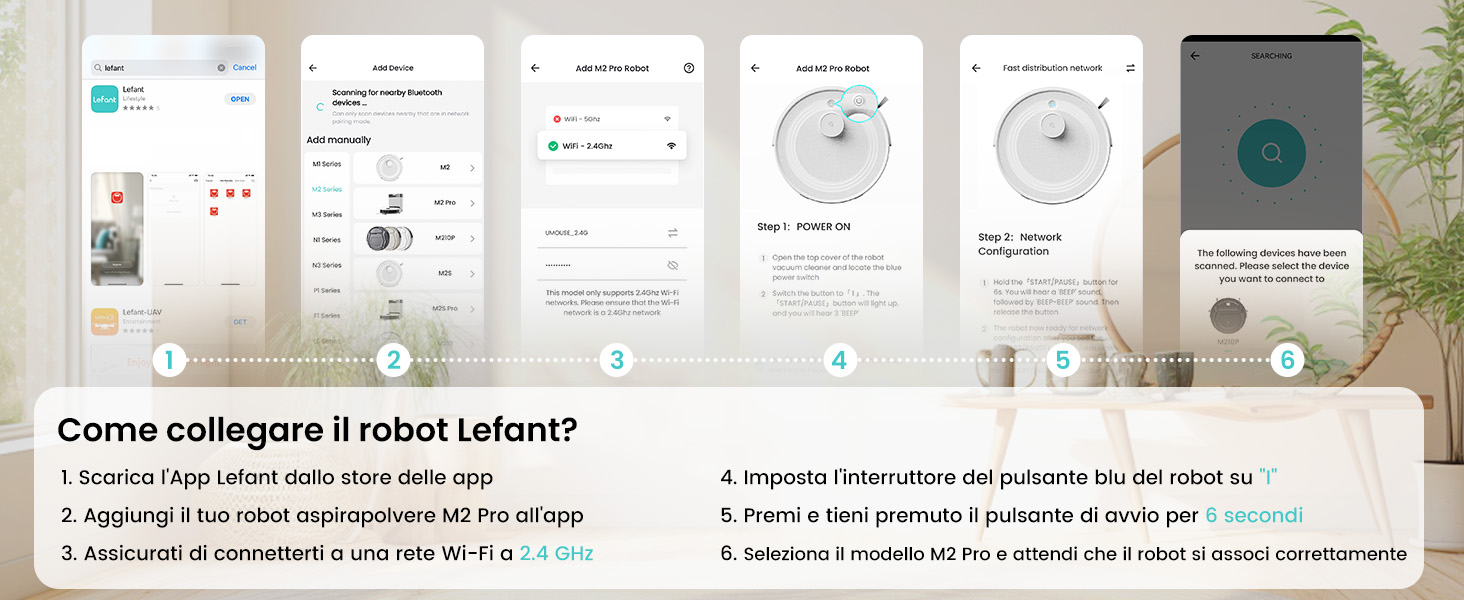
The Lefant app allows for full control and customization of your robot vacuum. Follow these steps to connect:
- Download the 'Lefant' app from your mobile device's app store (App Store for iOS or Google Play Store for Android).
- Open the app and register or log in to your account.
- Add your M2 Pro robot vacuum to the app by following the on-screen instructions.
- Ensure your mobile device is connected to a 2.4 GHz Wi-Fi network. The robot only supports 2.4 GHz Wi-Fi.
- Turn on the robot by setting the blue power button to 'I'.
- Press and hold the start button on the robot for 6 seconds until you hear a voice prompt indicating network configuration mode.
- Select the M2 Pro model in the app and wait for the robot to pair successfully.

3.3 Connecting to Voice Assistants (Alexa/Google Home)
For hands-free control, integrate your M2 Pro with Amazon Alexa or Google Home:
- Open the Lefant App. Navigate to Profile > Third-party assistance for voice commands.
- Register your voice account and password within the Lefant app.
- Open the Alexa App (or Google Home App). Go to 'More' > 'Skills & Games' (or 'Works with Google').
- Search for 'Smart Life'.
- Click 'Enable to Use'.
- Select your region and enter the voice account and password from step 2.
- Wait for the connection to complete. You can now use voice commands like "Alexa, ask robot to clean."
4. Operating Instructions
4.1 Cleaning Modes
The M2 Pro offers various cleaning modes to suit your needs:
- Automatic Cleaning: The robot intelligently navigates and cleans your entire home.
- Spot Cleaning: Focuses on a specific dirty area for intensive cleaning.
- Edge Cleaning: Cleans along walls and furniture edges.
- Scheduled Cleaning: Set specific times for the robot to clean automatically.
- Zone Cleaning: Define specific rooms or areas to be cleaned.

4.2 App Control
The Lefant app provides comprehensive control over your M2 Pro:
- Start/Pause Cleaning: Initiate or stop cleaning cycles.
- Adjust Suction Power: Choose from multiple suction levels (Low, Medium, High).
- Adjust Water Flow: Control the water output for mopping (Low, Medium, High).
- Set No-Go Zones: Define areas the robot should avoid.
- View Cleaning Map: Monitor the robot's progress and cleaned areas in real-time.
- Schedule Cleaning: Program daily or weekly cleaning tasks.
- Multi-Floor Mapping: Store maps for up to 3 different floors.

4.3 Voice Control
Once connected to Alexa or Google Home, use simple voice commands:
- "Alexa, ask robot to clean."
- "Alexa, ask robot to recharge."
- "Alexa, ask robot to stop cleaning."

5. Maintenance
5.1 Automatic Dust Emptying
The M2 Pro's automatic emptying station collects dust for up to 90 days, minimizing manual intervention. The station uses 2.5L dust bags for hygienic disposal.

5.2 Dustbin and Filter Cleaning
While the automatic station handles most dust, regular inspection and cleaning of the robot's internal dustbin and filters are recommended to maintain optimal performance. The M2 Pro's improved dustbin design ensures 98% debris removal during emptying.

5.3 Mop Cloth and Side Brush Maintenance
- Remove and clean the washable mop cloth after each mopping session.
- Regularly check the side brushes for tangled hair or debris and clean or replace them as needed.
6. Troubleshooting
If you encounter issues with your LEFANT M2 Pro, refer to the following common problems and solutions:
| Problem | Possible Cause | Solution |
|---|---|---|
| Robot does not start or respond. | Low battery; Power switch off; Robot stuck. | Ensure robot is charged; Check power switch; Clear any obstructions. |
| Poor cleaning performance. | Full dustbin; Clogged filters; Worn brushes. | Empty dustbin; Clean/replace filters; Clean/replace brushes. |
| Robot gets stuck frequently. | Obstacles (cables, small items); Uneven surfaces. | Clear floor of obstacles; Use no-go zones for problematic areas. |
| Cannot connect to Wi-Fi/App. | Incorrect Wi-Fi band (not 2.4GHz); Incorrect password; Robot not in pairing mode. | Ensure 2.4GHz Wi-Fi; Verify password; Re-enter pairing mode (hold start button for 6s). |
| Automatic emptying not working. | Dust bag full; Obstruction in emptying duct. | Replace dust bag; Check and clear emptying duct. |
For more detailed troubleshooting, refer to the full user manual or contact customer support.
7. Specifications
| Feature | Detail |
|---|---|
| Brand | LEFANT |
| Model Name | M2 Pro |
| Color | M2 Pro-black |
| Product Dimensions | 32 x 32 x 9.4 cm |
| Item Weight | 6.24 Kilograms |
| Dustbin Capacity | 2.5 Liters (Auto-empty station) |
| Voltage | 19 Volts |
| Material | Plastic |
| Special Features | Smart Mapping, dToF Laser Navigation, PSD Obstacle Avoidance, Carpet Boost, App/Voice Control |
| Compatible Devices | Smartphone (2.4GHz Wi-Fi), Alexa, Google Home |
| Recommended Surfaces | Hard floor, Carpet, Parquet, Tiles |
| Max Runtime | 140 minutes |
8. Warranty and Support
LEFANT products are designed for reliability and performance. For warranty information, please refer to the documentation included with your product or visit the official LEFANT website. If you require technical assistance, have questions about your product, or need to report an issue, please contact LEFANT customer support through the following channels:
- Lefant App: Access support features directly within the application.
- Official Website: Visit www.lefant.com for FAQs, troubleshooting guides, and contact information.
- Email Support: Refer to your product packaging or the official website for the dedicated support email address.
Please have your product model number (M2 Pro) and purchase details ready when contacting support to ensure efficient service.


