
1. Introduction
The HAXIAOER MIG200 is a versatile 6-in-1 multi-process welding machine designed for a wide range of welding applications. It supports Gas MIG, Gasless MIG, Lift TIG, MMA (Manual Metal Arc), Spot Welding, and Pulsed MIG. This welder is suitable for various materials including aluminum, steel, stainless steel, titanium, magnesium, and copper, making it an ideal solution for DIY enthusiasts, automotive workshops, and metal fabrication shops.
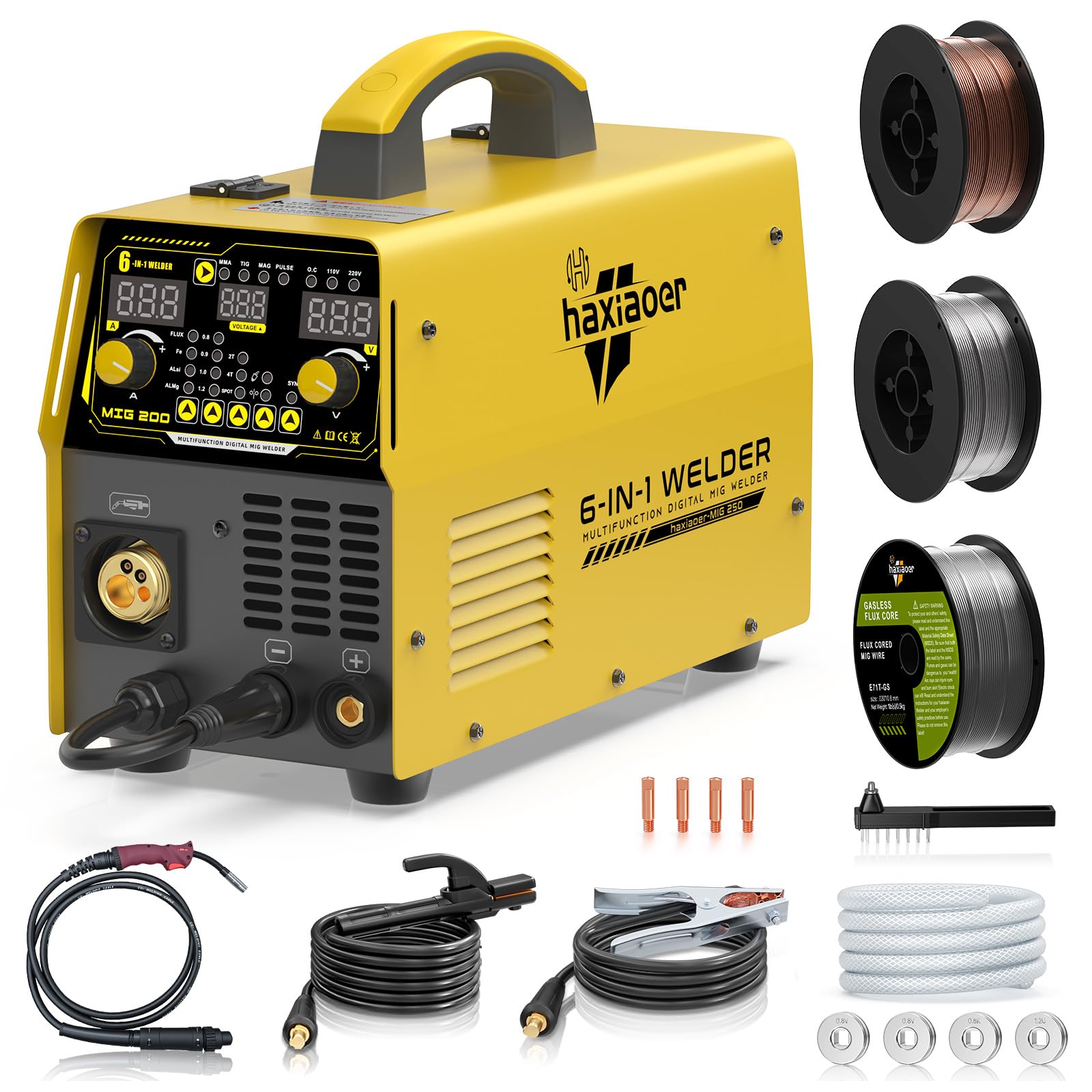
Image 1.1: HAXIAOER MIG200 6-in-1 Multi-Process Welder overview.

Image 1.2: Visual representation of the 6 welding processes supported by the MIG200.
2. Safety Information
Always prioritize safety when operating welding equipment. Failure to follow safety guidelines can result in serious injury or death.
- Personal Protective Equipment (PPE): Always wear a welding helmet with appropriate shade, flame-resistant clothing, welding gloves, and safety shoes. Protect bystanders with welding screens.
- Ventilation: Ensure adequate ventilation to remove welding fumes, which can be hazardous to health.
- Fire Prevention: Keep a fire extinguisher nearby. Remove all flammable materials from the welding area. Be aware of hot metal and sparks.
- Electrical Safety: Ensure the welding machine is properly grounded. Do not operate in wet conditions. Inspect cables and connections for damage before each use. The MIG200 features an integrated protection system against overheating, overload, and overvoltage, and has an IP21 protection rating, but proper electrical safety practices are still paramount.
- Arc Rays: Welding arcs produce intense visible and invisible (UV and IR) rays that can burn eyes and skin. Never look at the arc without proper eye protection.
- Fumes and Gases: Welding fumes and gases can be dangerous to your health. Keep your head out of the fumes. Use forced ventilation or local exhaust to remove fumes and gases from your breathing zone and the general area.
- Hot Parts: Allow welded materials and equipment to cool before handling.
3. Package Contents
Carefully unpack the box and verify that all items listed below are present and undamaged. If any items are missing or damaged, contact your retailer immediately.
- 1 x HAXIAOER MIG200 Welder
- 2 x MB15 MIG Torches (3m length)
- 3 x 0.5kg Welding Wire Spools (1.0mm Aluminum, Flux-cored, and Solid Wire)
- 1 x Graphite Liner
- 5 x Contact Tips (0.8/0.9/1.0mm standard, 1.0/1.2mm aluminum)
- 4 x Drive Wheels (0.8/0.9mm knurled, 0.8/1.0mm knurled, 0.8/1.0mm V-groove, 1.0/1.2mm U-groove)
- 1 x Ground Clamp Cable (1.8m)
- 1 x Electrode Holder Cable (1.8m)
- 1 x Gas Tube (2m)
- 1 x Instruction Manual

Image 3.1: All included accessories with the HAXIAOER MIG200 Welder.
4. Product Features
- Multi-Process Capability: Supports Gas MIG, Gasless MIG (Flux-cored), Pulsed MIG (for precise aluminum and thin metal welding), MMA, Lift TIG, and Spot Welding.
- Advanced Pulsed MIG Technology: Features intelligent ALSi/ALMg modes to prevent wire jamming, burnout, and excessive spatter, especially beneficial for aluminum welding.
- Flexible Torch Design: The burner includes a flexible swivel joint, allowing for comfortable welding at various angles.
- Synergic Mode: An intuitive mode for beginners that automatically suggests optimal voltage and wire feed speed based on selected material and wire type.
- Manual Mode: Provides full control over all welding parameters for experienced users requiring precise adjustments.
- IGBT Inverter Technology: Ensures stable arc performance and efficient power usage.
- Robust Safety Features: Built-in protection against overheating, overload, and overvoltage. Features forced air cooling and an IP21 protection rating for durability and safe operation.
- Wide Material Compatibility: Capable of welding aluminum, steel, stainless steel, titanium, magnesium, and copper.
- Thickness Capacity: Can weld sheets up to 14.0 mm thick.

Image 4.1: Examples of metals that can be welded with the MIG200, including ferroalloy, cast iron, aluminum, carbon steel, sheet metal, stainless steel, and copper.
5. Setup
Before operating the welder, ensure it is properly set up according to these instructions.
- Placement: Place the welder on a stable, level surface in a well-ventilated area, away from flammable materials.
- Power Connection: Connect the welder to a suitable AC power supply. Ensure the power outlet matches the welder's voltage requirements (230V).
- Ground Clamp Connection: Attach the ground clamp cable to the designated terminal on the welder. Securely attach the ground clamp to the workpiece or welding table, ensuring good electrical contact.
- Torch Connection: Connect the MIG torch to the appropriate connector on the front panel of the welder. For MMA, connect the electrode holder cable. For Lift TIG, connect the TIG torch (not included in standard package, but compatible).
- Wire Spool Installation:
- Open the wire spool compartment.
- Mount the appropriate wire spool (aluminum, flux-cored, or solid wire) onto the spindle.
- Thread the wire through the wire feed mechanism, ensuring it passes through the correct drive wheel groove for the wire diameter.
- Close the compartment and adjust the wire tension.
- Drive Wheel Selection: Select the correct drive wheel for your wire type and diameter. The package includes various drive wheels (knurled for flux-cored, V-groove for solid, U-groove for aluminum).
- Gas Connection (for Gas MIG/Pulsed MIG): If performing Gas MIG or Pulsed MIG welding, connect the gas tube to the gas inlet on the welder and to your shielding gas cylinder (e.g., Argon for aluminum, Argon/CO2 mix for steel). Ensure the gas regulator is properly installed and set to the recommended flow rate.
- Contact Tip Selection: Install the correct contact tip size (e.g., 1.0mm for 1.0mm wire) into the MIG torch. For aluminum, use the specific aluminum contact tips.

Image 5.1: Internal wire conveyor structure showing wire spool and drive wheels.
6. Operating Instructions
The HAXIAOER MIG200 features a user-friendly digital control panel.

Image 6.1: Digital control panel of the HAXIAOER MIG200.
- Power On: Turn on the main power switch located on the rear of the machine. The digital display will illuminate.
- Select Welding Mode: Press the "SYN" button (or mode selection button) to cycle through the available welding processes: MIG (Gas/Gasless), TIG, MMA, PULSE, SPOT.
- Choose Welding Material/Gas: Depending on the selected mode, choose the appropriate material (e.g., Fe for steel, ALSi/ALMg for aluminum) and gas type (if applicable).
- Select Wire Diameter: Set the wire diameter to match the installed welding wire.
- Adjust Current/Voltage:
- Synergic Mode: If using Synergic mode, the machine will automatically suggest optimal voltage and wire feed speed based on your material and wire selections. You can fine-tune these settings with the adjustment knobs.
- Manual Mode: For full control, switch to manual mode and adjust the current (Amperage) and voltage independently using the dedicated knobs.
- Perform a Test Weld: Before welding on your final workpiece, perform a test weld on scrap material to verify settings and ensure proper arc stability and penetration.

Image 6.2: Synergic mode workflow for beginners, showing steps to choose process, material, wire diameter, and adjust current.
6.1 Specific Welding Processes
- Gas MIG/Pulsed MIG: Requires shielding gas. Ideal for clean welds on steel, stainless steel, and aluminum (Pulsed MIG for aluminum).
- Gasless MIG (Flux-cored): Uses flux-cored wire, which produces its own shielding gas. Suitable for outdoor welding or when gas cylinders are inconvenient.
- MMA (Stick Welding): Connect the electrode holder and ground clamp. Select MMA mode. Use appropriate electrodes for your material.
- Lift TIG: Connect a TIG torch (with gas if needed) and ground clamp. Select TIG mode. Initiate arc by touching the tungsten electrode to the workpiece and lifting slightly.
- Spot Welding: Select Spot mode. Follow specific instructions for spot welding attachments and techniques.
7. Maintenance
Regular maintenance ensures the longevity and optimal performance of your HAXIAOER MIG200 welder.
- Cleaning: Regularly clean the exterior of the machine with a dry, soft cloth. Use compressed air to blow out dust and debris from the ventilation openings. Ensure the machine is unplugged before cleaning.
- Wire Feed Mechanism: Inspect the drive rollers for wear and tear. Clean any wire shavings or debris from the wire feed path. Ensure the wire tension is correctly set.
- Torch and Consumables:
- Regularly check and clean the MIG torch nozzle for spatter. Replace if heavily worn or damaged.
- Inspect contact tips for wear. Replace them when the opening becomes enlarged or misshapen, as this affects arc stability.
- Check the torch liner for blockages or damage. Replace if wire feeding becomes inconsistent.
- Cables and Connections: Periodically inspect all welding cables (ground, electrode, torch) for cuts, abrasions, or loose connections. Replace damaged cables immediately.
- Storage: Store the welder in a dry, clean environment when not in use.
8. Troubleshooting
This section provides solutions to common issues you might encounter. For problems not listed here, contact customer support.
| Problem | Possible Cause | Solution |
|---|---|---|
| No power to the machine | Power switch off, power cord unplugged, circuit breaker tripped, faulty power outlet. | Ensure power switch is ON. Check power cord connection. Reset circuit breaker. Test power outlet. |
| No arc / Weak arc | Poor ground connection, incorrect welding settings, worn contact tip, wrong wire feed speed, machine in protection mode. | Clean and secure ground clamp. Adjust current/voltage. Replace contact tip. Check wire feed speed. Allow machine to cool if overheated. |
| Wire jamming / Inconsistent wire feed | Incorrect drive roller tension, wrong drive roller type, bent torch liner, spatter in nozzle/tip, wire spool tangled. | Adjust drive roller tension. Ensure correct drive roller for wire type/diameter. Inspect and replace torch liner. Clean nozzle/tip. Untangle wire spool. |
| Excessive spatter | Incorrect voltage/wire feed speed, wrong gas flow, dirty workpiece, incorrect stick-out. | Adjust welding parameters. Check gas flow rate. Clean workpiece. Adjust wire stick-out. |
| Overheating protection activated | Exceeded duty cycle, poor ventilation, blocked air vents. | Allow machine to cool down. Ensure adequate ventilation. Clear any obstructions from air vents. |
9. Specifications
| Feature | Detail |
|---|---|
| Model Number | MIG200 |
| Manufacturer | haxiaoer |
| Dimensions (L x W x H) | 48 x 35.3 x 33.1 cm |
| Item Weight | 14.52 kg |
| Power Type | AC |
| Protection Rating | IP21 |
| Max Welding Thickness | Up to 14.0 mm |
| Included Components | 1x MIG200 Welder, 2x MB15 MIG Torches (3m), 3x 0.5kg Welding Wire Spools (Aluminum, Flux-cored, Solid), 1x Graphite Liner, 5x Contact Tips, 4x Drive Wheels, 1x Ground Clamp Cable (1.8m), 1x Electrode Holder Cable (1.8m), 1x Gas Tube (2m), 1x Instruction Manual. |
10. Warranty and Support
For information regarding warranty coverage, technical support, or service, please refer to the warranty card included with your product or visit the official HAXIAOER website. You may also contact your retailer for assistance.
Manufacturer: haxiaoer
Model: MIG200