
Introduction
The KOQICALL Queue Wireless Calling System is designed to streamline customer flow and improve service efficiency in various environments such as banks, hospitals, and post offices. This system features a Spanish LED display, waterproof 'NEXT' call buttons, and a red ticket dispenser stand. It allows for real-time display and broadcast of the next number to be served, helping customers understand their turn and estimated wait times.
Key features include:
- Power-off Memory: Retains the last called number and resumes counting from the next number upon power restoration.
- Adjustable Number Range: Allows setting custom start and end numbers for the queue, supporting up to 999 numbers.
- Quick Number Reset: Easily resets the current number to the preset starting value using a button combination or remote control.
- Customizable Display: Adjustable voice mode, volume, number of prompts, and LED number color. Default voice is "Ding-dong + Por favor número XXX ir al mostrador XX".
- Waterproof Call Buttons: 'NEXT' call buttons are designed for counter staff to efficiently call the next customer.
- Manual Ticket Dispenser: Provides numbered tickets from 000 to 999, with 2000 tickets per roll.

Image: The KOQICALL Queue Wireless Calling System in various service environments, demonstrating how different counters can call customers in turn.
Setup
1. Ticket Dispenser Assembly and Ticket Loading
The red ticket dispenser stand guides customers to take a number. It comes with a roll of paper tickets numbered from 000 to 999.
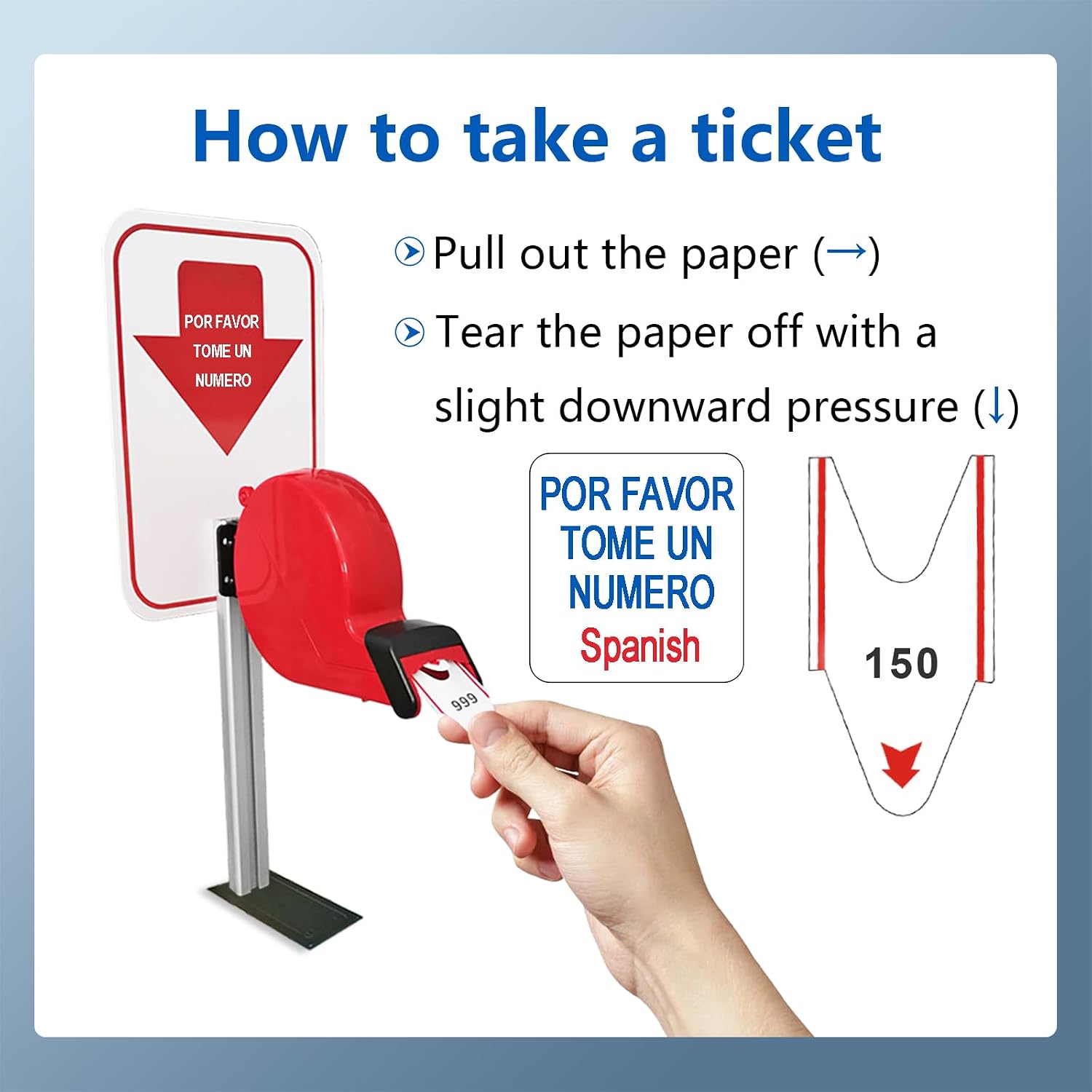
Image: Instructions on how to take a ticket from the dispenser: pull the paper out and tear it off with a slight downward pressure.
To take a ticket:
- Pull out the paper from the dispenser.
- Tear the paper off with a slight downward pressure.
2. Display Receiver Placement
The display receiver can be mounted on a wall or placed on a desktop for optimal visibility to customers.
3. Connecting Call Buttons
Place the waterproof 'NEXT' call buttons at each counter or service window where staff will be calling customers.
4. Initial Power-On
Connect the display receiver to a power source. The system will power on and be ready for initial configuration or operation.
Video: Demonstrates how to take a number from the red ticket dispenser with a stand. This video shows the physical action of pulling and tearing a ticket.
Operating Instructions
1. Calling the Next Customer
To call the next customer, simply press the 'NEXT' button on the waterproof transmitter. The display will automatically show and announce the next sequential number.

Image: A visual guide to the calling process, from a customer taking a ticket to staff pressing the 'NEXT' button and the display showing the called number and counter.
2. Power-off Memory Function
This system includes a power-off memory function. When activated, the last number called (e.g., 005) is stored. Upon reconnection of power, the system will automatically start calling from the next number (e.g., 006). This ensures continuity in queue management.
3. Setting Start and End Numbers
The system can store up to 999 numbers. By default, numbers are displayed sequentially from 001 to 999. You can configure the display to limit the call range, for example, from 50 to 100. Refer to the detailed settings menu in the display unit for specific instructions on how to adjust these parameters.
4. Quickly Resetting the Number
To quickly reset the current number to the preset starting value (e.g., 001), press the up and down keys on the display simultaneously. This function can also be performed using the remote control.
5. Display Settings (Voice, Volume, Prompts, LED Color)
The display receiver allows for adjustments to:
- Voice Mode: The default voice is "Ding-dong + Por favor número XXX ir al mostrador XX". An option for a "Ding-dong" sound only (without number broadcast) is available.
- Volume: Adjust the announcement volume to suit the environment.
- Number of Prompts: Configure how many times a number is announced.
- LED Number Color: Customize the color of the displayed numbers.

Image: Four types of selectable alert tones, including the default Spanish voice prompt. Note: Voice modification may require consulting the manufacturer.
6. Remote Control Functions
The provided remote control offers convenient operation:
- ON/OFF: Aim the remote at the infrared sensing area (top right of the screen) within 5 meters to turn the display on or off. Press the ON key once to turn on. Press the OFF key five times consecutively to turn off.
- Volume Adjustment: In standby mode, press the +/- keys to adjust the volume.
- Quick Reset: Press the 'RESET' button three times consecutively to quickly return the number to zero.
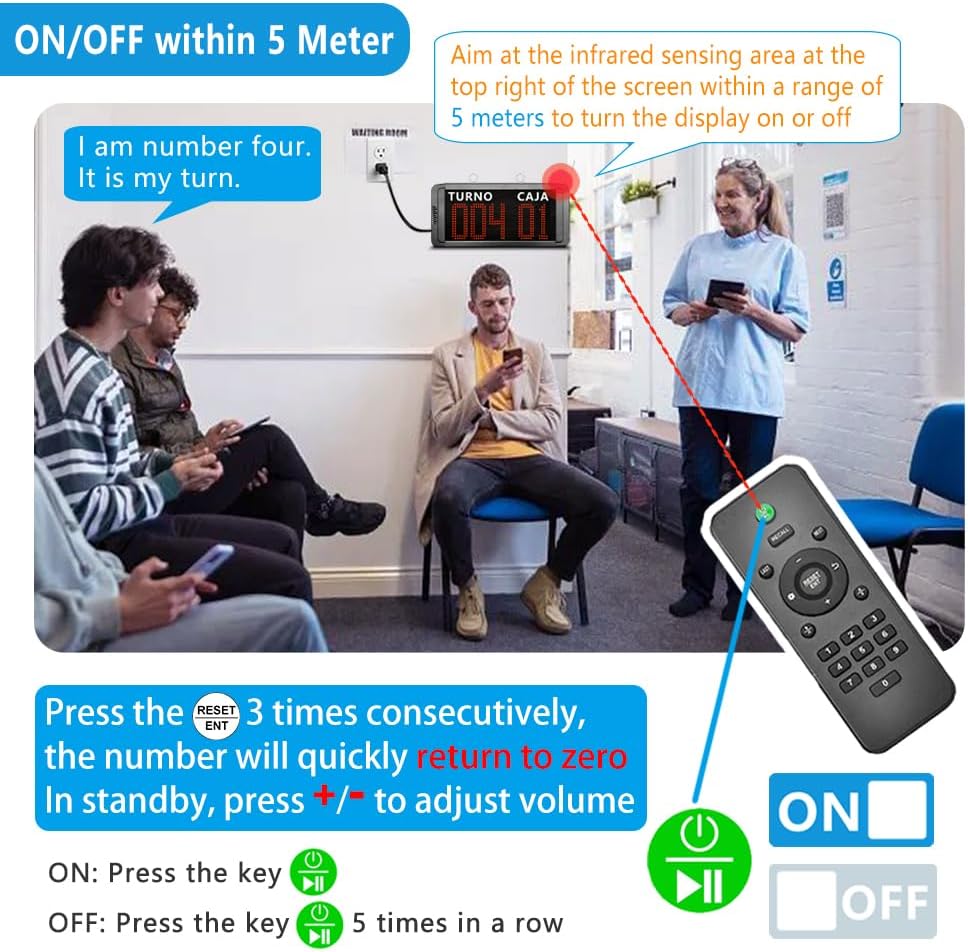
Image: Remote control usage for the queue system, detailing how to power on/off, adjust volume, and perform a quick reset.
Maintenance
1. Ticket Paper Refills
The ticket dispenser uses paper rolls numbered from 000 to 999. Each roll contains 2000 tickets. Ensure you have spare ticket paper refills available. These are typically available for purchase from the manufacturer or authorized retailers.
2. Cleaning
Wipe the display unit and call buttons with a soft, dry cloth. Avoid using abrasive cleaners or solvents, which may damage the surfaces. Ensure the devices are powered off before cleaning.
Troubleshooting
1. Display Not Powering On
- Check if the power adapter is securely connected to the display unit and a working power outlet.
- Ensure the power outlet is functional.
- If using the remote control, ensure batteries are functional and you are aiming at the infrared sensor within range.
2. Call Button Not Registering
- Verify that the call button is within the operational range of the display receiver.
- Check for any obstructions between the call button and the display.
- Ensure the call button's battery (if applicable) is not depleted.
3. Incorrect Number Displayed or Announced
- Confirm that the start and end number settings are correctly configured.
- If the system was recently powered off, ensure the power-off memory function is enabled and working as expected.
- Perform a quick reset to the initial number if the sequence is incorrect.
4. No Sound or Low Volume
- Check the volume settings on the display unit or via the remote control.
- Ensure the voice mode is set to broadcast numbers if desired, not just a 'Ding-dong' sound.
- Verify that the 3.5MM External Speaker Jack is not obstructed if an external speaker is not in use, or properly connected if it is.
Specifications
- Model Number: ES-B31+O1-N+TD-STAND 1+7+1
- Package Dimensions: 14.92 x 9.37 x 4.57 inches
- Item Weight: 4.93 pounds
- Manufacturer: quanzhou koqi electronic co., ltd
- Ticket Number Range: 000-999
- Counter Number Range: 00-99
- Display Language: Spanish (default)
- Connectivity: Wireless

Image: Feature description excerpt highlighting key functionalities and technical details like number ranges and external speaker jack.
Warranty and Support
For warranty information, technical support, or to purchase replacement parts and accessories (such as ticket paper refills), please contact KOQICALL customer service or refer to the official KOQICALL website. Please have your model number (ES-B31+O1-N+TD-STAND 1+7+1) available when contacting support.