
Introduction
The Warmco D4 Pro is an 8-inch ultra-thin rechargeable portable fan designed for versatile use in various environments, including camping, outdoor activities, indoor spaces, and travel. It features a high-capacity 20000mAh battery, fast charging capabilities, an integrated LED light, and a programmable timer. This manual provides essential information for the safe and efficient operation and maintenance of your fan.
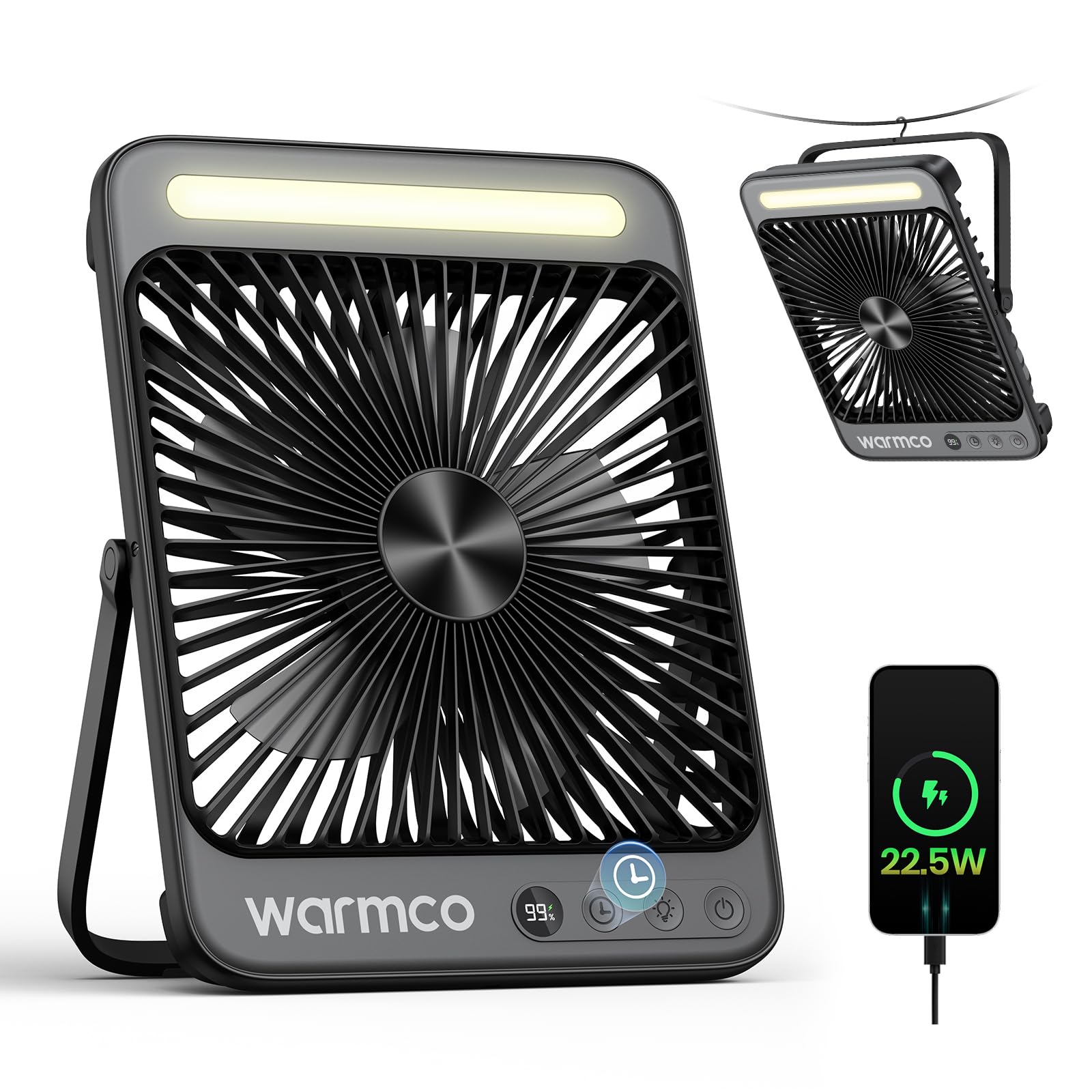
Figure 1: Warmco D4 Pro Portable Fan Overview
Product Features
- High-Capacity Battery: Equipped with a 20000mAh battery, providing 15 to 48 hours of runtime depending on speed settings.
- Fast Charging: Supports 18W input for a full charge in approximately 7 hours and 22.5W output for efficient device charging.
- Compact & Portable Design: Measures 1.77 x 8.27 x 10.71 inches and weighs 1.7 lbs, featuring a foldable stand and a built-in hanging hook for easy placement and transport.
- Integrated LED Light: A built-in LED light with 3 adjustable brightness levels, suitable for illumination in various settings.
- Whisper-Quiet Operation: Utilizes an efficient brushless motor to keep noise levels below 45dB, ensuring a peaceful environment.
- Adjustable Airflow: Offers 4 fan speed settings to customize cooling intensity.
- Smart Features: An LED display shows current battery level and selected fan speed.
- Timer Function: Programmable timer settings for 1, 2, 4, or 8 hours.
- Easy Maintenance: Features a detachable front cover for convenient cleaning of the fan blades.

Figure 2: Extended Battery Life and Capacity

Figure 3: Ultra-thin and Portable Design
Setup
- Unboxing: Carefully remove the fan and all included accessories (USB-C cable, instruction manual) from the packaging.
- Initial Charging: Before first use, fully charge the fan. Connect the provided USB-C cable to the fan's input port and to an 18W (or higher) power adapter (not included). The LED display will show the charging progress. A full charge takes approximately 7 hours.
- Placement:
- Desktop Use: Extend the foldable stand at the back of the fan to position it on a flat surface.
- Hanging Use: Utilize the built-in metal hook at the top of the fan to suspend it in tents, on branches, or other suitable locations.
Video 1: Detailed overview of the Warmco D4 Pro fan's features and setup.
Operating Instructions
- Power On/Off: Press the power button (usually marked with a power symbol) once to turn the fan on. Press and hold the power button to turn it off.
- Adjust Fan Speed: While the fan is on, press the fan speed button (often marked with fan blades or 'F') repeatedly to cycle through the 4 available speed settings. The LED display will indicate the current speed.
- Control LED Light: Press the light button (often marked with a light bulb symbol) repeatedly to cycle through the 3 brightness levels of the integrated LED light. Press again to turn the light off.
- Set Timer: Press the timer button (often marked with a clock symbol) repeatedly to select a runtime of 1, 2, 4, or 8 hours. The fan will automatically turn off after the selected time.
- Use as Power Bank: Connect your external device (e.g., smartphone) to the fan's 22.5W output USB port using an appropriate charging cable. The fan will begin charging your device.

Figure 4: Quiet Performance and Timer Function

Figure 5: Power Bank Functionality
Video 2: Demonstration of the fan's portability and features for travel.
Maintenance
Regular cleaning ensures optimal performance and extends the lifespan of your fan.
- Cleaning the Fan Blades: The front cover of the fan is detachable for easy cleaning. Unscrew the screws on both sides of the fan counter-clockwise to remove the cover. Gently wipe the fan blades with a soft, dry cloth. Do not use abrasive cleaners or immerse the fan in water.
- Exterior Cleaning: Wipe the exterior of the fan with a soft, damp cloth.
- Storage: When not in use for extended periods, ensure the fan is clean and fully charged. Store it in a cool, dry place.

Figure 6: Detachable Front Panel for Easy Cleaning
Troubleshooting
- Fan Not Turning On: Ensure the battery is sufficiently charged. Connect the fan to a power source using the USB-C cable and allow it to charge for at least 30 minutes before attempting to power on again.
- Weak Airflow: Check the selected fan speed setting and increase it if necessary. Ensure the fan blades are clean and free from obstructions.
- LED Light Not Working: Verify the fan has adequate battery power. Press the light button to cycle through the brightness settings.
- Device Not Charging (Power Bank Function): Ensure the fan has sufficient battery charge. Check that the charging cable is securely connected to both the fan's output port and your device.
Specifications
| Feature | Specification |
|---|---|
| Brand | Warmco |
| Model Name | D4 Pro |
| Dimensions (D x W x H) | 1.77" x 8.27" x 10.71" |
| Item Weight | 1.76 pounds (800 Grams) |
| Power Source | Battery Powered |
| Battery Capacity | 20000mAh (2 Nonstandard Battery batteries included) |
| Input Power | 18W (Charging time ~7 hours) |
| Output Power | 22.5W (for charging devices) |
| Fan Speeds | 4 levels |
| Noise Level | 45 Decibels |
| LED Light | Integrated, 3 levels |
| Timer | 1, 2, 4, or 8 hours |
| Included Components | D4 Pro Portable Fan, Instruction Manual, USB C Cable |
Warranty and Support
The Warmco D4 Pro Portable Fan comes with a 3-Year Replacement Promise. For any product inquiries, technical support, or warranty claims, please refer to the contact information provided in your product packaging or visit the official Warmco website.

Figure 7: 3-Year Replacement Promise