
Introduction
This manual provides essential instructions for the safe and efficient operation, maintenance, and troubleshooting of your ELBA Ice Ball Maker Model M82P. Please read this manual thoroughly before first use and retain it for future reference.
The ELBA Ice Ball Maker is a countertop appliance designed to produce spherical ice balls with a 5cm diameter. It features a 1.2-liter water capacity and can produce up to 6 ice balls per hour, with a daily output of approximately 4.6 kg of ice. The unit includes a storage drawer for up to 9 ice balls, a smart self-cleaning system, integrated cooling fans, and an intuitive touch control panel with LED indicators.
Safety Instructions
- Read all instructions before operating the appliance.
- Ensure the power supply voltage matches the rating label on the appliance.
- Do not immerse the appliance, power cord, or plug in water or other liquids.
- Keep the appliance away from heat sources, direct sunlight, and flammable materials.
- Supervise children to ensure they do not play with the appliance.
- Unplug the appliance before cleaning, maintenance, or when not in use.
- Do not operate the appliance with a damaged cord or plug. Contact qualified service personnel for repair.
- Use only potable water in the water tank.
- Ensure adequate ventilation around the appliance. Do not block ventilation openings.
- This appliance is for household use only.
Product Overview
The ELBA Ice Ball Maker M82P features a user-friendly design with key components for efficient ice production.
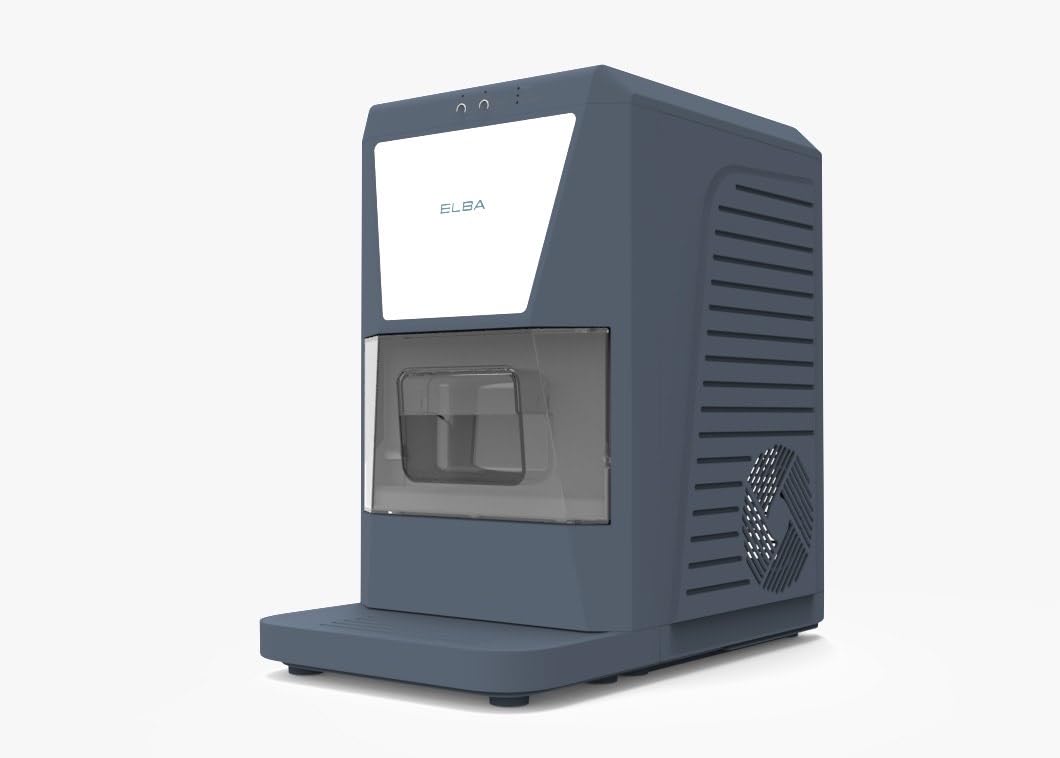
Figure 1: Front View of ELBA Ice Ball Maker M82P
This image shows the front view of the ELBA Ice Ball Maker. It features a sleek grey casing with a transparent window revealing the ice storage drawer. The control panel with LED indicators is visible at the top.
Key Components:
- Control Panel: Located at the top front, featuring touch controls and LED indicators for power, ice full, and water low.
- Water Tank: Internal reservoir with a 1.2-liter capacity for water supply.
- Ice Storage Drawer: A removable drawer designed to hold up to 9 spherical ice balls.
- Ice Making Mechanism: Internal components responsible for freezing water into ice balls.
- Cooling Fans: Integrated for optimal performance and heat dissipation.
Setup
- Unpacking: Carefully remove the ice maker from its packaging. Retain packaging materials for future transport or storage.
- Placement: Place the appliance on a stable, level surface, away from direct sunlight and heat sources. Ensure there is at least 10 cm of space around the unit for proper ventilation.
- Initial Cleaning: Before first use, clean the interior of the water tank and ice storage drawer with a soft cloth and mild detergent. Rinse thoroughly with clean water.
- Power Connection: Plug the power cord into a grounded electrical outlet.
Operating Instructions
- Fill Water Tank: Open the water tank cover and fill the 1.2-liter water tank with potable water up to the maximum fill line. Do not overfill.
- Power On: Press the Power button on the touch control panel. The Power LED indicator will illuminate.
- Ice Production: The appliance will automatically begin the ice-making cycle. The Ice Making LED indicator may flash or remain steady, depending on the model's specific indicator behavior.
- Ice Collection: Once ice balls are formed, they will be released into the ice storage drawer. The unit produces approximately 6 ice balls per hour.
- Ice Full Indicator: When the ice storage drawer is full, the "Ice Full" LED indicator will light up, and the ice-making process will pause. Remove ice to resume production.
- Water Low Indicator: If the water level in the tank is too low, the "Water Low" LED indicator will light up, and the ice-making process will pause. Refill the water tank to resume.
- Power Off: To stop ice production, press the Power button again. The Power LED indicator will turn off.
Maintenance and Cleaning
Regular cleaning ensures optimal performance and hygiene of your ice ball maker.
Self-Cleaning System:
- The ELBA Ice Ball Maker M82P is equipped with an integrated self-cleaning system. Refer to the control panel for a dedicated self-clean button or a combination of buttons to activate this function.
- To use the self-cleaning function, ensure the water tank is filled with clean water. Activate the self-cleaning cycle as per the instructions on the control panel.
- After the cycle completes, drain any remaining water from the tank and wipe the interior dry.
Manual Cleaning:
- Exterior: Wipe the exterior with a soft, damp cloth. Do not use abrasive cleaners or solvents.
- Interior: Periodically clean the water tank and ice storage drawer. Remove the ice storage drawer and wash it with warm, soapy water. Rinse and dry thoroughly.
- Draining: For thorough cleaning or long-term storage, ensure all water is drained from the unit.
Troubleshooting
Before contacting customer support, please refer to the following troubleshooting guide for common issues.
| Problem | Possible Cause | Solution |
|---|---|---|
| Appliance does not turn on. | No power supply; Power cord not properly connected. | Check if the appliance is plugged into a working outlet. Ensure the power cord is securely connected. |
| No ice production. | Water tank empty; "Water Low" indicator on; Ambient temperature too high. | Refill the water tank with potable water. Ensure the appliance is in a cool, well-ventilated area. |
| "Ice Full" indicator is on, but drawer is not full. | Ice sensor obstructed or dirty. | Clean the ice sensor area to ensure it is free from obstructions or ice buildup. |
| Ice balls are not perfectly spherical or are too small. | Water temperature too high; Insufficient water in tank. | Use colder water. Ensure the water tank is filled to the maximum level. |
Specifications
| Feature | Detail |
|---|---|
| Brand | ELBA |
| Model Name | M82P |
| Product Dimensions (D x W x H) | 38.5 cm x 30 cm x 50.5 cm |
| Water Tank Capacity | 1.2 Liters |
| Power | 120 Watts |
| Refrigerant | R290a |
| Ice Ball Production Rate | 6 ice balls per hour |
| Daily Ice Production | 4.6 kg (approx. 82 ice balls) |
| Ice Storage Capacity | Up to 9 ice balls |
| Control Type | Touch Control with LED Indicators |
| Special Features | Self-cleaning system, Integrated cooling fans |
| Materials | Plastic, Stainless Steel |
| Country of Origin | China |
| Part Number | 841869500000 |
Warranty and Support
For warranty information and customer support, please refer to the warranty card included with your product or contact your local ELBA service center. Keep your purchase receipt as proof of purchase for warranty claims.
For technical assistance or spare parts, please visit the official ELBA website or contact the retailer from whom you purchased the product.