
Introduction
The Rowenta Energy Force 70 Steam Iron, model DW7731, is engineered for efficient and powerful ironing. It features a strong steam shot of 200 g/min for effective crease removal and incorporates ECO Control Technology to reduce energy consumption by up to 50%. This iron is equipped with a precision tip, a 300ml water tank, and an ergonomic handle for comfortable use, ensuring impeccable results with every use.

Image: Rowenta Energy Force 70 Steam Iron overview.

Image: Main view of the Rowenta Energy Force 70 Steam Iron.
Setup
- Unpacking: Carefully remove the iron and all accessories from the packaging. Retain the packaging for future storage or transport.
- First Use Preparation: Before first use, it is recommended to iron an old cloth to remove any manufacturing residues from the soleplate. This ensures no marks are left on your garments.
-
Filling the Water Tank:
- Ensure the iron is unplugged and cool.
- Open the water tank inlet cover.
- Fill the tank with tap water up to the "MAX" level indicator (300ml capacity). Do not overfill.
- Close the water tank inlet cover securely.
- Note: For optimal performance and to prolong the life of your iron, avoid using scented water, water from tumble dryers, or chemically descaled water.
Operating Instructions
- Powering On: Plug the iron into a suitable electrical outlet.
- Temperature Setting: Adjust the thermostat dial to the appropriate temperature for your fabric type. Refer to the garment care label for guidance. The iron will heat up quickly.
- Continuous Steam: Once the iron reaches the selected temperature, steam will be generated automatically when the steam setting is active.
-
Powerful Steam Shot: For stubborn creases, press the steam shot button (often located under the handle or on top). This delivers a powerful burst of steam (200 g/min).

Image: Ironing with a powerful steam shot for professional results.
-
Vertical Steaming: The iron can be used for vertical steaming to refresh hanging garments, suits, or curtains. Hold the iron vertically a few centimeters from the fabric and press the steam shot button repeatedly.

Image: Using the iron for simple vertical steam emission.
-
ECO Control Technology: Activate the ECO mode by pressing the dedicated ECO button or trigger. This feature reduces energy consumption by up to 50% while still providing effective ironing results.

Image: Hand pressing the ECO button for responsible garment care.

Image: Up to 50% energy saving with ECO Control Technology.
-
Precision Tip: Utilize the precision tip to easily reach difficult areas such as collars, cuffs, and around buttons.

Image: Precision ironing with the iron's pointed tip.
-
Optimal Steam Distribution: The patented MicroSteam HD soleplate features 400 active micro-holes for optimal steam distribution and efficient results.

Image: Optimal steam distribution from the MicroSteam HD soleplate.
-
Suitable for All Fabric Types: The iron is designed to safely and effectively iron a wide range of fabrics.

Image: The iron is suitable for all types of fabrics.
Maintenance
- Emptying the Water Tank: After each use, unplug the iron and allow it to cool. Empty any remaining water from the tank to prevent limescale buildup.
-
Cleaning the Soleplate:
- Ensure the iron is cool.
- Wipe the soleplate with a damp cloth. For stubborn marks, use a specialized soleplate cleaning stick or a non-abrasive cleaner.
- Do not use abrasive pads or metallic objects, as these can damage the soleplate.
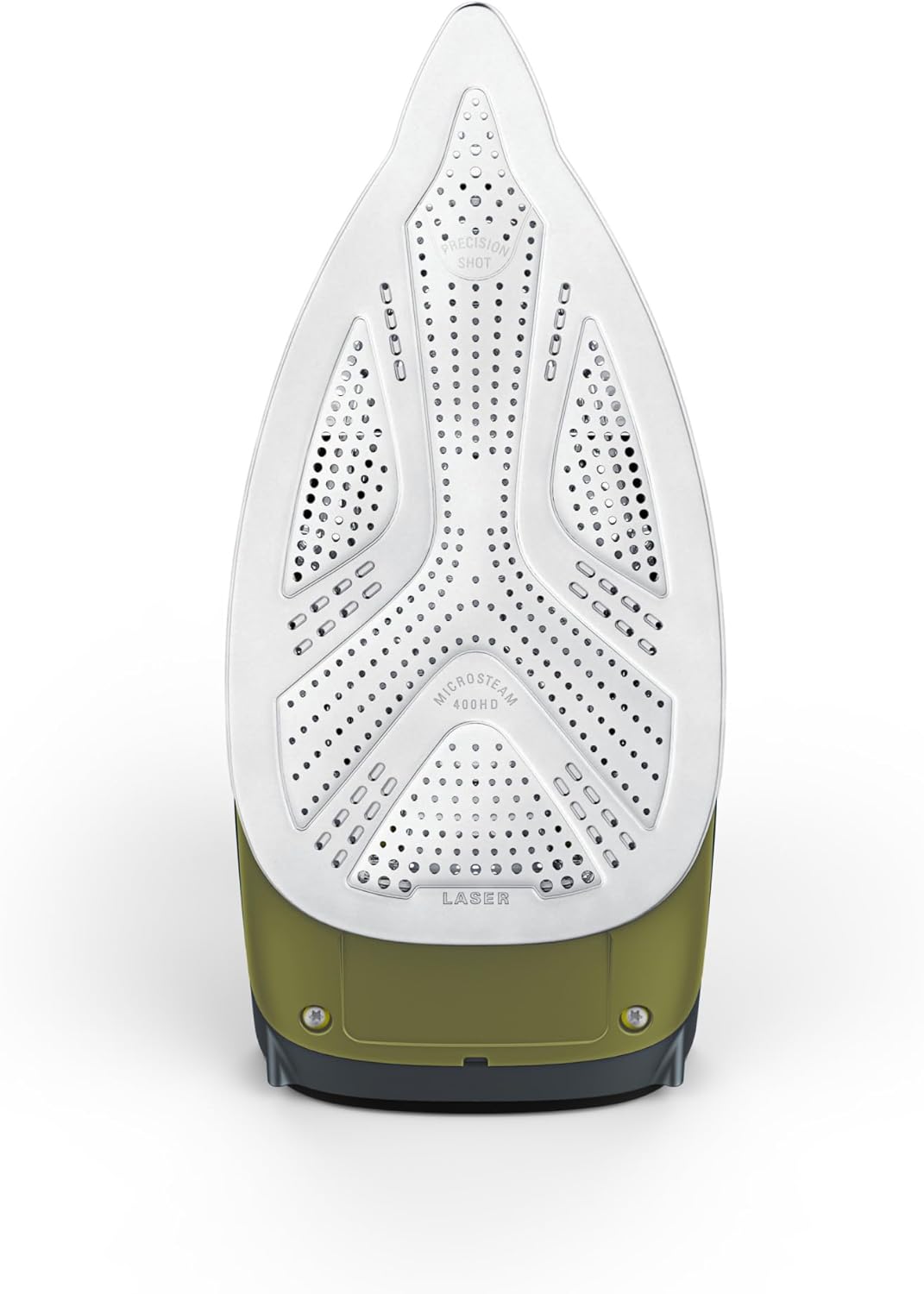
Image: Underside of the iron, showing the soleplate.
- Anti-Calc System: The iron features an integrated anti-calc system. Regularly follow the manufacturer's instructions for descaling, typically by rinsing the anti-calc collector (if removable) or performing a self-clean cycle.
- Storage: Store the iron upright on its heel rest in a safe, dry place once it has completely cooled down.
Troubleshooting
- Iron not heating: Ensure the iron is properly plugged into a working power outlet and the thermostat is set to a temperature above the minimum.
-
No steam or insufficient steam:
- Check if the water tank is filled.
- Ensure the iron has reached the selected temperature (indicator light usually turns off or changes color).
- The steam setting might be off or on a low setting.
- Limescale buildup might be blocking steam vents; perform descaling.
-
Water leaking from soleplate:
- The temperature might be too low for steam generation, causing water to drip. Increase the temperature.
- The water tank might be overfilled.
- The anti-drip system might be temporarily overwhelmed.
- Brown stains on fabric: This can be caused by limescale in the steam vents. Perform a descaling procedure and clean the soleplate.
- Iron sticking to fabric: The soleplate might be dirty, or the temperature setting is too high for the fabric type. Clean the soleplate and adjust the temperature.
Specifications
| Feature | Detail |
| Model Number | DW7731F0 |
| Brand | Rowenta |
| Power | 2800 Watts |
| Steam Shot | 200 g/min |
| Water Tank Capacity | 300 ml |
| Soleplate Type | MicroSteam HD with 400 active micro-holes |
| Energy Saving | Up to 50% with ECO Control Technology |
| Dimensions (Package) | 32 x 32 x 14.5 cm |
| Weight (Package) | 1.9 kg |
Warranty
This Rowenta product is designed for durability and comes with a commitment to repairability for 15 years. Spare parts are available through our network of 6200 authorized repair centers worldwide, ensuring quick and lasting repairs. This commitment is part of our effort to protect the environment and reduce waste. Please retain your proof of purchase for warranty claims.

Image: 15-year repairability commitment logo.
Support
For further assistance, technical support, or to locate an authorized service center, please refer to the official Rowenta website or contact their customer service department. Contact details can typically be found in the product packaging or on the official brand website.


