
Yottamaster HSD10-US
Yottamaster HSD10-US 2-Bay 10Gbps RAID Enclosure and Docking Station User Manual
Model: HSD10-US
1. Product Overview
The Yottamaster HSD10-US is a versatile 2-bay RAID enclosure and docking station designed to expand storage and connectivity for Mac mini M4, PCs, and laptops. It offers a hybrid storage solution supporting both 2.5"/3.5" SATA HDDs/SSDs and M.2 NVMe SSDs, alongside a comprehensive connectivity hub.
Key Features:
- Hybrid Storage Architecture: Supports two SATA HDD/SSD drives (up to 24TB each) and one M.2 NVMe SSD (up to 8TB) for a total capacity of 56TB.
- High-Speed Data Transfer: Utilizes USB 3.2 Gen 2 interface for up to 10Gbps data transfer rates, compatible with both NVMe and SATA M.2 (NGFF) SSDs.
- Integrated Connectivity Hub: Features one USB-A (10Gbps) port, three USB 2.0 ports, and independent UHS-I TF/SD 3.0 card readers.
- Configurable RAID Modes: Offers RAID 0, RAID 1, JBOD, and individual disk modes for flexible data management.
- Optimized Thermal Management: Brushed aluminum chassis with an active low-noise fan and ventilation ports ensures stable operation.

Figure 1: The Yottamaster HSD10-US 2-Bay RAID Enclosure, illustrating the insertion of a 3.5-inch HDD into one of the bays. The top cover is removed, and the side panel for the NVMe SSD slot is visible.
2. Setup and Installation
2.1 Package Contents
Before installation, verify that all components are present:
- Yottamaster HSD10-US Mini Tower
- Packing Box
- User Manual
- Heatsink Kit (for M.2 SSD)
- USB-C to USB-C Cable
- DC 12V5A Power Adapter
- Screwdriver and Screws
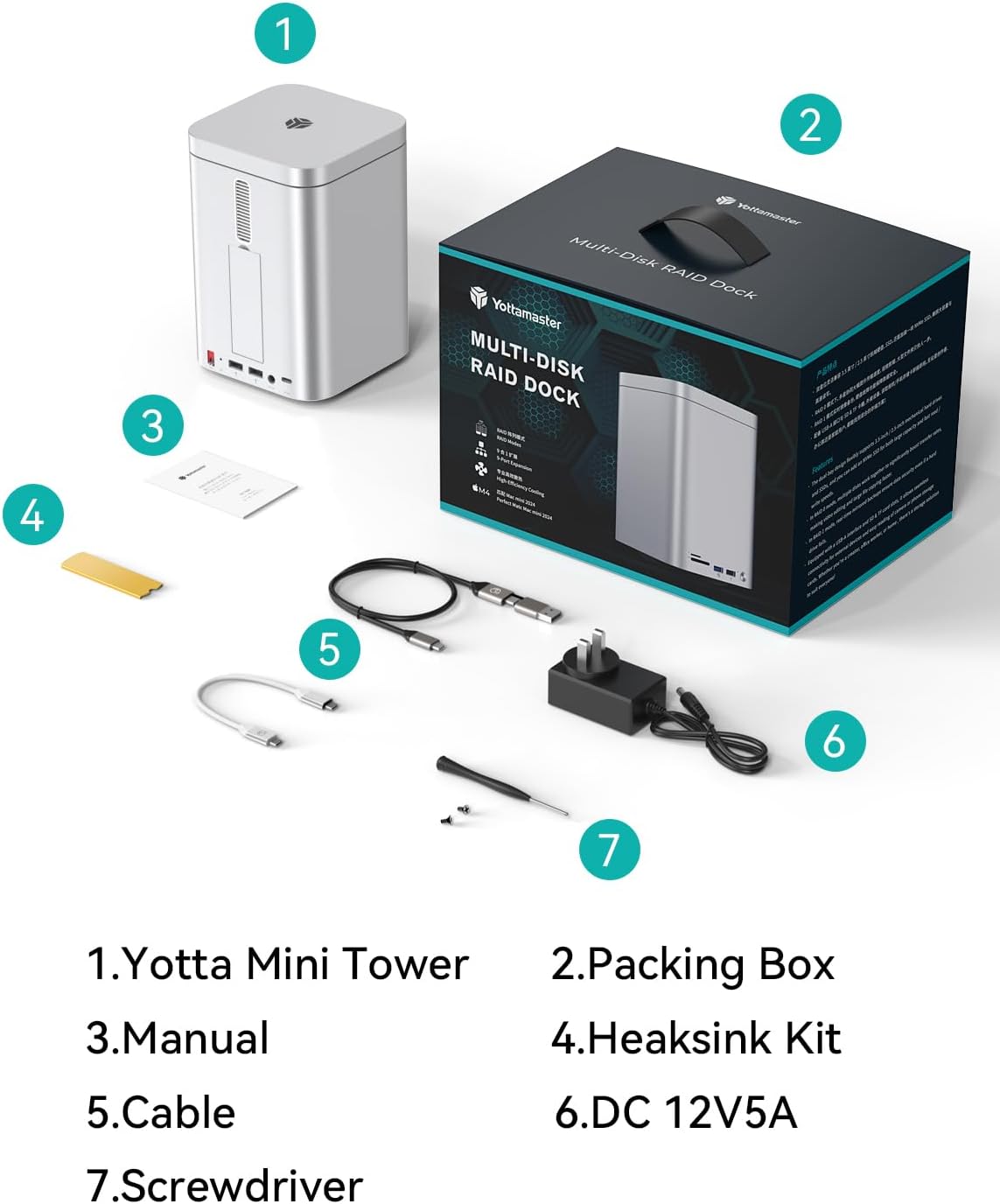
Figure 2: Illustration of the Yottamaster HSD10-US package contents, including the enclosure, cables, power adapter, and tools.
2.2 Installing 2.5"/3.5" SATA HDDs/SSDs
- Gently remove the top magnetic cover of the enclosure.
- Pull out the drive trays from the front bays.
- For 3.5" HDDs: Snap the drive into the tray using the side pins. No screws are typically needed for tool-free installation.
- For 2.5" SSDs/HDDs: Secure the drive to the tray using the provided screws through the bottom mounting holes.
- Slide the loaded drive tray back into the enclosure until it clicks securely into place.
- Repeat for the second drive if applicable.
Video 1: Demonstration of installing 2.5-inch and 3.5-inch drives into the enclosure's bays. This video shows the process of securing drives within the trays and inserting them into the unit.
2.3 Installing M.2 NVMe SSD
- Locate the NVMe SSD slot on the side of the enclosure and open its magnetic cover.
- Insert the M.2 NVMe SSD into the slot at an angle.
- Gently press down the SSD and secure it with the provided rubber plug or screw, depending on the design.
- Apply the thermal pad and heatsink (if provided) to the M.2 SSD for optimal heat dissipation.
- Close the magnetic cover.
Video 2: A short video demonstrating the installation of an M.2 NVMe SSD into the dedicated slot of the Yottamaster HSD10 enclosure.
2.4 Connecting to Host Device
- Connect the provided DC 12V5A power adapter to the enclosure's DC IN port and plug it into a power outlet.
- Use the supplied USB-C to USB-C cable to connect the enclosure's "PC IN" port to your Mac mini, PC, or laptop.
- Power on the enclosure using the ON/OFF switch.
- Your operating system should detect the new storage devices. You may need to initialize and format the drives before use (refer to your OS documentation).

Figure 3: Detailed view of the Yottamaster HSD10-US ports, including TF/SD card slots, USB 3.2 (10Gbps), USB 2.0, Power Button, RAID Key, USB 2.0 x 2, DC (12V5A), and PC IN (USB-C).
3. Operating Instructions
3.1 RAID Configuration
The HSD10-US supports multiple RAID modes for the two SATA drives. The RAID mode is selected using the physical DIP switches located on the rear of the unit. Important Note: The physical RAID mode selector switches on this unit operate in a reverse order (from bottom to top). Users must verify the selected mode against the indicator panel prior to finalizing the configuration to ensure data integrity and prevent unintended data loss.
| RAID Mode | Description | Switch Setting (Bottom to Top) |
|---|---|---|
| PM (Port Multiplier) | Each drive appears as an independent disk. | UP-UP |
| RAID 0 (Striping) | Combines drives for maximum performance and capacity, but offers no data redundancy. | UP-DOWN |
| RAID 1 (Mirroring) | Mirrors data across both drives for data redundancy. Capacity is limited to the smallest drive. | DOWN-UP |
| JBOD (Just a Bunch Of Disks) | Combines drives into a single large volume without performance or redundancy benefits. | DOWN-DOWN |
After setting the DIP switches, press and hold the "SET" button for 5 seconds while the power is on to apply the new RAID configuration. All data on the drives will be erased during RAID configuration. Back up important data before proceeding.

Figure 4: Visual guide to the RAID mode DIP switch settings and their corresponding functions for the Yottamaster HSD10-US.
3.2 Data Transfer and Connectivity
The enclosure supports high-speed data transfer up to 10Gbps via its USB 3.2 Gen 2 interface. Utilize the front-facing USB-A (10Gbps) port for fast peripheral connections, and the three USB 2.0 ports for standard peripherals like keyboards and mice. The integrated SD/TF card readers allow for convenient data import from memory cards.

Figure 5: The Yottamaster HSD10-US connected to a monitor, demonstrating its 10Gbps data transmission speed for various applications.
4. Maintenance
- Cleaning: Use a soft, dry cloth to clean the exterior of the enclosure. Avoid liquid cleaners or abrasive materials.
- Ventilation: Ensure that the ventilation ports on the top and bottom panels are not obstructed to maintain optimal airflow and prevent overheating.
- Drive Health: Regularly check the health of your installed drives using your operating system's disk utility tools.
- Firmware Updates: Check the Yottamaster official website periodically for any firmware updates for your HSD10-US model.

Figure 6: An internal view of the Yottamaster HSD10-US, highlighting its cooling fan, bottom air duct, and aluminum alloy housing designed for strong heat dissipation.
5. Troubleshooting
- Drives Not Detected:
- Ensure the power adapter is securely connected and the enclosure is powered on.
- Verify the USB-C cable is correctly connected to both the enclosure and the host device.
- Check if the drives are properly seated in their trays/slots.
- For new drives, ensure they are initialized and formatted by your operating system.
- If using RAID, confirm the DIP switches are set correctly and the configuration has been applied by pressing the SET button.
- Slow Data Transfer Speeds:
- Ensure your host device's USB port supports USB 3.2 Gen 2 (10Gbps) for optimal performance.
- Verify the USB-C cable used is rated for 10Gbps data transfer.
- Performance can be limited by the speed of the slowest drive in a RAID 0 or JBOD setup.
- Enclosure Overheating:
- Ensure adequate ventilation around the enclosure. Do not block air vents.
- Confirm the internal cooling fan is operating.
6. Specifications
| Feature | Detail |
|---|---|
| Brand | Yottamaster |
| Model Number | HSD10-US |
| Series | HSD10 |
| Storage Capacity | Up to 56 TB (2x 24TB SATA HDD/SSD + 1x 8TB M.2 NVMe SSD) |
| Compatible Drive Types | 2.5"/3.5" SATA HDD/SSD, M.2 NVMe SSD (2230/2242/2260/2280) |
| Hardware Interface | USB 3.2 Gen 2 (10Gbps) |
| Data Transfer Rate | 10 Gigabits Per Second |
| RAID Modes | RAID 0, RAID 1, JBOD, PM (Individual Disk) |
| Connectivity Ports | 1x USB-A (10Gbps), 3x USB 2.0, 1x SD Card Reader, 1x TF Card Reader, 1x USB-C (PC IN) |
| Compatible Devices | Mac Mini, Desktop PC, Laptop |
| Material | Alloy Steel (Aluminum Chassis) |
| Item Weight | 3.96 pounds |
| Package Dimensions | 10.63 x 7.87 x 7.09 inches |

Figure 7: Visual representation of the Yottamaster HSD10-US's compatibility with 2.5-inch/3.5-inch SSD/HDD and various M.2 NVMe SSD form factors.
7. Warranty and Support
For warranty information and technical support, please refer to the official Yottamaster website or contact their customer service directly. The product typically comes with a standard manufacturer's warranty. Keep your purchase receipt for warranty claims.
Return Policy: The standard return policy is 30 days for refund/replacement.
Manufacturer: Yottamaster
Official Store: Yottamaster Store on Amazon
Related documentsHSD10-US

Ask a question about this manual
Ask about setup, troubleshooting, compatibility, parts, safety, or missing instructions. Manuals+ will review the question and use this page’s manual context to help answer it.