
Introduction
Thank you for choosing the HOSTACK 47-inch Microwave Cabinet with Charging Station. This manual provides essential information for the safe assembly, operation, and maintenance of your new cabinet. Please read these instructions carefully before assembly and retain them for future reference.
Safety Information
- Weight Capacity: Do not exceed the maximum weight capacity of 280 lbs for the entire unit. Refer to the specifications section for individual shelf and drawer weight limits.
- Pinch Points: Exercise caution when opening and closing doors and drawers to avoid pinching fingers or other body parts.
- Cable Management: Ensure proper cable management for all electrical cords connected to the charging station to prevent tripping hazards and maintain a tidy appearance.
- Stability: Place the cabinet on a flat, stable surface. If necessary, use wall anchor kits (not included) to secure the cabinet to the wall, especially in households with children or pets, to prevent tipping.
- Electrical Safety: Only use the integrated charging station for compatible devices and appliances. Do not overload the outlets.
Product Overview
The HOSTACK 47-inch Microwave Cabinet is designed to provide versatile storage and a convenient charging station for your kitchen, dining room, or living area. It features a spacious countertop, a dedicated microwave compartment, two drawers, and two cabinets with adjustable shelving.

Image: The HOSTACK Microwave Cabinet with a microwave and coffee maker, showcasing its use in a dining room.
Key Features:
- Ample Storage Space: A 47-inch wide top surface, two smooth-gliding drawers, a central microwave stand, and two side cabinets with adjustable shelves.
- Built-In Charging Station: Integrated electrical outlets (120V/12A, 2 AC outlets) and USB ports (5V/2A, 2 USB ports) with a cable management hole for convenient power access.
- Versatile Design: Suitable for use as a microwave stand, buffet sideboard, coffee bar, or general storage cabinet.
- Durable Construction: Crafted from high-grade engineered wood with a sturdy base for enhanced stability and load-bearing capacity.

Image: Detailed diagram showing the dimensions of the cabinet and its components, along with maximum weight capacities for different sections.
Assembly Instructions
The HOSTACK Microwave Cabinet is designed for straightforward assembly. All parts are labeled, and a detailed instruction manual is included in the packaging. Please follow the step-by-step guide provided with your product for proper assembly.
- Unpack and Verify: Carefully unpack all components and hardware. Compare them against the parts list in your instruction manual to ensure all pieces are present and undamaged.
- Prepare Your Workspace: Assemble the cabinet on a clean, flat, and soft surface (e.g., a carpet or blanket) to prevent scratches.
- Follow Step-by-Step Guide: Adhere strictly to the numbered steps in the provided assembly manual. Do not overtighten screws unless specified.
- Two-Person Assembly Recommended: For stability and ease, especially during larger steps, two people are recommended for assembly.
- Tool Requirements: Basic tools such as a screwdriver are typically required. Power tools can be used with caution to avoid overtightening and damaging components.
Note: If any parts are missing or damaged, please contact customer support for assistance.
Operating Instructions
Using the Charging Station:

Image: The built-in charging station featuring two AC outlets, two USB ports, and an on/off switch.
- Power Connection: Plug the cabinet's power cord into a standard wall outlet.
- On/Off Switch: Use the red on/off switch on the charging station to control power to the AC outlets and USB ports.
- AC Outlets: Two 120V/12A AC outlets are available for small kitchen appliances or other electronic devices.
- USB Ports: Two 5V/2A USB ports are provided for charging mobile devices.
- Cable Management: Utilize the cable management hole located at the back of the microwave compartment to route appliance cords neatly and safely.
Utilizing Storage Compartments:

Image: The dedicated microwave stand area, designed to accommodate a standard microwave oven.
- Microwave Stand: The central open compartment is designed to hold a microwave oven. Ensure the microwave's dimensions fit within the compartment's clearance.
- Drawers: Two top drawers provide concealed storage for smaller items such as utensils, napkins, or other kitchen accessories.
- Side Cabinets: The two side cabinets feature adjustable shelves, allowing you to customize the storage height for various items like dishes, pantry staples, or small appliances.

Image: An open drawer displaying its capacity for storing jars and small kitchen utensils.
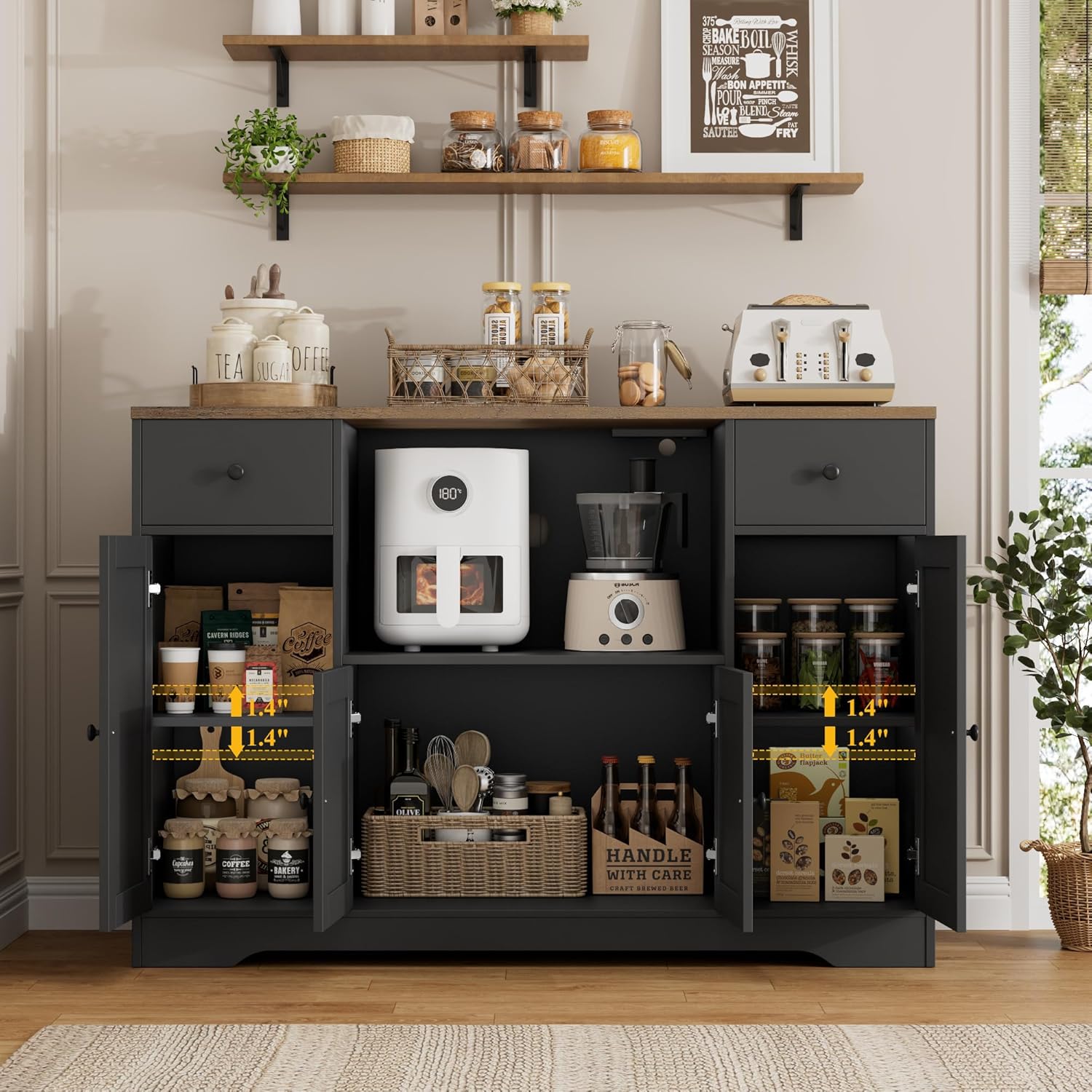
Image: The side cabinets with doors open, showing adjustable shelves and various items stored within.
Maintenance
- Cleaning: Wipe surfaces with a soft, damp cloth. Avoid harsh chemicals, abrasive cleaners, or excessive moisture, which can damage the engineered wood finish.
- Spills: Clean up spills immediately to prevent staining or damage to the wood.
- Hardware: Periodically check all screws and fasteners to ensure they are tight. Retighten if necessary to maintain stability.
- Avoid Direct Sunlight: Prolonged exposure to direct sunlight can cause fading or discoloration of the finish.
- Heat Protection: Use coasters or protective pads under hot items placed on the countertop to prevent heat damage.
Troubleshooting
| Problem | Possible Cause | Solution |
|---|---|---|
| Cabinet is wobbly or unstable. | Loose fasteners; uneven floor. | Ensure all screws are securely tightened. Adjust the cabinet's position or use shims under the legs if the floor is uneven. |
| Drawers do not slide smoothly. | Improper alignment; debris in tracks. | Check drawer runner alignment during assembly. Clean tracks of any dust or debris. |
| Charging station not working. | Power cord not plugged in; switch off; overloaded circuit. | Verify the cabinet's power cord is securely plugged into a functional wall outlet. Ensure the charging station's on/off switch is in the "on" position. Reduce the number of devices connected if overloaded. |
| Microwave does not fit in the compartment. | Microwave dimensions exceed compartment size; power outlet interferes. | Measure your microwave carefully before purchase. Be aware that the integrated power outlet on the top shelf of the microwave compartment may reduce the effective vertical clearance by approximately 2 inches, depending on the plug type. Consider using a microwave with a low-profile plug or a smaller overall height. |
Specifications
| Feature | Detail |
|---|---|
| Brand | HOSTACK |
| Model Name | 47-inch Microwave Cabinet with Charging Station |
| Color | Black/Rustic Brown |
| Product Dimensions (Overall) | 15.7"D x 47.2"W x 33.5"H |
| Material | Engineered Wood |
| Weight Capacity (Overall) | 280 lbs |
| Charging Station | 2 AC Outlets (120V/12A), 2 USB Ports (5V/2A) |
| Assembly Required | Yes |
| Number of Drawers | 2 |
| Number of Shelves | 1 (adjustable within side cabinets) |

Image: A visual representation of key product specifications including color, material, dimensions, and assembly details.
Warranty and Support
For warranty information, missing parts, or any product-related inquiries, please refer to the documentation included with your purchase or contact HOSTACK customer support directly. Contact details can typically be found on the manufacturer's website or through your retailer.
We are committed to providing quality products and support to our customers.