
1. Introduction
Thank you for choosing the Hocosyme 1000W Infrared Heating Panel. This manual provides essential information for the safe and efficient installation, operation, and maintenance of your new heating panel. Please read this manual thoroughly before use and retain it for future reference.
This infrared heating panel utilizes graphene electric heating technology for energy-efficient warmth. It features a minimalist design, zero noise operation, and can be controlled via an app or remote control, offering 7-day programmability.
2. Important Safety Information
WARNING: To reduce the risk of fire, electric shock, or injury, always follow these basic precautions:
- Read all instructions before using this heater.
- This heater is hot when in use. To avoid burns, do not let bare skin touch hot surfaces.
- Extreme caution is necessary when any heater is used by or near children or invalids and whenever the heater is left operating and unattended.
- Do not operate any heater with a damaged cord or plug or after the heater malfunctions, has been dropped or damaged in any manner.
- Do not use outdoors. This heater is for indoor use only.
- Do not run cord under carpeting. Do not cover cord with throw rugs, runners, or similar coverings. Arrange cord away from traffic area and where it will not be tripped over.
- To disconnect heater, turn controls to OFF, then remove plug from outlet.
- Do not insert or allow foreign objects to enter any ventilation or exhaust opening as this may cause an electric shock or fire, or damage the heater.
- To prevent a possible fire, do not block air intakes or exhaust in any manner. Do not use on soft surfaces, like a bed, where openings may become blocked.
- This heater has hot and arcing or sparking parts inside. Do not use it in areas where gasoline, paint, or flammable vapors or liquids are used or stored.
- Use this heater only as described in this manual. Any other use not recommended by the manufacturer may cause fire, electric shock, or injury to persons.
- Always plug heaters directly into a wall outlet/receptacle. Never use with an extension cord or relocatable power tap (outlet/power strip).
- The heater is TÜV and GS certified, infrared heating IP54, with double overheating protection.
3. Product Components
The Hocosyme Infrared Heating Panel consists of the main heating unit, a wireless remote control thermostat, and mounting hardware for ceiling or wall installation.

Figure 3.1: Overview of the Hocosyme 1000W Infrared Heating Panel. This image displays the sleek, white panel design suitable for various indoor environments.
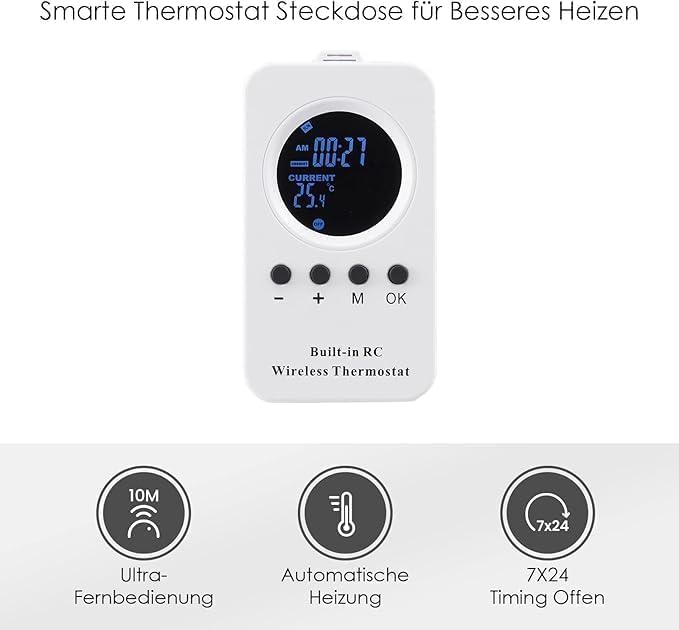
Figure 3.2: The wireless remote control thermostat. This device allows for convenient temperature and programming adjustments.
4. Setup and Installation
The Hocosyme Infrared Heating Panel is designed for easy installation on walls or ceilings. The product comes with all necessary mounting hardware and a 1.8-meter power cable.
4.1 Mounting the Heating Panel
The panel can be mounted on a wall or ceiling. Ensure the mounting surface is sturdy and capable of supporting the heater's weight (approximately 17.41 pounds). The back of the panel is made of fire-retardant gypsum board with strong overheat protection.
- Choose Location: Select a suitable indoor location for optimal heat distribution. For ceiling mounting, ensure adequate clearance.
- Secure Brackets: Use the provided wall and ceiling mounting hardware to securely attach the brackets to your chosen surface. For drywall, additional reinforcement may be required beyond the provided anchors.
- Attach Panel: Carefully attach the heating panel to the installed brackets. Ensure it is firmly secured.
- Connect Power: Plug the 1.8-meter cable directly into a standard wall outlet. Avoid using extension cords.

Figure 4.1: The infrared heating panel shown with its included mounting hardware, ready for installation.

Figure 4.2: An example of the infrared heating panel installed on a ceiling, demonstrating its discreet design and heat distribution.
4.2 Pairing the Remote Control Thermostat
To enable remote control functionality, the wireless thermostat must be paired with the heating panel.
- Ensure the heating panel is powered on.
- On the remote control, simultaneously long press the "-" and "+" keys.
- You will hear a "beep" sound from the heating panel, indicating successful pairing.
Video 4.1: This video demonstrates the process of pairing the wireless remote control thermostat with the infrared heating panel and setting weekly programming. It shows how to long-press the "-" and "+" keys for pairing, how the green light indicates operation, and how to navigate the weekly planning mode to set start times and target temperatures for each day, saving settings with the "OK" key.
5. Operating Instructions
Your Hocosyme Infrared Heating Panel can be operated using the wireless remote control thermostat or through a compatible smart home app (TUYA APP).
5.1 Basic Operation with Remote Control
- Power On/Off: After successful pairing, turn on the infrared radiator. A green light will illuminate on the panel, indicating it is active. The green light will turn off when the unit is powered off.
- Temperature Control: Use the "+" and "-" buttons on the remote to adjust the target temperature. The heater will stop heating when the current room temperature exceeds the set target temperature.
5.2 Weekly Programming Mode
The remote control allows for 7-day programmable heating schedules.
- Press the "M" key to enter the weekly programming mode.
- In this mode, you can set the start time and target temperature for each day of the week.
- Use the "+" and "-" keys to adjust the time and temperature settings.
- After setting the time and target temperature for a specific day, press the "OK" key once to save the settings for that day.
- To move to the next day's settings, short press the "M" key again.
- After successfully setting the programming mode for all desired days, the word "MOOD" will appear on the screen, indicating the programming is active.
5.3 Smart App Control (TUYA APP)
For advanced control and integration into smart home environments, the WiFi model can be controlled via the TUYA APP. Refer to the TUYA APP's instructions for pairing and operation.

Figure 5.1: The wireless thermostat displaying icons for ultra-remote control, automatic heating, and 7x24 timing, highlighting its programmable features.

Figure 5.2: Illustration of the heater's energy-saving capabilities (1kWh for 24 hours) and rapid heating to 120°C in 3 seconds.
6. Maintenance
Regular maintenance ensures optimal performance and longevity of your heating panel.
- Cleaning: Disconnect the heater from the power outlet before cleaning. Use a soft, damp cloth to wipe the exterior surfaces. Do not use abrasive cleaners or solvents.
- Storage: If storing the heater for an extended period, ensure it is clean and dry. Store it in a cool, dry place.
- Inspection: Periodically check the power cord and plug for any signs of damage. If damage is found, discontinue use and contact customer support.
7. Troubleshooting
If you experience issues with your Hocosyme Infrared Heating Panel, refer to the following common problems and solutions:
| Problem | Possible Cause | Solution |
|---|---|---|
| Heater does not turn on. | No power, remote not paired, or overheat protection activated. | Check power connection. Ensure remote is paired (see Section 4.2). Allow unit to cool down if overheat protection is active. |
| Heater turns off unexpectedly. | Overheat protection activated, or target temperature reached. | Allow unit to cool. Verify target temperature setting on remote. |
| Remote control not responding. | Batteries low/dead, or remote not paired. | Replace remote batteries. Re-pair the remote control (see Section 4.2). |
| Inconsistent heating. | Incorrect programming, or external drafts. | Review weekly programming settings (see Section 5.2). Ensure room is adequately sealed. |
8. Specifications
| Feature | Detail |
|---|---|
| Brand | Hocosyme |
| Model Number | T-XD-1000W-APP |
| Power Output | 1000W |
| Special Features | Overheat Protection, Programmable Thermostat, App Control, Remote Control, Zero Noise Operation |
| Color | White |
| Form Factor | Ceiling Mount |
| Indoor/Outdoor Usage | Indoor |
| Product Dimensions (LxWxH) | 49" x 28" x 2.36" (124.46 cm x 71.12 cm x 5.99 cm) |
| Item Weight | 17.41 pounds (7.9 kg) |
| Fuel Type | Electric |
| Max Temperature Setting | 248°F (120°C) |
| Certifications | TÜV, GS, IP54 |

Figure 8.1: Detailed dimensions of the Hocosyme Infrared Heating Panel, showing its length, width, and thickness.
9. Warranty and Customer Support
Your Hocosyme Infrared Heating Panel is backed by a comprehensive warranty and dedicated customer support.
- Warranty: The product comes with a 10-year infrared heater manufacturer’s warranty.
- Returns: Enjoy 90-day free returns.
- Replacement Policy: If the product is damaged within one year of purchase, it will be replaced with a new one immediately.
- Customer Support: For any questions, technical assistance, or warranty claims, please contact our after-sales support team. Refer to your purchase documentation for contact details or visit the official Hocosyme website.