
1. Introduction and Safety Information
This manual provides instructions for the safe and effective use of your Feyachi LF-69 Red Laser Flashlight and 1000 Lumen LED Weapon Light Combo. Please read all instructions carefully before operation and retain this manual for future reference.
1.1 Important Safety Warnings
- Laser Radiation: This product emits visible laser radiation. Avoid direct eye exposure. Do not stare into the beam.
- Class 3R Laser Product: Maximum output <5mW, Wavelength 650nm.
- Always ensure the device is pointed in a safe direction when activating the laser.
- Keep out of reach of children.
- Do not disassemble or modify the device, as this may cause damage or expose you to hazardous laser radiation.
- Use only the provided charging cable and follow charging instructions to prevent battery damage or fire.
2. Product Features
The Feyachi LF-69 combines a powerful flashlight with a precise red laser, designed for versatility and durability.
- High Brightness: 1000 lumens LED flashlight for clear illumination.
- Red Laser: 650nm red laser for accurate targeting.
- Multiple Modes: Flashlight only, laser only, flashlight and laser combo, and strobe mode.
- Rechargeable Battery: Integrated USB rechargeable battery for convenience.
- Durable Construction: Made of aircraft-grade aluminum alloy and impact-resistant polymer, shockproof and weatherproof.
- Picatinny Rail Mount: Designed for easy attachment to standard Picatinny rails on pistols and rifles.

Image: The Feyachi LF-69 weapon light combo demonstrating its bright flashlight and red laser.
3. Package Contents
Verify that all items are present in your package:
- Feyachi LF-69 Red Laser Flashlight Combo
- USB Charging Cable
- 2 x Allen Keys (for adjustments and installation)
- User Manual
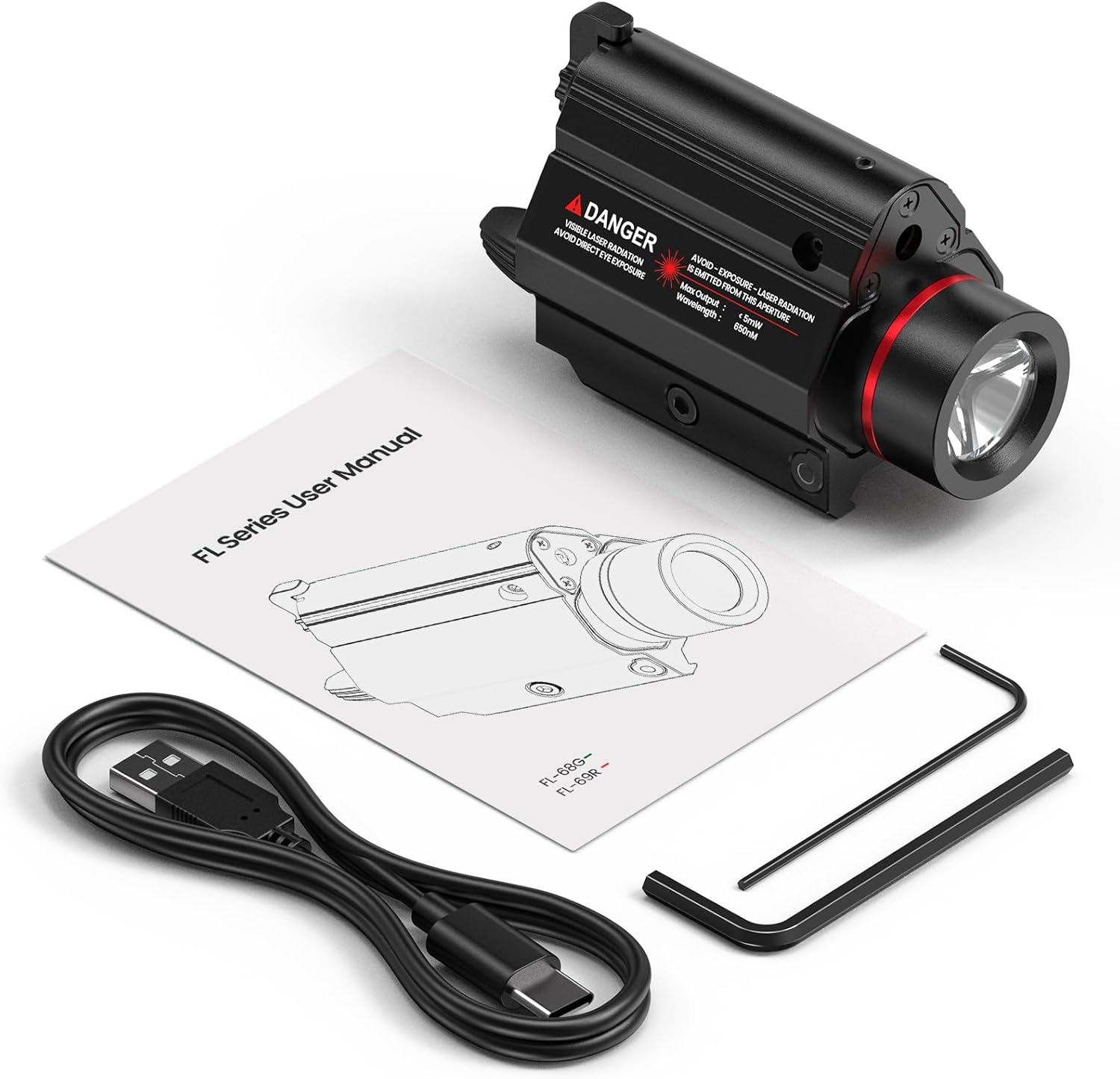
Image: All components included in the Feyachi LF-69 package: the laser flashlight combo, USB cable, two Allen keys, and the user manual.
4. Setup and Installation
4.1 Mounting on Picatinny Rail
- Ensure your firearm is unloaded and safe.
- Identify the Picatinny rail on your pistol or rifle. Ensure there is at least 1.53 inches of space between the rail groove and the trigger guard for proper fitment.
- Loosen the rail fixing screw on the LF-69 using one of the provided Allen keys. Do not remove the screw completely.
- Slide the LF-69 onto the Picatinny rail until it is in the desired position.
- Tighten the rail fixing screw firmly to secure the device.

Image: Illustration demonstrating the required rail space (at least 1.53 inches) for mounting the LF-69 on a handgun.
5. Operation
The LF-69 features a main switch for power and strobe, and a mode switch for selecting light/laser combinations.
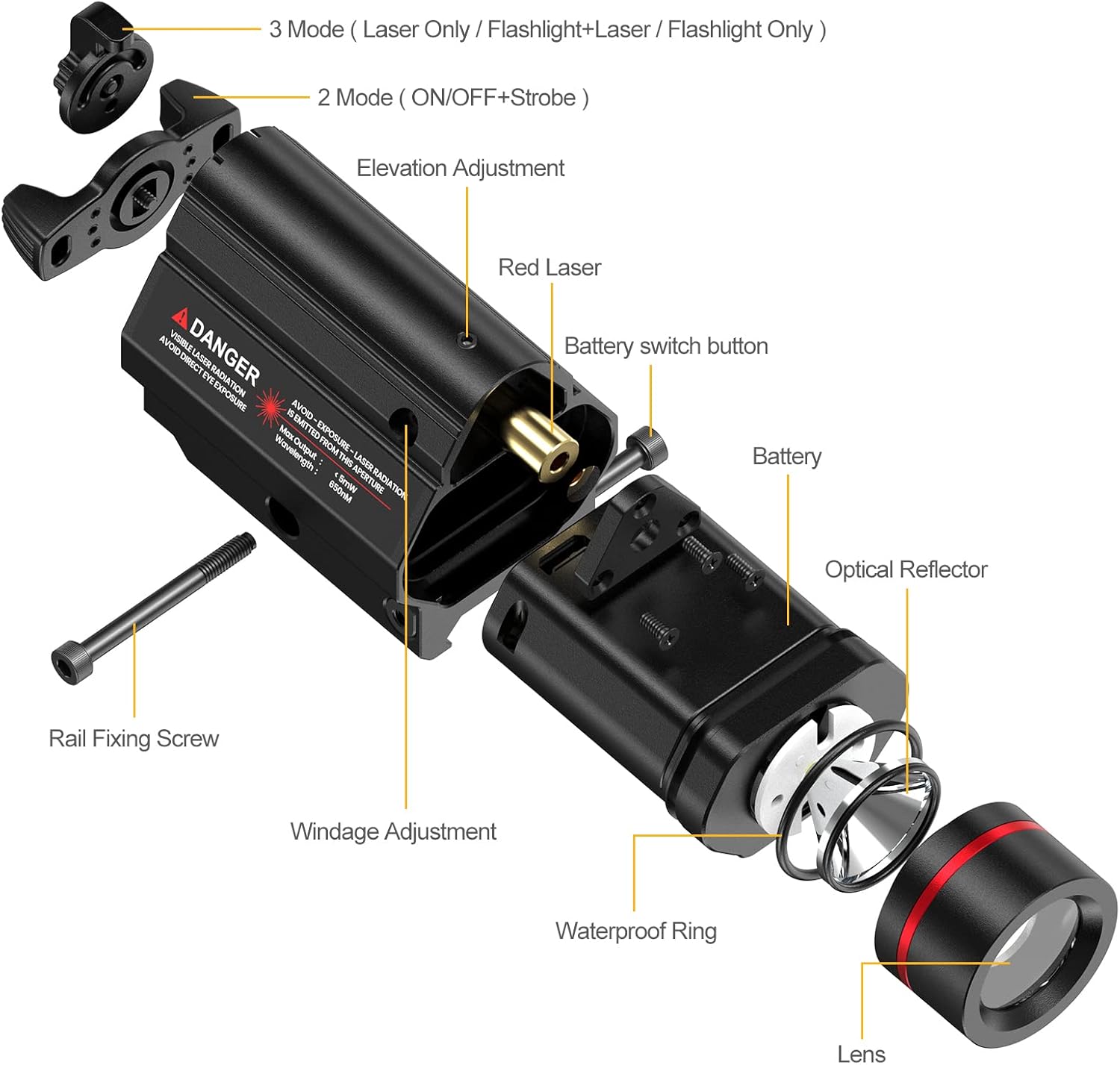
Image: An exploded diagram of the Feyachi LF-69, highlighting key components such as the battery, battery switch button, elevation and windage adjustments, and the main mode switches.
5.1 Power and Strobe Control
- The main switch (2 Mode ON/OFF+Strobe) is located at the rear of the device.
- Rotate the switch clockwise or counter-clockwise to turn the device ON or OFF.
- A quick double-tap or specific rotation pattern (refer to the physical manual for exact sequence) will activate the strobe function.
5.2 Mode Selection (Flashlight/Laser)
- The mode switch (3 Mode Laser Only / Flashlight+Laser / Flashlight Only) is typically a smaller toggle or button.
- Toggle this switch to cycle between:
- Laser Only
- Flashlight + Laser
- Flashlight Only

Image: Visual representation of the four operational modes: Laser Only, Flashlight + Laser, Flashlight Only, and Strobe.
6. Charging
The LF-69 features an integrated rechargeable battery. Follow these steps to charge your device:
- Locate the battery switch button (often labeled 'PUSH') on the side of the device.
- Press and hold the battery switch button to eject the internal battery module.
- Once the battery module is ejected, you will find a Micro USB port at its bottom.
- Connect the provided USB charging cable to the Micro USB port on the battery module and plug the other end into a suitable USB power source.
- During charging, an indicator light will typically show red.
- When fully charged (approximately 2 hours), the indicator light will turn green.
- After charging, carefully reinsert the battery module into the device until it clicks securely into place.
Note: Do not shake the connection or the charging cable violently during charging to avoid damage to the port.

Image: The Feyachi LF-69 connected to a USB charger, showing the red indicator light for charging and green for full charge.

Image: A visual guide to the charging procedure, showing the battery module ejection and USB connection.
7. Adjustments (Windage and Elevation)
The laser can be adjusted for windage (horizontal) and elevation (vertical) to align with your point of aim.
- Identify the small adjustment screws on the side (windage) and top (elevation) of the device.
- Use the smaller Allen key to make precise adjustments.
- Turn the screws incrementally and test the laser's alignment until it matches your desired point of impact.
- Clockwise turns typically move the laser right or down, while counter-clockwise turns move it left or up. Refer to the markings on the device for specific directions.
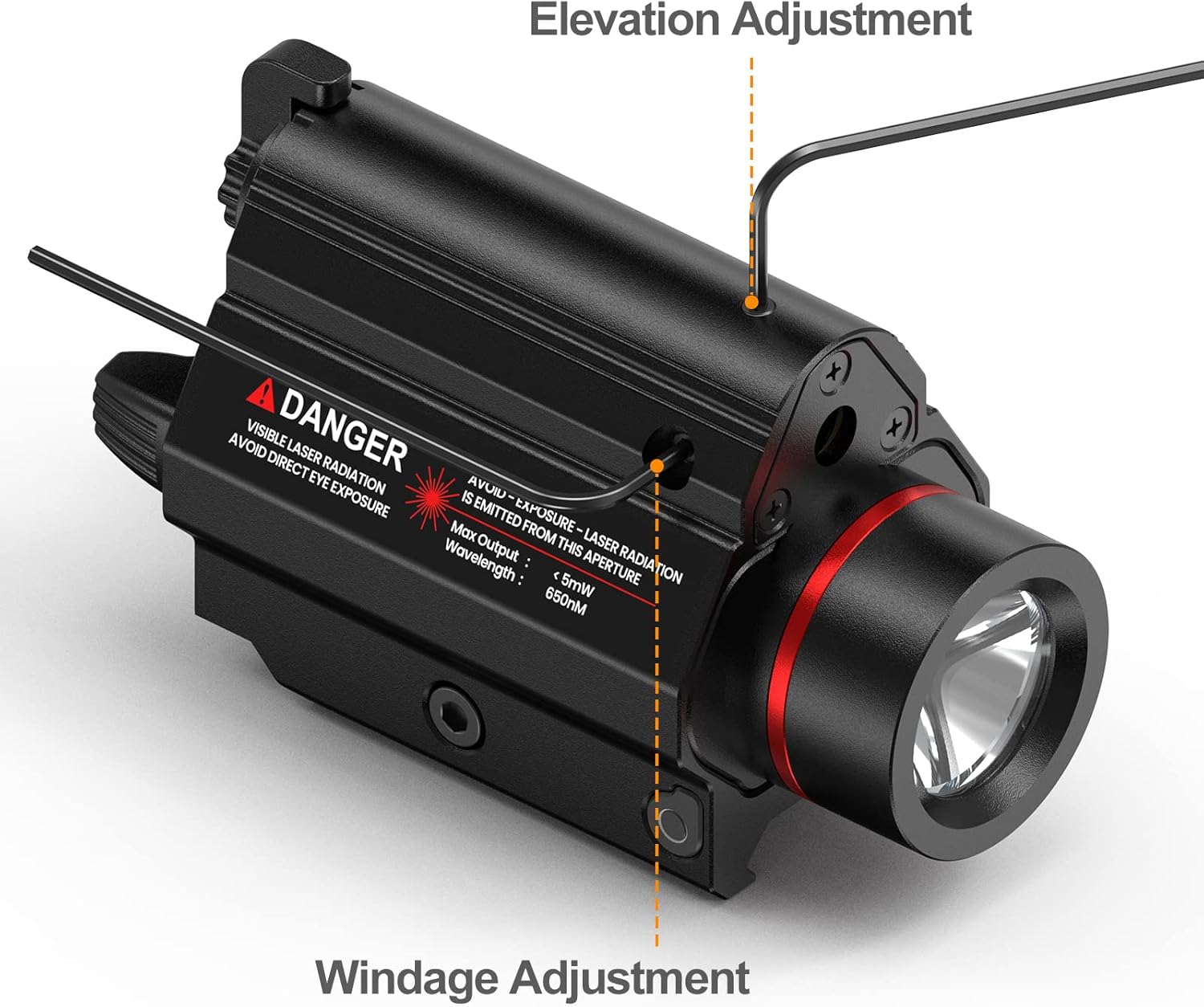
Image: Close-up view indicating the location of the elevation adjustment screw on top and the windage adjustment screw on the side of the LF-69.
8. Maintenance
Proper maintenance ensures the longevity and performance of your Feyachi LF-69.
- Cleaning: Use a soft, dry cloth to clean the exterior of the device. For the lens, use a lens-specific cleaning cloth and solution.
- Storage: Store the device in a cool, dry place away from direct sunlight and extreme temperatures.
- Battery Care: Recharge the battery regularly, even if not in use, to maintain battery health. Avoid fully discharging the battery for extended periods.
- Water Resistance: The device is O-ring and gasket sealed for weather resistance. Ensure all parts are properly seated after battery removal/insertion to maintain this seal.
9. Troubleshooting
If you encounter issues with your LF-69, refer to the following common problems and solutions:
| Problem | Possible Cause | Solution |
|---|---|---|
| Device does not turn on. | Battery is discharged. | Charge the battery fully. |
| Light flickers or turns off during use. | Loose battery connection; low battery. | Ensure battery module is securely seated. Recharge the battery. |
| Laser is not visible or weak. | Laser mode not selected; low battery. | Toggle the mode switch to laser or flashlight+laser. Recharge the battery. |
| USB charging port feels loose. | Manufacturing variation or wear. | Handle with care during charging. If charging is unreliable, contact customer support. |
| Device does not mount securely. | Rail fixing screw not tightened; incompatible rail. | Ensure the rail fixing screw is tightened. Verify your rail is a standard Picatinny type. |
10. Specifications
| Feature | Specification |
|---|---|
| Model Number | FA3069 |
| Light Output | 1000 Lumens |
| Laser Type | Red Laser (650nm, <5mW) |
| Power Source | Rechargeable Lithium Ion Battery |
| Material | Aluminum |
| Mounting Type | Gun Mount (Picatinny) |
| Water Resistance Level | Water Resistant |
| Item Weight | 6.7 Ounces |
| Dimensions (L x W x H) | 2.8 x 3.15 x 0.98 inches (approximate) |
11. Warranty and Support
11.1 Manufacturer's Warranty
Feyachi provides a 1-year limited warranty for this product. This warranty covers manufacturing defects and workmanship under normal use. It does not cover damage caused by misuse, accidents, unauthorized modifications, or normal wear and tear.
11.2 Customer Support
For technical assistance, warranty claims, or any questions regarding your Feyachi LF-69, please contact Feyachi customer support through their official website or the retailer where the product was purchased.
Video: Official Feyachi LF-69 Red Laser Flashlight product overview. This video demonstrates the features and functionality of the device.