
Introduction
Thank you for purchasing the THREEKEY TK-CW305 MagSafe Qi2.2 25W Wireless Charger. This manual provides essential information for the safe and efficient use of your new device. Please read it thoroughly before use and retain it for future reference.
Product Overview
Key Features
- Qi2.2 Official Certification & 25W High-Speed Charging: Upgraded Qi2.2 version with WPC official certification, offering up to 25W high-speed charging for compatible devices.
- Magnetic Automatic Alignment: Optimized magnetic technology ensures precise alignment for efficient and stable charging.
- High-Speed Cooling Fan: Built-in fan effectively dissipates heat during charging, preventing overheating and maintaining optimal performance.
- Dual-Sided Magnetic Design: One side for device charging, the other for magnetic holders, allowing versatile use in various scenarios.
- 2m Durable Braided USB-C to C Cable: Includes a 2-meter nylon braided cable for enhanced durability and flexible placement.
- Smart Temperature Control & Multi-Protection: Features advanced heat dissipation, foreign object detection, and multiple safety protections (overheat, short-circuit, over-voltage, over-current).
- Compact and Portable Design: Slim 15mm thickness and lightweight (60g) for easy portability.
- Wide Compatibility: Supports various iPhone, Android, and AirPods models with different charging speeds.
Package Contents
- THREEKEY TK-CW305 Wireless Charger Unit
- 2m Ultra-Long Nylon Braided USB-C to C Cable
- User Manual
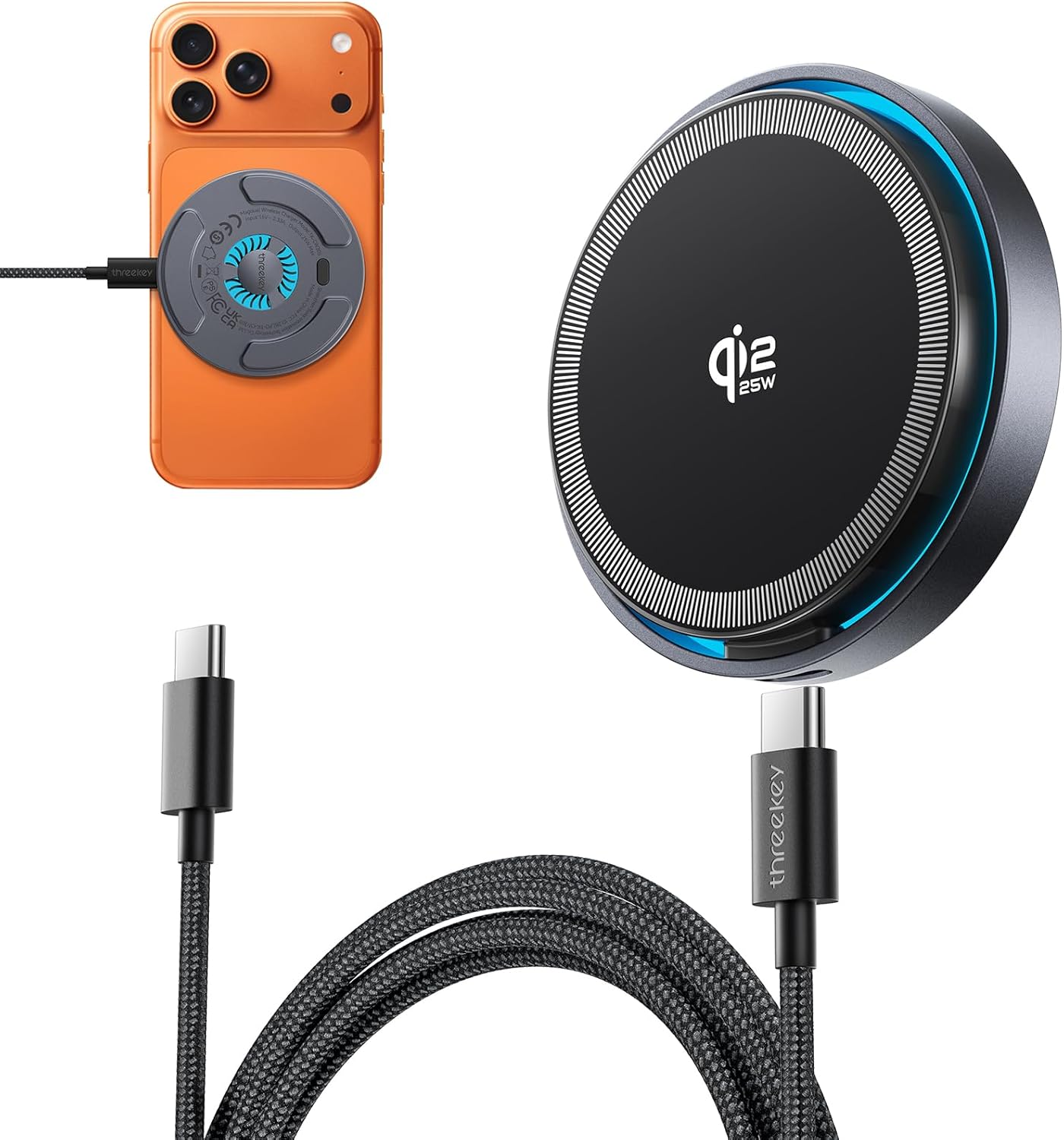
Figure 1: The THREEKEY TK-CW305 wireless charger, featuring a sleek black design with a blue LED ring, shown alongside its durable 2-meter braided USB-C to C cable. A smartphone with the charger attached is also visible, demonstrating its magnetic connection.

Figure 2: An exploded view of the THREEKEY TK-CW305 wireless charger, illustrating its internal components including the high-density coil, cooling fan, and magnetic rings.
Setup
Connecting the Charger
- Connect one end of the provided USB-C to C cable to the USB-C port on the THREEKEY TK-CW305 wireless charger.
- Connect the other end of the USB-C to C cable to a compatible power adapter. For optimal 25W high-speed charging, a power adapter with an output of 35W or higher is recommended (power adapter not included).
- Ensure the power adapter is plugged into a functional wall outlet.

Figure 3: The 2-meter long USB-C cable provides flexibility, allowing comfortable charging from various locations like a sofa or desk, helping to maintain a tidy workspace.
Operating Instructions
Charging Your Device
- Once the charger is connected to power, place your MagSafe-compatible device onto the charging surface.
- The charger's magnetic array will automatically align with your device, ensuring optimal charging efficiency.
- Charging will begin automatically. The blue LED ring will illuminate to indicate active charging.
- The charger supports both vertical and horizontal device orientation during charging.

Figure 4: The precise magnetic alignment feature of the THREEKEY Qi2 25W wireless charger ensures accurate device placement for efficient charging, minimizing alignment errors.

Figure 5: The compact design of the charger allows for a clean and organized desk setup. Simply place your smartphone on the charger to initiate charging.
Cooling Fan and LED Control
The built-in high-speed cooling fan activates automatically during charging to maintain optimal temperature. The blue LED provides a soft ambient light and indicates charging status. Both the fan and LED can be toggled on or off with a single click of the button located on the charger's back, allowing for undisturbed use, especially during sleep.

Figure 6: The THREEKEY TK-CW305 charger actively cools a smartphone during charging, ensuring efficient heat dissipation and stable performance.
Case Compatibility
For optimal charging performance, it is recommended to use cases thinner than 2.5mm. Cases between 2.5mm and 4mm thick may result in reduced charging speeds (e.g., 15W). Cases thicker than 4mm may prevent charging altogether due to interference with magnetic alignment and power transfer.

Figure 7: This chart illustrates how case thickness affects charging speed and capability with the THREEKEY TK-CW305 wireless charger.
Versatile Usage
The dual-sided magnetic design allows for flexible use. One side securely attaches to your device, while the other can be mounted on compatible magnetic holders, such as desk stands or car mounts. This enables hands-free use for video calls, media consumption, or navigation while charging.
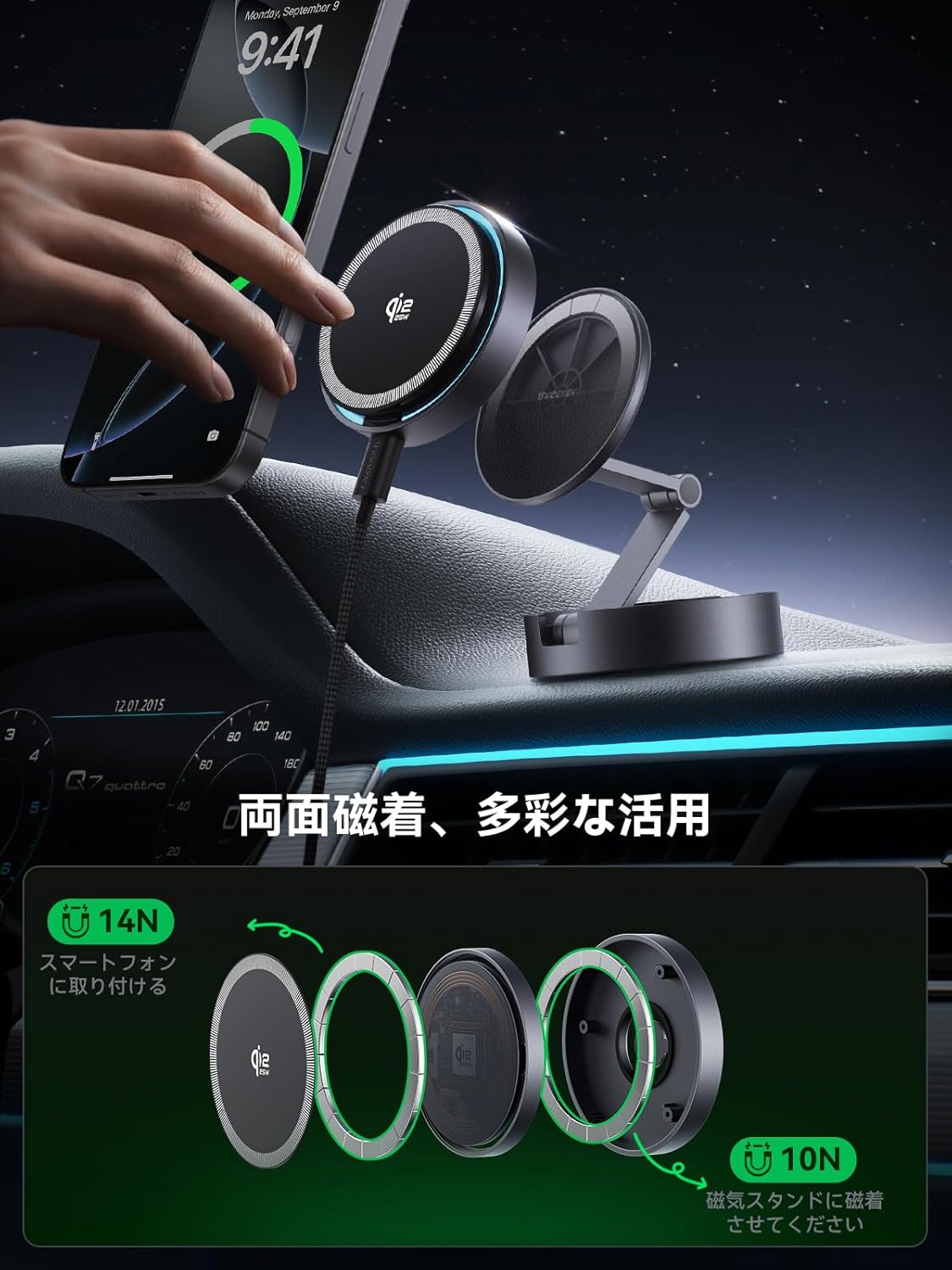
Figure 8: An illustration demonstrating the dual-sided magnetic design of the THREEKEY TK-CW305 charger. One side magnetically attaches to a smartphone (14N), while the other side can attach to a magnetic holder or stand (10N), enabling versatile use.
Maintenance
- Keep the charger clean by wiping it with a soft, dry cloth.
- Avoid exposing the charger to extreme temperatures, direct sunlight, or high humidity.
- Do not disassemble or attempt to repair the charger yourself. This will void the warranty and may cause damage or injury.
- Store the charger in a cool, dry place when not in use.
Troubleshooting
Device Not Charging or Charging Slowly
- Power Adapter: Ensure you are using a power adapter of 35W or higher for maximum 25W charging. Lower wattage adapters may result in slower charging or no charging.
- Cable Connection: Verify that the USB-C cable is securely connected to both the charger and the power adapter.
- Foreign Objects: Remove any metal objects or foreign materials between the charger and your device. The charger features Foreign Object Detection (FOD) and will stop charging if metal is detected.
- Case Thickness: Check your device's protective case. Cases thicker than 4mm may prevent charging. For optimal performance, use cases thinner than 2.5mm.
- Device Compatibility: Ensure your device is compatible with Qi2.2 wireless charging. Refer to the compatibility section or your device's manual.
Overheating During Charging
- The THREEKEY TK-CW305 is designed with a high-speed cooling fan and smart temperature control to prevent overheating.
- If the device feels excessively hot, ensure the cooling fan is operating (it activates automatically). Check for any obstructions to the fan vents.
- The charger will automatically switch to a trickle charging mode when the device battery reaches 80% to prevent overcharging and reduce heat.
Specifications
| Model Number | TK-CW305 |
| Brand | THREEKEY |
| Input Voltage | 15V |
| Output Power | 25W (Max) |
| Connectivity | USB Type C |
| Cable Length | 2m |
| Dimensions | 16.2 x 9.1 x 2.1 cm |
| Weight | 60g |
| Included Components | Wireless Charger Unit, 2m USB-C to C Cable, User Manual |
| Features | MagSafe compatible, Qi2 25W official certification, High-rotation cooling fan, Dual-sided magnetic, Smart temperature control, Multi-protection |
| Color | Black |
Compatibility
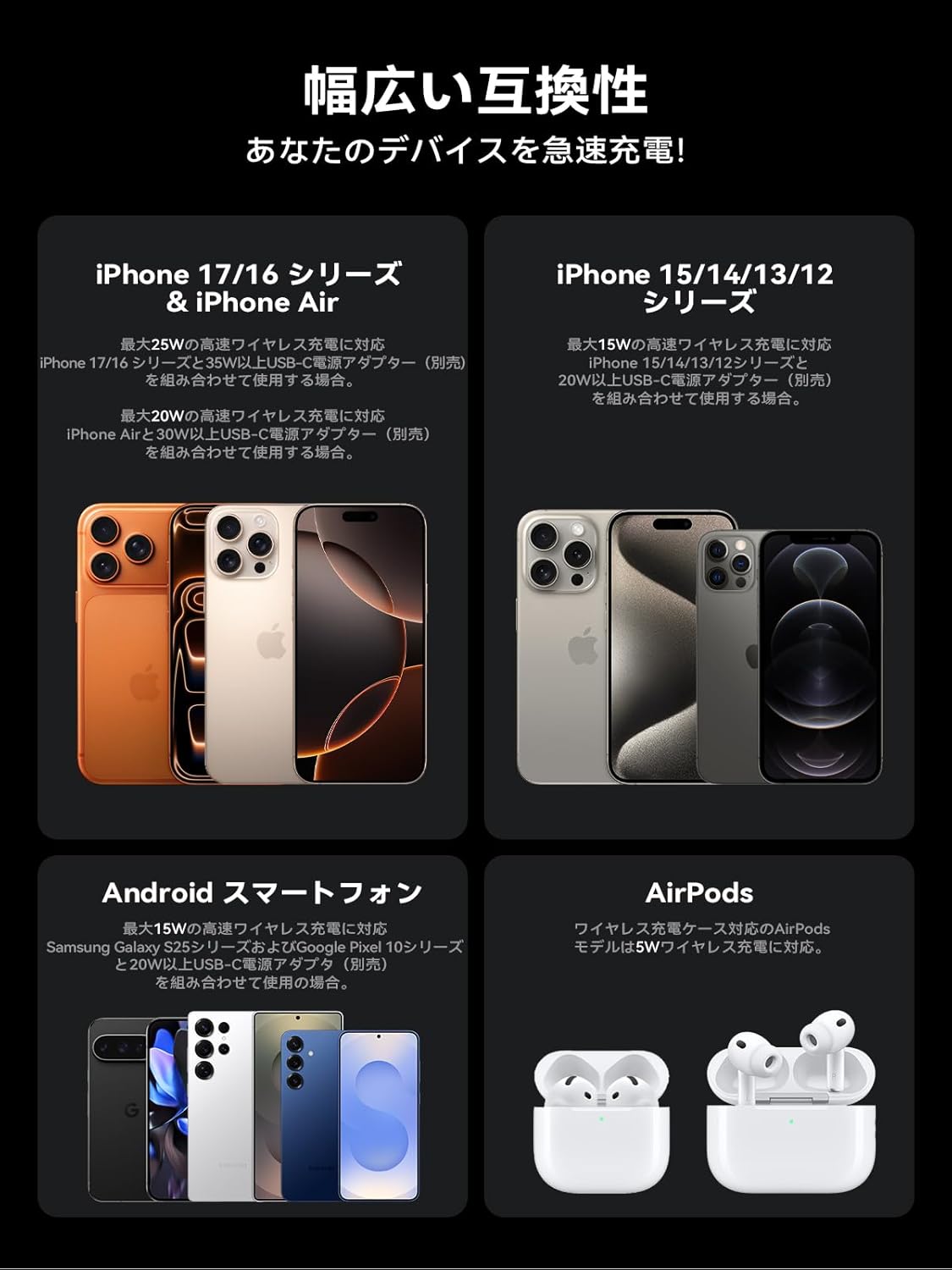
Figure 9: Compatibility chart for THREEKEY TK-CW305 wireless charger with various iPhone, Android, and AirPods models, indicating different charging speeds based on device and power adapter.
- 25W High-Speed Wireless Charging: Compatible with iPhone 17/16 series (with iOS 26 or later) when used with a 35W or higher USB-C power adapter (sold separately).
- 15W High-Speed Wireless Charging: Compatible with iPhone 16 (prior to iOS 26), iPhone 12-15 series, Samsung Galaxy S25 series, and Google Pixel 10 series when used with a 20W or higher USB-C power adapter (sold separately).
- 5W Wireless Charging: Compatible with AirPods models that support wireless charging cases.
Safety Information
The THREEKEY TK-CW305 wireless charger incorporates multiple safety features to ensure secure and reliable operation:
- Overheat Protection: Prevents the charger and device from reaching unsafe temperatures.
- Short-Circuit Protection: Safeguards against electrical shorts.
- Over-Voltage Protection: Protects against excessive voltage input.
- Over-Current Protection: Regulates current flow to prevent damage.
- Signal Interference Prevention: Minimizes interference with other electronic devices.
- Foreign Object Detection (FOD): Automatically stops charging if metal objects are detected on the charging surface, preventing heat buildup.
- Smart Trickle Charging: Automatically switches to a low-current charging mode when the battery reaches 80% to prevent overcharging and extend battery life.
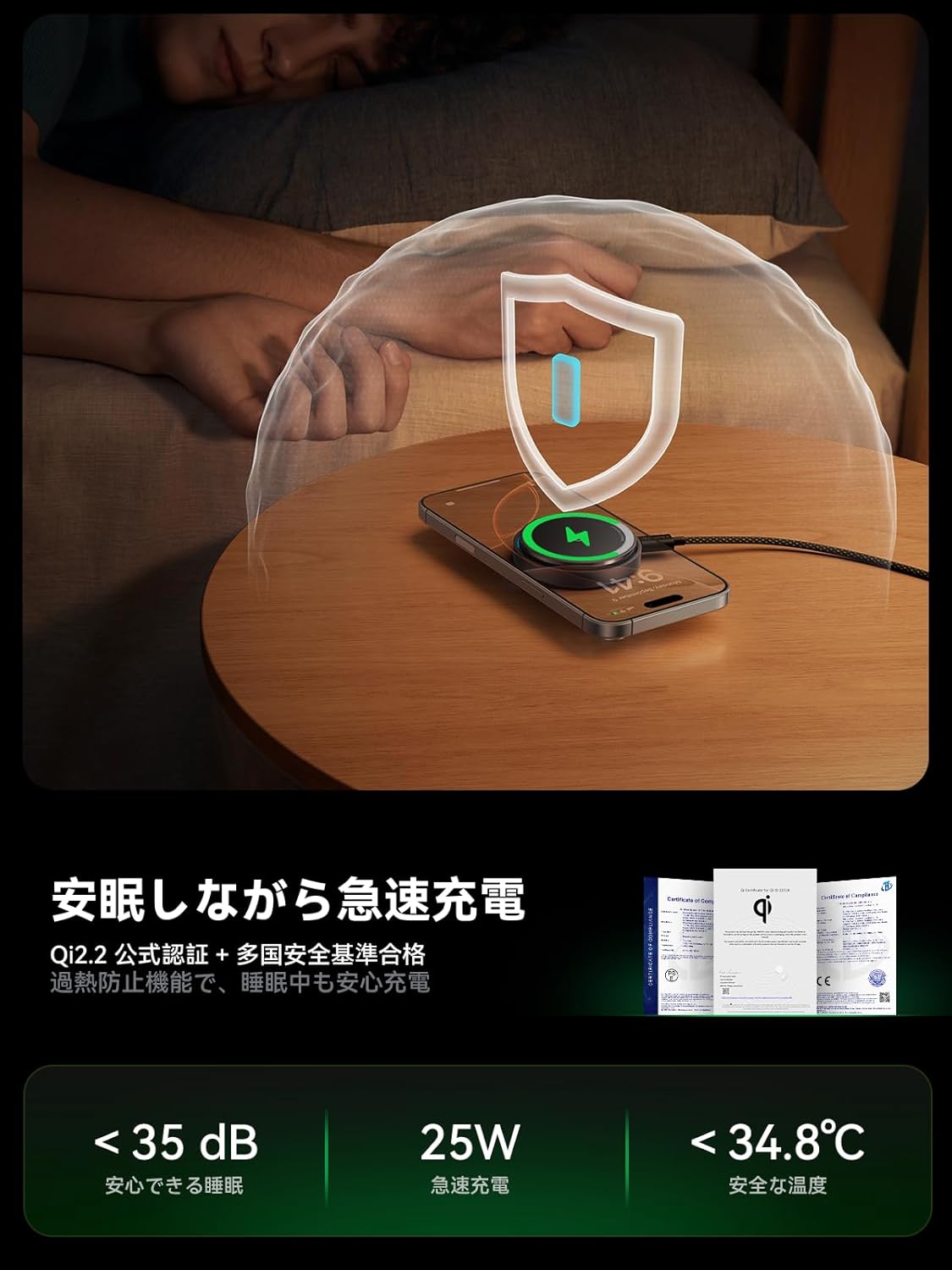
Figure 10: The charger's safety features ensure rapid and safe charging, even overnight, with low noise levels (below 35dB) and controlled temperatures (below 34.8°C).

Figure 11: The THREEKEY TK-CW305 charger has obtained Qi2.2 official certification and complies with international safety standards, ensuring technical safety and efficiency.
Warranty and Support
THREEKEY provides a 36-month warranty for this product. If you encounter any issues or have questions regarding your THREEKEY TK-CW305 wireless charger, please contact our customer support team. We are committed to providing assistance and resolving any concerns you may have.
For support, please refer to the contact information provided on the product packaging or the official THREEKEY website.


