
1. Introduction
This manual provides detailed instructions for the proper use, setup, and maintenance of your Pard USA Night Stalker 4K EX Digital Night Vision Scope. Please read this manual thoroughly before operating the device to ensure optimal performance and safety. Retain this manual for future reference.
2. Safety Information
- Do not look directly at strong light sources through the device, as this may damage your eyes and the device's sensor.
- Keep the device away from extreme temperatures, direct sunlight, and high humidity.
- Avoid dropping or subjecting the device to severe impacts.
- Do not attempt to disassemble or modify the device. This will void the warranty and may cause damage.
- Use only specified batteries and chargers. Improper battery use can lead to fire, explosion, or other hazards.
- Ensure the device is securely mounted before use to prevent accidental dislodgement.
3. Package Contents
Verify that all items are present in your package:
- Pard USA Night Stalker 4K EX Digital Night Vision Scope
- User Manual
- Protective Cover
- Mounting Accessories (if included with specific model variant)
- Charging Cable
4. Product Overview
Familiarize yourself with the main components of your Night Stalker 4K EX scope.
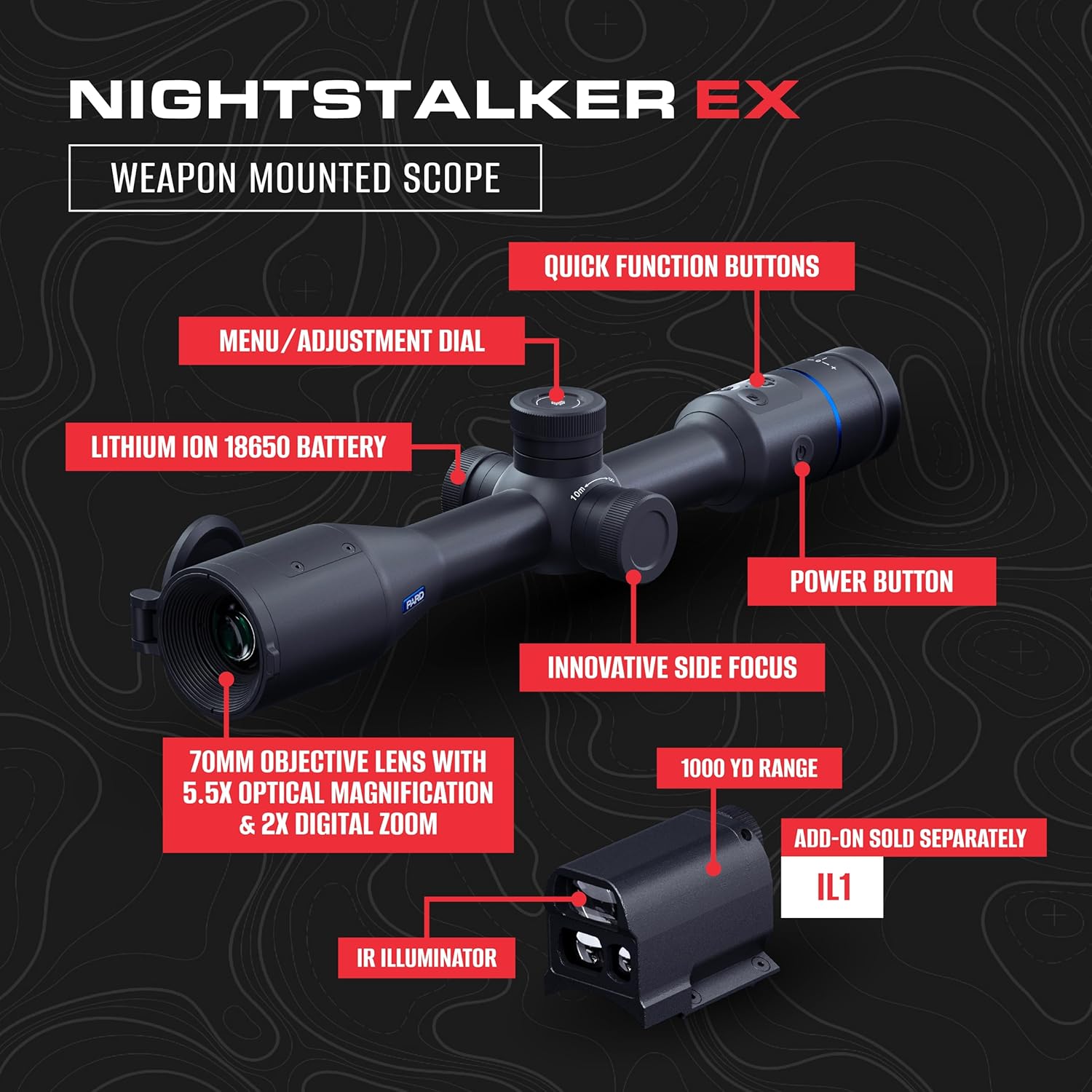
- 70mm Objective Lens: Primary lens for light collection.
- Eyepiece/OLED Display: Where the user views the image.
- Side Focus Knob: For precise focus adjustments.
- Menu/Adjustment Dial: Navigates menus and adjusts settings.
- Quick Function Buttons: Programmable or dedicated buttons for common functions.
- Power Button: Turns the device on and off.
- Battery Compartment: Houses the Lithium Ion 18650 battery.
- Mounting Points: For attaching to a weapon or tripod.
5. Setup
5.1. Battery Installation
- Locate the battery compartment cover, typically on the side or bottom of the scope.
- Unscrew or open the cover.
- Insert a fully charged 18650 Lithium Ion battery, ensuring correct polarity (+/-).
- Securely close the battery compartment cover.
5.2. Mounting the Scope
The Night Stalker 4K EX is designed for weapon mounting. Use appropriate rings and bases compatible with your firearm and the scope's mounting points.
- Attach the mounting rings to your weapon's rail or base according to the ring manufacturer's instructions.
- Place the scope into the lower halves of the rings.
- Position the scope for optimal eye relief and comfortable viewing.
- Place the upper halves of the rings and tighten the screws evenly, ensuring the scope is level and secure. Do not overtighten.
5.3. Initial Power On
Press and hold the Power Button for approximately 3 seconds until the display illuminates. The device will perform a self-check and then display the main viewing screen.
6. Operating Instructions
6.1. Power On/Off
- To Power On: Press and hold the Power Button for 3 seconds.
- To Power Off: Press and hold the Power Button for 3 seconds until the display shuts down.
6.2. Focus Adjustment
The Night Stalker 4K EX features an innovative side-focus design for intuitive adjustments.

- Look through the eyepiece.
- Rotate the side focus knob (typically located on the left side of the scope) until the image appears sharp and clear.
- Adjust as needed for different distances.
6.3. Magnification (Optical/Digital Zoom)
The scope offers 5.5x optical magnification and 2x digital zoom.
- Optical Magnification: This is fixed at 5.5x.
- Digital Zoom: Use the Menu/Adjustment Dial or a designated quick function button to cycle through digital zoom levels (e.g., 1x, 2x). Refer to the on-screen display for current zoom level.
6.4. Menu Navigation and Settings
The Menu/Adjustment Dial is used to access and navigate the device's settings.
- Press the Menu/Adjustment Dial to enter the main menu.
- Rotate the dial to scroll through menu options.
- Press the dial again to select an option or confirm a setting.
- Use quick function buttons for shortcuts if available.
6.5. Reticle Selection and Adjustment
The scope offers multiple reticle styles and colors for various preferences and conditions.

- Access the Reticle settings through the main menu.
- Select from 6 available reticle styles.
- Choose from 4 reticle colors.
- Perform zeroing procedures as required for your specific firearm and ammunition. Refer to advanced settings in the menu for zeroing adjustments.
6.6. Image Modes and Scene Modes
Optimize your viewing experience with different image and scene modes.
- Image Modes: Select between Color Mode for daytime viewing and Mono Mode for enhanced night vision clarity. Access these via the menu.
- Scene Modes: The device offers 3 scene modes, which adjust image processing for different environmental conditions (e.g., forest, desert, snow). Select the most appropriate mode via the menu for optimal visibility.
6.7. Recording Function
The Night Stalker 4K EX supports recoil-activated recording.
- Ensure a compatible microSD card (not included) is inserted into the designated slot.
- Enable 'Recoil-Activated Recording' in the system settings.
- The device will automatically record video clips when recoil is detected.
- Manual recording can also be initiated via a quick function button or menu option.
6.8. Wi-Fi Connection
Connect your scope to a mobile device for remote viewing and control.
- Download the official Pard Vision app from your device's app store.
- Enable Wi-Fi on your Night Stalker 4K EX via the menu.
- On your mobile device, connect to the Wi-Fi network broadcast by the scope (SSID and password will be displayed on the scope's screen).
- Open the Pard Vision app to establish a connection.
6.9. Accessory Integration
The scope is compatible with optional accessories.
- Pard USA IL1 Removable LRF Rangefinder: Attach the IL1 module (sold separately) to the designated port for integrated laser rangefinding capabilities. Follow the IL1's specific instructions for installation and operation.
- IR Light Module: An external IR illuminator (sold separately) can be mounted to enhance night vision performance in extremely dark conditions.
7. Maintenance
7.1. Cleaning
- Lenses: Use a soft, lint-free cloth specifically designed for optical lenses. Gently wipe the lens surfaces. For stubborn smudges, use a small amount of lens cleaning solution.
- Body: Wipe the scope's body with a soft, damp cloth. Avoid abrasive cleaners or solvents.
- Ensure all covers (lens caps, port covers) are in place when not in use to protect against dust and moisture.
7.2. Storage
- Store the device in a cool, dry place, away from direct sunlight and extreme temperatures.
- Remove the battery if the device will not be used for an extended period to prevent leakage.
- Use the provided protective cover or a suitable carrying case for storage and transport.
7.3. Battery Care
- Charge batteries fully before first use.
- Do not overcharge or completely discharge batteries.
- Replace batteries when their performance significantly degrades.
- Dispose of used batteries according to local regulations.
8. Troubleshooting
| Problem | Possible Cause | Solution |
|---|---|---|
| Device does not power on | Battery depleted or incorrectly installed | Charge or replace battery; ensure correct polarity. |
| Image is blurry | Focus not adjusted; eyepiece diopter needs adjustment | Adjust the side focus knob. If available, adjust the eyepiece diopter for your vision. |
| No image in low light | IR illuminator off or insufficient ambient light | Ensure IR illuminator is active (if applicable). Consider using an external IR light module. |
| Wi-Fi connection issues | Incorrect password; device too far from phone; Wi-Fi not enabled on scope | Verify password; move closer to the scope; enable Wi-Fi in scope settings. |
| Buttons unresponsive | Device frozen; low battery | Perform a soft reset (hold power button for 10-15 seconds). Charge battery. |
9. Specifications
Technical specifications for the Pard USA Night Stalker 4K EX Digital Night Vision Scope.
| Feature | Specification |
|---|---|
| Model Name | Night Stalker 4K EX |
| Objective Lens Diameter | 70 mm |
| Optical Magnification | 5.5x |
| Digital Zoom | 2x |
| Sensor | 4K CMOS (3840x2160 resolution, 2.9µm pixels) |
| Low-Light Sensitivity | 0.001 lux |
| Display Type | OLED |
| Display Resolution | 2560x2560 |
| Horizontal FOV @ 100m | 10.7 m (5.8°) |
| Diagonal FOV | 7.3° |
| Recoil-Activated Recording | Yes |
| Material | Housing: Aluminum |
| Color | Black |
| Product Dimensions | 17.75"L x 7"W x 5.25"H |
| Item Weight | 5.8 Pounds |
| Reticle Type | Crosshair (multiple styles available) |
| UPC | 850071106077 |
10. Warranty and Support
The Pard USA Night Stalker 4K EX Digital Night Vision Scope is covered by a manufacturer's warranty. Specific warranty terms and duration may vary by region and retailer. Please refer to your purchase documentation or contact your point of sale for detailed warranty information.
For technical support, service, or warranty claims, please contact Pard customer service through their official website or the retailer from whom you purchased the product. Ensure you have your product model and serial number available when contacting support.


