
1. Introduction
This manual provides essential information for the safe and efficient use of your VIVO T4R 5G smartphone. Please read this manual thoroughly before using your device to ensure optimal performance and longevity. The VIVO T4R 5G features a Quad Curved AMOLED Display, a Dimensity 7400 5G Processor, and a 50MP OIS camera system.
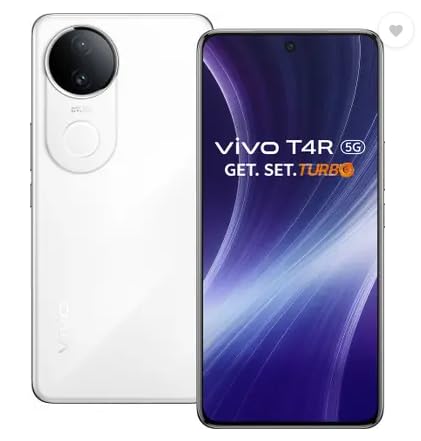
Figure 1: Front view of the VIVO T4R 5G smartphone.
2. Setup
2.1 Unboxing and Package Contents
Carefully unpack your VIVO T4R 5G smartphone. Verify that all items listed below are present:
- Handset
- Quick Start Guide
- USB Cable
- Charger
- Eject Tool
- Phone Case
- Protective Film (Applied)
- Warranty Card
2.2 SIM Card Installation
The VIVO T4R 5G supports Dual Nano SIM cards. Use the provided eject tool to open the SIM card tray.
- Locate the SIM card tray on the side of the device.
- Insert the eject tool into the small hole next to the tray and press gently until the tray pops out.
- Place your Nano SIM card(s) into the designated slots on the tray, ensuring the gold contacts face downwards.
- Carefully reinsert the tray into the phone until it clicks into place.
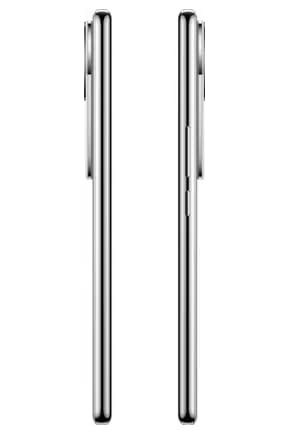
Figure 2: Side view illustrating SIM card tray location.
2.3 Initial Charging and Power On
Before first use, it is recommended to fully charge your device. Connect the USB Type-C cable to the phone's charging port and the charger to a power outlet.
- Once charged, press and hold the Power button (located on the right side) until the VIVO logo appears.
- Follow the on-screen instructions to complete the initial setup, including language selection, Wi-Fi connection, and Google account setup.
3. Operating Instructions
3.1 Basic Navigation
The VIVO T4R 5G operates on Funtouch OS 15, based on Android 15. Navigation is primarily touch-based:
- Tap: Select an item or open an app.
- Swipe: Scroll through screens or lists.
- Pinch: Zoom in or out on images and web pages.
- Long Press: Access contextual menus or move app icons.
3.2 Calls and Messaging
To make a call, open the Phone app and dial the number or select a contact. To send a message, open the Messages app, tap to compose a new message, enter the recipient and your text.
3.3 Camera Usage
The VIVO T4R 5G features a 50MP (OIS) main rear camera and a 32MP front camera. Open the Camera app to capture photos and videos.
- Photo Mode: Tap the shutter button to take a picture.
- Video Mode: Switch to video mode and tap the record button to start/stop recording.
- AI Features: Utilize AI Photo Enhance and AI Erase 2.0 for improved image quality and editing.
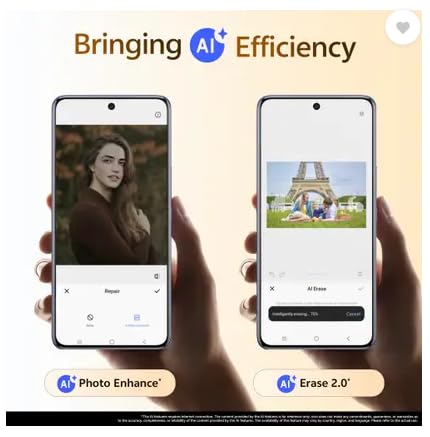
Figure 3: AI Photo Enhance and AI Erase 2.0 features in action.
3.4 Security Features
The device includes Fingerprint Recognition for secure unlocking. Set up your fingerprint in the Security settings menu.
4. Maintenance
4.1 Cleaning Your Device
Use a soft, lint-free cloth to clean the screen and body of your phone. Avoid using harsh chemicals or abrasive materials.
4.2 Software Updates
Regularly check for and install software updates to ensure your device has the latest features, security patches, and performance improvements. The VIVO T4R 5G is designed to receive 2 years of OS updates and 3 years of security updates.
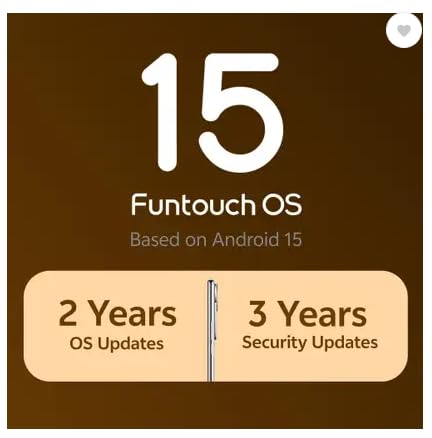
Figure 4: Software update policy for VIVO T4R 5G.
4.3 Battery Care
The VIVO T4R 5G is equipped with a 5700 mAh battery. To prolong battery life:
- Avoid extreme temperatures.
- Use the original charger and USB cable.
- Do not let the battery drain completely before recharging frequently.
4.4 Water Resistance
The device is rated as Water Resistant. While it can withstand splashes and light rain, avoid submerging it in water or exposing it to high-pressure water jets.
5. Troubleshooting
If you encounter issues with your VIVO T4R 5G, try the following steps:
- Device not turning on: Ensure the battery is charged. Press and hold the power button for at least 10 seconds.
- Apps crashing or freezing: Close the app and reopen it. If the issue persists, restart the phone.
- Network connectivity issues: Check if Airplane Mode is off. Restart the phone. Verify SIM card insertion.
- Slow performance: Clear cache, uninstall unused apps, or perform a factory reset (back up data first).
For more complex issues, refer to the official VIVO support website or contact customer service.
6. Specifications
Key technical specifications for the VIVO T4R 5G smartphone:
| Feature | Specification |
|---|---|
| Brand | vivo |
| Operating System | Android 15 (Funtouch OS 15) |
| Processor | Mediatek Dimensity 7400 5G (2.67 GHz) |
| RAM | 8 GB |
| Internal Storage | 128 GB |
| Display | 17.2 cm (6.77 inch) Quad Curved AMOLED 120 Hz Display (1080 x 2392 Pixels) |
| Rear Camera | 50 MP (OIS) + 2 MP |
| Front Camera | 32 MP |
| Battery Capacity | 5700 mAh |
| SIM Card Slot | Dual SIM (Nano) |
| Connectivity | 5G, Bluetooth, USB Type C, Wi-Fi, NFC |
| Biometric Security | Fingerprint Recognition |
| Water Resistance | Water Resistant |
| Dimensions | 16.4 x 7.5 x 0.8 Centimeters |
| Weight | 190 Grams |
7. Warranty Information
The VIVO T4R 5G comes with a domestic warranty of 1 year for the handset and 6 months for accessories from the date of purchase. Please retain your proof of purchase for warranty claims. For detailed terms and conditions, refer to the warranty card included in the package.
8. Support
For further assistance, technical support, or service inquiries, please contact VIVO customer support. You can find contact details on the official VIVO website or in the Quick Start Guide.
Manufacturer: Vivo Mobile India Pvt. Ltd.
Importer Contact Information: Vivo Mobile India Private Limited PLOT NO 8, SECTOR 24, YAMUNA EXPRESSWAY AREA, GAUTAM BUDDHA NAGAR, UP INDIA-201310


