1. Introduction
The Vector Optics MOJ to VOD Adapter (SCFRM-13) is a precision CNC machined accessory designed to seamlessly integrate your Frenzy Plus Enclosed Red Dot Sight (SCRD-63/75 line) with pistols featuring an RMR optic-ready cut. This adapter provides an extreme low-profile mounting solution, ensuring compatibility and optimal sight alignment.
2. Product Features
- MOJ Footprint: Compatible with RMR optic-ready pistol cuts.
- VOD Footprint: Compatible with Aimpoint ACRO footprint red dot sights.
- Extreme Low Profile: Designed for minimal height addition.
- Precision CNC Machined: Ensures exact fit and durability.
- Material: Constructed from durable Aluminum.
3. Package Contents
The following items are typically included with your Vector Optics MOJ to VOD Adapter:
- Vector Optics MOJ to VOD Adapter (SCFRM-13)
- Mounting Screws (various sizes for compatibility)
- Hex Key / Torx Wrench for installation and adjustments
- Cleaning Cloth
- User Manual
- VIP Lifetime Warranty Card
Video 1: CVLIFE Enclosed Red Dot Unboxing. This video provides a visual overview of the typical contents included in a red dot sight package, which may include the adapter, screws, and tools.
Video 2: Enclosed Red Dot Sight Unboxing. Another unboxing video from a seller, showing the various components and accessories that come with a red dot sight, including mounting hardware.
4. Setup and Installation
Follow these steps to properly install your MOJ to VOD Adapter and mount your compatible red dot sight:
- Ensure your firearm is unloaded and safe before beginning installation.
- Identify the RMR optic-ready cut on your pistol slide.
- Place the Vector Optics MOJ to VOD Adapter onto the pistol slide, aligning the mounting holes.
- Secure the adapter to the slide using the appropriate screws provided. Tighten screws evenly to the manufacturer's recommended torque specifications.
- Mount your compatible red dot sight (e.g., Frenzy Plus Enclosed Red Dot Sight) onto the VOD footprint of the adapter.
- Secure the red dot sight to the adapter using the screws provided with your red dot sight.
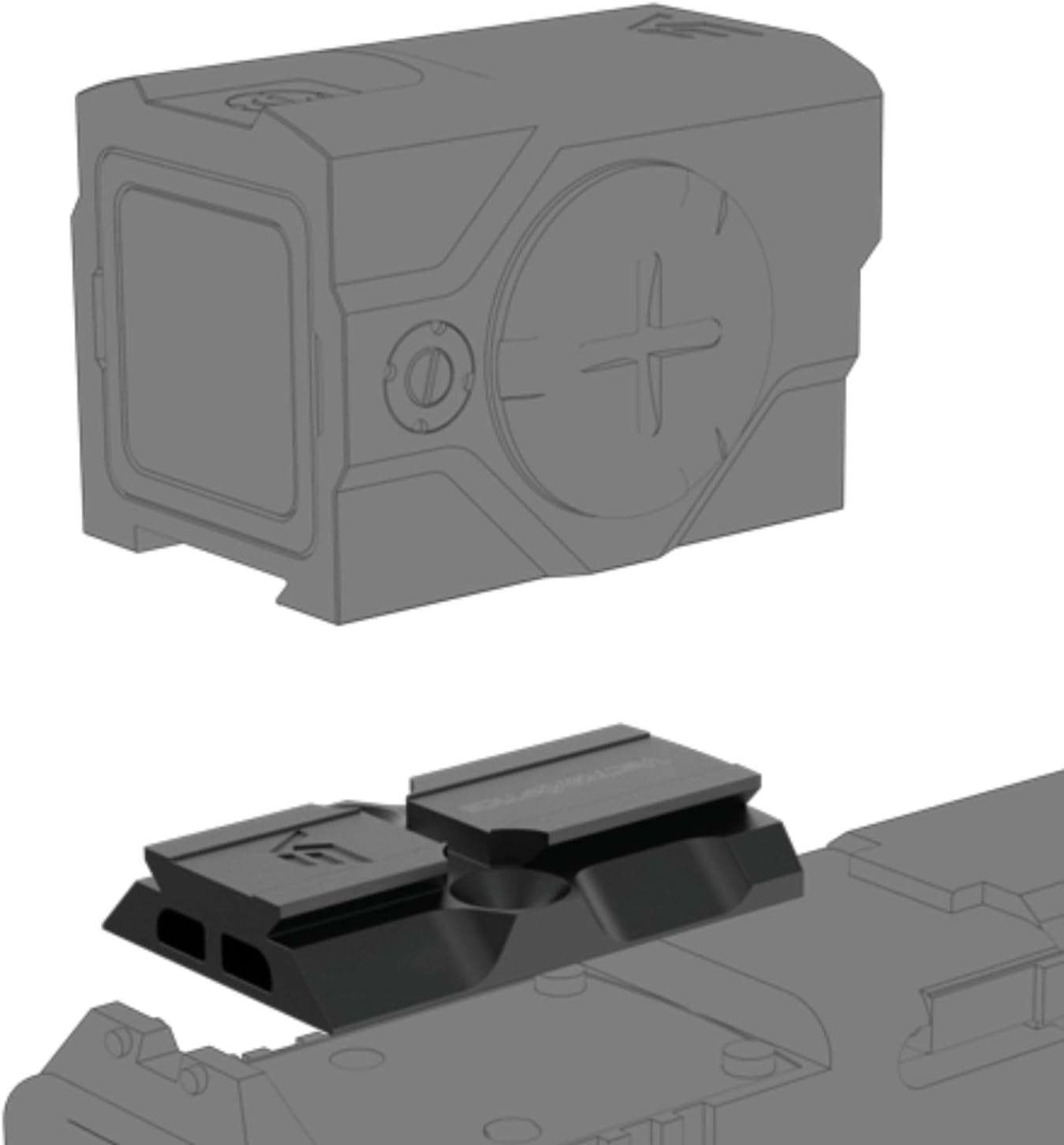
Image 1: Exploded View. This image illustrates the separate components of the MOJ to VOD adapter and a compatible red dot sight, showing how they fit together.

Image 2: Mounted Sight. This image shows a compatible red dot sight securely mounted onto the MOJ to VOD adapter, ready for use.
5. Operating Instructions (Red Dot Sight)
While this manual focuses on the adapter, here are general operating instructions for a compatible red dot sight, often featuring similar controls:
5.1 Power On/Off & Brightness Adjustment
- Press the '+' button to power on the red dot sight.
- Use the '+' and '-' buttons to adjust the brightness level of the reticle.
- To power off, press and hold the '-' button for several seconds.
5.2 Reticle Selection
- Some red dot sights offer multiple reticle options (e.g., 2 MOA dot, 6 MOA dot, 32 MOA circle).
- To cycle through reticle types, press and hold the '-' button (or a dedicated reticle button if available) for approximately 2 seconds.
5.3 Motion Activation
- Many modern red dot sights feature motion activation. If the sight detects no movement for a set period (e.g., 3 minutes), it will enter sleep mode to conserve battery.
- Any movement will instantly reactivate the sight to its last brightness and reticle setting.
- To manually enable/disable motion activation, double-tap the '-' button and hold for 3 seconds.
5.4 Windage and Elevation Adjustment
- Use the provided adjustment tool (flathead or Torx) to turn the windage (left/right) and elevation (up/down) adjustment screws on your red dot sight.
- Each click typically corresponds to 1 MOA (Minute of Angle) of adjustment.
- Clockwise turns generally move the point of impact right or up; counter-clockwise moves it left or down. Refer to your red dot sight's specific manual for precise directions.
Video 3: How to Use Frenzy 1x24x29. This official seller video demonstrates the basic operation of a compatible red dot sight, including power, brightness, and reticle adjustments.
6. Maintenance
To ensure the longevity and optimal performance of your adapter and red dot sight:
- Cleaning: Use the provided cleaning cloth or a soft, lint-free cloth to wipe the lenses and body of the red dot sight. For stubborn dirt, a small amount of lens cleaning solution can be used.
- Adapter Care: Keep the adapter free from dirt and debris. Periodically check mounting screws for tightness.
- Battery Replacement: For red dot sights with side-loading battery trays, replace the battery as needed without removing the sight from the adapter.
7. Troubleshooting
If you encounter issues with your red dot sight or adapter, consider the following:
- Dot Not Appearing: Check battery level and ensure the sight is powered on. Replace battery if low.
- Dot Flickering/Dim: Replace battery. Ensure battery cap is securely tightened.
- Inaccurate Zero: Ensure all mounting screws (adapter to slide, sight to adapter) are properly torqued. Re-zero the sight.
- Motion Activation Issues: Verify motion activation is enabled (refer to red dot sight manual).
8. Specifications (Adapter)
| Brand | Vector Optics |
| Model Name | Vector Optics MOJ to VOD-R Adapter (SCFRM-13) |
| Material | Aluminum |
| Color | Matte Black |
| Product Dimensions (L x W x H) | 1.8" x 1.1" x 0.2" |
| Item Weight | 41 Grams |
| Compatible Devices | Handgun (with RMR optic-ready cut) |

Image 3: Adapter Dimensions. This diagram provides precise measurements for the MOJ to VOD adapter, aiding in compatibility assessment.
9. Warranty and Support
Vector Optics products, including the MOJ to VOD Adapter, typically come with a VIP Lifetime Warranty. For any warranty claims or technical support, please refer to the contact information provided on your VIP Warranty Card or visit the official Vector Optics website.


