
1. Introduction
Thank you for choosing the LEFANT M210P Robot Vacuum Cleaner. This manual provides essential information for the safe operation, maintenance, and troubleshooting of your device. Please read it thoroughly before use and retain it for future reference.
2. Product Overview
The LEFANT M210P is an ultra-thin robot vacuum cleaner designed for efficient cleaning of various floor types, including hard floors, parquet, carpets, and rugs. It features advanced navigation, multiple cleaning modes, and smart control options.

Image: The LEFANT M210P robot vacuum cleaner, its charging base, two side brushes, and a filter, illustrating the main components included.
3. Setup
3.1 Charging Base Placement
Place the charging base against a wall in an open area. Ensure there is at least 1 meter (3.3 feet) of clear space to the front and 0.5 meters (1.6 feet) to each side of the charging base for optimal robot navigation and docking.
3.2 Initial Charging
Before first use, fully charge the robot vacuum. Connect the charging base to a power outlet. Place the robot onto the charging base, ensuring the charging contacts align. The indicator light on the robot will show charging status.
3.3 App Connection Guide
The LEFANT M210P can be controlled via the Lefant App. Follow these steps to connect your robot:
- Download the Lefant App from your device's app store.
- Open the App and tap "Add Device." Enable Bluetooth on your smartphone.
- Rotate the blue button switch on the robot to 'I' (On) and press and hold the start button for 6 seconds until the robot indicates pairing mode.
- The App will automatically detect the M210P robot and display it on the connection page.
- Ensure your smartphone is connected to a 2.4 GHz Wi-Fi network.
- Wait for the robot to successfully connect to the App.

Image: A visual guide detailing the six steps required to connect the LEFANT M210P robot vacuum cleaner to the Lefant mobile application.
4. Operating the Robot Vacuum
4.1 Cleaning Modes and Suction Levels
The M210P offers six cleaning modes and three adjustable suction levels to suit various cleaning needs and floor types.
- Automatic Mode: The robot cleans systematically.
- Random Mode: The robot cleans in a random pattern.
- Spot Cleaning: The robot focuses on a specific dirty area.
- Edge Cleaning: The robot cleans along walls and furniture edges.
- Scheduled Cleaning: Set specific cleaning times via the App.
- Manual Control: Direct the robot's movement using the App.
You can switch between modes and adjust suction levels (up to 2200Pa) via the Lefant App.

Image: This image illustrates the various cleaning modes available, including random, zigzag, edge, and spot cleaning patterns, demonstrating the robot's versatility.
4.2 Intelligent Zig-Zag Cleaning Path
The M210P utilizes an intelligent zig-zag cleaning path for comprehensive coverage. This method ensures fewer missed spots compared to random cleaning patterns, making the cleaning process more efficient.
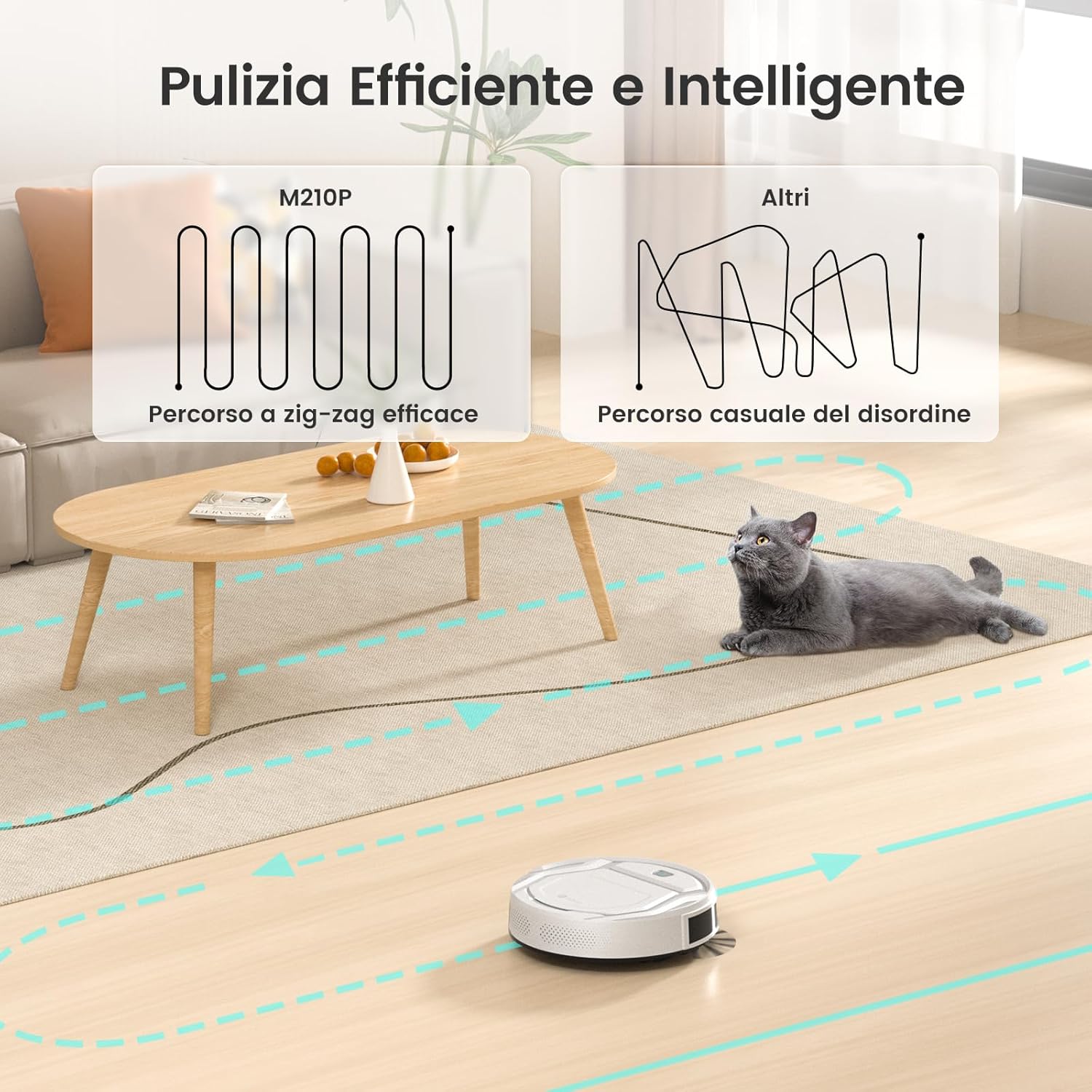
Image: A visual comparison showing the LEFANT M210P's effective zig-zag cleaning pattern versus a less organized, random cleaning path of other robot vacuums.
4.3 FreeMove 3.0 Technology
Equipped with FreeMove 3.0 technology and 6D infrared sensors, the M210P detects its environment at 720°. This prevents collisions with obstacles and falls from stairs, ensuring smooth and efficient movement even in complex environments.

Image: The LEFANT M210P robot vacuum cleaner showcasing its FreeMove 3.0 technology, using sensors to detect and avoid obstacles in its cleaning path.
4.4 Pet Hair Cleaning
The M210P features a brushless suction port design, which effectively prevents pet hair from tangling. Combined with dual side brushes, it efficiently collects dust, hair, and pet dander, making it suitable for homes with pets.

Image: The LEFANT M210P robot vacuum cleaner effectively collecting pet hair from a wooden floor, demonstrating its suitability for pet owners.
4.5 Smart Control
Control your M210P using the Lefant App, Amazon Alexa, or Google Assistant. The App allows you to schedule cleaning times, select cleaning modes, monitor the cleaning path, and adjust suction power. Voice commands provide convenient hands-free operation.

Image: The LEFANT M210P robot vacuum cleaner demonstrating smart voice control compatibility with Amazon Alexa and Google Assistant.

Image: A smartphone displaying the Lefant application interface, which allows users to program, control suction, manually operate, and recharge the robot vacuum.
4.6 Automatic Recharging
When the battery is low or cleaning is complete, the robot will automatically return to its charging base to recharge.

Image: The LEFANT M210P robot vacuum cleaner illustrating its automatic return path to the charging station for recharging.
5. Maintenance
Regular maintenance ensures optimal performance and extends the lifespan of your LEFANT M210P.
5.1 Dustbin and Filter Cleaning
The 500ml dustbin should be emptied after each cleaning cycle. The dual-layer filter helps prevent secondary pollution. It is important to note that the filters are not washable and should be replaced periodically.

Image: The LEFANT M210P robot vacuum cleaner with its top cover open, revealing the 500ml capacity dustbin for easy emptying.
5.2 Side Brushes
Inspect the side brushes regularly for wear or entanglement. Clean any hair or debris wrapped around them. Replace worn brushes to maintain cleaning effectiveness.
5.3 Sensors and Charging Contacts
Wipe the robot's sensors and charging contacts on both the robot and the charging base with a dry cloth periodically to ensure proper function and charging.
6. Troubleshooting
This section addresses common issues you might encounter with your LEFANT M210P.
- Robot gets stuck or cleans the same area repeatedly: Ensure the cleaning area is free of excessive clutter, loose cables, or small objects that could obstruct movement. The robot's navigation may sometimes lead to repeated passes in certain zones if the environment is complex.
- Robot does not return to charging base: Check if the charging base is properly plugged in and placed in an open area as described in the setup section. Ensure there are no obstacles blocking the robot's path to the base.
- App mapping issues: The M210P's mapping feature may not save maps permanently, meaning it recreates a map for each cleaning cycle. This can prevent selecting specific rooms for cleaning. This is a design characteristic, not a malfunction.
- Mechanical issues (e.g., wheel stuck): If a wheel or other moving part becomes jammed, first power off the robot and inspect for any visible obstructions. If the issue persists, contact customer support for assistance.
For more detailed troubleshooting or persistent issues, please refer to the official LEFANT support resources.
7. Specifications
| Feature | Detail |
|---|---|
| Model Number | M210P |
| Dimensions | 28 x 28 x 7.8 cm |
| Weight | 3 kg |
| Form Factor | Round |
| Battery Type | 1 A (required) |
| Battery Life | Up to 120 minutes |
| Dustbin Capacity | 500 ml |
| Filter Type | Multi-layer |
| Suction Power | Up to 2200Pa |
| Connectivity | 2.4GHz WiFi, App, Alexa, Google Assistant |
| Color | White |

Image: This image highlights the LEFANT M210P's impressive runtime of 120 minutes, capable of cleaning an area up to 120 square meters on a single charge.

Image: The LEFANT M210P robot vacuum cleaner demonstrating its ultra-thin profile (7.8cm height) and quiet operation (55dB), allowing it to clean under furniture without disturbance.
8. Warranty and Support
8.1 Warranty Information
Specific warranty details are typically provided with your product packaging or on the official LEFANT website. Please refer to these resources for information regarding warranty duration and terms.
8.2 Customer Support
For technical assistance, troubleshooting not covered in this manual, or spare parts, please contact LEFANT customer support. Contact information can usually be found on the LEFANT official website or through your purchase platform.


