
1. Introduction
Thank you for choosing the Veitob 88 Key Digital Piano Model 883. This instrument is designed to provide a rich musical experience for beginners and experienced players alike, featuring semi-weighted keys, a wide range of tones and rhythms, and modern connectivity options like Bluetooth and MIDI. This manual will guide you through the setup, operation, and maintenance of your new digital piano to ensure optimal performance and enjoyment.
2. Package Contents
Please verify that all items listed below are included in your package. If any items are missing or damaged, please contact customer support.
- Veitob 88 Key Digital Piano
- Adjustable X-Style Piano Stand
- Sustain Pedal
- Power Adapter (DC9-12V)
- Music Rest
- Headphones
- Carry Bag
- Cleaning Cloth
- User Manual (this document)
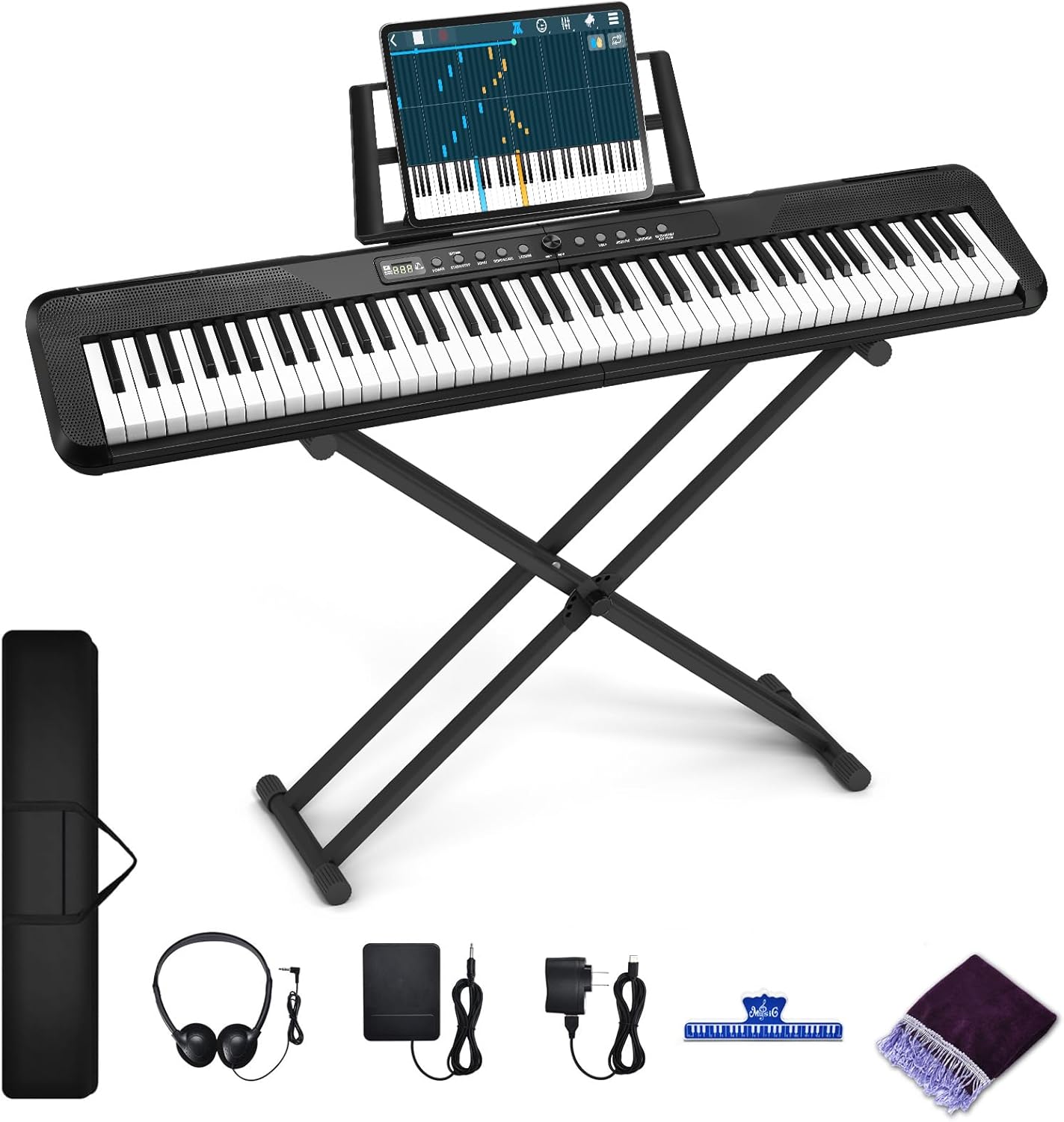
Image: All components included with the Veitob 88 Key Digital Piano.
3. Product Features
- 88 Semi-Weighted Keys: Designed to emulate the feel of an acoustic piano, offering a responsive playing experience suitable for beginners.
- 200 Rhythms & 200 Polyphony: Explore a wide variety of musical styles and complex compositions.
- 80 Demo Songs: Pre-loaded songs for practice and enjoyment.
- LCD Screen Display: Clearly shows the status of functions, tones, and rhythms in use.
- Portable Design: Built-in speakers, external headphone jacks, and battery power option allow for playing anywhere.
- MIDI Functionality: Connect to computers and other MIDI devices for music arrangement and expanded capabilities via MIDI input/output jacks.
- Bluetooth Connectivity: Wirelessly connect to compatible external equipment or software for smart teaching and practice.
- Dual Keyboard Function: Enables two players to use the keyboard simultaneously, ideal for teaching and duet playing.
- Double Hi-Fi Speaker System: Provides clear and rich stereo sound.
- Multiple Connectivity Ports: Includes USB port, Sustain pedal input, MIC input, Audio Input, Audio Output, and DC9-12V power input.

Image: The digital piano's LCD screen display indicating available tones, rhythms, keys, and demo songs.

Image: Details of the high-quality keys, multi-function panel, and internal speaker design.
4. Setup
4.1 Assembling the Piano Stand
The X-style piano stand requires assembly. Follow these steps:
- Unfold the X-style stand frame.
- Identify the rubber straps (sometimes referred to as "leveling glue" in less clear instructions). These are used to secure the top and bottom sections.
- For easier installation, especially with stiff rubber straps, you may soak them in warm water for approximately 30 seconds to increase flexibility.
- Carefully pull the small bolt or connector through the rubber strap and secure it around the top of the stand. Needle-nose pliers may assist in this process. Ensure the stand is stable.
- Adjust the stand to your desired height. The adjustable height range is approximately 18 inches to 37.8 inches.
4.2 Connecting the Piano
Once the stand is assembled, place the digital piano securely on top. Then, proceed with the following connections:
- Power Supply: Connect the included power adapter to the DC9-12V input port on the piano and then to a wall outlet.
- Sustain Pedal: Plug the sustain pedal into the designated "Sustain pedal" port.
- Music Rest: Insert the music rest into the slots on the top panel of the piano.
- Headphones: For private practice, plug the headphones into one of the "PHONES" jacks.

Image: Rear panel connectivity ports of the Veitob Digital Piano.

Image: The carry bag and adjustable stand, illustrating their dimensions and height range.
5. Operating Instructions
5.1 Power On/Off and Volume
Locate the Power button on the control panel. Press it to turn the piano on or off. Use the Volume knob or buttons to adjust the overall sound output. Ensure the volume is set to a comfortable level before playing.
5.2 Selecting Tones and Rhythms
The digital piano offers 200 different tones (instrument sounds) and 200 rhythms (backing tracks). Use the dedicated buttons or a combination of function keys and number keys (refer to the piano's control panel markings) to select your desired tone or rhythm. The LCD screen will display your current selection.
5.3 Demo Songs
The piano includes 80 demo songs. Press the "Demo" button and use the number keys to select a song. Press "Demo" again to stop playback.
5.4 Bluetooth Functionality
To connect your digital piano via Bluetooth for smart teaching or app integration:
- Ensure Bluetooth is enabled on your external device (smartphone, tablet, computer).
- Activate Bluetooth mode on the digital piano (refer to the control panel for the specific Bluetooth button or function key combination).
- On your external device, search for available Bluetooth devices and select the Veitob Digital Piano.
- Once paired, you can use compatible music learning apps or software to interact with the piano.
5.5 MIDI Connectivity
The MIDI input/output jacks allow connection to other MIDI-compatible devices or a computer for advanced music production and arrangement.
- Connect a MIDI cable from the piano's MIDI OUT to the MIDI IN of your external device (e.g., sound module, audio interface).
- Connect a MIDI cable from the piano's MIDI IN to the MIDI OUT of your external device for receiving MIDI data.
- For computer connection, a USB-to-MIDI interface may be required if your computer does not have direct MIDI ports.
5.6 Dual Keyboard Function
This feature splits the keyboard into two identical ranges, allowing two people to play simultaneously, which is ideal for lessons or duets. Activate this function using the dedicated button or function key combination on the control panel.

Image: Demonstrating the dual keyboard function for collaborative playing or teaching.

Image: A user interacting with the semi-weighted keys of the digital piano.
6. Maintenance
- Cleaning: Use the provided cleaning cloth or a soft, dry cloth to wipe down the piano's surface and keys. Avoid using abrasive cleaners, solvents, or waxes, as these can damage the finish.
- Storage: When not in use, store the piano in a cool, dry place away from direct sunlight, extreme temperatures, and humidity. Use the included carry bag for protection during transport or storage.
- Power: Always disconnect the power adapter from the wall outlet when the piano is not in use for extended periods.
- Handling: Handle the piano with care. Avoid dropping it or subjecting it to strong impacts.
7. Troubleshooting
- No Sound:
- Ensure the power adapter is securely connected and the piano is turned on.
- Check the volume level.
- If headphones are plugged in, sound will only come through them. Unplug headphones to hear sound from the built-in speakers.
- Verify that the correct tone is selected and not a silent patch.
- Keys Not Responding or Low Volume on Certain Notes:
- Ensure keys are pressed firmly. Semi-weighted keys require a certain amount of pressure.
- If specific keys consistently have issues, contact customer support.
- Difficulty Assembling Stand:
- Refer to Section 4.1 for detailed stand assembly instructions, including tips for softening rubber straps.
- Ensure all parts are correctly aligned before tightening.
- Bluetooth Connection Issues:
- Ensure the piano's Bluetooth mode is active and your external device's Bluetooth is on.
- Try restarting both the piano and the external device.
- Ensure no other devices are currently paired with the piano.
- MIDI Not Working:
- Verify MIDI cables are correctly connected (OUT to IN, IN to OUT).
- Check MIDI settings on both the piano and the connected device/software.
8. Specifications
| Feature | Detail |
|---|---|
| Brand | Veitob |
| Model Number | 883 |
| Number of Keys | 88 |
| Key Type | Semi-Weighted |
| Polyphony | 200 |
| Rhythms | 200 |
| Demo Songs | 80 |
| Connectivity | Bluetooth, MIDI In/Out, USB, Audio In/Out, MIC, Sustain Pedal |
| Power Supply | DC9-12V Adapter (included), Battery Powered (for portability) |
| Item Weight | 14.81 pounds |
| Package Dimensions | 47 x 14.8 x 4.6 inches |
| UPC | 728161807220 |
| Color | Black |
| Skill Level | All |
9. Warranty and Support
For warranty information, technical support, or any inquiries regarding your Veitob 88 Key Digital Piano Model 883, please refer to the contact information provided with your purchase documentation or visit the official Veitob website. Keep your proof of purchase for warranty claims.