
1. Introduction
This manual provides important information regarding the installation, operation, and maintenance of your Safeliveo Carbon Monoxide (CO) Detector, Model CO03. This device is designed to detect carbon monoxide gas and alert you to its presence, helping to protect you and your family from the dangers of CO poisoning. Carbon monoxide is an odorless, colorless, and tasteless gas that can be fatal. Please read this manual thoroughly before using the detector and keep it for future reference.
The Safeliveo CO Detector is a stand-alone unit featuring an LCD display, peak value memory, and a replaceable battery, making it portable for use in homes, travel, and caravans. It conforms to EN 50291-1:2018 standards.
2. Safety Information
Important Safety Warnings:
- This CO detector is designed to detect carbon monoxide gas from any combustion source. It is not designed to detect smoke, fire, or other gases.
- Carbon monoxide is a poisonous gas. This detector is not a substitute for proper maintenance of fuel-burning appliances, including ventilation and exhaust systems.
- Test the detector weekly to ensure proper operation.
- Do not paint the detector. Paint can clog the sensor openings and interfere with the unit's ability to detect CO.
- Do not block the ventilation openings of the detector.
- If the alarm sounds, evacuate the premises immediately and call emergency services.
3. Product Features
- Replaceable Batteries: Equipped with 2 replaceable AA batteries (approximate lifetime: 1 year). Features a low battery audible alarm (every 60 seconds) and a yellow LED flash.
- Low Concentration CO Early Alert: Triggers an alarm at 20ppm for 35 minutes, conforming to EN 50291-1:2018.
- Two Installation Options: Compact design (105 × 32.7 × 60 mm) allows free placement on flat surfaces or wall mounting with provided screws.
- Memory of CO Spikes: Automatically records and retains the maximum CO level that triggered an alert for 3 days. A red LED flashes twice every 50 seconds during this period.
- Test and Mute Button: A simple press tests the alarm sound. A short press mutes the alarm for 9 minutes (if CO concentration is below 300 ppm).
- Intuitive Reading Screen: Clearly displays real-time CO concentration (minimum reading 10ppm). Covers an area of 20 to 40 m².
- Three Color Indicator: LED shows Red for alarm, Yellow for error or low battery, and Green for normal operation. Green standby light can be activated/disabled by double-pressing the test button.
4. Package Contents
Verify that all items are present and in good condition:
- 1 x Safeliveo Carbon Monoxide Detector
- 1 x Screw Kit (for wall mounting)
- 1 x User Manual
- 2 x AA Batteries (pre-installed or included separately)
5. Setup and Installation
5.1 Battery Installation
The detector is equipped with 2 AA batteries. These batteries may be pre-installed with a protective film. Remove any protective film before use. Ensure batteries are inserted with correct polarity (+/-). The detector will typically perform a self-test upon battery insertion.
Note: The device features a mechanism that prevents it from being reattached to the wall mount without batteries inserted, ensuring continuous operation.
5.2 Placement Options
The compact design of the CO detector allows for flexible placement. It can be:
- Freely Placed: On any flat surface such as a table, shelf, or bedside table.
- Wall Mounted: Using the screws provided in the kit. Choose a location where CO is most likely to be detected, typically near fuel-burning appliances but not directly above them, and at a height where it can be easily seen and heard. Avoid placing it in dead air spaces (e.g., corners of rooms or peaked ceilings) or directly in front of windows or vents.
For optimal detection, place the unit in a central location within the area of 20 to 40 m² you wish to monitor. In sleeping areas, place it near the sleeping person's head level.
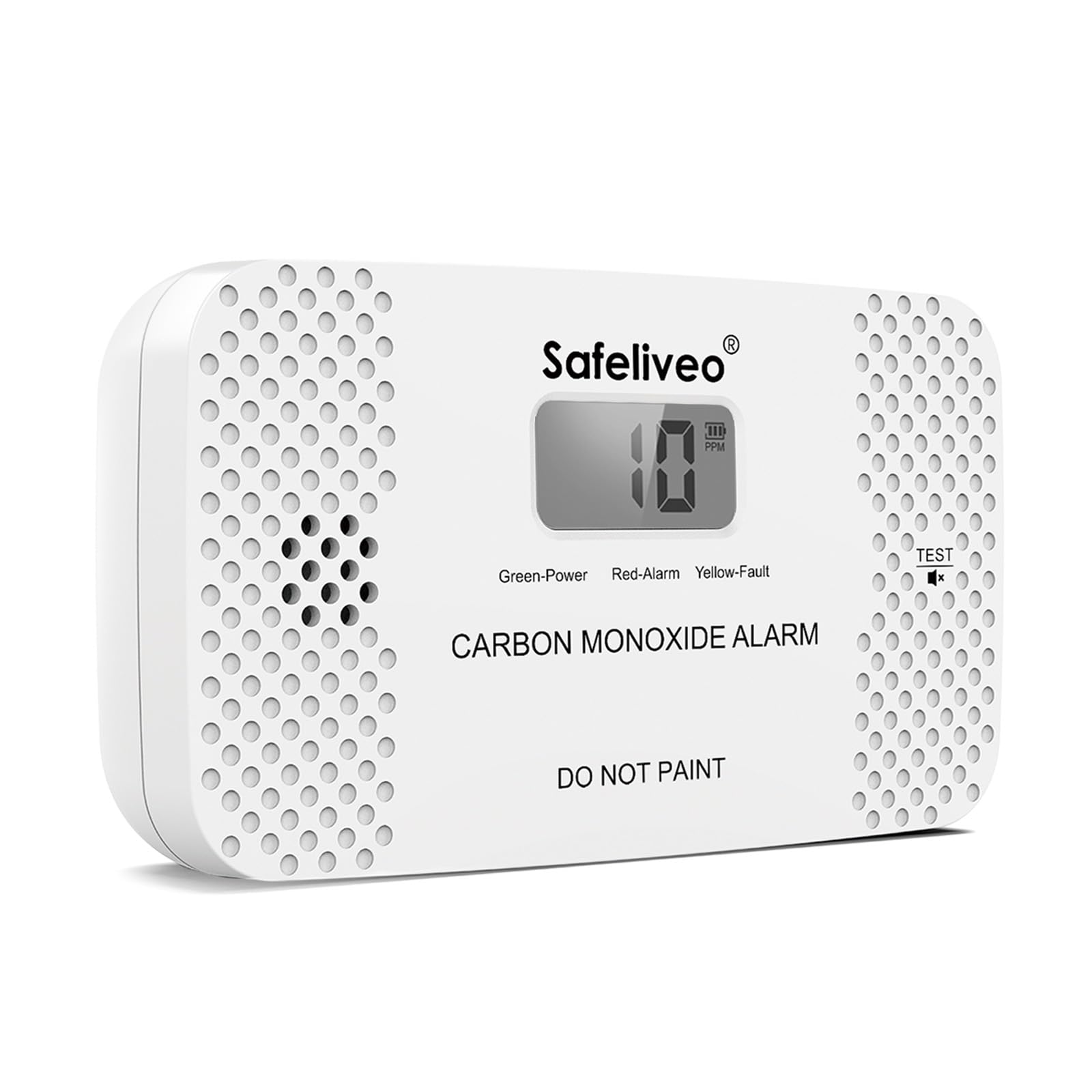
Image 1: Safeliveo Carbon Monoxide Detector. This image shows the front of the detector with its LCD screen and test button. The device is compact and designed for easy placement or wall mounting.
6. Operation
6.1 Initial Power-On
After battery installation, the detector will typically initiate a 60-second countdown or self-test. Once complete, it will enter normal operation mode, displaying "0 ppm" if no CO is detected.
6.2 LCD Display
The LCD screen continuously displays the real-time carbon monoxide concentration in parts per million (ppm). The minimum reading displayed is 10ppm.
6.3 LED Indicators
The detector uses a three-color LED system to indicate its status:
- Red LED: Indicates a CO alarm.
- Yellow LED: Indicates an error or low battery condition.
- Green LED: Indicates normal operation. The green standby light can be toggled on or off by quickly pressing the test button twice.
6.4 Test Button Functionality
The test button serves multiple purposes:
- Self-Test: A simple press of the test button will activate a self-test. The alarm sound will gradually increase, confirming the device is functioning correctly. This test cannot be interrupted until maximum volume is reached.
- Mute Alarm: During an alarm (if CO concentration is below 300 ppm), a short press of the test button will mute the alarm for 9 minutes. The red light will flash slowly during the mute period. If CO concentration exceeds 300 ppm, the alarm cannot be muted.
- Toggle Green Standby Light: Quickly press the test button twice to activate or disable the green standby light.
6.5 Alarm Conditions and Response
The detector triggers an alarm based on CO concentration and exposure time:
- 20 ppm: Alarm after 35 minutes.
- Higher Concentrations: Alarm will trigger more quickly at higher CO levels.
If the alarm sounds:
- Immediately move to fresh air outdoors or open all doors and windows to ventilate the area.
- Do a head count to check that all persons are accounted for.
- Call emergency services or your gas supplier from a fresh air location.
- Do not re-enter the premises until it has been aired out and the CO source has been identified and corrected.
6.6 Peak Value Memory
If you are away and miss an alarm, the detector automatically records the maximum CO level detected that triggered the alert. This data is retained for 3 days. During this period, the red LED light will flash twice every 50 seconds to indicate that a CO concentration exceeding safe levels was detected while you were absent.
7. Maintenance
7.1 Battery Replacement
The detector uses 2 AA batteries with an approximate lifetime of 1 year. When the batteries are low, an audible alarm will sound every 60 seconds, and the yellow LED will flash once. Replace both batteries immediately with new, high-quality AA alkaline batteries.
To replace batteries:
- Carefully remove the detector from its mounting location or flat surface.
- Open the battery compartment.
- Remove the old batteries and dispose of them properly according to local regulations.
- Insert two new AA alkaline batteries, ensuring correct polarity.
- Close the battery compartment and re-mount the detector. The unit will perform a self-test.
7.2 Cleaning
Clean the detector regularly to prevent dust and debris from accumulating and affecting its performance. Use a soft, damp cloth to wipe the exterior. Do not use cleaning solvents or chemicals. Do not spray cleaning agents directly onto the detector. Do not paint the detector.
7.3 Regular Testing
Test the detector weekly by pressing the test button to ensure the alarm sounds and the unit is functioning correctly.
8. Troubleshooting
| Problem | Indication | Solution |
|---|---|---|
| Low Battery | Audible alarm every 60 seconds, Yellow LED flashes once. | Replace both AA batteries immediately. |
| CO Alarm | Loud audible alarm, Red LED flashes. LCD displays CO concentration. | Evacuate to fresh air, call emergency services. Do not re-enter until safe. |
| Error/Malfunction | Yellow LED flashes (without low battery alarm), or unusual behavior. | Perform a test. If the error persists, replace the unit. |
| No Display/No Power | LCD is blank, no lights or sounds. | Check battery installation and polarity. Replace batteries if necessary. |
| Peak Memory Indication | Red LED flashes twice every 50 seconds (no audible alarm). | Indicates a CO spike was detected within the last 3 days. Investigate potential CO sources. |
9. Specifications
| Model Number | CO03 |
| Power Source | 2 x AA Alkaline Batteries |
| Battery Life | Approximately 1 year |
| Item Weight | 121 g |
| Package Dimensions | 10.8 x 7.4 x 4.4 cm |
| Detector Dimensions (L x W x H) | 105 x 32.7 x 60 mm |
| CO Detection Range | 10 ppm - 999 ppm (display range) |
| Alarm Thresholds | 20 ppm for 35 minutes (EN 50291-1:2018 compliant) |
| Coverage Area | 20 to 40 m² |
| Standards Compliance | EN 50291-1:2018 |
10. Warranty and Support
Specific warranty details are not provided in this manual. For warranty information, technical support, or service inquiries, please refer to the product packaging or contact Safeliveo customer service through their official website or the retailer where the product was purchased. Keep your purchase receipt as proof of purchase.