
1. Introduction
Thank you for choosing the EasyAcc Q22 Dehumidifier. This device is designed to efficiently remove excess moisture from the air, helping to prevent mold, mildew, and musty odors in your home. It is suitable for various small to medium-sized spaces such as bedrooms, bathrooms, RVs, and closets. Please read this manual thoroughly before use to ensure proper operation and maintenance.

Figure 1: EasyAcc Q22 Dehumidifier
2. Important Safety Information
To reduce the risk of fire, electric shock, or injury, always follow these basic safety precautions:
- Read all instructions before using the appliance.
- Do not operate the dehumidifier with a damaged cord or plug. If the cord or plug is damaged, contact customer service.
- Ensure the voltage indicated on the appliance matches your local power supply before connecting.
- Do not immerse the appliance, cord, or plug in water or other liquids.
- Keep the appliance away from heat sources, direct sunlight, and flammable materials.
- Always place the dehumidifier on a stable, level surface.
- Do not block the air inlets or outlets. Maintain at least 10 cm (4 inches) clearance around the unit.
- Unplug the appliance before cleaning, performing maintenance, or when not in use.
- This appliance is not intended for use by persons (including children) with reduced physical, sensory, or mental capabilities, or lack of experience and knowledge, unless they have been given supervision or instruction concerning use of the appliance by a person responsible for their safety.
3. Package Contents
Please check the package for the following items:
- EasyAcc Q22 Dehumidifier Unit
- Water Tank (pre-installed)
- Power Adapter
- User Manual (this document)
4. Product Overview
The EasyAcc Q22 Dehumidifier features a compact design with intuitive controls and a visible water tank. Key components include:
- Air Inlets: Located on the sides, these draw in humid air.
- Air Outlet: Located on the top, releases dry air.
- Control Panel: Top-mounted buttons for power, mode selection, and light control.
- Water Tank: Transparent, removable tank at the bottom to collect condensed water.
- Power Port: Located at the back for connecting the power adapter.

Figure 2: Dehumidifier with highlighted air inlets for efficient moisture removal.

Figure 3: Easy Control Panel for the dehumidifier.
5. Setup
- Unpack: Carefully remove the dehumidifier and all accessories from the packaging.
- Placement: Place the unit on a flat, stable surface in the desired room. Ensure there is at least 10 cm (4 inches) of space around all sides for proper air circulation. Avoid placing it directly against walls or furniture.
- Power Connection: Connect the power adapter to the dehumidifier's power port, then plug the adapter into a suitable electrical outlet.
- Water Tank: Ensure the water tank is correctly inserted into the unit. The dehumidifier will not operate if the tank is full or improperly positioned.
Video 1: Demonstrates the EasyAcc Q22 Dehumidifier's setup, water tank removal, and operation in a bedroom and bathroom setting.
6. Operating Instructions
The EasyAcc Q22 Dehumidifier features a simple control panel for ease of use.
- Power On/Off: Press the power button (On/Off icon) once to turn the unit on or off.
- Mode Selection: Press the mode button (Powerful / Sleep Mode icon) to switch between two operating modes:
- Powerful Mode: Provides maximum dehumidification for faster moisture removal.
- Sleep Mode: Operates at a lower fan speed for quieter operation, ideal for nighttime use. The noise level is approximately 30-45dB.
- Colorful Night Light: Press the light button (Colorful Light icon) to cycle through 7 different LED colors or turn the light off. This feature creates a calming atmosphere.
- Automatic Shut-Off: The dehumidifier will automatically turn off when the water tank is full or if it is incorrectly positioned. The indicator light will flash to alert you. Empty the water tank and reinsert it correctly to resume operation.

Figure 4: Powerful and Sleep Modes with Night Light feature.

Figure 5: Automatic Shut-Off feature for water tank full or improper positioning.
7. Maintenance
Regular maintenance ensures optimal performance and extends the lifespan of your dehumidifier.
- Emptying the Water Tank: When the water tank is full, the unit will automatically shut off. Carefully pull out the water tank from the front of the unit, empty the collected water, and then slide the tank back into place until it clicks securely.
- Cleaning the Unit: Wipe the exterior of the dehumidifier with a soft, damp cloth. Do not use abrasive cleaners or solvents.
- Cleaning Air Inlets/Outlets: Use a soft brush or vacuum cleaner to remove dust and debris from the air inlets and outlets to maintain efficient airflow.
8. Troubleshooting
If you encounter issues with your EasyAcc Q22 Dehumidifier, please refer to the following common problems and solutions:
| Problem | Possible Cause | Solution |
|---|---|---|
| Dehumidifier does not turn on. | No power; Water tank full or improperly installed. | Check power connection; Empty and re-install water tank correctly. |
| Red light flashes. | Water tank full or improperly installed. | Empty and re-install water tank correctly. |
| Dehumidification is not effective. | Room size too large; Low room temperature/humidity; Air inlets/outlets blocked. | Ensure unit is used in recommended area (up to 1100 sq ft); Optimal operation above 15°C (59°F); Clear any obstructions from air inlets/outlets. |
| Unusual noise during operation. | Unit not on a level surface; Internal component issue. | Place on a flat, stable surface; If noise persists, contact customer support. |
9. Specifications
| Feature | Detail |
|---|---|
| Brand | EasyAcc |
| Model Name | Q22 |
| Dehumidification Capacity | 1.32 Liters per Day (45 oz/day) |
| Water Tank Volume | 2000 Milliliters |
| Coverage Area | Up to 1100 Sq.Ft |
| Noise Level | 30-45dB |
| Product Dimensions | 12.95"D x 5.71"W x 9.29"H |
| Item Weight | 7.48 pounds |
| Special Features | Automatic Shutoff, Compact & Portable Size, Quiet Operation, 7 Color Light, Dual-Semiconductor Technology |
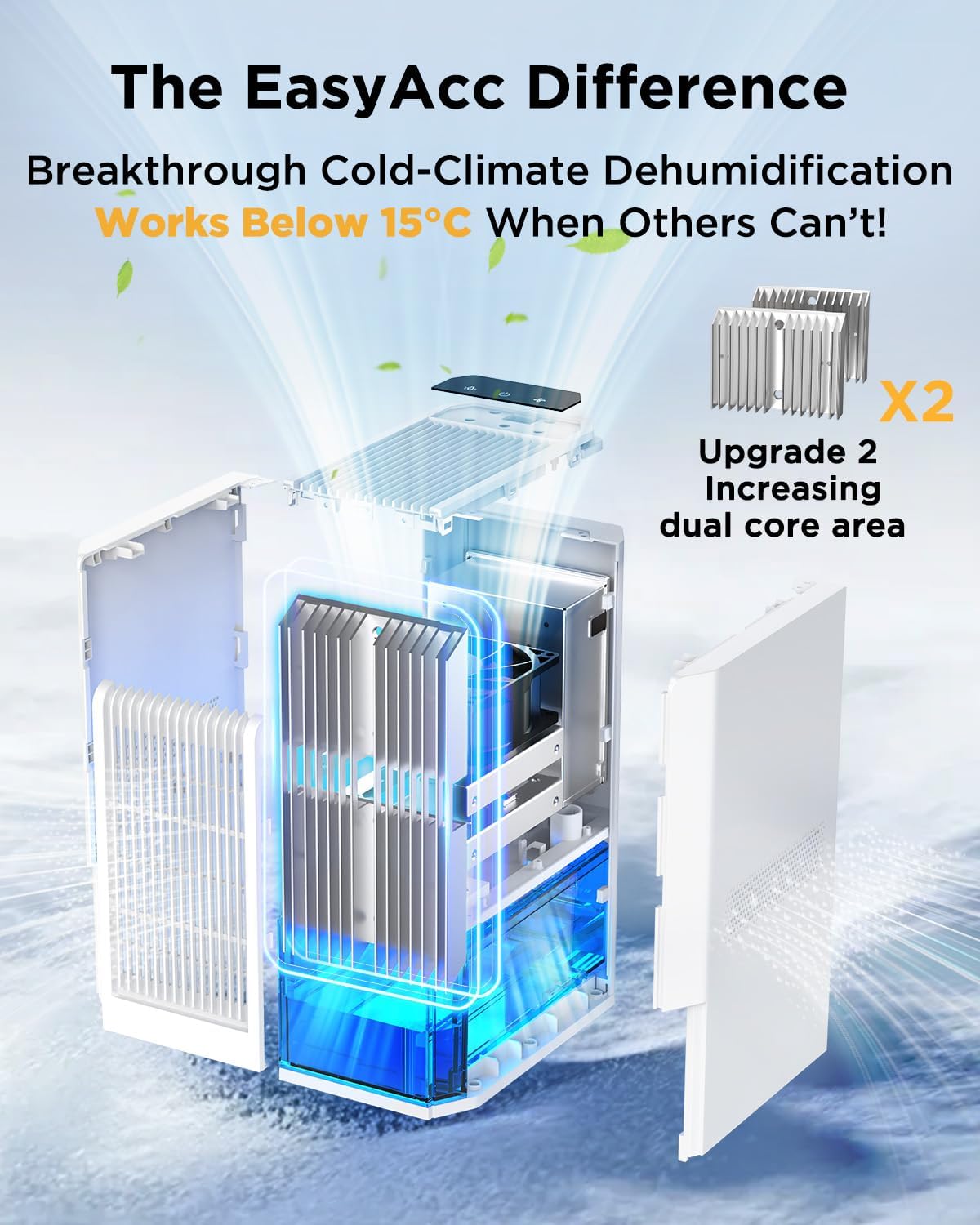
Figure 6: Internal components highlighting the dual core area for enhanced performance in cooler environments.

Figure 7: Energy efficiency of the EasyAcc Q22 Dehumidifier.
10. Warranty and Support
The EasyAcc Q22 Dehumidifier comes with a 2-year service warranty. For any product-related inquiries, technical support, or warranty claims, please contact EasyAcc customer service. Refer to the contact information provided on the product packaging or the official EasyAcc website.
