
1. Introduction
The BSIDE OS1 is a versatile handheld device that integrates the functionalities of a digital oscilloscope and a multimeter. Designed for hobbyists and professionals, it offers a 10MHz bandwidth oscilloscope and a 6000-count multimeter for various electrical measurements. Its compact design, 3.2-inch color LCD, and rechargeable battery make it suitable for both benchtop and field use.
This manual provides essential information for the safe and effective operation, maintenance, and troubleshooting of your BSIDE OS1 device. Please read it thoroughly before use.
2. Safety Information
To ensure safe operation and prevent damage to the device or injury, observe the following safety precautions:
- Always use the device within its specified voltage and current limits.
- Do not use the device if it appears damaged or if the test leads are compromised.
- Ensure proper connection of test leads before taking measurements.
- Avoid contact with live circuits when connecting or disconnecting test leads.
- Do not operate the device in wet environments or in the presence of explosive gases or fumes.
- Refer to the CAT III 600V rating for maximum input voltage considerations.
3. Package Contents
Verify that all items are present in the package:
- 1 x BSIDE OS1 Handheld Oscilloscope Multimeter
- 1 x Carrying Case
- 1 x Charging Cable (USB Type-C)
- 1 x Pair of Test Leads (Red and Black)
- 1 x User Manual (this document)

Figure 3.1: BSIDE OS1 device with its standard accessories.
4. Device Overview
The BSIDE OS1 features a clear 3.2-inch color LCD and intuitive controls for easy operation.

Figure 4.1: Front view of the BSIDE OS1.
4.1 Key Components
- 3.2-inch Color LCD: Displays measurement results, waveforms, and menu options.
- Function Wheel: Navigates menus and adjusts parameters.
- Mode Button: Switches between Oscilloscope and Multimeter modes.
- Input Jacks: For connecting test leads (VΩHz, COM, OSC).
- USB-C Port: For charging the internal battery.

Figure 4.2: The 3.2-inch full-viewing LCD screen.
5. Setup and Initial Use
5.1 Charging the Device
The BSIDE OS1 is equipped with a 1200mAh rechargeable battery. Before first use, or when the low battery indicator appears, charge the device using the provided USB-C cable.
- Connect the USB-C end of the charging cable to the device's USB-C port.
- Connect the other end of the charging cable to a standard USB power adapter (not included) or a computer's USB port.
- The charging indicator on the screen will show the charging status.

Figure 5.1: Charging the BSIDE OS1.
5.2 Connecting Test Leads
The device uses standard test leads for all measurements, eliminating the need for separate BNC connectors.
- Insert the red test lead into the VΩHz input jack.
- Insert the black test lead into the COM (common) input jack.
- For oscilloscope measurements, the test leads are connected to the OSC input.

Figure 5.2: Connecting test leads.
6. Operating Instructions
6.1 Power On/Off
- To power on: Press and hold the Power button (usually located on the side or top).
- To power off: Press and hold the Power button again until the screen turns off.
6.2 Switching Modes (Oscilloscope / Multimeter)
Press the MODE button to toggle between Oscilloscope mode and Multimeter mode.
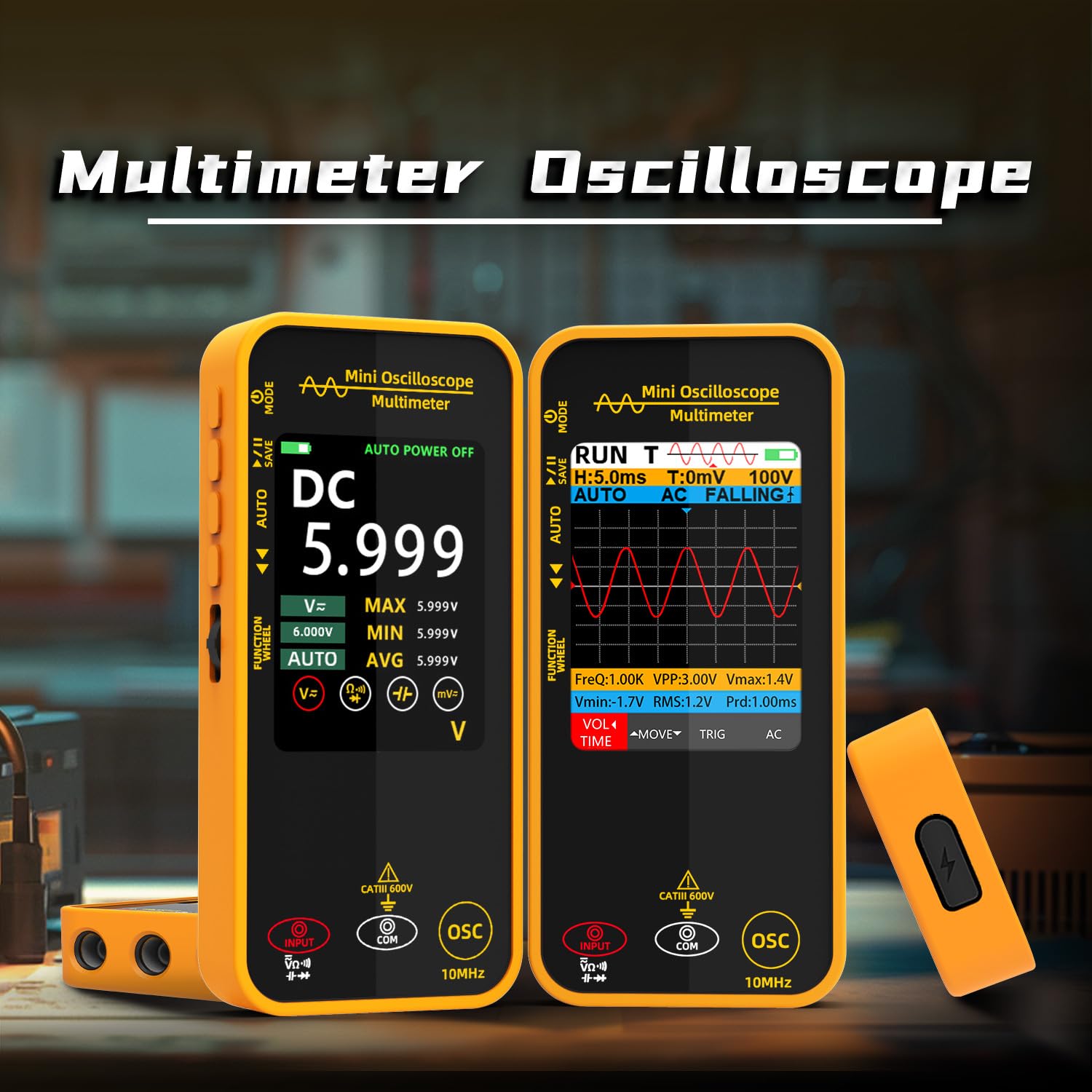
Figure 6.1: Multimeter and Oscilloscope modes.
6.3 Oscilloscope Mode
In Oscilloscope mode, the device displays waveforms, allowing for analysis of signal characteristics such as frequency, amplitude, and period.

Figure 6.2: Oscilloscope mode in use.
6.3.1 Trigger Functions
The OS1 supports Auto, Normal, and Single trigger modes:
- Auto Trigger: Automatically triggers when a signal is present.
- Normal Trigger: Triggers only when the signal meets the set trigger conditions.
- Single Trigger: Captures a single waveform when the trigger condition is met, then stops.
Use the Function Wheel to adjust trigger level and type.
6.3.2 Time Base and Vertical Sensitivity
Adjust the horizontal (time base) and vertical (voltage sensitivity) scales using the Function Wheel to properly view and analyze waveforms.
6.4 Multimeter Mode
In Multimeter mode, the device performs various electrical measurements with a 6000-count display.
6.4.1 Measurement Functions
Use the Function Wheel to select the desired measurement type:
- DC/AC Voltage: Measures direct and alternating current voltage.
- Resistance: Measures electrical resistance in Ohms (Ω).
- Capacitance: Measures capacitance in Farads (F).
- Diode Test: Checks the functionality of diodes.
- Continuity Test: Checks for electrical continuity with an audible buzzer.
- MAX/MIN/AVG: Displays maximum, minimum, and average readings.
6.5 Data Saving and Export
The BSIDE OS1 allows for saving tested data. Refer to the on-screen menu options for saving measurements and waveforms. Data can be exported to a computer via the USB-C connection for further analysis (specific software or driver may be required, refer to manufacturer's website for details).
7. Maintenance
7.1 Cleaning
To clean the device, use a soft, dry cloth. Do not use abrasive cleaners or solvents, as these may damage the casing or screen.
7.2 Battery Care
To prolong battery life:
- Avoid fully discharging the battery frequently.
- Charge the device regularly, even if not in frequent use.
- Store the device in a cool, dry place when not in use for extended periods.
7.3 Protective Case
The included protective case helps guard the device against shocks, friction, and bumps. Always use the case when transporting or storing the device to ensure its longevity.

Figure 7.1: Protective case for the BSIDE OS1.
8. Troubleshooting
If you encounter issues with your BSIDE OS1, refer to the following common problems and solutions:
| Problem | Possible Cause | Solution |
|---|---|---|
| Device does not power on | Low battery | Charge the device fully. |
| No reading in Multimeter mode | Incorrect test lead connection or wrong mode selected | Ensure test leads are properly connected and the correct measurement function is selected. Check the circuit. |
| Unstable waveform in Oscilloscope mode | Incorrect trigger settings or time base/vertical sensitivity | Adjust trigger level, type (Auto/Normal/Single), time base, and vertical sensitivity. |
| Screen is blank or frozen | Software glitch | Perform a hard reset by holding the power button for an extended period (e.g., 10-15 seconds) or allow the battery to fully discharge and then recharge. |
If the problem persists, contact BSIDE customer support for assistance.
9. Specifications
Detailed technical specifications for the BSIDE OS1 Handheld Digital Oscilloscope Multimeter:
| Feature | Specification |
|---|---|
| MAX Display | 6000 counts |
| Screen Size | 3.2 inch Color LCD |
| Bandwidth | 10MHz |
| Real-time Sample Rate | 48MSa/s |
| Input Impedance | 1MΩ |
| Maximum Input Voltage | 300V (DC+AC peak) |
| Horizontal SEC Range | 50ns/div - 20s/div |
| Vertical Sensitivity | 200mV/div - 100V/div |
| DC Voltage | 60mV, 600mV, 6V, 60V, 600V, 1000V |
| AC Voltage | 60mV, 600mV, 6V, 60V, 600V, 750V |
| Resistance | 600Ω, 6kΩ, 60KΩ, 600KΩ, 6MΩ, 60MΩ |
| Capacitance | 999.9nF, 9.99µF, 999.9µF, 99.99mF |
| Diode Test | Yes |
| Continuity Test | Yes |
| Power | 1200mAh rechargeable battery |
| Dimensions (L x W x H) | 143 x 66 x 21 mm (5.63 x 2.6 x 0.83 inches) |
| Weight | 160g (5.47 ounces) |
10. Warranty and Support
10.1 Warranty Information
BSIDE products are typically covered by a limited warranty against defects in materials and workmanship. Please refer to the warranty card included with your product or visit the official BSIDE website for specific warranty terms and conditions, as these may vary by region and purchase date.
10.2 Customer Support
For technical assistance, troubleshooting not covered in this manual, or warranty claims, please contact BSIDE customer support. You can usually find contact information on the official BSIDE website or through your retailer.
Online Resources: For additional information, FAQs, and software updates, visit the official BSIDE website: www.bside.com (Note: This is a placeholder URL as no specific support link was provided in the input data).