
1. Product Overview
The NiteRider Lumina Dual 2000 is a high-performance, USB-C rechargeable dual LED front bike light designed for maximum visibility and durability. It delivers up to 2000 lumens, providing a wide and even beam suitable for various cycling conditions, including high-speed trail riding, enduro terrain, and night road cycling. The light features 7 lighting modes, an intuitive single-button control, and enhanced side lighting for increased rider visibility.
Constructed with an aluminum heat sink and DuPont reinforced nylon housing, the Lumina Dual 2000 offers advanced cooling and impact resistance. Its IP64 rating ensures dustproof and water-resistant performance in challenging weather and trail conditions.
2. What's Included
The NiteRider Lumina Dual 2000 package includes the following components:
- Dual LED Headlight
- Internal Li-Ion Battery (integrated)
- Screw-On Handlebar Mount
- USB-C Charging Cable
3. Setup and Installation
3.1 Unlocking Travel Lock Mode
The light ships in Travel Lock Mode to prevent accidental activation and battery drain during transit. Before first use, you must unlock the device.
- Locate the power button on the top of the light.
- Press and hold the power button for approximately 8-10 seconds until the light activates.
- The light is now unlocked and ready for use.
3.2 Mounting the Light
The Lumina Dual 2000 features a tool-free, thumb-screw quick-release clamp mount for easy attachment to handlebars. It is compatible with both standard and oversized handlebars up to 35mm.
- Open the handlebar clamp by loosening the thumb-screw.
- Position the mount on your handlebar in the desired location. Ensure the light is centered and facing forward.
- Tighten the thumb-screw until the mount is secure and does not rotate freely. Do not overtighten.
- Slide the light onto the mount until it clicks into place.

Image: The NiteRider Lumina Dual 2000 light securely mounted on a bicycle handlebar, showing its dual LED design.

Image: A close-up view of the NiteRider Lumina Dual 2000, highlighting the USB-C charging port and the power button.
4. Operating Instructions
4.1 Power On/Off
- To turn the light ON: Press and hold the power button for approximately 1 second.
- To turn the light OFF: Press and hold the power button for approximately 1 second.
4.2 Changing Light Modes
The Lumina Dual 2000 offers 7 lighting modes: 5 steady modes (Low, Medium, High, Boost, Walk) and 2 flash modes (Pulse, Fast). To cycle through the modes:
- With the light ON, short press the power button to cycle through the steady modes.
- To activate flash modes, double-press the power button. Double-press again to return to steady modes.
The integrated side lighting panels increase visibility from all directions, enhancing safety at intersections and in traffic.
4.3 Smart Power Indicator
The backlit power button serves as a battery status indicator:
- Blue/Red Glow: Indicates Boost Mode is active.
- Red Glow: Indicates the battery level is below 20%, signaling that recharging is needed soon.
5. Light Modes and Run Times
The following table details the available light modes, their approximate lumen output, and estimated run times. Run times are approximations and may vary based on environmental conditions and battery age.
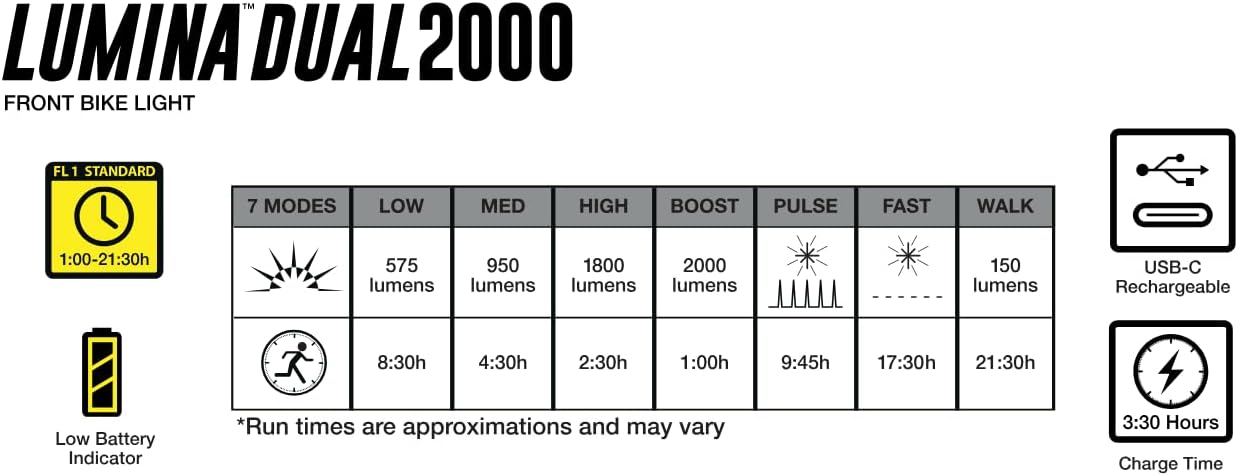
Image: A detailed chart outlining the 7 light modes (Low, Med, High, Boost, Pulse, Fast, Walk) with their corresponding lumen outputs and approximate run times.
| Mode | Lumens (Approx.) | Run Time (Approx.) |
|---|---|---|
| Low | 575 | 8:30h |
| Medium | 950 | 4:30h |
| High | 1800 | 2:30h |
| Boost | 2000 | 1:00h |
| Pulse | Flash | 9:45h |
| Fast | Flash | 17:30h |
| Walk | 150 | 21:30h |
6. Charging the Battery
The Lumina Dual 2000 is equipped with a USB-C charging port for convenient and fast recharging. Use the included USB-C charging cable.
- Locate the USB-C port on the light.
- Connect the USB-C cable to the light and plug the other end into a compatible USB power source (e.g., wall adapter, computer USB port).
- The power indicator light will show charging status (specific color not detailed, but typically red for charging, green for full).
- A full charge typically takes approximately 3 hours and 30 minutes.

Image: The NiteRider Lumina Dual 2000 light on a bike, with overlays indicating USB-C charging, a charge time of 3:30h, and a weight of 258g. It also notes compatibility with standard and oversized 35mm handlebars.
7. Maintenance
Proper maintenance ensures the longevity and optimal performance of your NiteRider Lumina Dual 2000 bike light.
- Cleaning: Wipe the light housing and lens with a soft, damp cloth. Avoid using abrasive cleaners or solvents, as these can damage the finish or lens.
- Storage: Store the light in a cool, dry place when not in use. For long-term storage, ensure the battery is partially charged (around 50%) and recharge it every few months to maintain battery health.
- Battery Care: Avoid fully discharging the battery frequently. Recharge the light promptly when the low battery indicator appears.
- Mount Inspection: Periodically check the handlebar mount for tightness and wear. Ensure it is securely fastened before each ride.
8. Troubleshooting
If you encounter issues with your Lumina Dual 2000, refer to the following common solutions:
- Light does not turn on:
- Ensure the light is not in Travel Lock Mode (see Section 3.1).
- Check if the battery is charged. Connect the light to a power source using the USB-C cable.
- Light turns off unexpectedly:
- The battery may be low. Recharge the light.
- Ensure the light is not overheating. While the aluminum heat sink is designed for cooling, extreme conditions or prolonged use in Boost mode can cause thermal protection to activate, reducing output or temporarily shutting off.
- Light output is dim:
- Check the current light mode. Cycle through modes to ensure a brighter setting is selected.
- The battery may be low. Recharge the light.
- Clean the lens if it is dirty or obstructed.
- Mount is loose:
- Tighten the thumb-screw on the handlebar mount.
- Ensure the light is properly seated and clicked into the mount.
If these steps do not resolve the issue, please contact NiteRider customer support.
9. Product Specifications
| Feature | Detail |
|---|---|
| Model Name | Lumina Dual 2000 |
| Light Output Maximum | 2000 Lumens |
| Number of Settings | 7 (5 steady, 2 flash) |
| Power Source | Internal Li-Ion Battery |
| Charging Port | USB-C |
| Charge Time | Approx. 3 hours 30 minutes |
| Material | Aluminum, DuPont Reinforced Nylon |
| Water Resistance Level | IP64 (Dustproof, Water Resistant) |
| Item Weight | 258 Grams |
| Mounting Type | Handlebar Mount (fits up to 35mm) |
| Color | Black |
| Manufacturer | NiteRider |
| Part Number | 6820 |
| UPC | 702699068209 |
10. Warranty and Support
10.1 Warranty Information
NiteRider provides the following warranty coverage for the Lumina Dual 2000:
- Limited Lifetime Warranty: Covers defects in mechanical components (housings, covers, mounts, fasteners) and LEDs.
- 2-Year Warranty: Covers printed circuit boards, switches, and AC adapters.
- 1-Year Warranty: Covers rechargeable battery cells.
Please retain your proof of purchase for warranty claims. The warranty covers manufacturing defects and does not cover damage resulting from misuse, accidents, or unauthorized modifications.
10.2 Customer Support
For further assistance, technical support, or warranty inquiries, please visit the official NiteRider website or contact their customer service department. Contact information can typically be found on the NiteRider website or product packaging.


